
Guides / illustrated walkthrough
Jev MCP Server: Connect Jev Decisions to Claude Code & Cursor
TypeSafe ships a drop-in Agent Skill instead of an MCP server, and the community answered with 20+ third-party Jev MCP servers. This guide shows the decision layer every one of them wraps — state plus typed questions, thresholds, and a TypeScript SDK demo.
Quick takeaway
There is no official Jev MCP server. TypeSafe’s documented route for coding agents is a drop-in Agent Skill — a plugin that hands Claude Code or Codex the Jev API context — and the ecosystem filled the transport gap with 20+ third-party MCP servers (jkudish/jev-browser at 268 stars and ~3.7k npm downloads a week, maxkimambo/jev-mcp at ~981 a week, walidboulanouar/jev-agent-kit with 11 tools, Bizuayeu/GenericJevMCP on a self-hosted DiffusionGemma backend). Whatever transport you pick, the wire format is identical, and it is the one Codevolution demonstrates below: a state (plain text, JSON object, or array) plus typed Noul/Choice/Score questions, answered with calibrated probabilities in under a second — answers your agent, MCP tool, or skill then branches on. Community demos put hard numbers on why: a 29,150-token MCP skill list filtered to the 2 servers a task actually needs (≈5× less context, ≈$236 saved per 1,000 requests), and a fuse that blocked an irreversible rm -rf in about half a second instead of ~5 seconds and 124 tokens on the main model.
Video source
Codevolution
Step-by-step walkthrough
- 1
Know what you are wiring in: Jev decides, it never writes
Before plugging anything into Claude Code or Cursor, be clear about the thing on the other end of the wire. Jev is TypeSafe’s “System One” model: it does not generate text — it judges the state you send and returns typed, probability-scored answers in 70–500 ms. The video’s running example is a support message — “I’ve contacted you three times, and I’m still waiting” — fed to Jev with the yes/no question “Does this customer sound frustrated?” and answered Yes. That is exactly why it suits agents: a Jev MCP tool or skill can hand your coding agent a probability it can branch on, and the model has no prose to hallucinate.
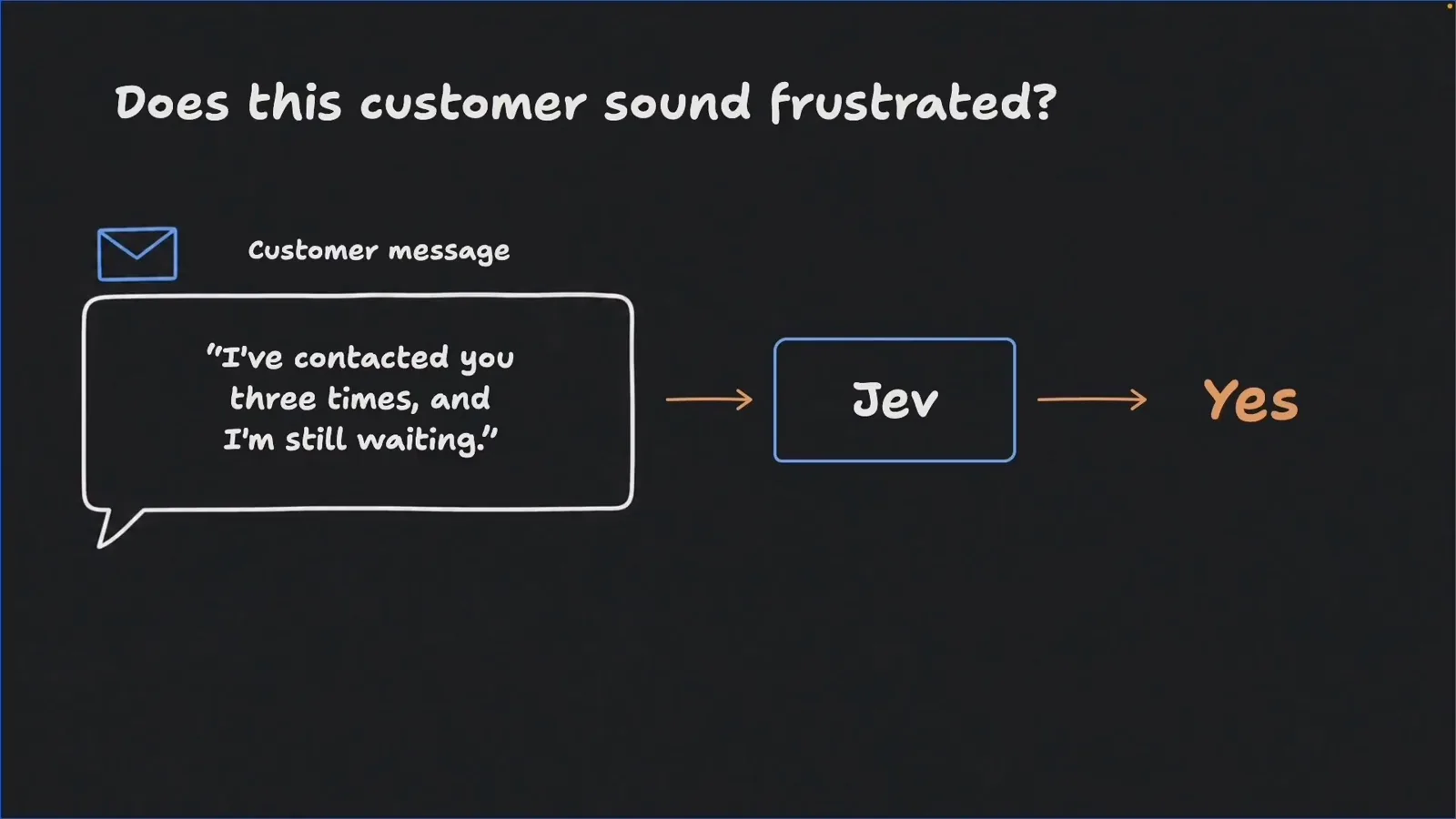
A smart if statement: Jev judges the message, your code branches.Watch at 1:35 - 2
Model the payload: one state plus typed questions
Every Jev request — and therefore every Jev MCP tool call underneath — has two parts. The state is the information to judge: plain text, a JSON object, or an array. The questions are what you want to know about that state, and each carries a type that fixes the shape of its answer: Noul for yes/no probability, Choice for picking from options you define, Score for a position on a scale you describe. Questions are evaluated independently and in parallel, so one question never sees another’s answer. Get this payload right and the MCP-vs-skill choice becomes a transport detail.
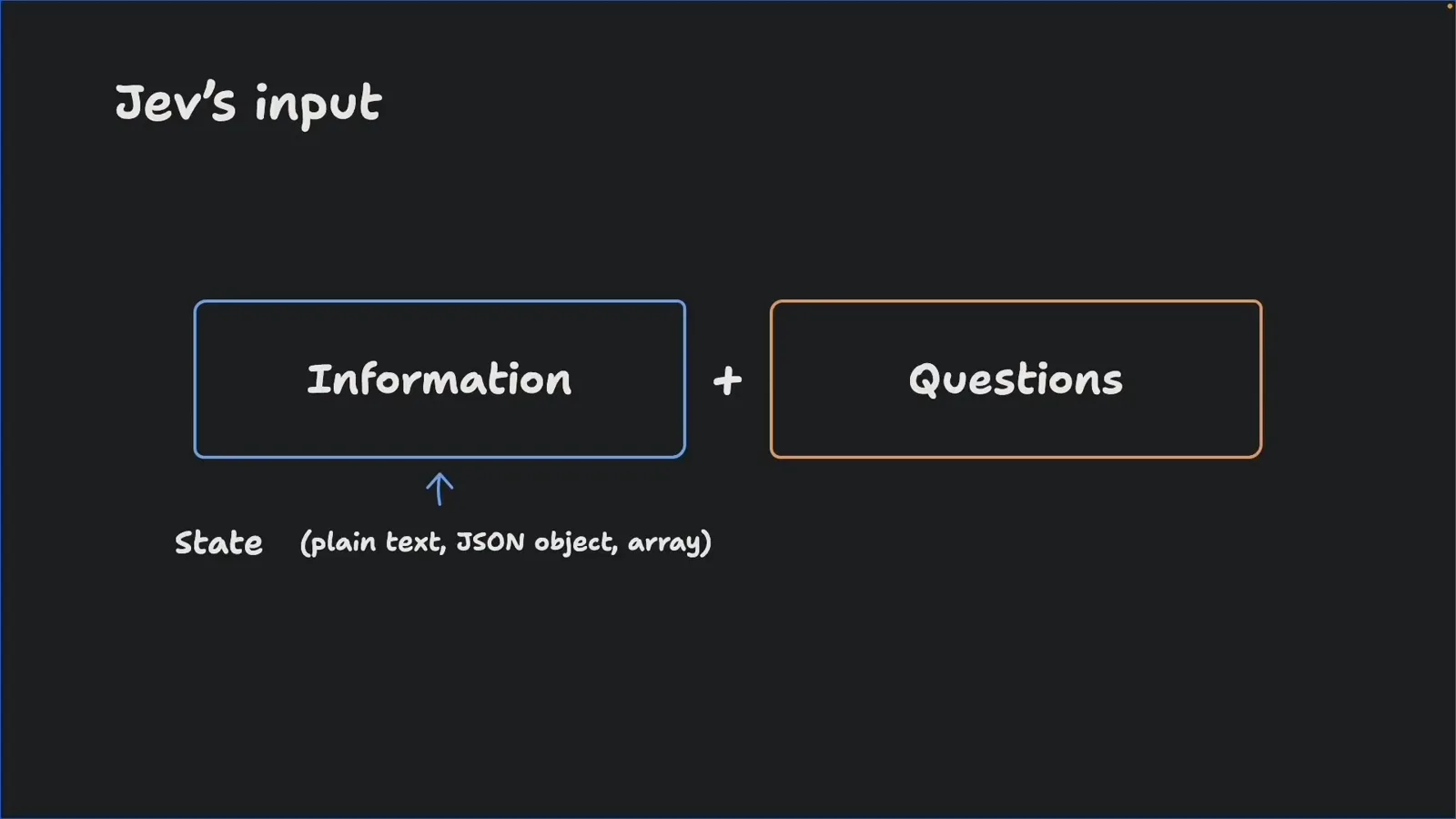
State plus typed questions — the whole request surface.Watch at 6:30 - 3
Prove the decision in the TypeSafe console before wiring anything
The fastest way to validate a decision is the TypeSafe console playground, no code needed: put the state on top — here the JSON object { "message": "I’ve contacted you three times, and I’m still waiting." } — pick a primitive in the Questions panel (Noul to evaluate how true something is, Score for a rubric, Choice for a multiple-choice question), and hit Run request. The same screen lists API Keys in the sidebar, walkthrough lessons like “Is hotdog a sandwich?”, and real-life use cases from résumé screening to LLM guardrails. Jev was in early access at recording (waitlist, Vercel AI gateway, free until September 23), and OpenRouter serves the same models if you already have a key there.
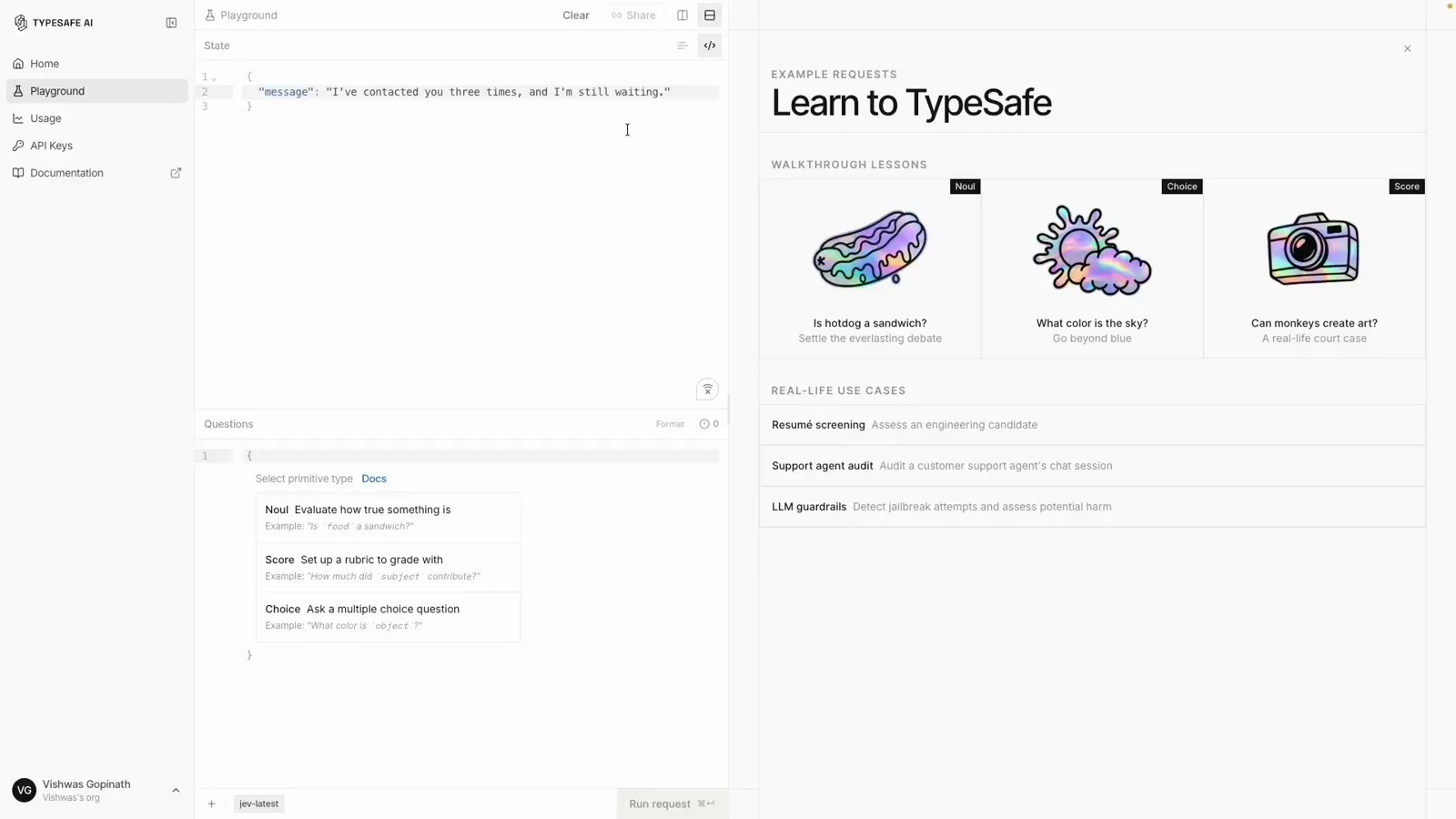
Try the decision in the console sandbox before writing code.Watch at 12:10 - 4
Install the TypeScript SDK and make the first typed call
In code, the video’s jev-demo project adds @typesafe-ai/sdk (0.6.x) to package.json and keeps the key in .env as TYPESAFE_API_KEY, created in the console. demo.ts then guards on the key, builds a client, and sends one Noul question: state = { message: "I’ve contacted you three times, and I’m still waiting." }, questions = { isFrustrated: noul("Does message express frustration?") }, dispatched with client.systemOne(state, questions). The demo script runs through tsx with --env-file=.env. Python and JavaScript SDKs exist too — and this same call is what a community Jev MCP server wraps as a tool.
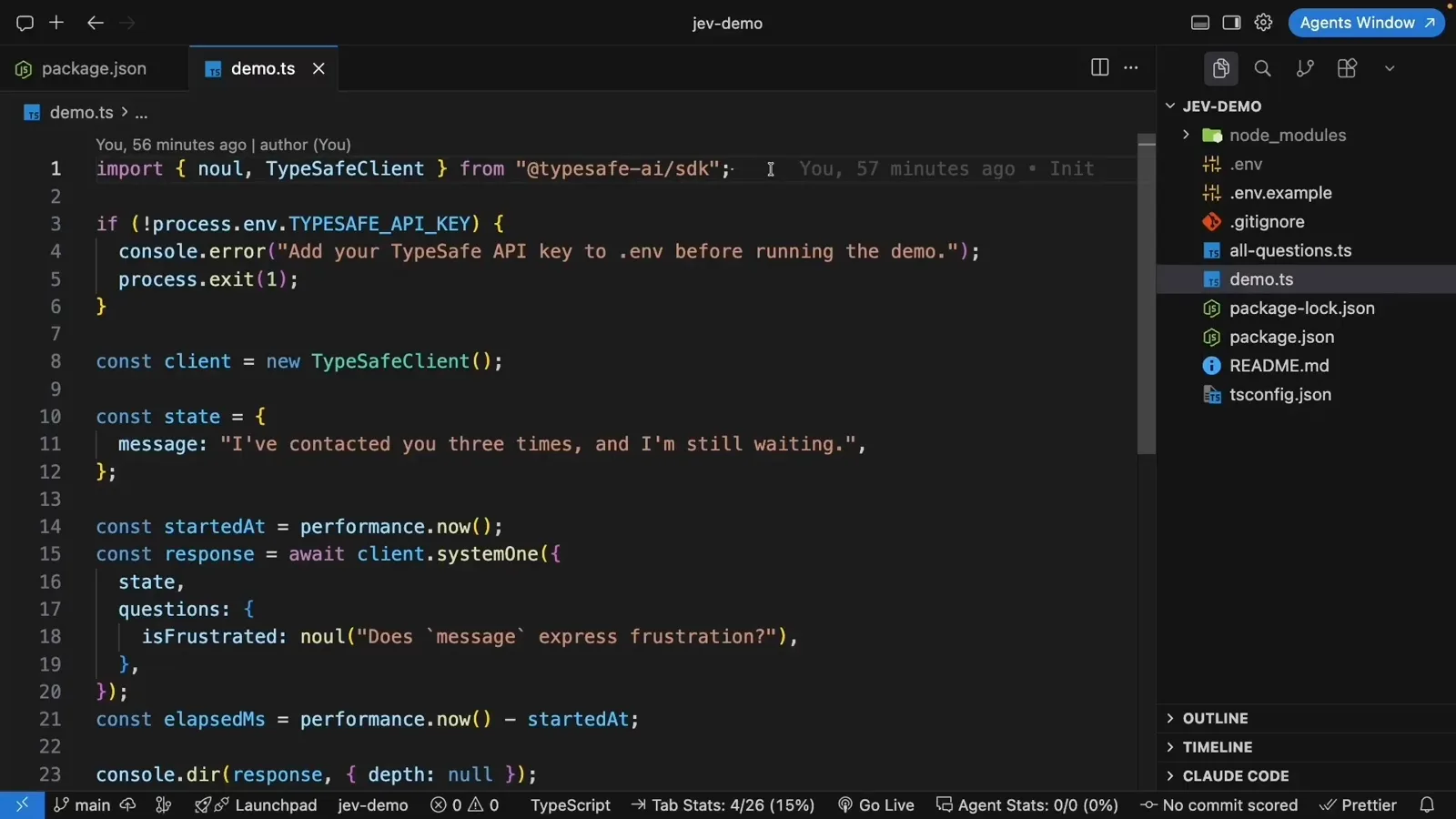
First typed call: noul over a customer message.Watch at 14:20 - 5
Run it twice and read calibrated answers, not prose
npm run demo returns model jev-1.13.0 with answers.isFrustrated.noul = 0.94 — a 94% probability the message is frustrated — plus usage (292 input / 23 output tokens) and an elapsed time of 861 ms. Swapping the state to “Thanks for the update. Everything is working now.” flips the same question to 0.03. That clean flip is the point: the number moves with the evidence, so thresholds in your agent are safe to trust. Note a Noul answer carries no separate confidence field — the distance from 0.5 is the confidence; Choice and Score answers do include one.
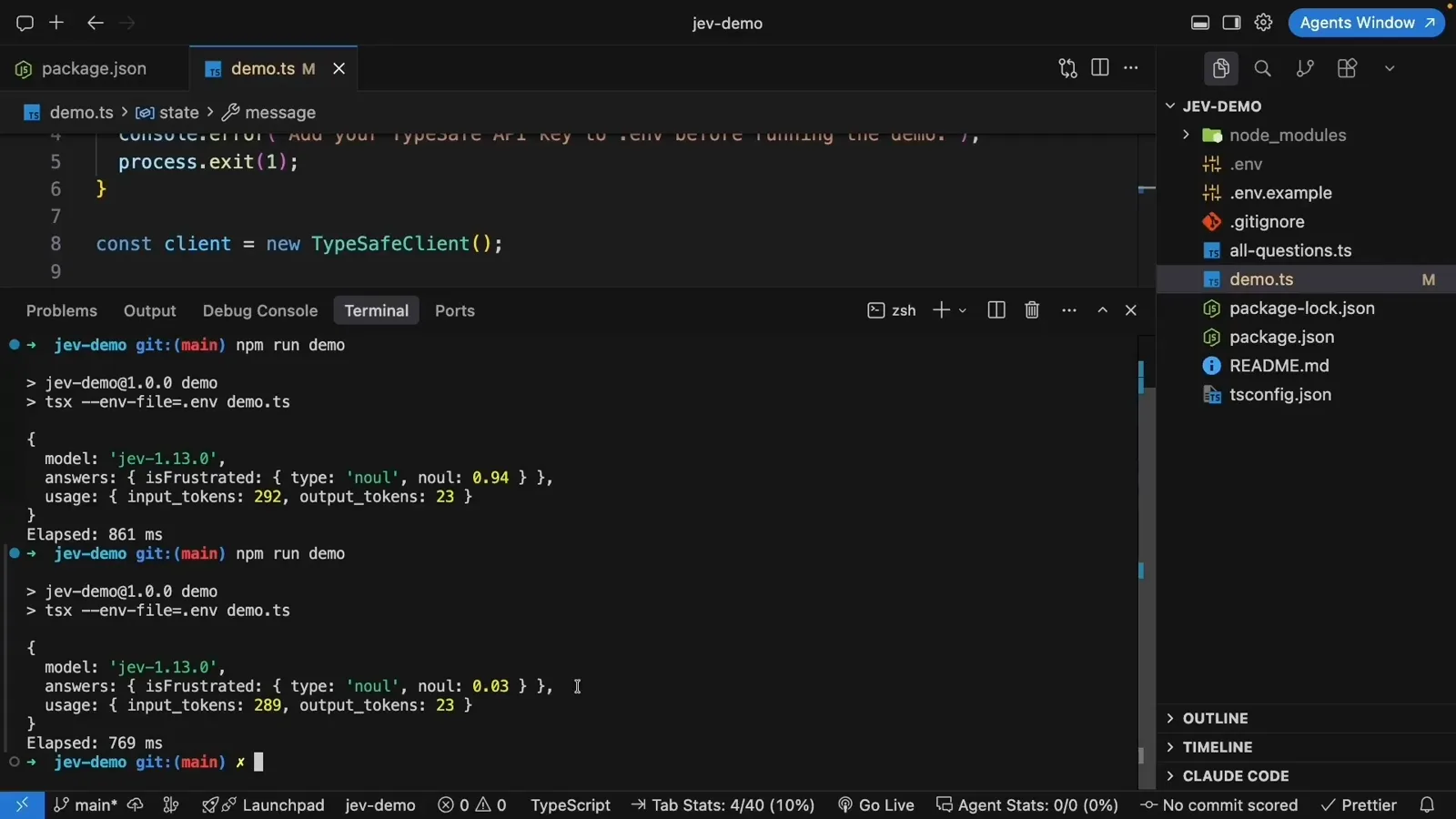
0.94 vs 0.03 — the flip is the signal.Watch at 16:10 - 6
Ask Noul, Choice, and Score together in a single call
all_questions.ts keeps the same state and stacks all three primitives: isFrustrated stays a Noul; requestType becomes a Choice — “What is the main request in this message?” over the options an upgrade, a refund, a replacement, or other; frustrationLevel becomes a Score over three described levels, from makes a request without expressing frustration through expresses dissatisfaction without strong anger to expresses strong anger. Describing each level gives the model more to work with than a bare 1–10, and all three questions still ride one API call.
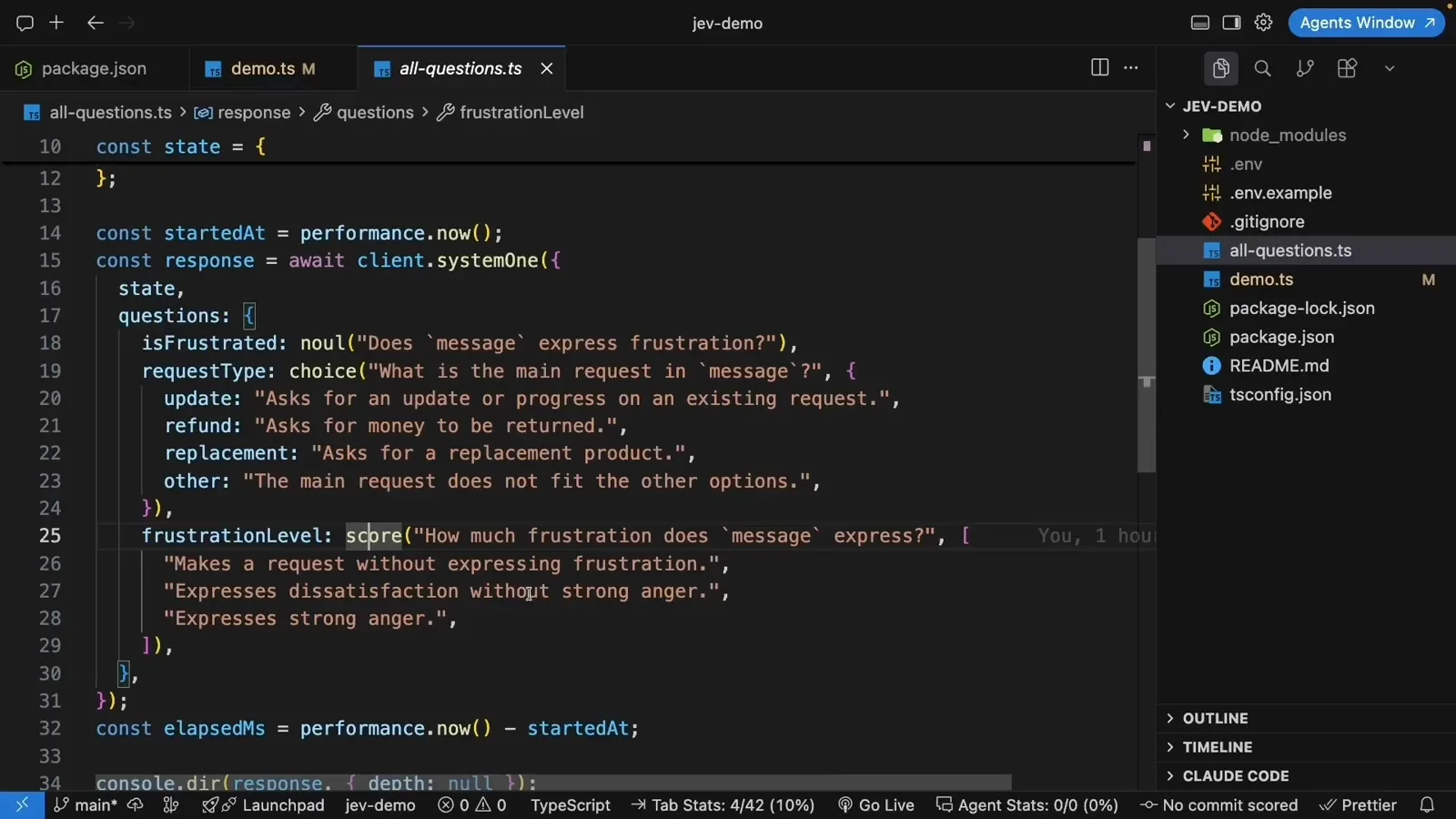
Three question types, one state, one call.Watch at 17:20 - 7
Branch on thresholds — the part your agent or MCP tool owns
One call returns every typed answer at once: requestType = “an upgrade” with confidence 0.99, frustrationLevel = 1.02 with confidence 0.97 (dissatisfaction edging toward anger), still in 834 ms for 495 input tokens. The demo sets a reviewThreshold of 0.8 and flags the message for support review instead of leaving it in the normal queue — and that branch is precisely where agents plug in: a Jev MCP tool or skill uses the same answers to route the task to a cheaper model, load one skill instead of a 145-skill dump, or block an irreversible command before the big model ever sees it. Tune the threshold on your own examples, as the video advises.
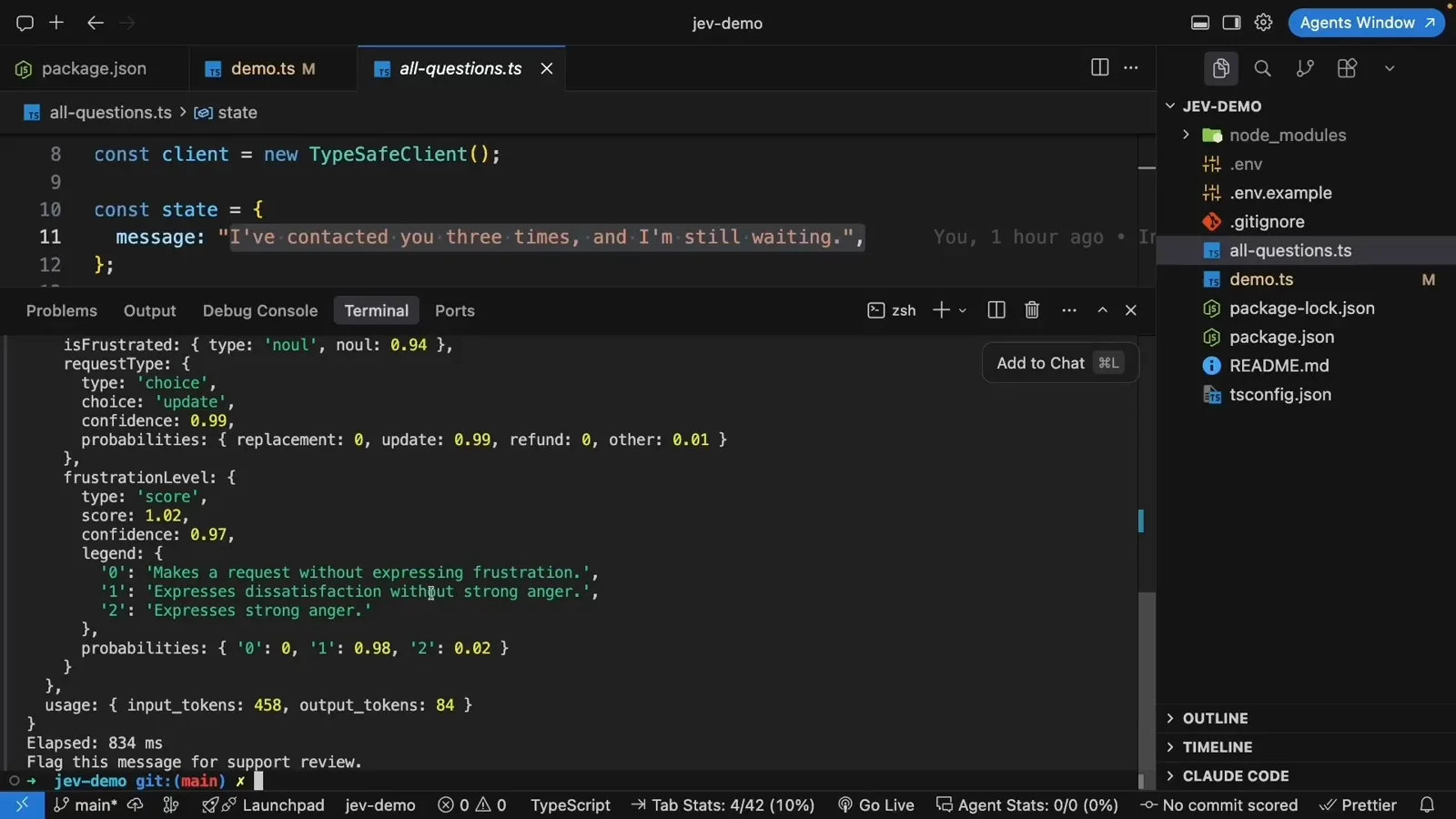
Three typed answers in 834 ms — thresholds do the rest.Watch at 18:30
Frequently asked questions
Does Jev have an official MCP server?
No. TypeSafe’s documented route for coding agents is a drop-in Agent Skill — a plugin that gives Claude Code or Codex the Jev API context — and the docs are explicit that Jev is not the LLM behind the agent (there is no model: jev-latest option). The MCP transport layer is entirely community-built: the Glama directory lists 20+ third-party Jev MCP servers, led by jkudish/jev-browser (268 stars, ~3.7k npm downloads a week), maxkimambo/jev-mcp (~981 a week), walidboulanouar/jev-agent-kit (11 tools), and Bizuayeu/GenericJevMCP (self-hosted DiffusionGemma backend).
How do I connect Jev to Claude Code?
The official skill route installs in two commands: claude plugin marketplace add typesafe-ai/skills, then claude plugin install typesafe@typesafe-ai (or copy the skills/typesafe-ai directory into ~/.claude/skills for a manual install). Community walkthroughs show a second route — hand your agent an OpenRouter API key plus a router setup prompt, and it wires Jev-based model routing into the session. The same agent-setup prompt and skill.md pattern also works in Cursor or Codex. Both routes end at the state + typed-question call shown in this guide.
What does a Jev decision layer actually do for my agent?
Community demos put hard numbers on it. Filtering an MCP/skill context: a 29,150-token server list collapsed to the 2 servers a Stripe-webhook task actually needed — roughly 5× less context and an estimated $236 saved per 1,000 requests. A safety fuse: an irreversible rm -rf blocked in about half a second by Jev instead of ~5 seconds and 124 tokens on the main model. Bulk triage: 30 support tickets classified in 2.6 seconds at a fraction of the LLM cost. Routing, tool filtering, and permission gates are the three patterns that keep coming back.
Agent Skill or community MCP server — which should I use?
They solve different halves. The official skill is context: it teaches your agent when and how to call Jev, stays aligned with the docs, and updates with the SDK. A community MCP server is transport: it exposes Jev as a runtime tool any MCP client — Claude Code, Cursor, Codex — can invoke inside the loop for model routing, tool filtering, or permission gating. A practical combo is the official skill for setup knowledge plus one vetted community server for in-loop decisions, and — as the MG setup video cautions — run evaluations on your own cases before trusting the judgments in production.
Related guides
Agent Routing Recipe
Gate which model or tool handles each agent task with a typed Choice and threshold.
ReadJev Model Router Guide
Sam Witteveen builds a privacy-gated router — the most popular coding-agent pattern for Jev.
ReadJev API Reference
The evaluate endpoint and typed payload that every Jev MCP server wraps.
ReadPrompt Injection Defense
Screen untrusted MCP tool results before they reach your agent’s context.
ReadMore video walkthroughs
- Jev Classification Quickstart: OpenRouter API, Primitives & Real Probabilities
- Jev Architecture Explained: Why 70ms Decision Models Beat LLMs for Workflow Automation
- Ultra-Fast Browser Agents with Jev: 178ms DOM Loops & Dual Model Orchestration
- Open Jev Models Are Here: Semif, Nimble, Decider, DiffusionGemma & Laya Hands-On
- Jev vs LLM: Will Jev Replace LLMs? Krish Naik's Whiteboard Explainer
- Jev Trader Tutorial: Build a Subsecond AI Trading Bot on Monad
- Jev Model Router: Build a Privacy-Gated LLM Router with Jev & OpenJev
- Jev Tutorial for Beginners: State, Questions & the TypeScript SDK
- Run Jev Locally: Kev, SemIf & Von on Your Own GPU (OpenJev Guide)
- Jev RAG Reranker: Policy-Steered Reranking for Retrieval-Augmented Generation
- When to Use Jev: An Engineer's Audit of Claims, Gates, and Failure Modes
- LangChain + Jev Integration Tutorial: Routing, Guardrails & Evals
- Jev vs Luna: Independent Benchmarks Put "Better, Faster, Cheaper" to the Test
- Jev Agent Harness: Where the Decision Gate Sits in Your LLM Loop