
Guides / illustrated walkthrough
Julia-1 Tutorial: Install the Open-Source Jev Replacement in Pure Python (and Watch It Beat If-Statements 9 to 2)
A hands-on Julia-1 tutorial, turned into a step-by-step page: venv, one Hugging Face snapshot_download, pip install -e, a first choice question at ~85% billing — then the same ten support messages that sink keyword if-rules at 2/10 while Julia-1 scores 9/10, with its one 100%-confident miss left in.
Quick takeaway
This is the pure-Python install of Julia-1, a free open decision model from Supersonic Labs that the video bills as a lightweight Jev replacement — no Ollama, no GPU, just pip. Requirements: Python 3.11+, ~2 GB of disk, a terminal. Step one creates a julia-demo folder with a virtual environment; step two runs snapshot_download("SupersonicLabs/Julia-1") and pulls 46 files (~550 MB) into a local folder; step three runs pip install -e ./Julia-1, which drags in PyTorch and Transformers (on Linux, install CPU-only torch first or pip grabs gigabytes of CUDA libraries you will never use). The API shape: load_model("Julia-1", device="cpu", strict_encoding=True, max_length=8192, head_length=512), then engine.predict() with a state and typed questions — "choice" with short, clearly different option descriptions, or "noul" for yes/no probabilities. First test: "I was charged twice for the same order." → billing at 0.854 (the ~85% the narration quotes), shipping 0.143, access 0.003. The real test routes ten real-style support messages through both a keyword matcher and the model: the rules trip on a negation ("I'm not asking for a refund" → billing ✗ while Julia reads shipping ✓), on a message with no keyword ("My card got hit twice"), on typos ("cant sign in... wrong pasword"), and on Portuguese — final score 2/10 vs 9/10. The video keeps the miss on screen: "Payment went through fine, but the box never showed up" is shipping, and Julia-1 said billing at 100% — a high probability is not a guarantee. The noul replay scores keyword rule 1/6 vs Julia-1 5/6, fooled once by "No refund needed" at 99% yes. Speed, measured on a 2-core cloud Linux VM, median of 50 runs: ~9 s to load once, then ~40 ms per decision, tunable via JULIA_CPU_THREADS. Every number here is the creator's demo run on demo data — test on your own messages and keep a human in the loop for anything that matters.
Video source
Singularity Feed
Step-by-step walkthrough
- 1
The pitch: a model that decides, measured against if-statements
Julia-1 is a free decision model from Supersonic Labs, and the video frames the whole tutorial as a job interview: one small online store, three teams — billing, shipping, account help — and ten tricky customer messages that must each land on exactly one team. The classic automation is a few if statements ("refund" → billing, "package" → shipping, "password" → account): simple, fast, and broken the moment a real customer types something you did not expect. The scoreboard the video opens with gives away the ending — keyword rules 2/10, Julia-1 9/10 — and promises to show the one message it got wrong. Everything between here and that miss is install and code, none of it requiring a graphics card.
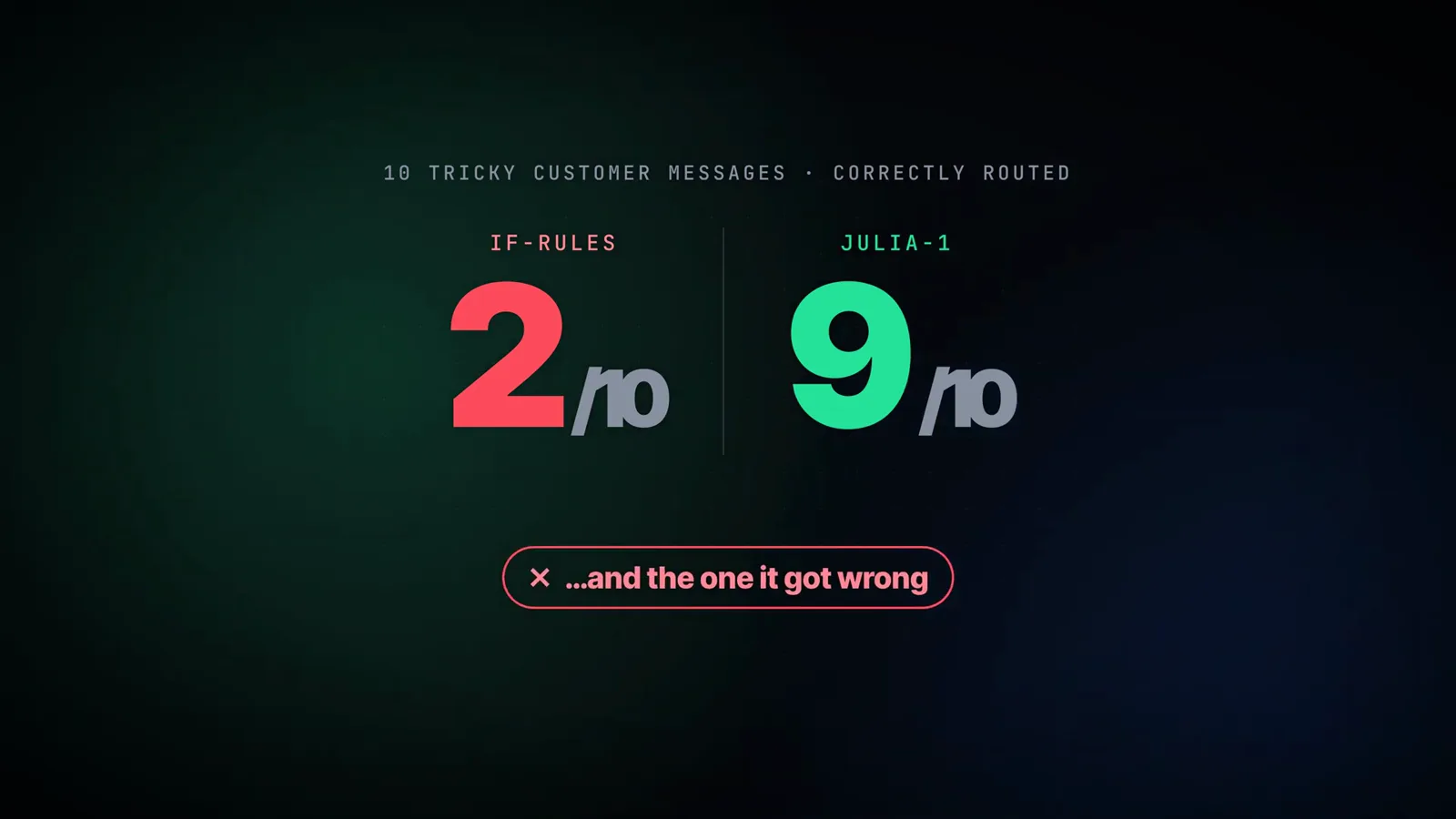
The cold open gives away the ending: 2/10 for if-rules, 9/10 for Julia-1 — plus one honest miss to explain.Watch at 0:33 - 2
Step 1: a project folder and a virtual environment
The prerequisites fit on one slide: Python 3.11 or newer, about 2 GB of free disk — the model is roughly 550 MB and PyTorch accounts for most of the rest — and a terminal: PowerShell on Windows, the regular Terminal app on macOS and Linux. No GPU anywhere; everything in this tutorial runs on the CPU. The first command creates a julia-demo folder and a virtual environment inside it, so Julia's packages stay separate from everything else on the machine. Windows uses python -m venv .venv in PowerShell; macOS and Linux use python3 -m venv .venv. When the environment is active, (.venv) shows up at the start of your prompt.
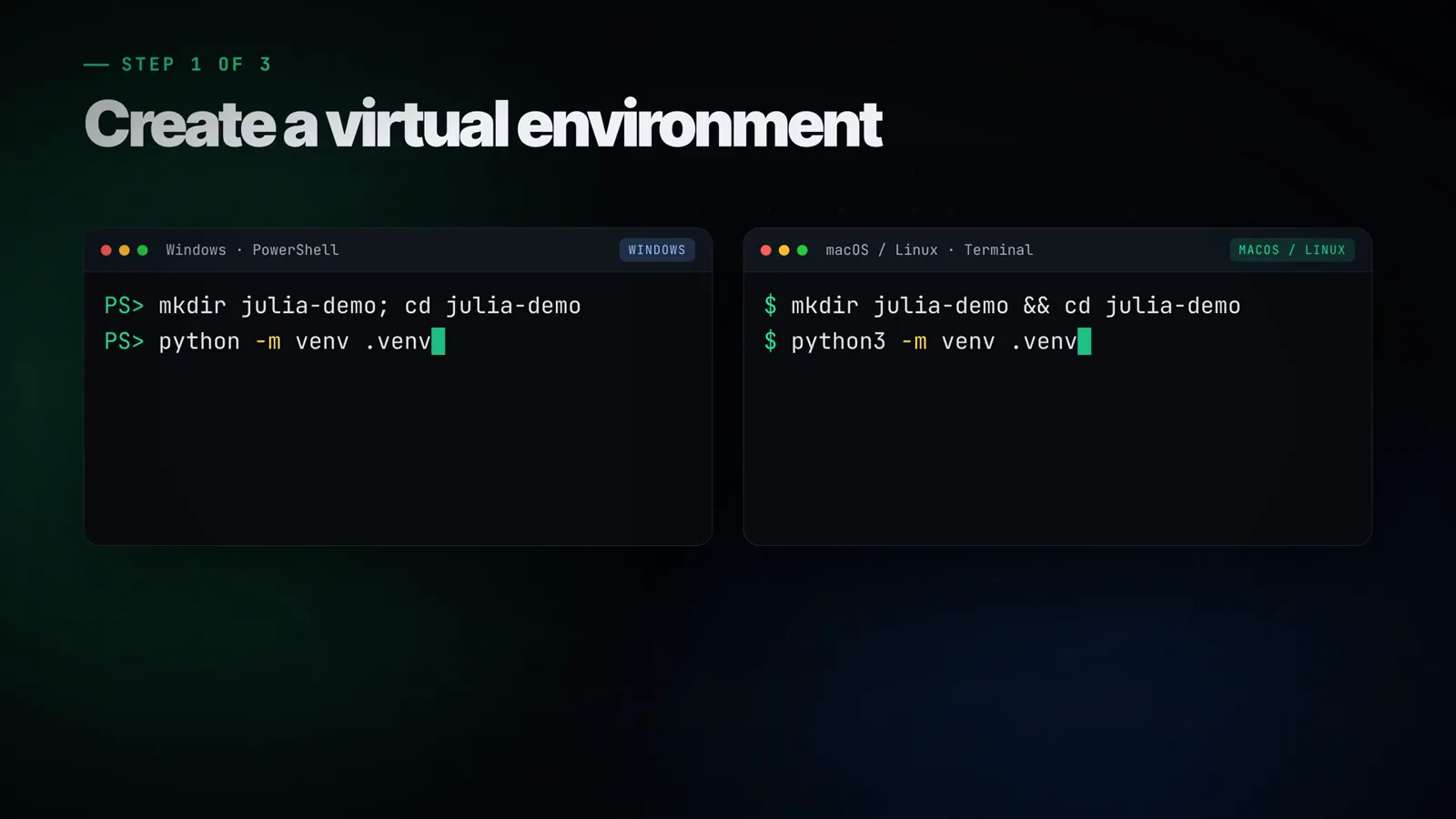
Both command flavors on screen: PowerShell and macOS/Linux — one venv, and (.venv) in the prompt once it works.Watch at 1:52 - 3
Step 2: one snapshot_download pulls the whole repo
With the environment active, install the Hugging Face Hub package, then run the one-liner on the card: snapshot_download("SupersonicLabs/Julia-1", local_dir="Julia-1"). That single call fetches the entire model repository — 46 files, about 550 MB — into a local Julia-1/ folder, with model.safetensors as the heavyweight in the file tree. The card also carries a small macOS/Linux courtesy note: if plain python is not found, use python3 — inside the active venv, both point at the same interpreter. Note what is absent here: no Ollama, no GGUF quantization, no runtime download. Julia-1 ships as a Python package you install in the next step, which is why this route works on any machine Python runs on.
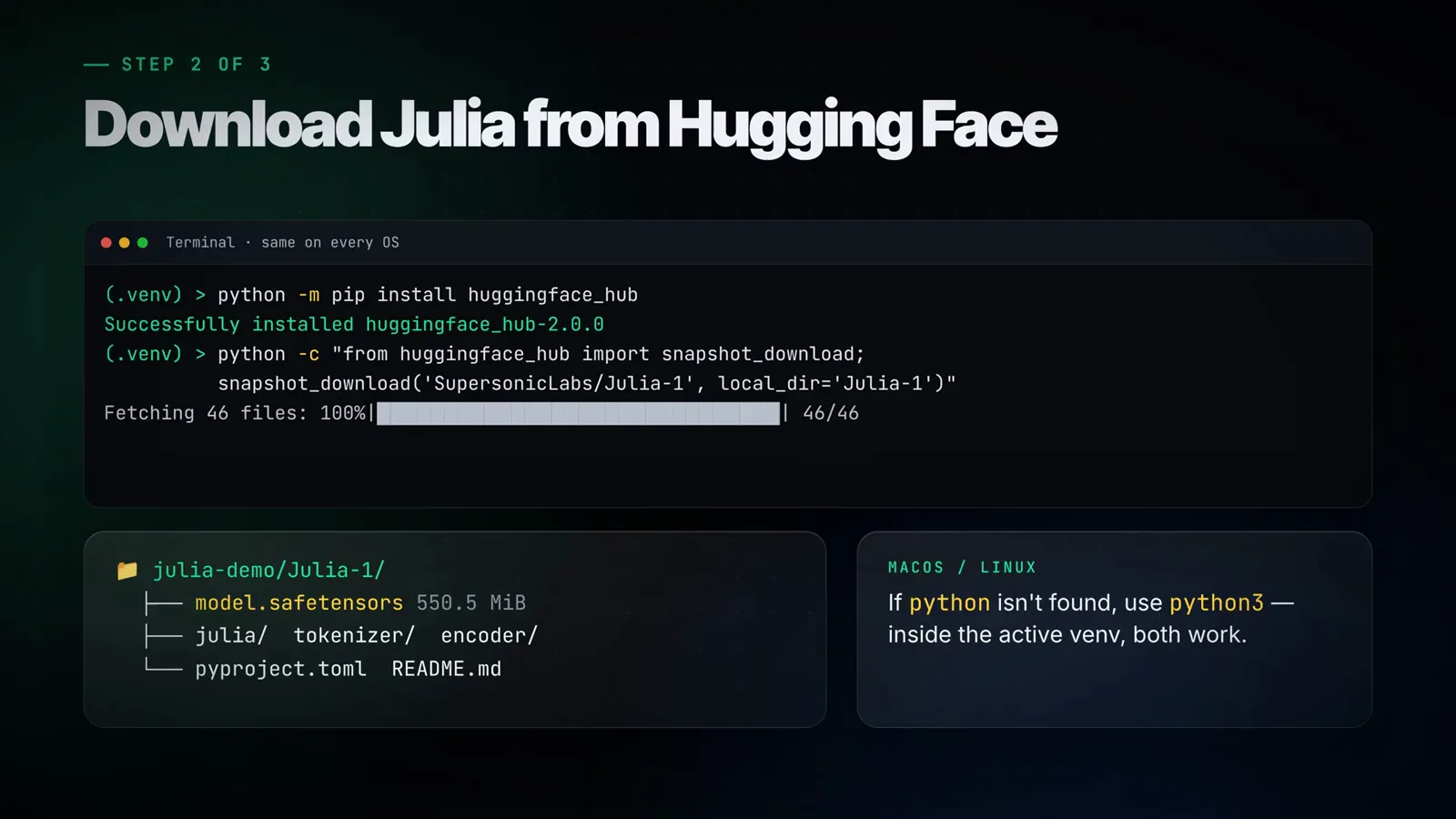
One line: snapshot_download("SupersonicLabs/Julia-1") — 46 files, ~550 MB, straight into ./Julia-1.Watch at 2:20 - 4
Step 3: pip install -e ./Julia-1 (and the Linux CUDA trap)
The last install step points pip at the folder you just downloaded: python -m pip install -e ./Julia-1. Because it pulls in PyTorch and Transformers alongside, this is the slowest step of the three — the video's advice is to grab a coffee. Linux users get the one warning worth repeating: install the CPU-only build of PyTorch first, otherwise pip may happily download several gigabytes of CUDA libraries you will never use on a CPU-only box. That is the whole install: three steps, no compiler adventures, no graphics card, nothing to configure. The rest of this page is what the model does once it is loaded.
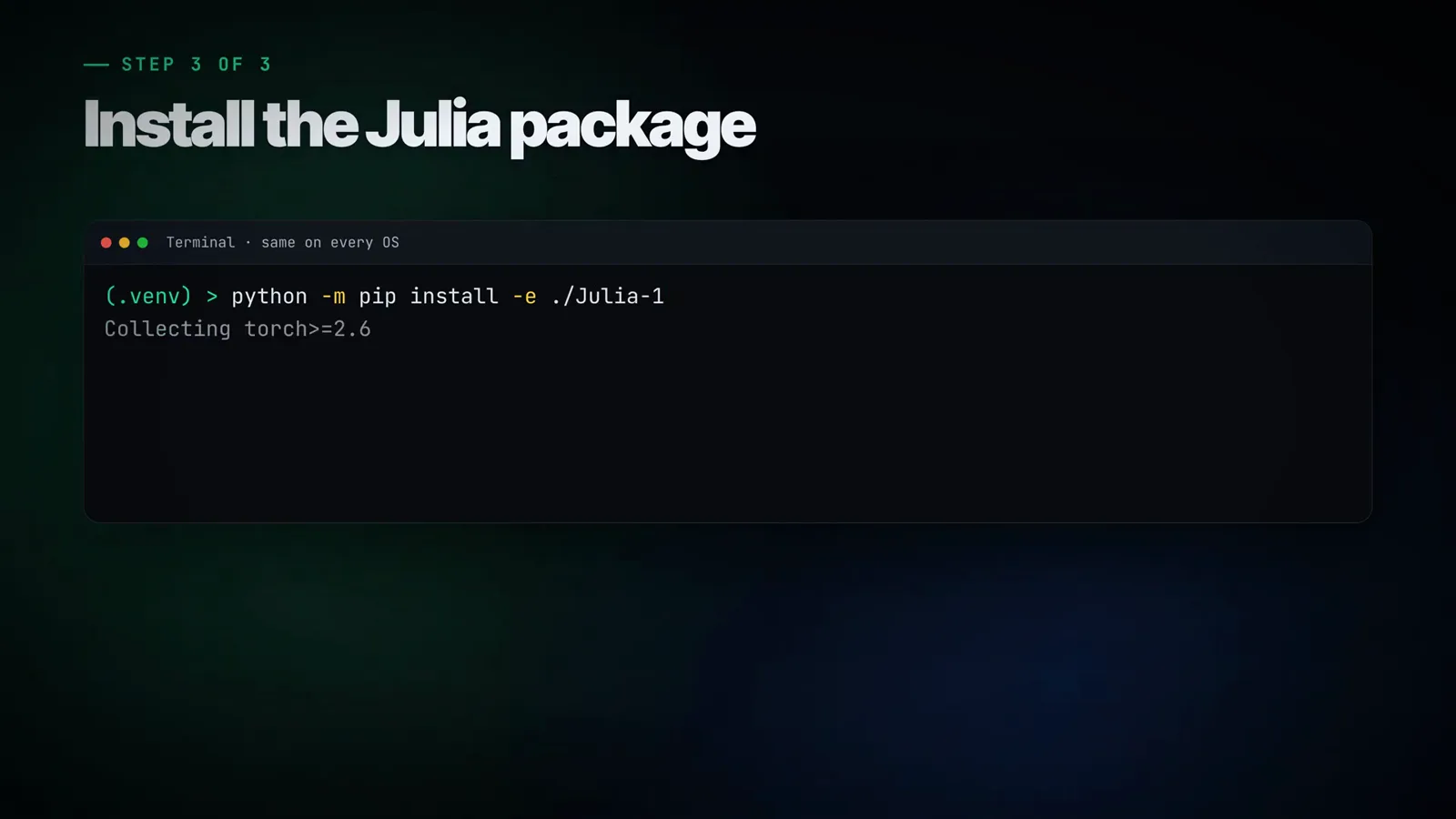
pip install -e ./Julia-1 — editable install, PyTorch and Transformers riding along. On Linux: CPU-only torch first.Watch at 2:30 - 5
First test: one state, one typed question, three options
quick.py is the minimal viable question. load_model("Julia-1", device="cpu", strict_encoding=True, max_length=8192, head_length=512) returns an engine, and engine.predict() receives a state — the text to judge, here "I was charged twice for the same order." — plus a questions dict. The "team" question has type "choice", an instructions line ("Which team should handle this request?"), and a criteria map where each option carries an id plus a short plain-English description: billing = "Billing and payment disputes", shipping = "Shipping and delivery", access = "Account access and login". The terminal prints billing as the winning choice with probabilities of 0.854, 0.143, and 0.003 — the roughly 85% the narration quotes. Loading takes a few seconds, so in a real app you load the model once and keep the engine around.
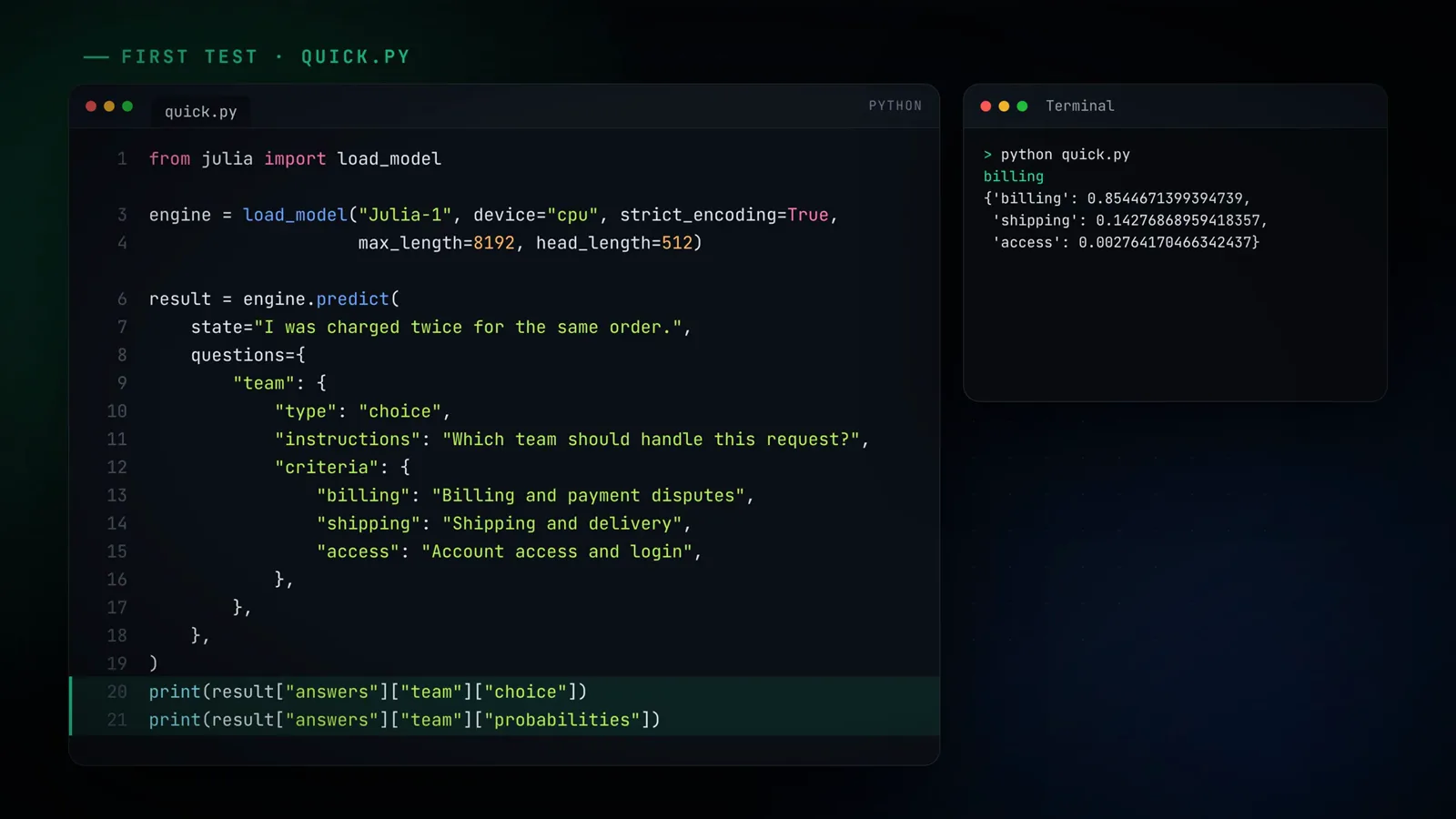
billing wins at 0.854, shipping 0.143, access 0.003 — one forward pass, no generated text.Watch at 3:20 - 6
The real test: ten messages, if-rules vs Julia-1, side by side
router.py keeps the same three teams and writes two functions: one classic keyword matcher (refund/charge/payment → billing, package/delivery → shipping, password/login → account) and one ask_julia() that asks the quick.py question and returns the winning team plus how sure it is. Fed the same ten messages, both print answers side by side. The easy ones both get right. Then the table highlights row three: "I'm not asking for a refund, I just want my package sent to my new address." The rule sees refund and answers billing ✗; Julia reads the not and answers shipping 100% ✓. Next to it: "My card got hit twice for the same sneakers." — no keyword at all, so the rules column gives up (unknown ✗) while Julia says billing. "cant sign in, the app keeps saying wrong pasword" — typos and sign in instead of login — leaves the rules at unknown; Julia answers account. And the Portuguese tickets ("Fui cobrado duas vezes pelo mesmo pedido") sail past the rules; Julia gets them because it was built on a multilingual base model — the narration counts Spanish in too. Final score: rules 2/10, Julia 9/10.
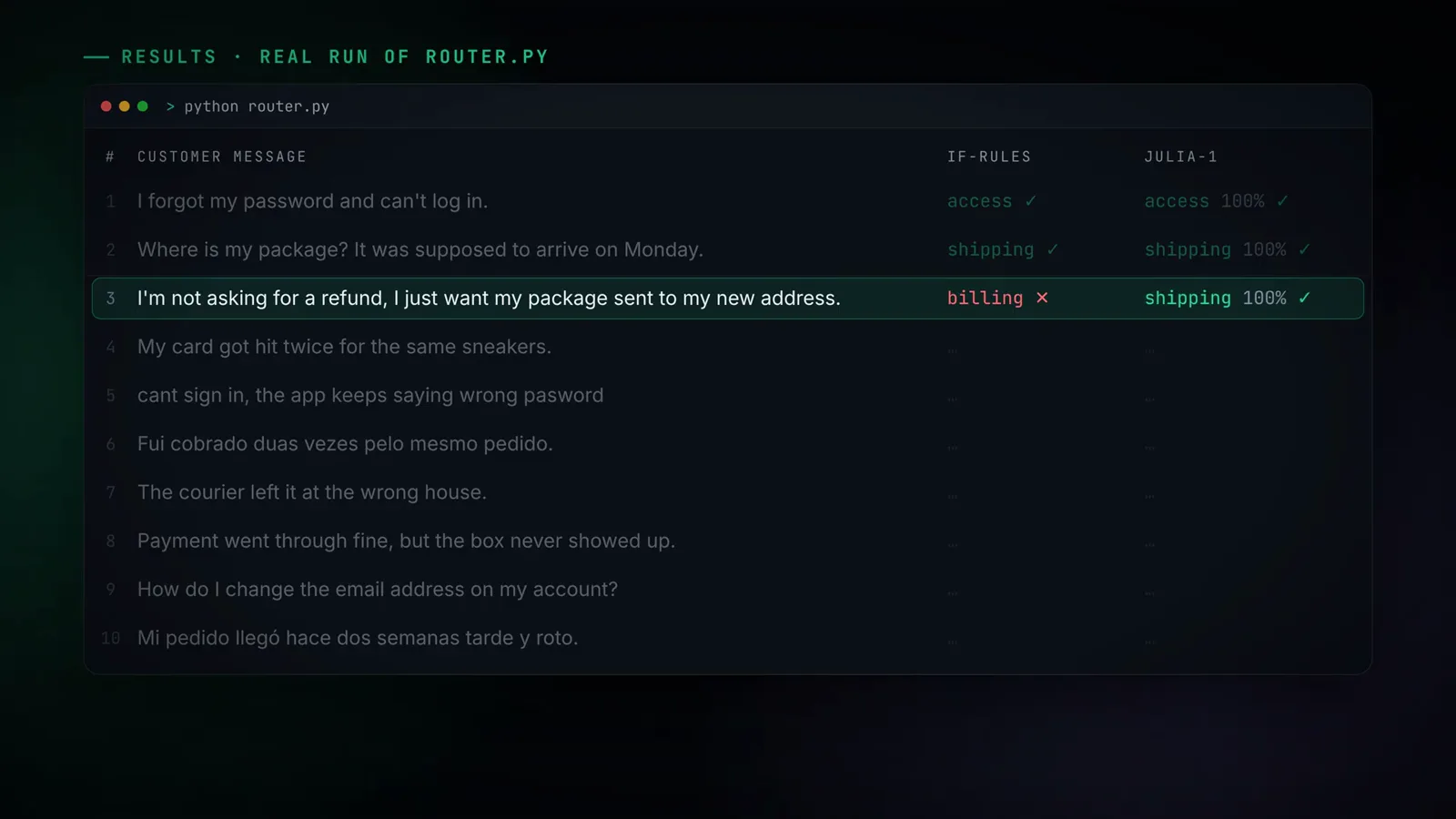
Same ten messages: the rule column trips on the negation, Julia-1 answers shipping at 100%.Watch at 4:23 - 7
The one it missed: 100% confident, still wrong
Message 8 is the video keeping its promise: "Payment went through fine, but the box never showed up." Any human reads a shipping problem — the payment succeeded, the parcel did not arrive. Julia-1 answered billing, and the card shows the uncomfortable part: 100%, no hedge. The slide under the miss card is the lesson worth taking out of the whole video: a high probability is not a guarantee. Keep the honesty frame intact, too — this is a demo set of ten messages, not a benchmark, and every number on this page is the creator's demo run on demo data, not an independent evaluation. The video's own advice is the right default: test Julia on your own real messages before letting it route anything automatically, and keep a human in the loop for decisions that actually matter.
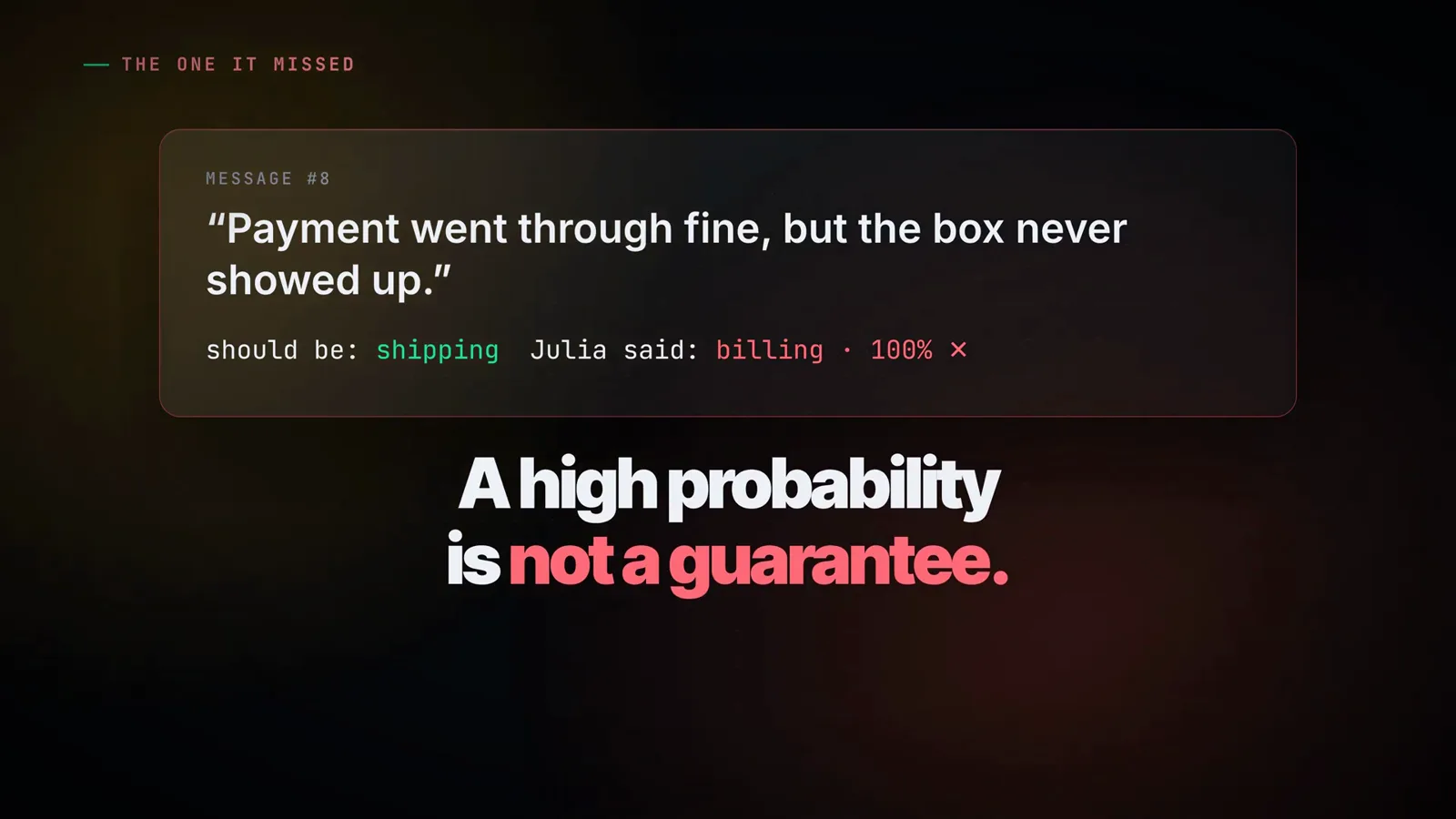
"A high probability is not a guarantee." — the miss card the video promised in its first 30 seconds, kept in.Watch at 5:18 - 8
Yes/no questions: the noul type
Decisions are not only multiple choice. refund.py defines wants_refund(msg) with a question of type "noul" — the yes/no primitive the auto-captions mishear as "null" — and the instructions line "Is the customer asking for a refund?"; the answer comes back as a single probability of yes. Against a keyword rule that just looks for the word refund, six messages tell the story: "I'm not asking for a refund..." → 11% yes ✓; "Please just give me my money back..." (no keyword to find) → 88% ✓; "Can you refund the second charge on my card?" → 100% ✓; "Quero meu dinheiro de volta." (Portuguese) → 100% ✓; "The refund policy on your site is confusing, but I'm happy to keep the jacket." → 1% ✓. And the fooled one: "No refund needed, just send the missing item." → 99% yes ✗. Scoreboard: keyword rule 1/6, Julia-1 5/6 — same lesson as the router, same honest footnote.
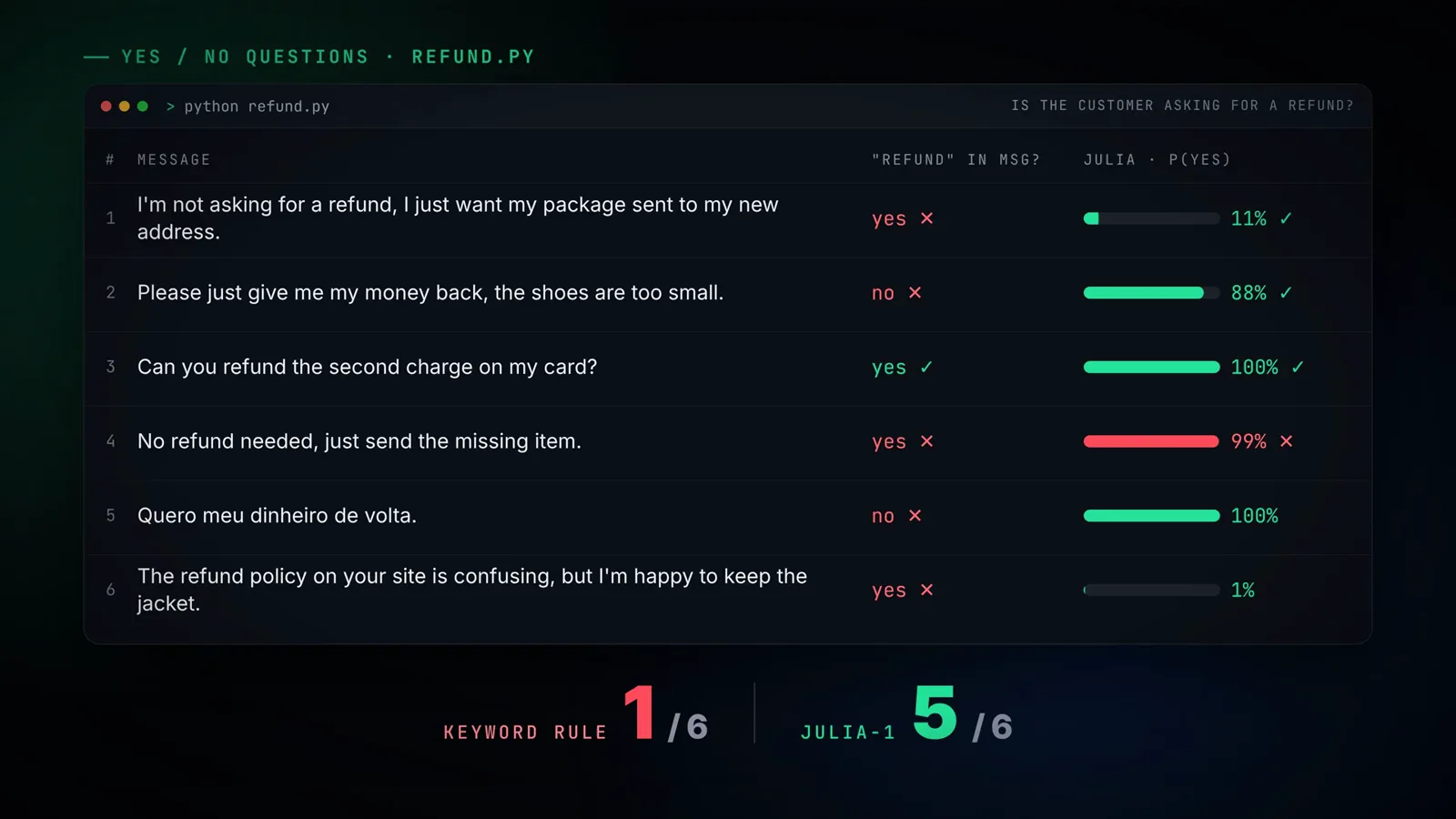
P(yes) per message: 11, 88, 100, 99 (the fooled one), 100, 1 — keyword rule 1/6, Julia-1 5/6.Watch at 5:50 - 9
Speed and tuning: ~9 s to load, ~40 ms per decision
The speed card is careful with its own fine print: measured on a small 2-core cloud Linux VM, CPU only, median of 50 runs — your machine will differ. On that box Julia-1 took about 9 seconds to load, once, and then about 40 milliseconds per decision. The tips card reads like a checklist: load the model once and reuse the engine instead of reloading per request; keep option descriptions short and clearly different from each other; stay within 2 to 20 options per question; and set JULIA_CPU_THREADS (export JULIA_CPU_THREADS=4 on macOS/Linux, $env:JULIA_CPU_THREADS=4 in PowerShell) to control how many CPU threads it uses. Three install steps, one short script, and — in the video's closing line — a model that reads meaning instead of matching keywords.
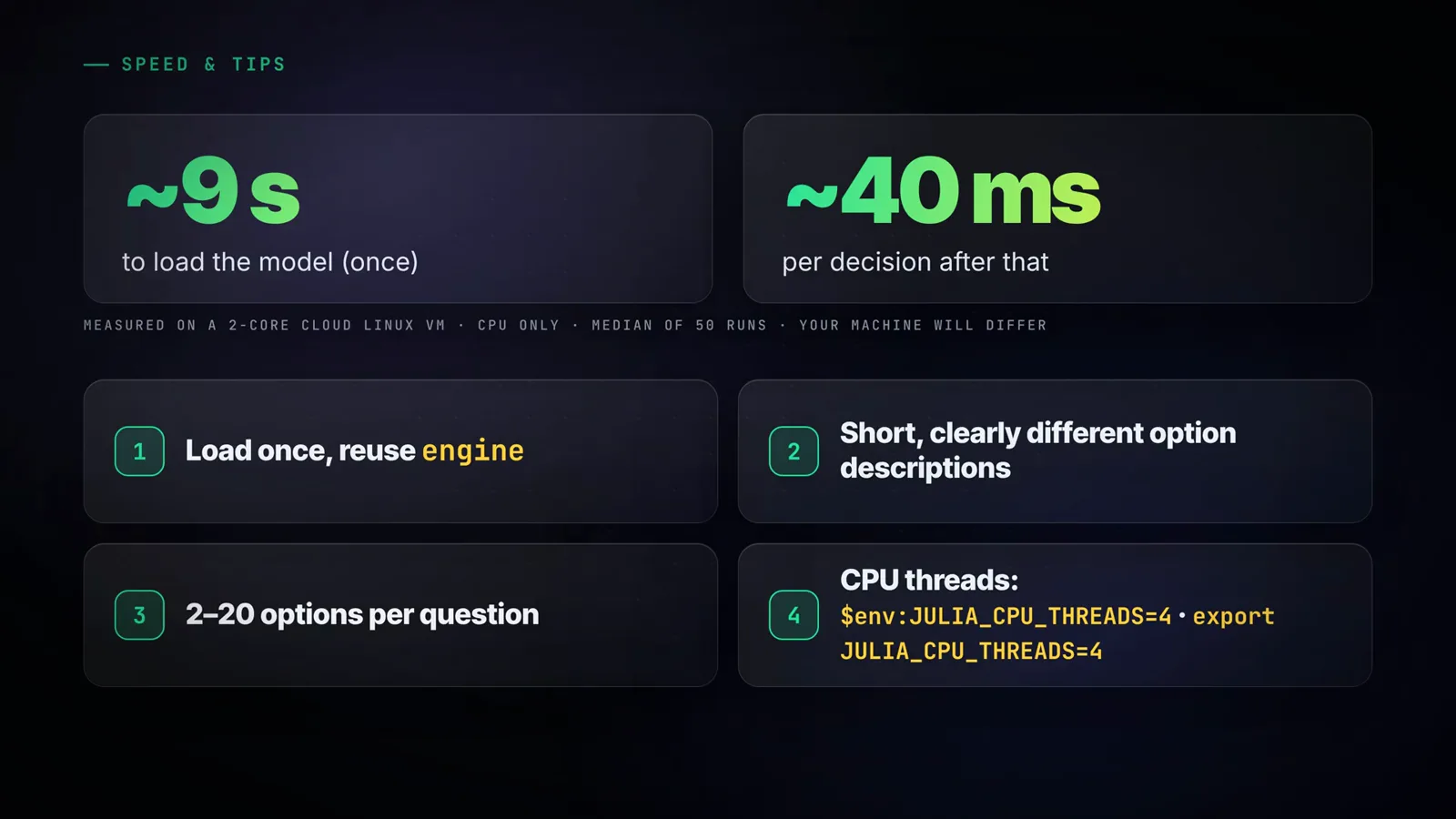
~9 s load, ~40 ms per decision, median of 50 runs on 2 CPU cores — with the four tuning tips on the same card.Watch at 6:33
Frequently asked questions
What do you need to install Julia-1?
Three things: Python 3.11 or newer, about 2 GB of free disk space (the model download is ~550 MB, and PyTorch + Transformers take most of the rest), and a terminal — PowerShell on Windows, the standard Terminal on macOS/Linux. No graphics card is needed; the whole tutorial runs on CPU. The install is three commands: python -m venv .venv, the snapshot_download("SupersonicLabs/Julia-1") one-liner, and pip install -e ./Julia-1. On Linux, install the CPU-only PyTorch build first so pip does not pull gigabytes of CUDA libraries.
Is Julia-1 the official Jev model?
No. Julia-1 is an independent open project (SupersonicLabs/Julia-1 on Hugging Face), and the video presents it as a free, lightweight, open-source Jev replacement. It shares the typed-decision shape this site covers — a state plus typed questions returning per-option probabilities — but it is not built by or endorsed by the Jev team, and a shared category name transfers nothing: not benchmarks, not accuracy claims, not pricing. Treat every number here as the video creators demo run, and evaluate any model on your own workload before shipping it.
What hardware does Julia-1 need, and how fast is it?
Modest by design: the video ran it on a small 2-core cloud Linux VM with no GPU and measured about 9 seconds to load the model once, then about 40 milliseconds per decision — median of 50 runs, with the cards own caveat that your machine will differ. You can tune CPU usage with the JULIA_CPU_THREADS environment variable (for example export JULIA_CPU_THREADS=4). A regular laptop or the cheapest cloud instance is enough for experimentation; loading is the expensive part, so load the engine once and reuse it.
Is 9/10 an accuracy guarantee?
No — and the video is explicit about it. The 9/10 comes from ten demo messages in one small e-commerce scenario, run once, on demo data written by the creator; it measures the demo, not the model. The proof is the miss it shows: "Payment went through fine, but the box never showed up" is a shipping problem, and Julia-1 sent it to billing at 100% confidence. The noul test has the same shape — 5/6, fooled by "No refund needed" at 99% yes. A high probability is not a guarantee: test on your own real messages and keep a human in the loop for anything consequential.
When should you pick Julia-1 over if-statements — or over an LLM?
It fills the gap between the two. Keyword if-rules are fast and free but break on negation, missing keywords, typos, and other languages — exactly the four categories the video demos. A general LLM handles meaning but generates text you must parse, pays per token, and adds latency. Julia-1 reads meaning and returns typed probabilities over your options (2–20 per question) on CPU in tens of milliseconds, with no text generated. Use it for routing, gating, and yes/no checks; do not use it when you need a written reply or a guarantee — keep review paths for ambiguous or high-consequence cases.
How much does Julia-1 cost to run?
The model itself is free to download from Hugging Face, and because inference runs locally on CPU there is no per-decision API cost — no tokens, no metered calls. Your only cost is compute, and the videos benchmark box was a small 2-core cloud VM, the cheapest tier at most providers. Budget for the one-time ~550 MB download plus a couple of gigabytes for PyTorch, and if you route meaningful traffic through it, the honest extra line item is the review queue for low-confidence or high-stakes decisions.
Related guides
Run Jev Locally: the Official Local Setup
The official-product axis this page deliberately avoids: running Jev itself locally. Different brand, different install route — read both before choosing what to deploy.
ReadJev Open Models: the Open-Weights Landscape
Where a download like SupersonicLabs/Julia-1 fits among the other openly available decision models, and what open weights do and do not promise.
ReadWhen to Use Jev (and When Not To)
The fit-boundary guide: routing, gating, and tagging versus tasks that need generated text — the same boundary Julia-1 inherits by copying the typed-question shape.
ReadJev vs Ollama: Hosted API or Local Runtime
The hosted-versus-local trade-offs in detail — the same CPU-only honesty as this videos 2-core, 40-millisecond measurements.
ReadMore video walkthroughs
- Jev Classification Quickstart: OpenRouter API, Primitives & Real Probabilities
- Jev Architecture Explained: Why 70ms Decision Models Beat LLMs for Workflow Automation
- Ultra-Fast Browser Agents with Jev: 178ms DOM Loops & Dual Model Orchestration
- Open Jev Models Are Here: Semif, Nimble, Decider, DiffusionGemma & Laya Hands-On
- Jev vs LLM: Will Jev Replace LLMs? Krish Naik's Whiteboard Explainer
- Jev Trader Tutorial: Build a Subsecond AI Trading Bot on Monad
- Jev Model Router: Build a Privacy-Gated LLM Router with Jev & OpenJev
- Jev Tutorial for Beginners: State, Questions & the TypeScript SDK
- Run Jev Locally: Kev, SemIf & Von on Your Own GPU (OpenJev Guide)
- Jev RAG Reranker: Policy-Steered Reranking for Retrieval-Augmented Generation
- When to Use Jev: An Engineer's Audit of Claims, Gates, and Failure Modes
- LangChain + Jev Integration Tutorial: Routing, Guardrails & Evals
- Jev MCP Server: Connect Jev Decisions to Claude Code & Cursor
- Jev vs Luna: Independent Benchmarks Put "Better, Faster, Cheaper" to the Test
- Jev Agent Harness: Where the Decision Gate Sits in Your LLM Loop
- Jev Playground Walkthrough: The Hotdog Lesson, Criteria, and a Four-Console Token Test
- Jev Text Classification API: Zero-Shot CLI & REST with classifier.dev
- Jev API Examples: First Request, curl & All Three Question Types
- Jev Log Triage with Expanso Edge
- Jev Lead Enrichment with Treg: ICP and Signup Scoring
- Use Jev Decision Nodes in Heym for Model Routing
- Laya Tutorial: Open-Source AI Routing With Calibrated Probabilities (Laya vs Jev Setup)
- Train Your Own Jev: Fine-Tune a Jev-Style Decision Model for $5–$17 (What You Can and Cannot Train)
- Jev Tips: 8 Best Practices for Better Decisions (State, Questions, Criteria & Thresholds)
- Jev Context Compaction: Prune AI Agent Memory Without Generative Summaries
- Jev as an LLM Judge: Confidence-Gated Cascades at 0.36% of the Cost
- TypeSafe Computer Use: Local Desktop Automation with Jev, Step by Step
- Jev Resume Screening: Build an AI Resume Evaluator with the Jev JavaScript SDK
- Jev + Claude Code Guide: Voice-Controlled Browser Automation with Typed Decisions
- Jev + Codex: Install the TypeSafe Skill and Triage a Real Gmail Inbox
- Jev vs Ollama: Can Local AI Replace Hosted Jev Without Sending Your Data Away?
- Build Your Own Jev: Train a Free Open-Source Zero-Shot Classifier (That Plays Doom)
- CUA-S1-Forms: a 706K-Parameter Jev-Like Model That Fills GUI Forms on Your CPU
- NOC/SOC Alert Triage with Jev: Rules First, One Typed Question, a Policy Gate
- Ollama Decision Models: Run tev1 and Nimble Locally (Tested on an 8 GB Card)
- Jev Guardrails in Production: A Five-Step Playbook for Decision Automation
- A Session Drift Guard for Pi Agent: Let the Jev Model Propose, Let Code Decide
- 50 Tev1 Use Cases: What a Local Decision Model Can Actually Do (Tested on an 8 GB Laptop)
- Jev, Hands-On: Where the Official Claims Meet Independent Remeasurement
- Jev Ticket Classification in a Real App: the After-Insert Hook and the Calculated Field
- OpenJev RLCD: Run the Open-Source Calibrated Decision Model Locally (Full Guide)
- Clef-Flash vs Jev: I Tested Cloudflare's Decision Model Locally in Ollama (Q4_K_M)
- OpenJev 0.8B on CPU: I Built a Ticket-Routing Inbox and Calibrated the Thresholds
- Jev n8n Integration: the JevGate Community Node, Step by Step (Plus a Plain-HTTP Fallback)