
Guides / illustrated walkthrough
Laya Tutorial: Open-Source AI Routing With Calibrated Probabilities (Laya vs Jev Setup)
A frame-by-frame Laya tutorial from Alex Hitt: structure the state-plus-questions payload, stay under the 192-token option budget, calibrate probabilities to ECE 0.081, gate on 0.85 confidence, route languages, and preload both checkpoints onto the GPU.
Quick takeaway
One narrated whiteboard animation, the whole Laya playbook. Laya is the open-source, non-autoregressive “System 1” decision engine — instead of generating tokens it scores a state document plus a strict question scheme in a single forward pass. The video’s benchmark card (a single Tesla T4) puts Laya at 38.4 ms P50 for one question versus 236–276 ms published figures for Jev, 156.0 ms for a batch of ten, and an expected calibration error of 0.081 versus 0.246 — a claimed 7× latency advantage. The working rules it teaches: split the payload into a state document and typed questions (Choice for categorical routing, Score for an ordinal rubric, Noul for true/false with a calibrated 0.0–1.0 probability); keep the option prompt inside its fixed 192-token head_max_len budget (77 Banking77 options ≈ 4 tokens each and accuracy collapses to a 0.425 ceiling — use hierarchical routing and stay under 20 options); calibrate with RLCD plus a local temperature fit before trusting the number; hard-code a confidence gate (above 0.85 act, below hold for review); route non-English payloads to the multilingual checkpoint in under half a millisecond (the English spine scores Khmer at zero while reporting 0.952 confidence); and set preload=True to pin both checkpoints — 1.5 GB of VRAM — because a cold checkpoint load costs over 10 seconds and would erase the sub-40 ms advantage.
Video source
Alex Hitt
Step-by-step walkthrough
- 1
Shape the payload first: a state document plus a question scheme
Before you pip-install anything, internalize the input contract — it is the whole mental shift. Laya refuses conversational chat histories. You send two separable pieces: the data state (the unstructured document being analyzed) and a structured question scheme built from strict decision primitives. The video sketches a state document as plain JSON — { "project": "AI Architecture", "components": [ { "type": "NeuralNet", "id": "NN01" }, { "type": "DataPipeline", "id": "DP01" } ], "status": "Active" } — exactly the kind of object you would pull from a ticket, a log line, or a database row. The three primitives you can attach: Choice handles categorical decisions such as departmental routing by assigning the input to criteria you define; Score places the state on a sequential ordinal rubric (the video flags it as currently the weakest component on strict mathematical scaling tasks); Noul evaluates true/false conditions but returns a deeply calibrated scalar probability bounded exactly between 0.0 and 1.0 instead of a text string. When you clone the GitHub repo, every example request follows this same state-plus-questions shape.
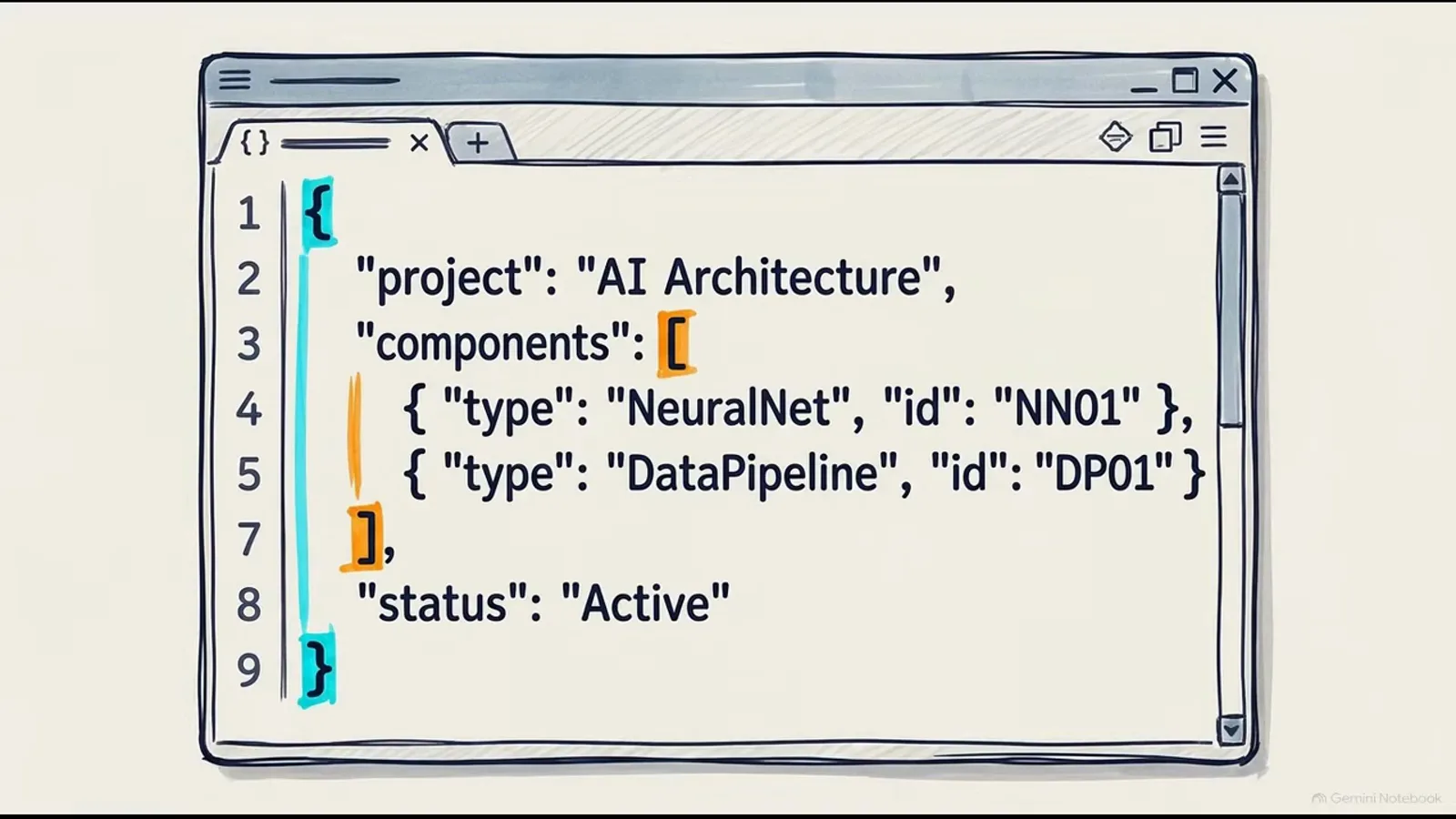
No chat history: a state document plus typed questions is the entire request.Watch at 1:06 - 2
Check the numbers you are signing up for: the 7× latency card
The video’s benchmark card, titled “Laya Demonstrates a 7x Latency Advantage over Commercial Counterparts,” compares Laya against typical published Jev figures on a single Tesla T4 GPU. P50 latency for one question: Laya 38.4 ms versus 236–276 ms. Batched latency for ten questions: Laya 156.0 ms — about 15 ms per question — versus roughly 1,500 ms. Expected calibration error: 0.081 versus 0.246, lower being better. The card’s own fine print says the data comes from the Laya README and Hugging Face, and numbers shift between README revisions (the project has also quoted as low as 7.2 ms per question for the same ten-question batch on a T4) — treat every figure as one measurement, not a law of physics. The direction, however, is the point: because Laya never runs an autoregressive next-token loop, latency stays flat as the option list grows, which is what a queue of routing decisions actually needs.
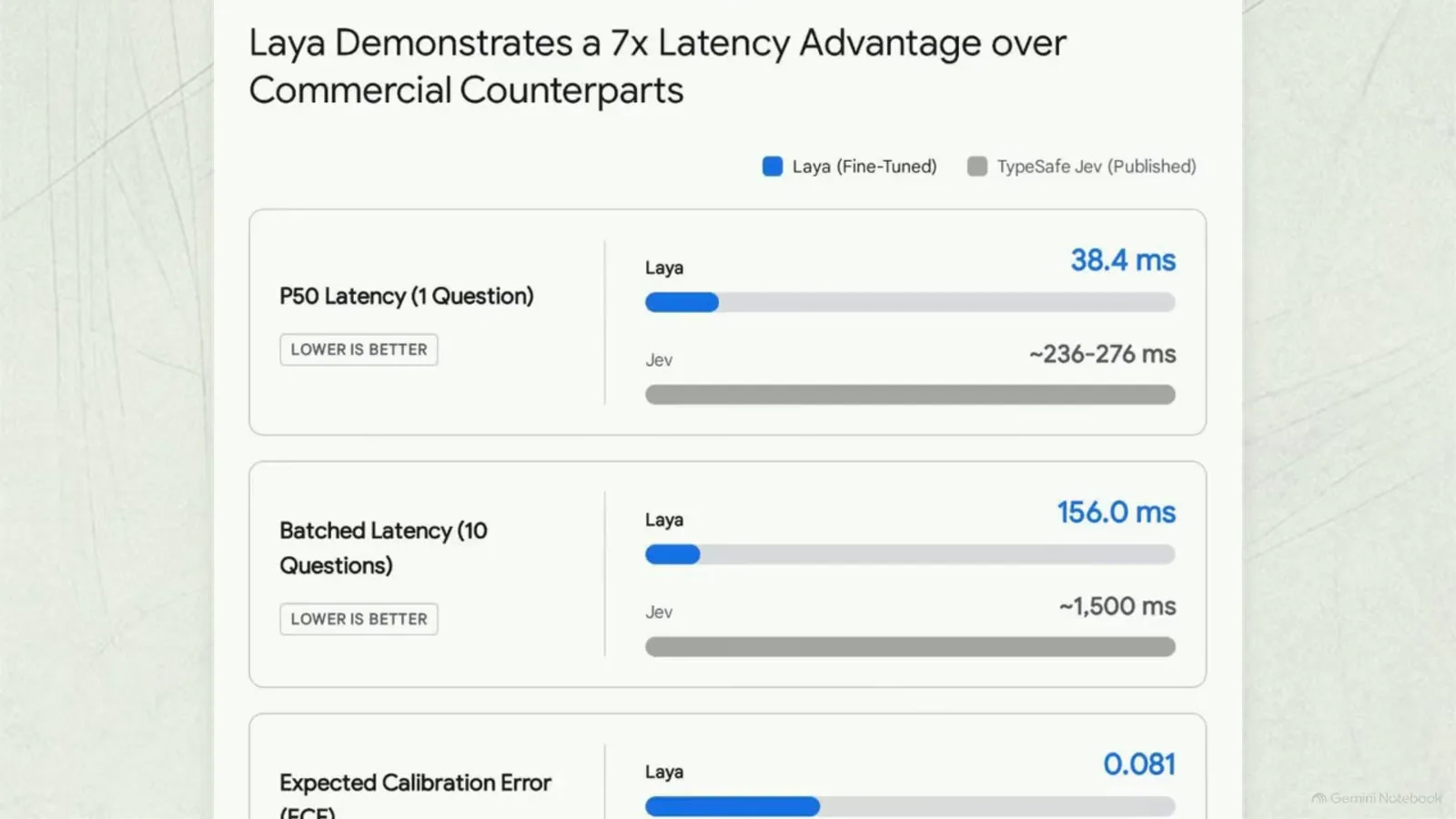
One Tesla T4, three rows: latency per question, batched latency, calibration error.Watch at 1:12 - 3
Read a decision, not a sentence — then wire it into code
Because the question scheme forces the model to evaluate only the options you listed, the output arrives as typed JSON, not prose. The video’s output panel shows the shape: { "Status": "Success", "Data": { "Result": true, "Value": 100 } } with arrows mapping each field straight into standard Boolean logic — if (Status == "Success"), then if (Result), else. There is nothing to parse and no free-form text to hallucinate; the prediction command bypasses the next-token generation cycle entirely. Under the hood, each candidate option gets a unique mask token, the whole payload is processed in one simultaneous block by the bidirectional transformer backbone, and two specialized transformer layers — an MLP decision head — project each 1,024-dimensional marker state onto a single scalar logit, softmaxed across exactly your options. A Choice question comes back as a probability distribution that sums to 1.0 (the video’s example: Billing 85%, Technical 15%, with the autoregressive loop crossed out), and a Noul question as one calibrated scalar — the video shows 0.987 with CONFIDENCE: HIGH on its mock predict run.
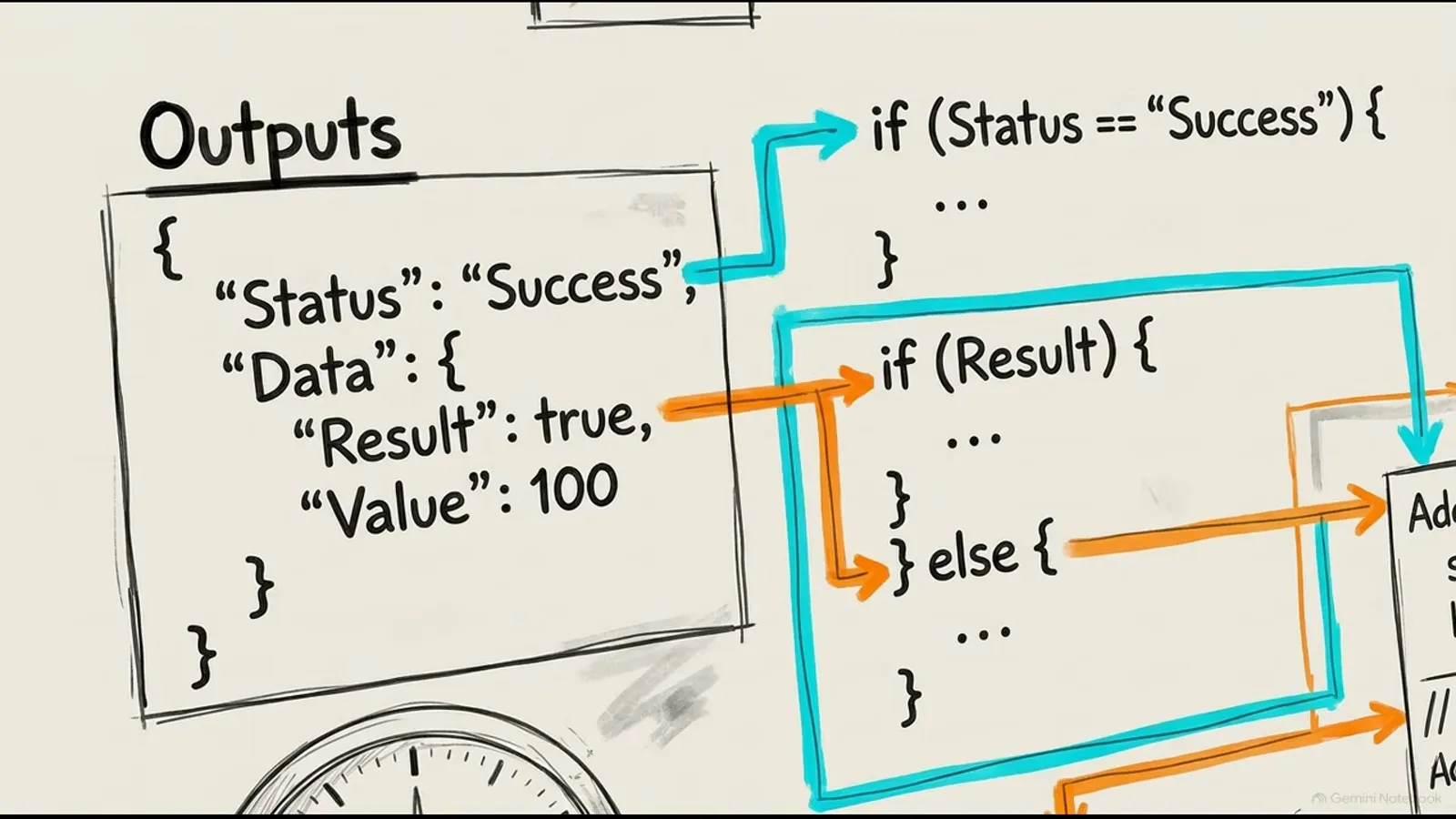
The verdict is a JSON object your if-statements can consume as-is.Watch at 2:56 - 4
Respect the option budget: 192 tokens, and keep sets under 20
This is the limitation that bites newcomers. The video introduces “context forking”: the total token context is strictly divided into a zone for the state document (its sketch shows 320 tokens) and a fixed budget reserved for the option prompt — the head_max_len parameter, 192 tokens in the English checkpoint. Cram a massive taxonomy in and every option starves: 77 Banking77 labels squeezed into the fixed budget get roughly four semantic tokens each, the options lose their distinctive characteristics, and both the English and multilingual models hit an artificial precision ceiling of exactly 0.425. The video gives two fixes. The quick one is manually overriding the configuration dictionary and extending head_max_len with rope embeds before execution. The structurally superior one is hierarchical routing — split a large label set into a two-step coarse-to-fine decision tree so no Choice scheme ever exceeds 20 options. Design the schema like an engineer, the video argues; do not dump an unstructured taxonomy into the model.
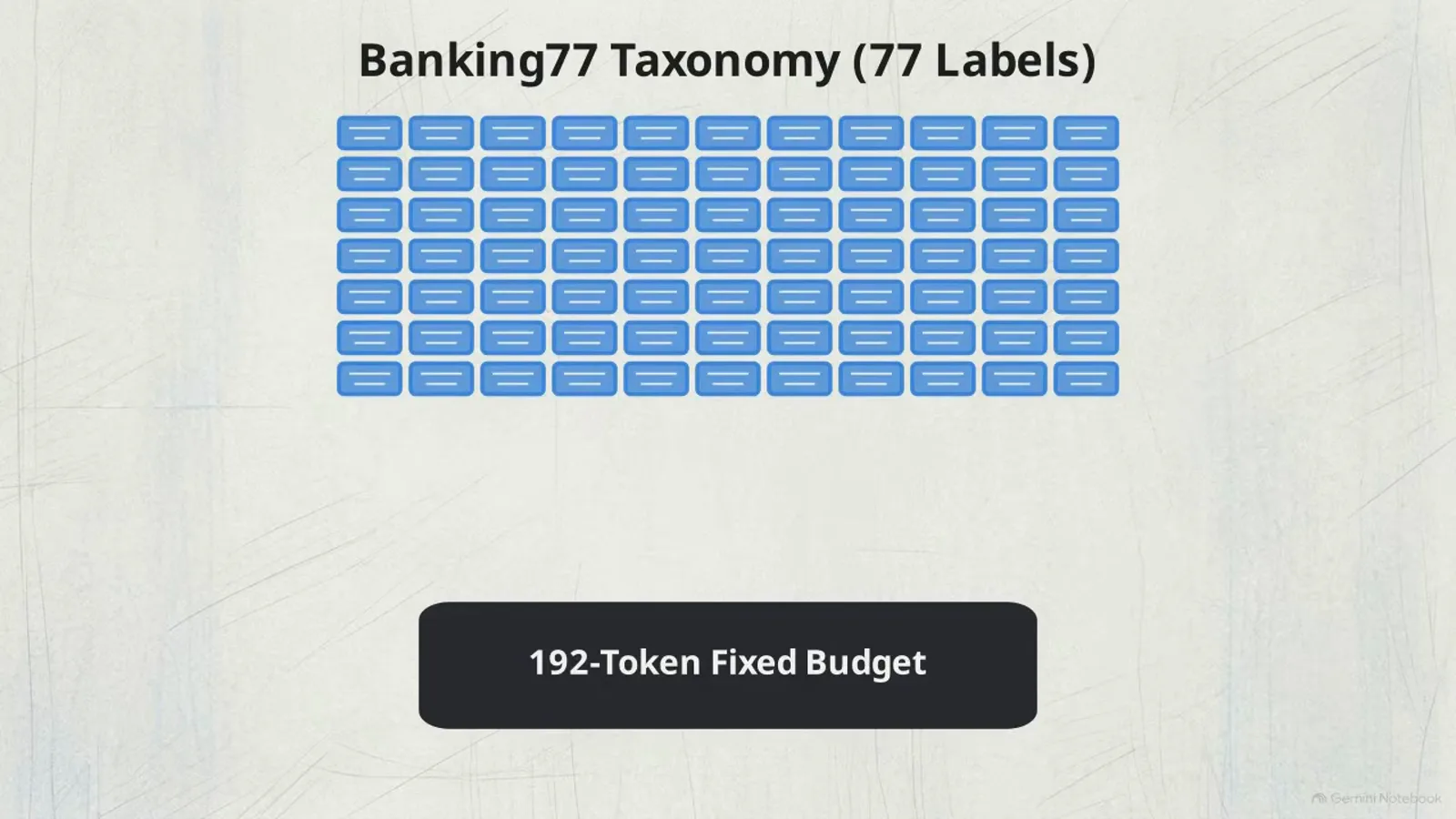
77 options ÷ 192 tokens ≈ 4 tokens each — semantic overcrowding, accuracy capped at 0.425.Watch at 5:01 - 5
Calibrate before you trust the number: RLCD plus a local temperature fit
Fast and wrong is worse than slow, so the video spends a full segment on calibration. Models trained with standard binary reinforcement learning push their maximum probability toward 1.0 — great for the reward signal, fatal for calibration, because a confidently wrong answer silently corrupts an autonomous workflow. The metric to watch is the expected calibration error (ECE), read off a reliability diagram that plots model predicted probability against actual correctness — the video’s “Calibrating AI Confidence To Reality” chart shows points hugging the perfect-calibration diagonal once adjusted. Two corrections do the work: the checkpoints are trained with reinforcement learning for calibrated decisions (RLCD — zero-mean Gaussian noise added to the logits during exploration, rewarded by strictly proper scoring rules so the model must emit its honest distribution), and then you apply a local temperature adjustment, fitting the temperature variable against a slice of your company’s own data. With that done, the video cites the English model’s ECE dropping to 0.081 while macro precision stays stable at 83.8%. The practical payoff: you can hard-code thresholds against probabilities that mean what they say.
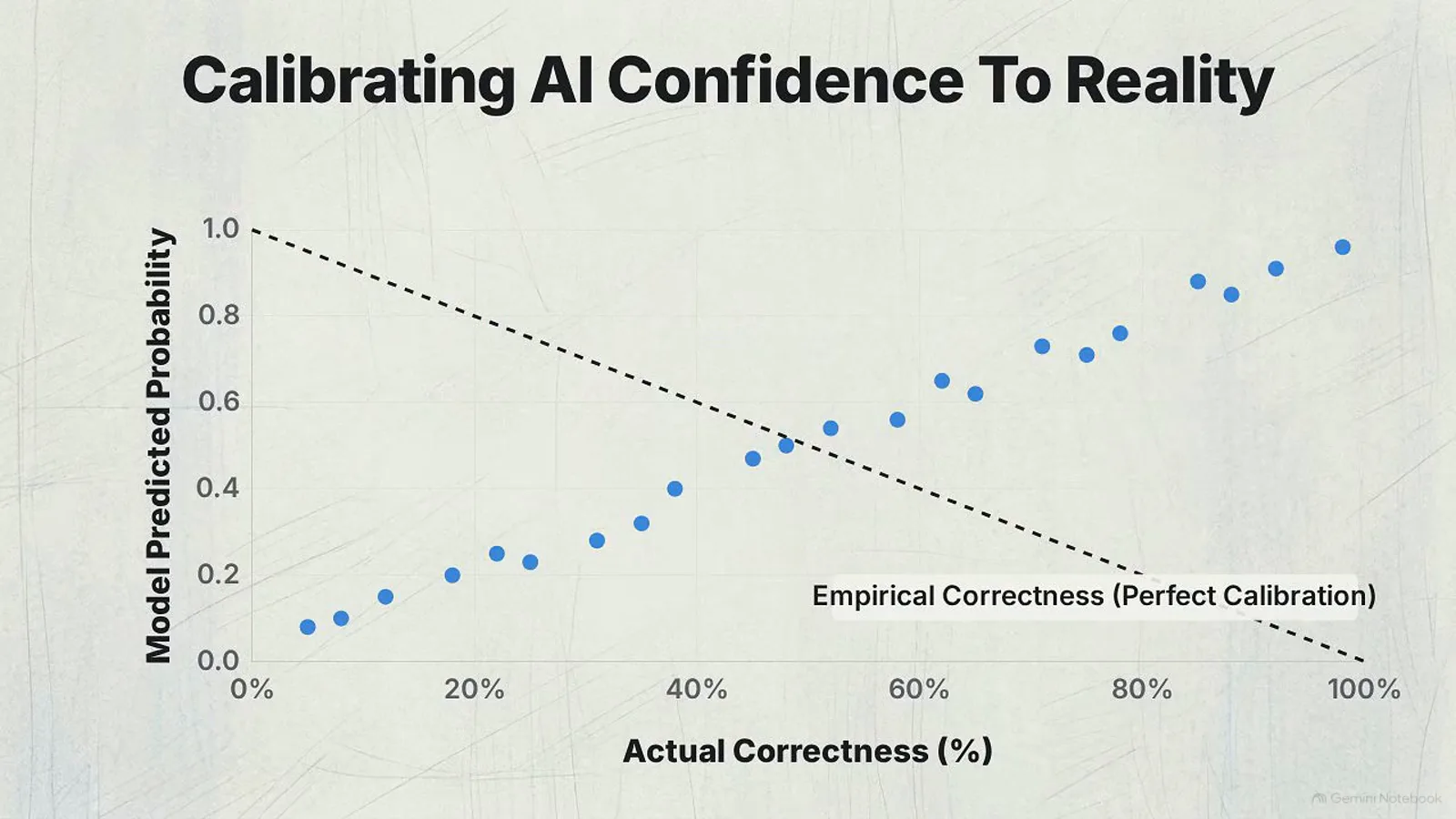
Points on the diagonal mean a 0.9 really is right nine times out of ten.Watch at 6:50 - 6
Write the confidence gate: above 0.85 act, below 0.85 hold
Low ECE is only useful if your code acts on it. The video’s threshold-check flowchart shows the pattern: incoming decisions pass through a logic gate that compares the calibrated confidence against a hard-coded cutoff — confidence above 0.85 takes autonomous action, anything below 0.85 routes to a hold queue for human review. That one branch is what eliminates silent automation failures: ambiguous cases escalate instead of shipping a wrong answer confidently. It pairs with the act/escalate head inside the model itself — a secondary header that reads the pooled CLS token representing the whole document and applies a severe cost matrix, rewarding correct automated decisions with +1.0 while penalizing incorrect safe actions with −3.0. Copy the pattern verbatim in your own integration: one threshold constant, two code paths, and a log line recording the confidence value of every escalation so you can retune the cutoff against real traffic.
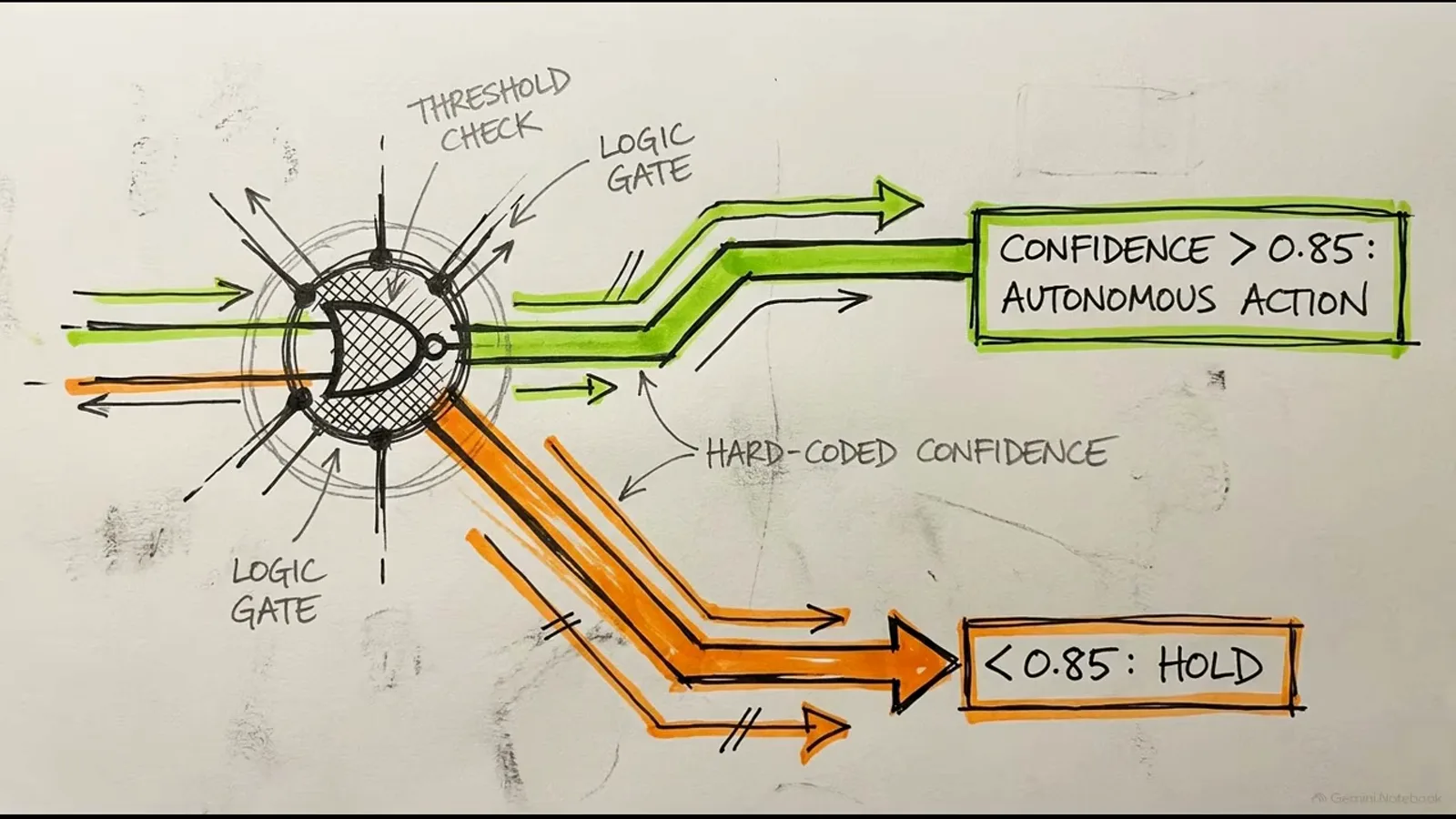
One hard-coded cutoff turns calibrated probabilities into safe automation.Watch at 7:28 - 7
Route non-English payloads to the multilingual checkpoint
The English spine has a documented failure mode the video dramatizes: on non-Latin scripts such as Khmer, accuracy drops to zero — while the model keeps reporting a false confidence score of 0.952, sailing past any post-inference safety gate. A number can be calibrated in aggregate and still lie catastrophically outside its training distribution, so do not let English-only payloads near the multilingual model or vice versa by accident. The fix is route mode: an embedded Python script evaluates the payload in under half a millisecond and automatically sends non-English text to the multilingual checkpoint (which claims 100+ languages). The video’s diagram shows the full path — incoming payload, Python router, then a fork to the English model or the multilingual checkpoint. One warning it adds in the next breath: the default lazy-loading strategy makes switching between checkpoints brutally expensive, which is exactly what the last step fixes.
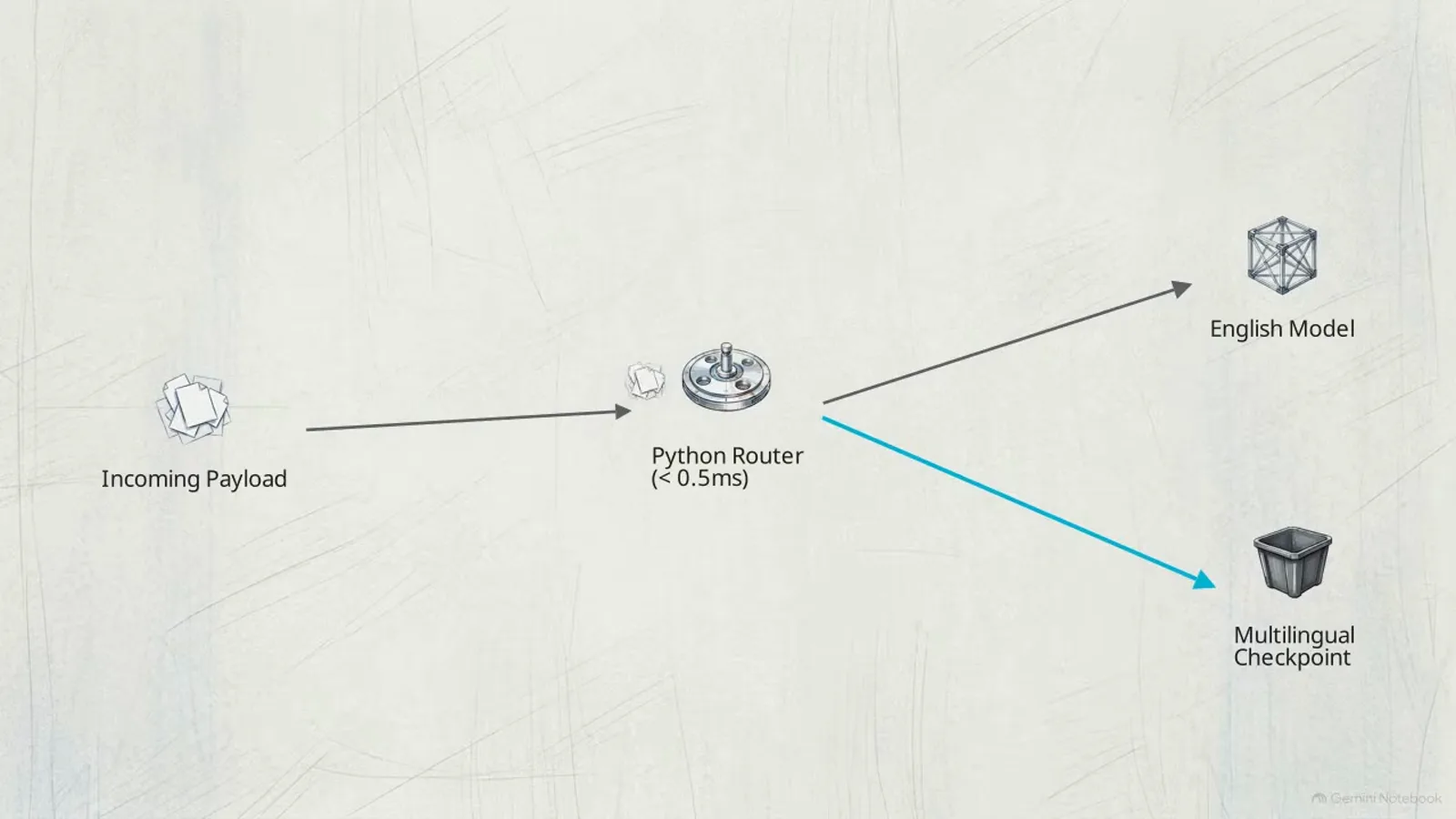
Sub-millisecond language detection, then the right checkpoint — automatically.Watch at 8:01 - 8
Set preload=True and keep both checkpoints hot in VRAM
The final setup mistake the video warns about: Laya’s default lazy loading strategy only builds a checkpoint when it is first needed, and loading a cold checkpoint on a GPU takes more than 10 seconds — the video’s GPU memory chart shows the spike, labeled cold boot, with system stall and structural failure as the consequences of letting it happen under load. In production that one-off penalty destroys the entire sub-40-millisecond advantage. The fix is one line in the code editor sketch: router = Router(preload=True, device="cuda"). Setting the preload parameter to true commits about 1.5 GB of VRAM and keeps both checkpoints — English and multilingual — resident and instantly accessible, so route mode can flip between languages for free. With memory respected, the video concludes, the engine delivers its latency advantage of six to eight times over commercial alternatives. That is the whole setup: a shaped payload, a disciplined option schema, a calibrated and gated probability, a language router, and both checkpoints pinned in VRAM.
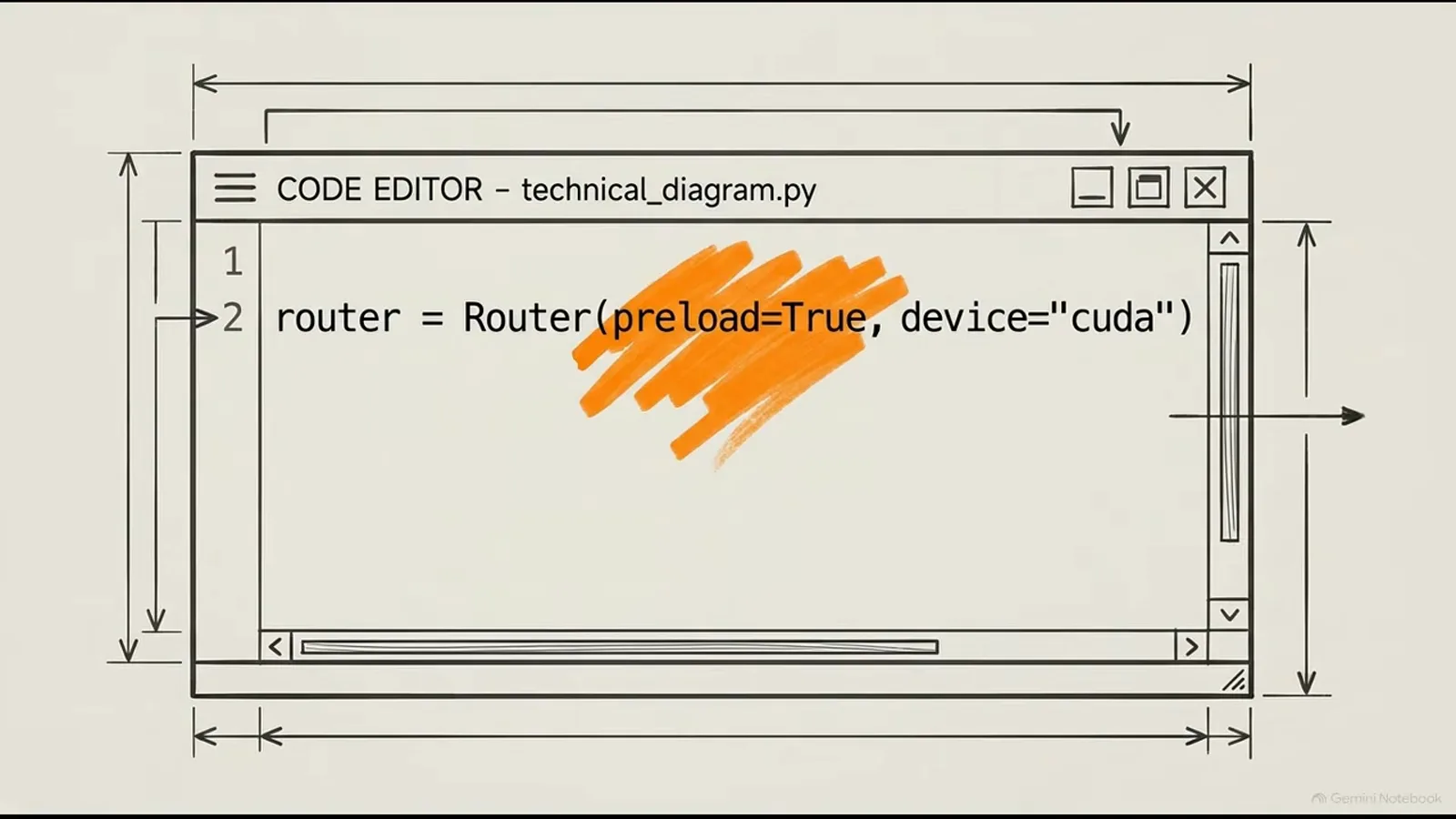
One line, 1.5 GB of VRAM, and no 10-second cold boots in production.Watch at 8:32
Frequently asked questions
What is Laya?
Laya is an open-source, non-autoregressive “System 1” decision engine from NandhaKishorM / Convai Innovations, distributed under Apache-2.0. Instead of generating text token by token, it takes a state document plus a strict question scheme and scores every option in a single forward pass through a ModernBERT-large backbone (421M parameters for the English checkpoint), returning typed, calibrated probabilities. The code lives on GitHub (github.com/NandhaKishorM/laya), the weights on Hugging Face (convaiinnovations/laya), and the package on PyPI as laya.
How does Laya relate to Jev — can it replace the Jev API?
Laya positions itself as the open, self-hosted alternative to Jev’s hosted decision API and speaks a compatible payload: the same state-plus-questions shape and the same Choice / Score / Noul primitive vocabulary. The video’s benchmark card compares 38.4 ms single-question latency against published Jev figures of 236–276 ms and ECE 0.081 versus 0.246 — but those Jev numbers are third-party published figures, not a controlled head-to-head run. Use Laya when self-hosting, per-decision cost, and latency dominate; use the Jev API when you want the hosted reference quality, especially on wide option sets where Laya weakens.
How do you install Laya?
Install from PyPI with pip install laya (Python 3.10+, with torch and transformers as the core dependencies) and pull checkpoints from Hugging Face — convaiinnovations/laya for English, plus multilingual and typed-decisions variants. For serving, the laya extra installs FastAPI and Uvicorn so laya-serve can expose a Jev-compatible POST /v1/systemone endpoint. Then follow the payload discipline from this tutorial: a state document, typed questions, options that fit the budget, and a Router configured with preload=True.
Do you need a GPU to run Laya?
The headline numbers assume one. The video’s benchmark card is measured on a single Tesla T4 (38.4 ms per question, 156.0 ms for ten), and its production advice — preload=True committing about 1.5 GB of VRAM — presumes a CUDA device. Laya does run on CPU (Apple-silicon tests put a few questions in the tens-of-milliseconds range), and cold-loading a checkpoint on GPU takes over 10 seconds, so the practical guidance is: any modest GPU gives you the advertised sub-40 ms experience, while CPU works for low-volume or batch jobs where seconds do not hurt.
How does Laya’s probability calibration actually work?
In two layers. Training: the checkpoints are tuned with RLCD — reinforcement learning for calibrated decisions — which adds zero-mean Gaussian noise to the logits during exploration and rewards the model with strictly proper scoring rules, forcing it to emit its true probability distribution instead of a pushed-to-1.0 maximum. Deployment: you fit a local temperature adjustment against a sample of your own data, which the video credits for the English model’s ECE of 0.081 (versus 0.246 for the uncalibrated baseline) at 83.8% macro precision. Then you spend that calibration by hard-coding a confidence threshold — the video’s example acts above 0.85 and holds below it.
When should you pick Laya over the Jev API?
Pick Laya when data cannot leave your infrastructure, per-decision API cost matters at your volume, and your option sets are small and well-structured — its single-pass scoring makes millions of sub-40 ms daily decisions nearly free on one T4. Think twice when your questions carry wide label sets: the video shows 77-option taxonomies collapsing to a 0.425 ceiling inside the 192-token budget, and the English checkpoint scores Khmer at zero with false confidence above 0.95, so non-English traffic must route to the multilingual checkpoint. For the full spec comparison and benchmark caveats, see our Laya vs Jev alternative profile.
Related guides
Laya vs Jev: Full Alternative Profile
The spec sheet this tutorial complements: parameters, licenses, benchmark tables, and the honest caveats behind every Laya claim.
ReadRun Jev Locally: Kev, SemIf & Von on Your Own GPU
The same self-hosting playbook for three other open routers — this page adds Laya to that set.
ReadOpen Jev Alternatives Catalog
The whole landscape of open decision engines, benchmarked and triaged.
ReadSelf-Hosted Jev Guide
Hosting patterns for wire-compatible decision engines — where a Laya deployment fits.
ReadOpen Models Guide
How to pick between open checkpoints using JevBench and the decision index.
ReadMore video walkthroughs
- Jev Classification Quickstart: OpenRouter API, Primitives & Real Probabilities
- Jev Architecture Explained: Why 70ms Decision Models Beat LLMs for Workflow Automation
- Ultra-Fast Browser Agents with Jev: 178ms DOM Loops & Dual Model Orchestration
- Open Jev Models Are Here: Semif, Nimble, Decider, DiffusionGemma & Laya Hands-On
- Jev vs LLM: Will Jev Replace LLMs? Krish Naik's Whiteboard Explainer
- Jev Trader Tutorial: Build a Subsecond AI Trading Bot on Monad
- Jev Model Router: Build a Privacy-Gated LLM Router with Jev & OpenJev
- Jev Tutorial for Beginners: State, Questions & the TypeScript SDK
- Run Jev Locally: Kev, SemIf & Von on Your Own GPU (OpenJev Guide)
- Jev RAG Reranker: Policy-Steered Reranking for Retrieval-Augmented Generation
- When to Use Jev: An Engineer's Audit of Claims, Gates, and Failure Modes
- LangChain + Jev Integration Tutorial: Routing, Guardrails & Evals
- Jev MCP Server: Connect Jev Decisions to Claude Code & Cursor
- Jev vs Luna: Independent Benchmarks Put "Better, Faster, Cheaper" to the Test
- Jev Agent Harness: Where the Decision Gate Sits in Your LLM Loop
- Jev Playground Walkthrough: The Hotdog Lesson, Criteria, and a Four-Console Token Test
- Jev Text Classification API: Zero-Shot CLI & REST with classifier.dev
- Jev API Examples: First Request, curl & All Three Question Types
- Jev Log Triage with Expanso Edge
- Jev Lead Enrichment with Treg: ICP and Signup Scoring
- Use Jev Decision Nodes in Heym for Model Routing
- Train Your Own Jev: Fine-Tune a Jev-Style Decision Model for $5–$17 (What You Can and Cannot Train)
- Jev Tips: 8 Best Practices for Better Decisions (State, Questions, Criteria & Thresholds)