
Guides / illustrated walkthrough
Jev Resume Screening: Build an AI Resume Evaluator with the Jev JavaScript SDK
A step-by-step walkthrough of Mohammad Azam’s Resume Evaluator: a 6:48 demo where a PDF upload meets ten typed Jev questions — eight noul skill checks, one choice for seniority, one score for fit — and returns per-answer confidence percentages plus an Excellent/Poor Match verdict.
Quick takeaway
Mohammad Azam’s 6:48 demo (azamsharp) shows a complete Jev resume screening loop built on an Express server and the Jev JavaScript SDK. The app is “Resume Evaluator,” a single static page that asks for a resume for a Senior SwiftUI Developer position, with three synthetic resumes waiting in the Downloads folder: a senior SwiftUI developer, an entry-level SwiftUI developer, and a Python developer who has no business applying. Uploading a resume POSTs the file to /api/upload, where multer stores it, readPdf and extractText with { mergePages: true } pull the full text, and client.systemOne({ state: { document: text }, questions: resumeQuestions }) sends it to Jev. The question set exercises all three typed primitives: eight noul questions (SwiftUI, SwiftData, networking/REST APIs, Swift concurrency, testing, architecture, persistence, and production-app experience — each a single sentence like “Does the candidate have experience with SwiftUI?”), one choice question (experience_level with entry_level / mid_level / senior criteria), and one score question (technical_fit graded against a three-level rubric from “limited evidence” to “strong evidence of advanced SwiftUI skills”). mapResumeEvaluation turns raw probabilities into UI-shaped JSON: hasExperience is answers.<question>.noul >= 0.5, confidence is the same noul value, experienceLevel takes the choice, and technicalFit takes the score. In the demo data the senior resume comes back all-Yes at 95–99% confidence with Experience Level “Senior” at 88% and Technical Fit “Excellent Match” at 95%; the entry-level resume fails testing and production-app checks and lands on “Entry Level / Poor Match”; the Python resume draws No on SwiftUI and SwiftData and still scores a Poor Match. The numbers are demo data on fake resumes, but the closing advice is production real: run the evaluation in a server-side layer, persist the findings to a database, show candidates only a thank-you page, and give the employer an admin dashboard with every evaluation.
Video source
Mohammad Azam
Step-by-step walkthrough
- 1
Meet the app: one upload box for a Senior SwiftUI Developer role
The demo opens on “Resume Evaluator,” a single static page whose subtitle sets the job: “Upload your resume to evaluate your experience for a SwiftUI Developer position.” The whole client is one index.html file — a Choose File input and a black Evaluate Resume button. There is no framework and no build step on the front end; every smart decision happens on the server behind that one button.
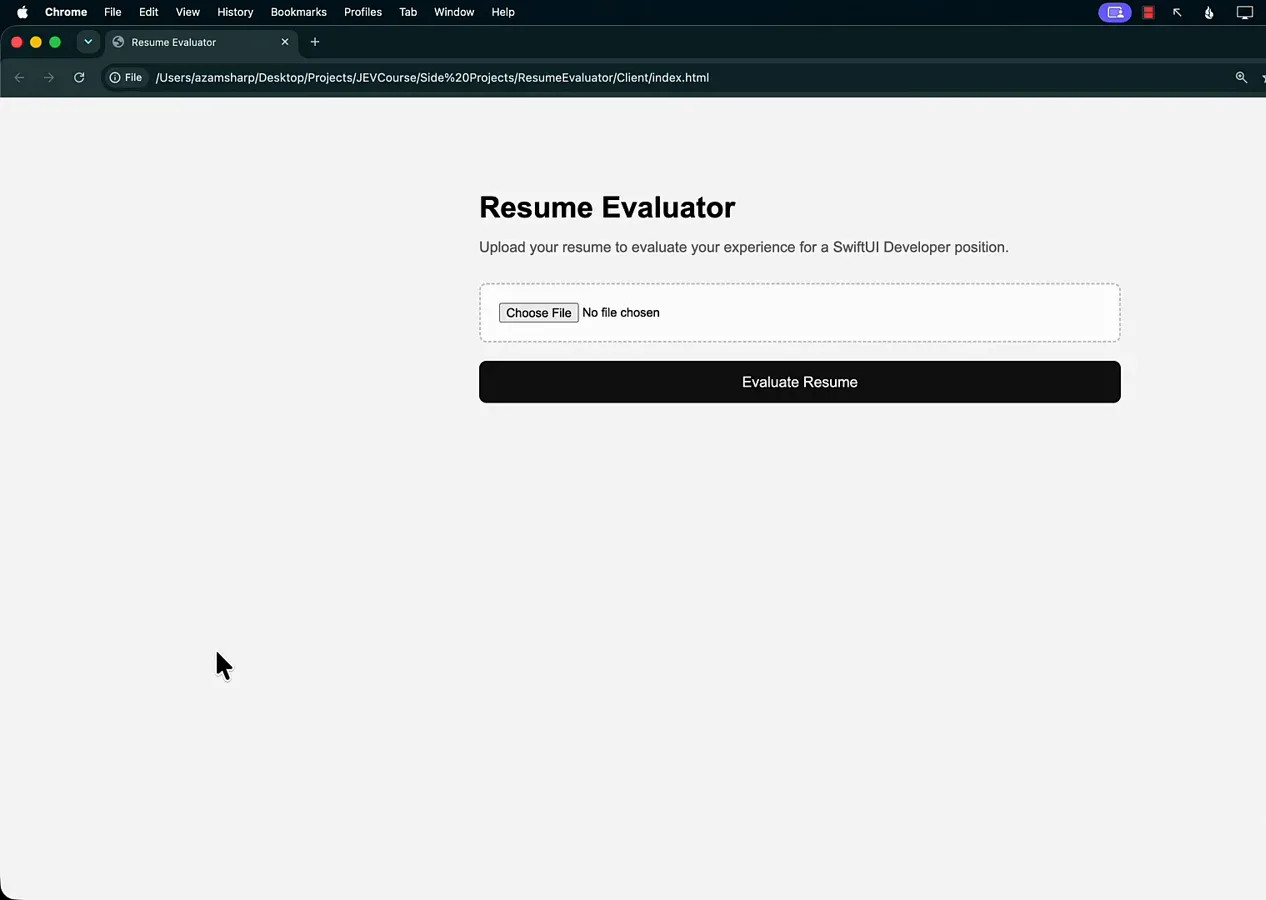
One static page, one button — the Jev evaluation lives entirely on the server.Watch at 0:10 - 2
Pick a candidate: three fake resumes, one job
The macOS file picker shows the test corpus in the Downloads folder: python_developer_resume.pdf, entry_level_swiftui_developer_resume.pdf, and swiftui_developer_resume.pdf for the senior candidate. All three are synthetic resumes written for the demo. The Python file is deliberate provocation — the opening is for a Senior SwiftUI Developer, so that resume should never score well, and watching it fail is the fastest way to see whether the evaluation actually reads the text.
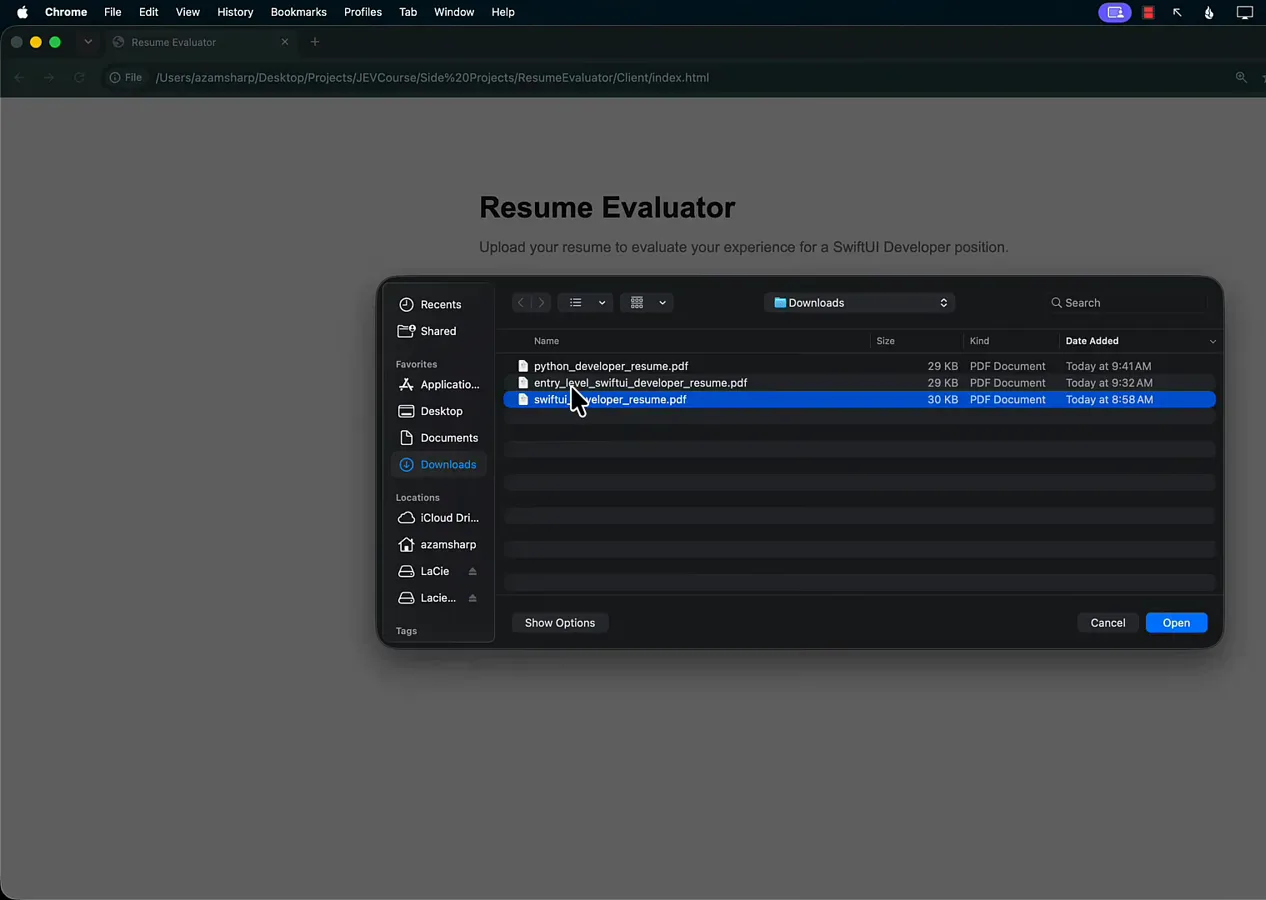
A wrong-stack resume is part of the test corpus — it should never pass.Watch at 0:45 - 3
Senior resume: every skill comes back Yes with a confidence
The senior resume’s result card is a wall of green. Under Skills, all seven checks are Yes — SwiftUI 99%, SwiftData 99%, REST APIs 99%, Swift Concurrency 95%, Testing 97%, Architecture 98%, Persistence 99% — and Professional Experience adds Production App Experience at Yes, 95%. Each row is one noul question answered with a probability, and the UI renders that probability as a percentage (demo data on a fake resume, but the shape is what production would return).
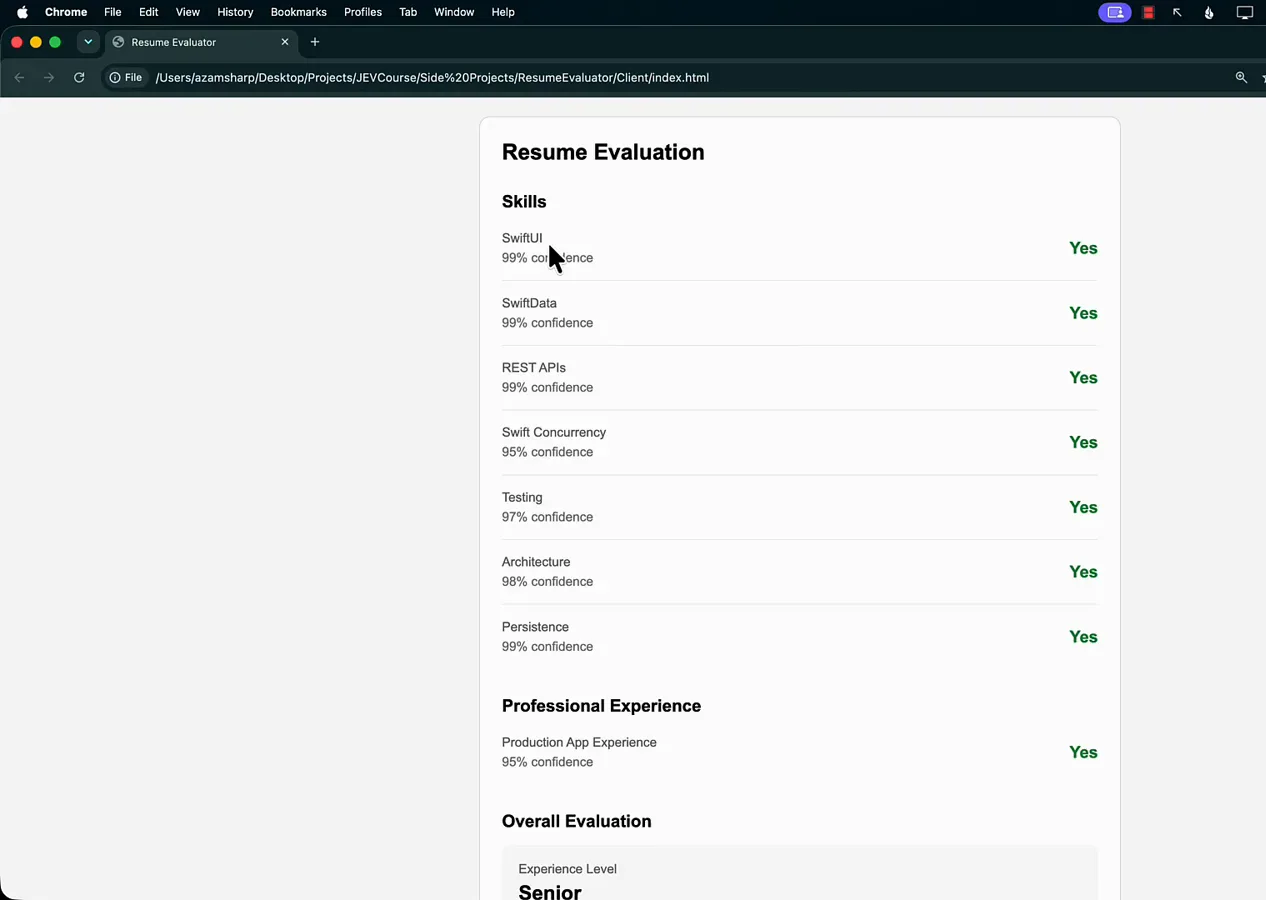
Every Jev answer ships with its own confidence, not just a verdict.Watch at 1:24 - 4
The verdict: Senior at 88%, Technical Fit “Excellent Match”
Scrolled to the bottom of the same card, the Overall Evaluation block turns two typed answers into a hiring verdict. Experience Level shows Senior with 88% confidence — the answer to the choice question. Technical Fit shows Excellent Match with 95% confidence — the answer to the score question, graded against the three-level rubric. This is the pair an employer actually reads: seniority and fit, both with their own certainty.
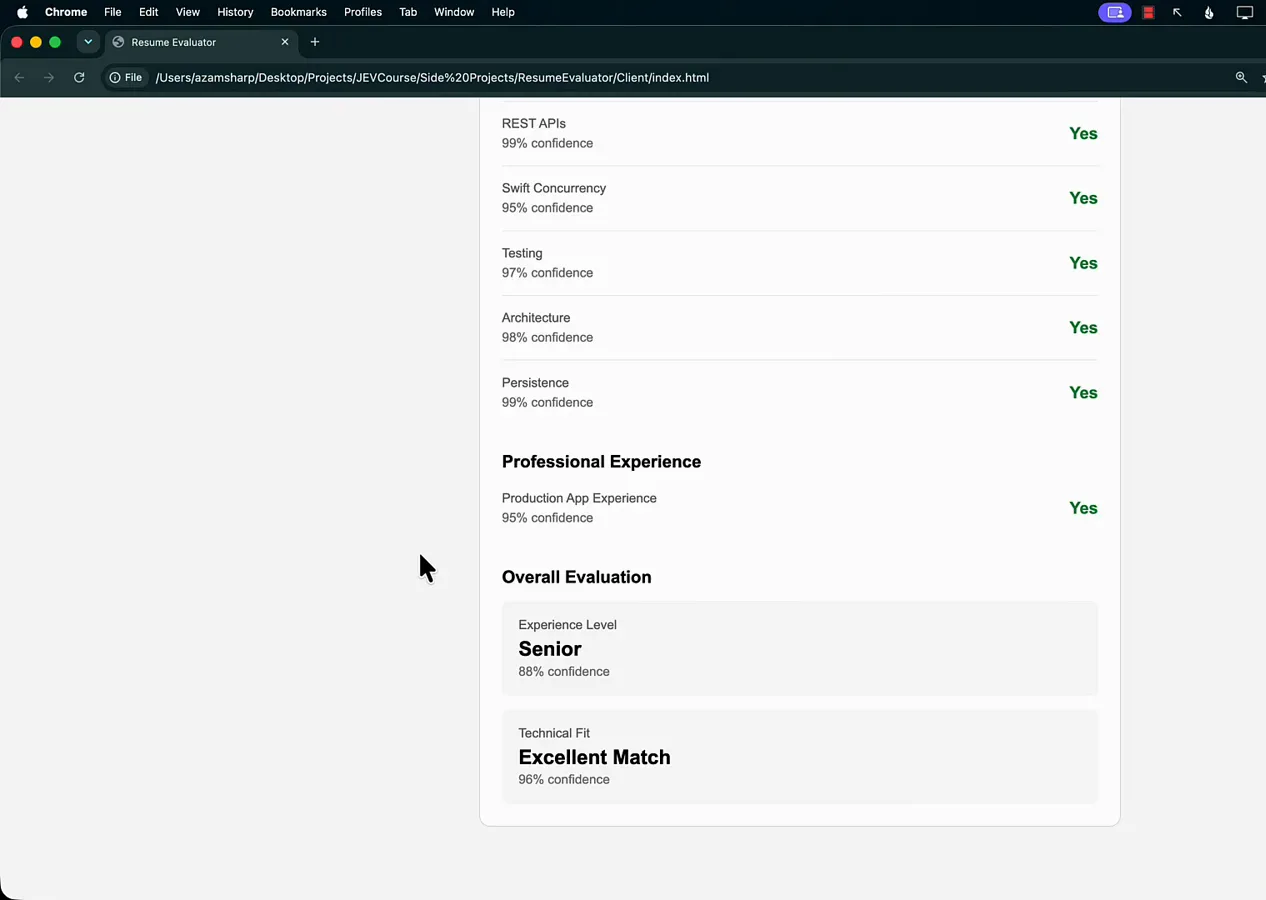
A choice for seniority, a score for fit — two typed answers become the verdict.Watch at 1:35 - 5
Entry-level resume: same questions, harsher verdict
The entry-level SwiftUI resume proves the questions discriminate. Testing comes back No at 78% confidence, Production App Experience No at 84%, and the Overall Evaluation lands on Experience Level “Entry Level” at 100% confidence with Technical Fit “Poor Match” at 98%. Some rows still say Yes — but the two checks that define a senior hire fail, and the verdict follows the rubric instead of averaging the green away.
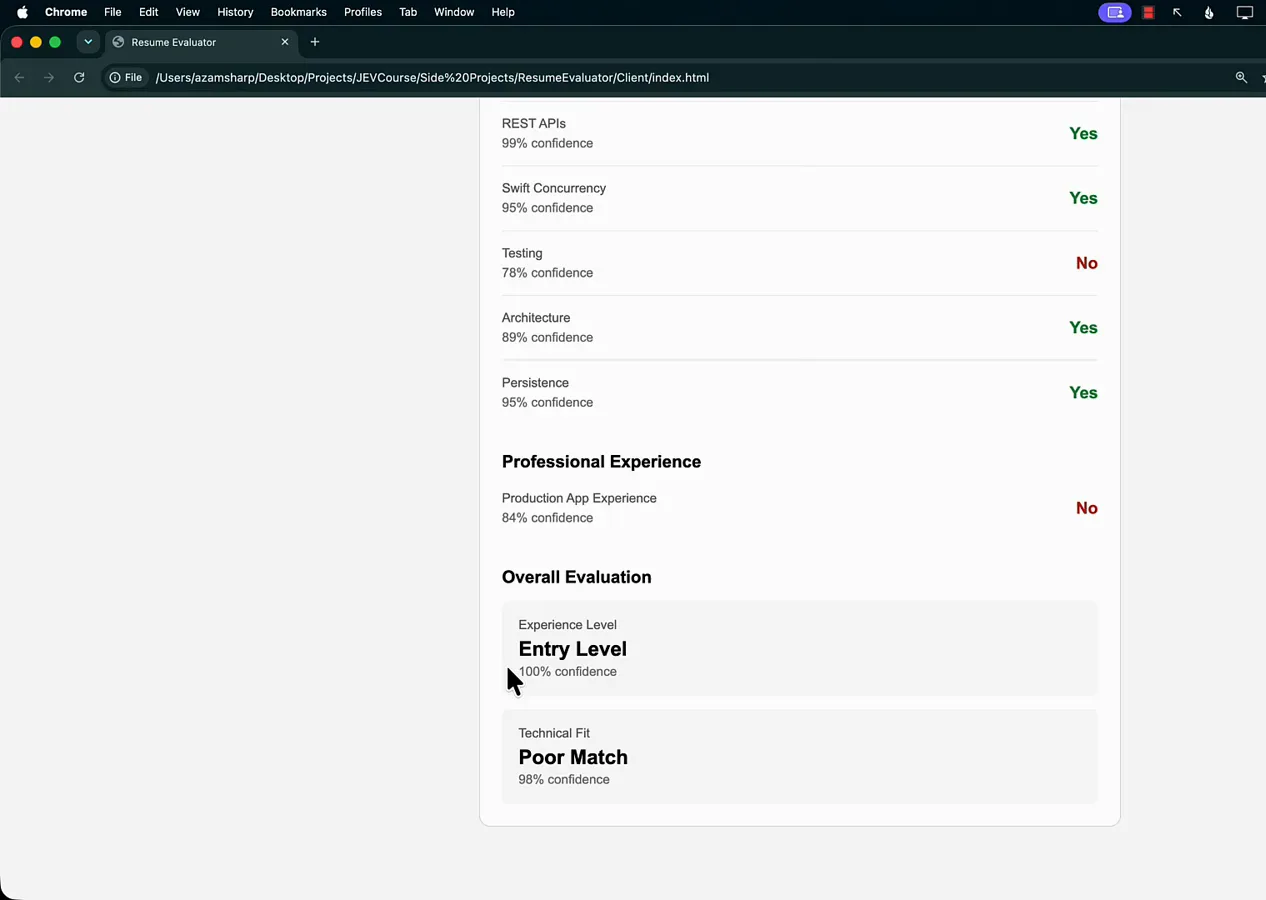
The junior resume passes some checks but fails the two that matter.Watch at 2:06 - 6
Wrong stack, wrong job: the Python developer resume
The Python developer’s card is the stress test. SwiftUI No at 95% confidence, SwiftData No at 99%, Swift Concurrency No, Testing No — while REST APIs (89%), Architecture (71%), and Persistence (94%) stay Yes, because database and API experience transfers even when the framework does not. Production App Experience: No, 76%. Final verdict: Experience Level “Entry Level,” Technical Fit “Poor Match.” A fine developer, a wrong application — and the evaluation says so row by row.
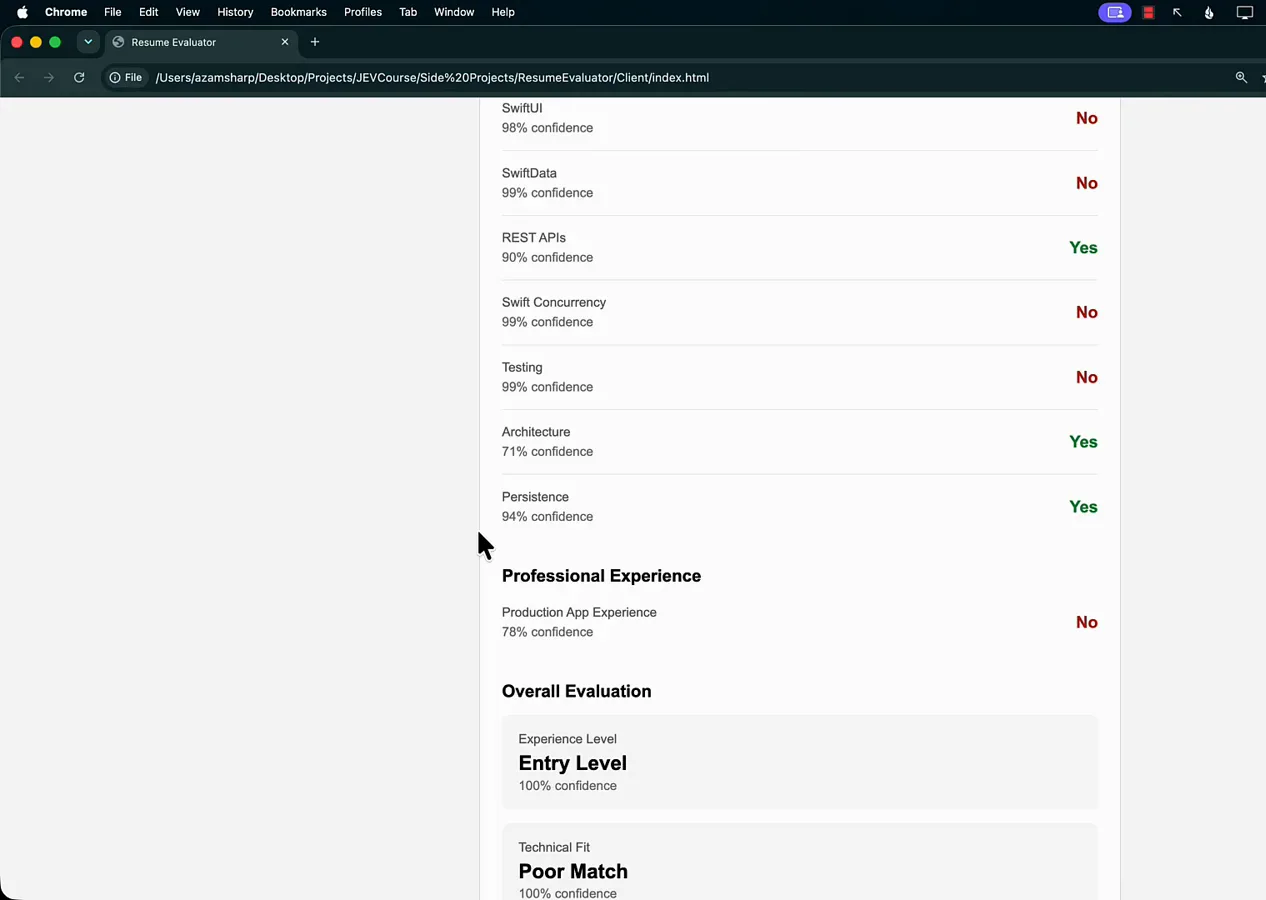
A great developer is still a Poor Match when the stack does not line up.Watch at 2:45 - 7
Under the hood: one Express endpoint runs the whole loop
The Server folder’s app.js is refreshingly small. app.post('/api/upload', upload.single('resume')) receives the file via multer, then readPdf(req.file.path) and extractText(new Uint8Array(buffer), { mergePages: true }) pull the full resume text. That text becomes the Jev state: const response = await client.systemOne({ state: { document: text }, questions: resumeQuestions }). mapResumeEvaluation(response) reshapes the answer for the UI and res.json(evaluation) returns it. The terminal underneath runs nodemon on port 8080 — upload, extract, evaluate, map, respond.
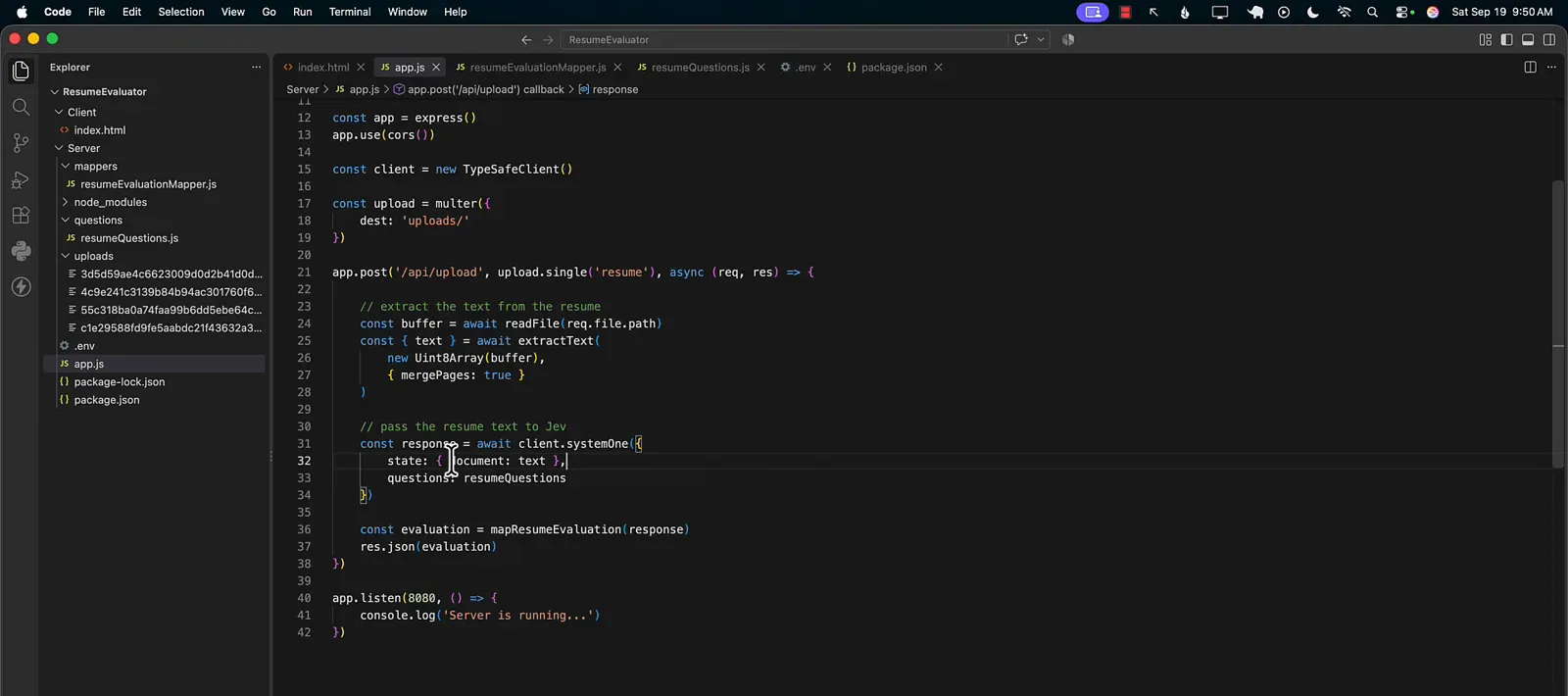
Upload, extract, evaluate, map — the entire Jev pipeline in about twenty lines.Watch at 3:28 - 8
Write the questions: eight noul checks for the stack
resumeQuestions.js in Server/questions defines what Jev is asked. Eight entries carry type: "noul" — has_swiftui_experience, has_swiftdata_experience, has_networking_experience (“experience consuming REST APIs or performing network requests”), has_concurrency_experience (async/await, Task, actors), has_testing_experience (automated tests for iOS applications), has_architecture_experience, has_persistence_experience (SwiftData, Core Data, SQLite), and has_production_experience (“worked on production applications used by real users”). Each is one plain-English instruction — the whole rubric is readable in a screenful.
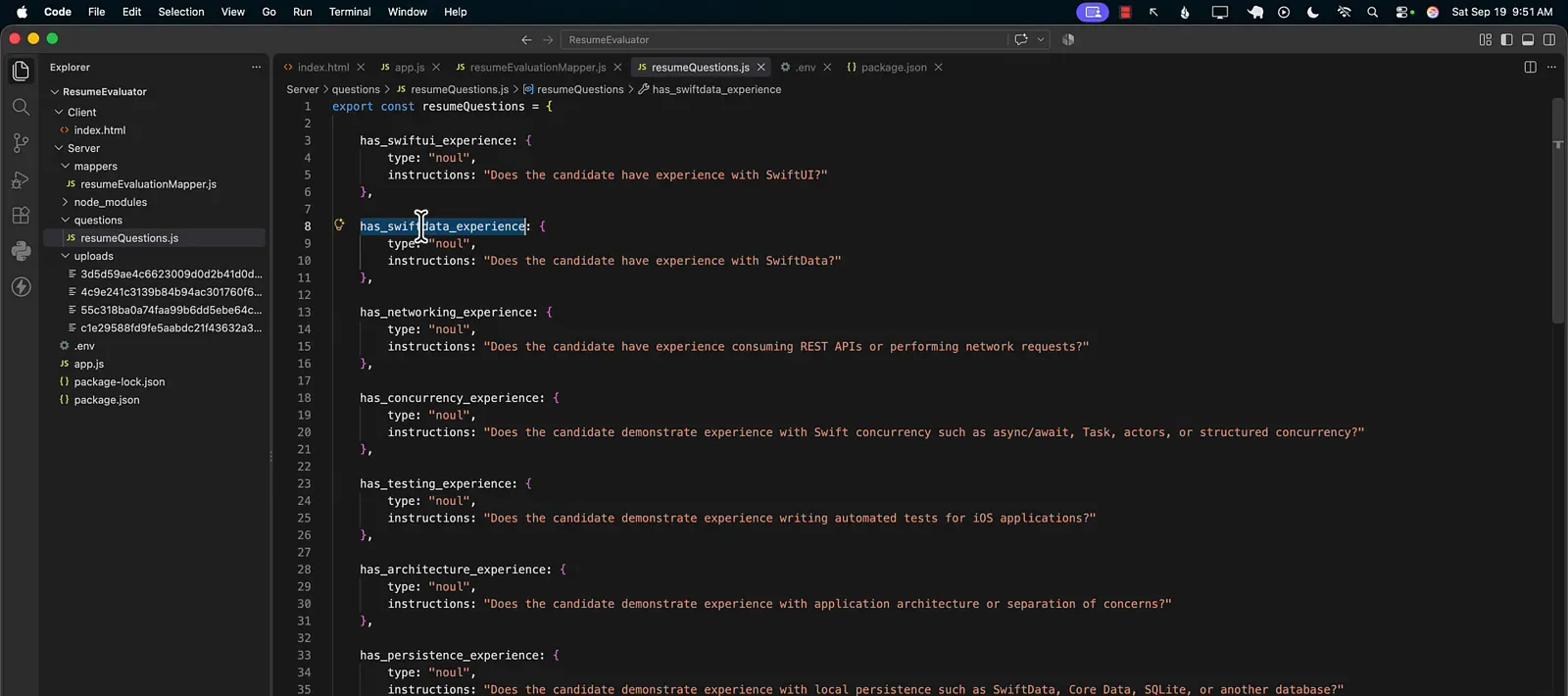
Each question is one sentence the model answers with a yes-probability.Watch at 4:12 - 9
Beyond yes/no: choice and score questions rank the candidate
The bottom of the same file shows the other two typed primitives. experience_level is type: "choice" — “What is the candidate’s iOS development experience level?” with criteria for entry_level (“primarily educational, personal project, internship”), mid_level (“several years of professional iOS development with independent feature ownership”), and senior (“extensive professional experience with architecture, complex systems, technical ownership, or leadership”). technical_fit is type: "score", graded against a three-line rubric from limited evidence up to “strong evidence of advanced SwiftUI skills, substantial professional iOS experience, architecture ownership, and senior-level technical responsibility.”
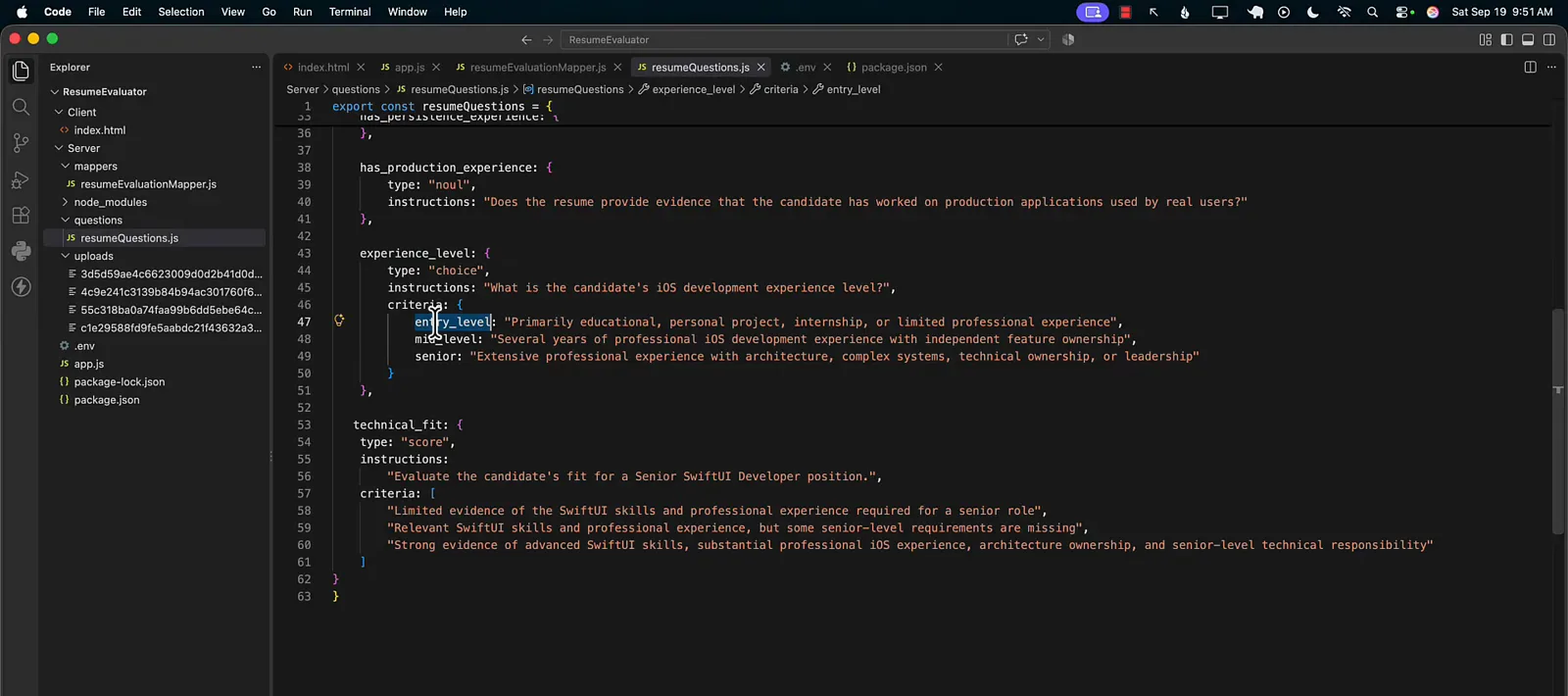
Choice returns a label, score returns a rank — both typed, both rubric-driven.Watch at 4:20 - 10
Map the response: 0.5 turns a probability into Yes or No
Server/mappers/resumeEvaluationMapper.js is where raw Jev output becomes UI JSON. For every skill, hasExperience is response.answers.has_swiftui_experience.noul >= 0.5 and confidence is that same noul value — the 0.5 threshold is the only place a probability becomes a label, and you can move it per role. The mapper continues with productionExperience, experienceLevel (the choice plus its confidence), and technicalFit (the score plus its confidence), so the page never sees anything it cannot render directly.
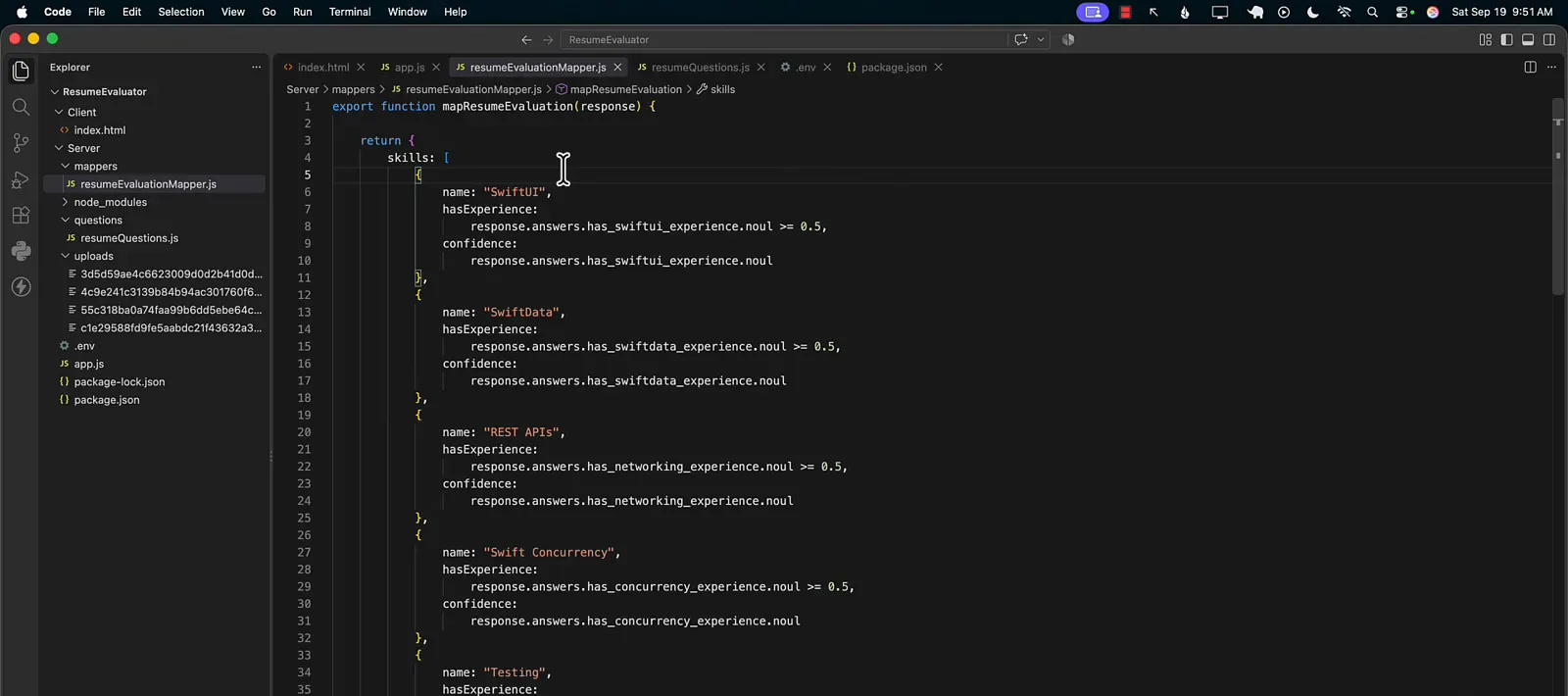
One threshold owns the Yes/No line — 0.5 by default, tunable per role.Watch at 4:38
Frequently asked questions
What is Jev resume screening?
It is the workflow shown in the video: extract the text from an uploaded resume and evaluate it with Jev System One against a fixed set of typed questions, so every candidate is graded on the same rubric — eight yes/no skill checks, an experience-level choice, and a technical-fit score — instead of a free-form LLM summary that changes shape per applicant.
What do the confidence percentages in the results card mean?
Each noul answer is a probability between 0 and 1 that the answer is yes. The mapper applies a 0.5 threshold for the Yes/No label, and the UI displays Math.round(confidence * 100) as “99% confidence” — for a No answer it shows 1 minus the probability. The specific numbers in the video are demo data generated against fake resumes.
What are the noul, choice, and score question types?
noul is a yes/no question that returns a probability (“Does the candidate have experience with SwiftData?”). choice returns one label from a criteria list — the demo’s experience_level offers entry_level, mid_level, and senior with written criteria for each. score grades against an ordered rubric — technical_fit has three levels, from “limited evidence” up to “strong evidence of advanced SwiftUI skills.”
How would you take this demo to production?
The author’s own closing note: keep the evaluation in a server-side layer. In a real hiring app the candidate uploads a resume, the server runs the Jev evaluation, and the findings are persisted to a database. The candidate only ever sees “thank you for submitting your resume,” while the employer reviews every evaluation in an admin dashboard.
Related guides
Build a Text Classification API with Jev
The closest sibling build guide: a REST endpoint, typed questions, and JSON probabilities end to end.
ReadLead Scoring Recipe
The same choice/score machinery applied to triaging a sales pipeline instead of a candidate pool.
ReadTreg Lead Enrichment Guide
Enrich incoming records with typed Jev verdicts before a human ever reads them.
ReadThe Jev API
System One, question shapes, and answer fields — the primitives this resume evaluator is built on.
ReadDocument Classification Recipe
When resumes arrive as multi-page scans with attachments: split the packet with Noul boundaries, then classify each document.
ReadMore video walkthroughs
- Jev Classification Quickstart: OpenRouter API, Primitives & Real Probabilities
- Jev Architecture Explained: Why 70ms Decision Models Beat LLMs for Workflow Automation
- Ultra-Fast Browser Agents with Jev: 178ms DOM Loops & Dual Model Orchestration
- Open Jev Models Are Here: Semif, Nimble, Decider, DiffusionGemma & Laya Hands-On
- Jev vs LLM: Will Jev Replace LLMs? Krish Naik's Whiteboard Explainer
- Jev Trader Tutorial: Build a Subsecond AI Trading Bot on Monad
- Jev Model Router: Build a Privacy-Gated LLM Router with Jev & OpenJev
- Jev Tutorial for Beginners: State, Questions & the TypeScript SDK
- Run Jev Locally: Kev, SemIf & Von on Your Own GPU (OpenJev Guide)
- Jev RAG Reranker: Policy-Steered Reranking for Retrieval-Augmented Generation
- When to Use Jev: An Engineer's Audit of Claims, Gates, and Failure Modes
- LangChain + Jev Integration Tutorial: Routing, Guardrails & Evals
- Jev MCP Server: Connect Jev Decisions to Claude Code & Cursor
- Jev vs Luna: Independent Benchmarks Put "Better, Faster, Cheaper" to the Test
- Jev Agent Harness: Where the Decision Gate Sits in Your LLM Loop
- Jev Playground Walkthrough: The Hotdog Lesson, Criteria, and a Four-Console Token Test
- Jev Text Classification API: Zero-Shot CLI & REST with classifier.dev
- Jev API Examples: First Request, curl & All Three Question Types
- Jev Log Triage with Expanso Edge
- Jev Lead Enrichment with Treg: ICP and Signup Scoring
- Use Jev Decision Nodes in Heym for Model Routing
- Laya Tutorial: Open-Source AI Routing With Calibrated Probabilities (Laya vs Jev Setup)
- Train Your Own Jev: Fine-Tune a Jev-Style Decision Model for $5–$17 (What You Can and Cannot Train)
- Jev Tips: 8 Best Practices for Better Decisions (State, Questions, Criteria & Thresholds)
- Jev Context Compaction: Prune AI Agent Memory Without Generative Summaries
- Jev as an LLM Judge: Confidence-Gated Cascades at 0.36% of the Cost
- TypeSafe Computer Use: Local Desktop Automation with Jev, Step by Step
- Jev + Claude Code Guide: Voice-Controlled Browser Automation with Typed Decisions
- Jev vs Ollama: Can Local AI Replace Hosted Jev Without Sending Your Data Away?