
Guides / illustrated walkthrough
NanoJev Tutorial: Install the 0.6B Open-Source Jev Replica and Watch It Route Decisions at 47 ms
A hands-on NanoJev walkthrough turned into a step-by-step page: clone TianyuCodings/NanoJev, install the torch-2.14.0-pinned requirements, download the unified-games-v1 checkpoint with snapshot_download, verify it live on a 50x50 maze at 47 ms, then route on 85%/50% probability thresholds — with the honest accuracy-collapse section kept in.
Quick takeaway
This is Alex Hitt's six-and-a-half-minute local install of NanoJev, the open-source nano replica of the Jev System One architecture — GitHub TianyuCodings/NanoJev and Hugging Face C-Tianyu/NanoJev (write the full paths; there is an unrelated sdmlai/nano-jev on the Hub). The model is a 0.6B parallel decision machine: a Qwen3-0.6B backbone with decision heads and no vocabulary generation head, so it cannot emit conversational text even if you ask — it only estimates probabilities. Because the shared state is encoded exactly once and the questions are distributed in parallel, the GPU answers in a single matrix pass; the video's demo badges read 34-47 ms. The install: clone the repo and pip install -r requirements-toy.txt (there is no requirements.txt and no CPU variant — the three files are requirements-toy.txt, requirements-vizdoom.txt, requirements-shooting-demo.txt). The core file pins torch==2.14.0 (with transformers==5.17.0), and on newer hardware such as an RTX 5090 that default binary may not recognize the architecture — manually install a CUDA-compatible wheel or the model falls back to CPU and latency jumps from ~50 ms to over 400 ms, the video's own 'CPU Fallback Destroys Latency' chart. Weights ride separately from code: snapshot_download(repo_id="C-Tianyu/NanoJev", revision="unified-games-v1", local_dir="checkpoints/NanoJev-unified", allow_patterns=["best.safetensors", "config.json", "tokenizer/*", "backbone_config/*"]) — the video's on-screen pseudo-code writes repo_id="unified-games-v1", but in the real repo unified-games-v1 is the revision tag (the step-400 checkpoint of the hard_lr1e5 run, one model for Maze, Snake, ViZDoom Basic and Predict Position). Miss the best.safetensors pattern and you get an empty local directory; the video also warns about HF token gating, while the repo's current README says the release is public and downloadable without signing in — either way, an empty folder means a wrong pattern or missing authorization. Verification runs as two services: the PyTorch inference engine on 127.0.0.1:8765 (repo entry: scripts/serve_decisions.py, POST /api/evaluate) and an HTML front-end on 8080, where the dashboard shows NanoJev navigating a 50x50 maze — header 'Environment: 50x50 Maze Grid (OOD)' — with per-direction confidence bars (North 97.2%, South 2.9%, East 3.7%, West 3.2% in our captured frame) and a 47 ms System One latency badge. Then the routing script: point sys.path at the checkpoints folder, import the prediction class, and respect the entry contract — no conversational prompts. Build the shared state payload (application logs, code diffs, parsed DOM trees), define typed questions against it (categorical choice, boolean, ordered score), and one forward pass returns a nested dictionary of normalized floats — demo card: choice 0.842, boolean 0.991, score 0.740 — no strings, no JSON chain-parsing, $0.00 exit-token fees. The routing layer is the asymmetric-error principle: 85%+ executes autonomously, 50-85% hits the ambiguity gate and a human, below 50% reroutes to a backup frontier model — numerical gates that filter high-volume work without API fees. The honest ending, kept on purpose: the unified checkpoint is heavily conditioned by physical positioning and game spatial mechanics — the video's own chart shows ~88% on spatial navigation collapsing to near zero on semantic text — so before production, run your own supervised fine-tuning flow with the repo's monitoring scripts (the closing card shows Fine-Tuning Epoch 1/5). Local System One models give you autonomous apps that react at software speed; the fine-tune is what makes them yours.
Video source
Alex Hitt
Step-by-step walkthrough
- 1
Why token-by-token generation cannot route decisions
The video opens on a two-column diagram. Left: a traditional LLM in an autoregressive decode loop, producing Token 1 through Token 4 one at a time — hundreds of milliseconds before an answer exists, and one wrong character inside a JSON schema breaks every line of code downstream (the red card reads 'key': 'value' — sequence comparison error). Right: NanoJev (System One) encodes the shared state once and answers questions in parallel. NanoJev itself is a community-built open-source replica of the Jev System One architecture: per the repo README it is a 0.6B parallel decision model — a Qwen3-0.6B backbone with decision heads — and it has no vocabulary generation head at all, so it is architecturally incapable of conversational output. It does exactly one thing: probability estimation. Because the state is processed exactly once while questions fan out in parallel, the GPU executes a single matrix pass and returns direct floating-point probabilities in under 50 milliseconds — the responsiveness real-time control needs. The rest of the video installs this thing locally and points it at real decisions.
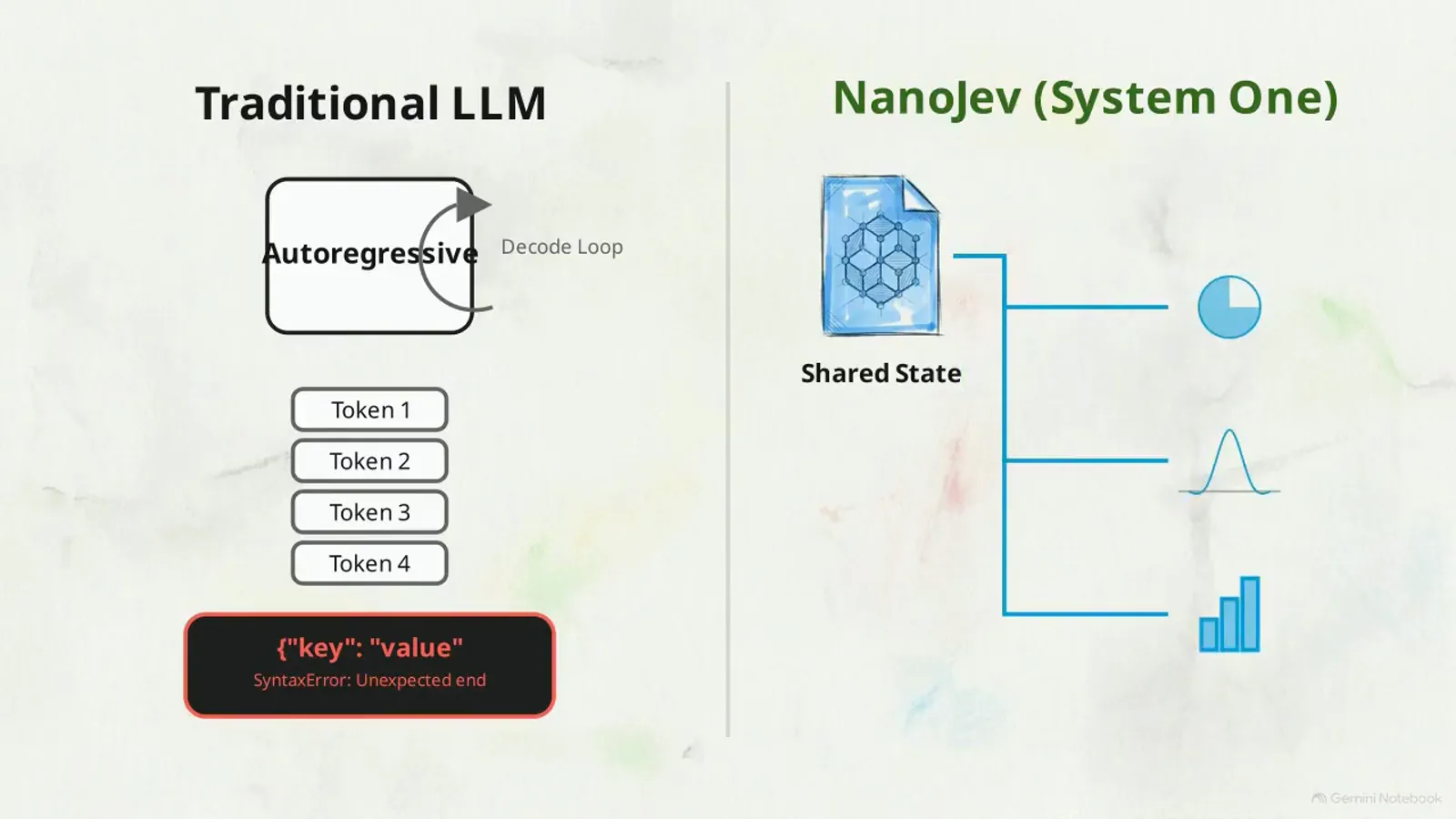
The video's opening diagram: a decode loop plus one bad JSON character on the left, one shared-state pass with parallel answers on the right.Watch at 0:40 - 2
Clone the repo and install the pinned dependencies
Skip the cloud APIs — this video installs locally. The terminal card sketches git clone plus pip install, and the requirement file it names is real: the repo's quick start is git clone https://github.com/TianyuCodings/NanoJev.git followed by python -m pip install -r requirements-toy.txt huggingface_hub. Note what the repo does and does not ship: there is no single requirements.txt and no CPU variant — three task-scoped files exist (requirements-toy.txt for the model core, requirements-vizdoom.txt for the shooting environments, requirements-shooting-demo.txt for replay and sprite export). The core file is where the video's warning lives: it pins torch==2.14.0, transformers==5.17.0, safetensors==0.8.0, numpy==2.5.3 — versions actually used on the authors' A100 box. Before any of it, check your hardware: the video asks for Python 3.10 or higher and a dedicated NVIDIA GPU running a native CUDA environment — the opposite pole from the CPU-only install routes other small decision models take.
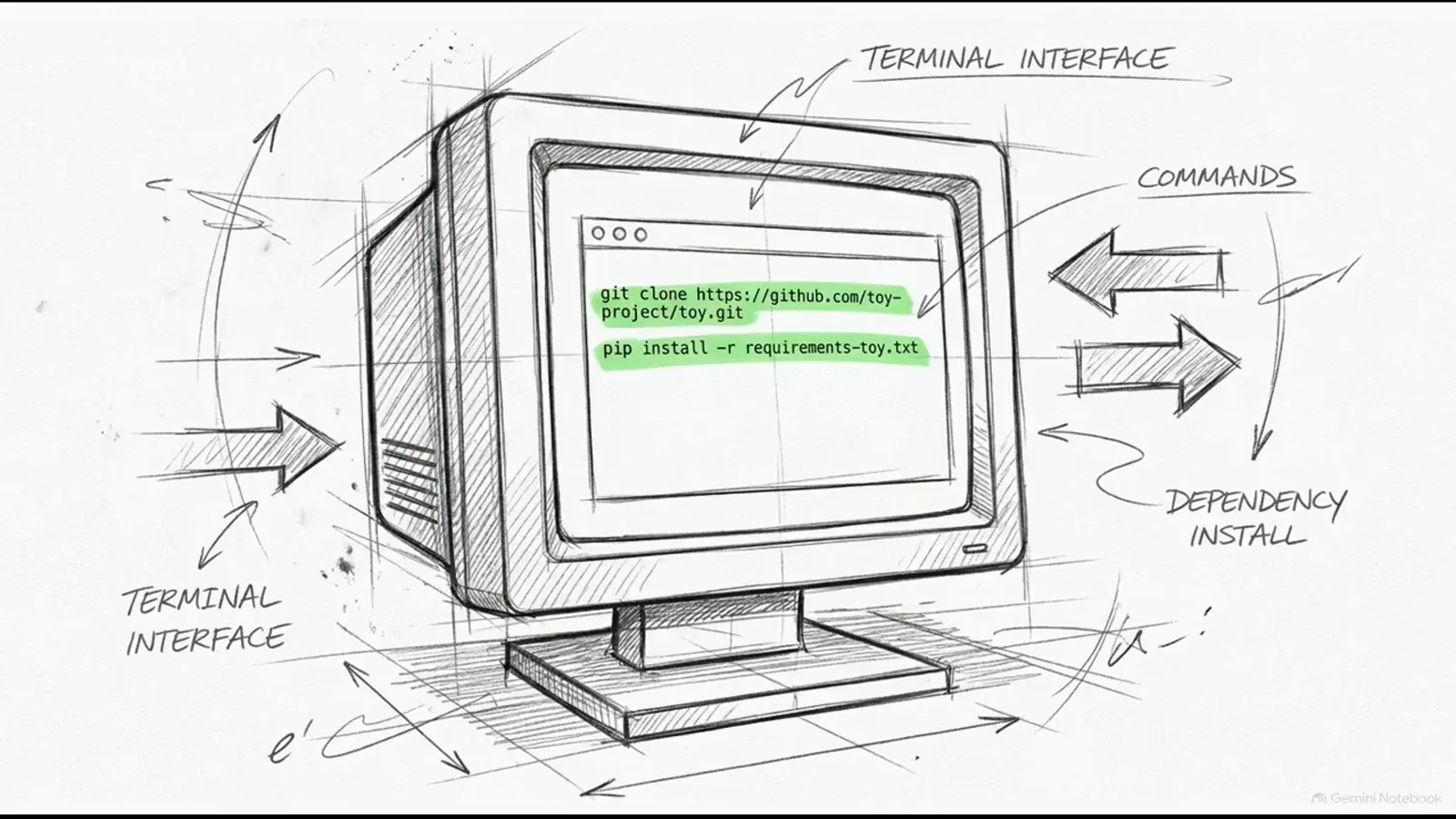
Clone, then install: requirements-toy.txt is the real core manifest, and it comes with a torch pin that matters on the next step.Watch at 1:30 - 3
The PyTorch pin and the CPU cliff: 50 ms becomes 400 ms
Pay close attention to the PyTorch link, the video says, because the default manifest fixes torch to 2.14.0 — verified in the repo — and that binary may not recognize newer GPU architectures. Its example is an RTX 5090: you must manually override the requirements with a CUDA-compatible wheel (the video's editor card sketches pip install torch --index-url .../whl/cu121). Skip that, and nothing errors — the model just silently runs on the CPU, and response times jump from around 50 milliseconds to over 400. The video's chart makes the cliff visceral: GPU at 50 ms, CPU Fallback at 400 ms, under the title 'CPU Fallback Destroys Latency'. This is the GPU-vs-CPU fault line of the open decision-model matrix: NanoJev's speed claim only exists on a working CUDA stack, which is exactly the axis where CPU-first projects like OpenJev and Julia-1 chose the other trade-off.
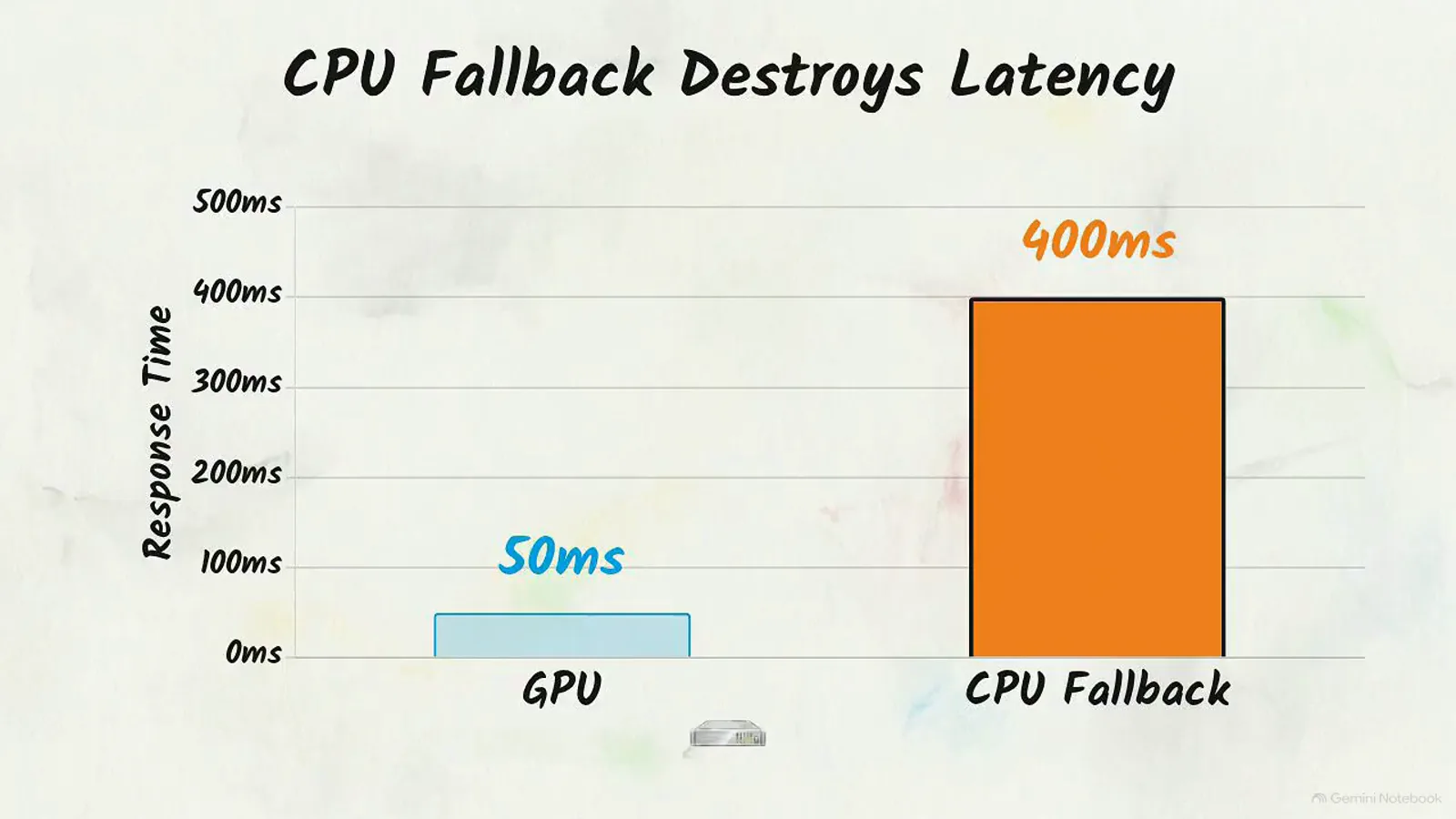
The cost of ignoring the pin: 50 ms on GPU, 400 ms on CPU fallback — the video's own chart, no exaggeration.Watch at 2:08 - 4
Download the checkpoint: code and weights travel separately
The repository separates the base code from the neural network parameters to keep your local directory manageable, so the weights arrive through a download script instead of git. The video shows snapshot_download configured for the Unified Games V1 release — and the real command in the README is snapshot_download(repo_id="C-Tianyu/NanoJev", revision="unified-games-v1", local_dir="checkpoints/NanoJev-unified", allow_patterns=[...]). Read that carefully: unified-games-v1 is the Hugging Face revision tag, not the repo id — the video's on-screen pseudo-code writes repo_id="unified-games-v1", which is illustration, not syntax. Per the repo, unified-games-v1 packages the step-400 checkpoint of the hard_lr1e5 training run: one model covering four games (50x50 maze, Snake, ViZDoom Basic aiming, Predict Position), trained with mixed-task cross entropy. Decoupling scripts from downloads is deliberate — it lets you hot-swap a future tuned checkpoint (the video animates Model v1 handing off to Model v2) without disturbing the operational runtime.
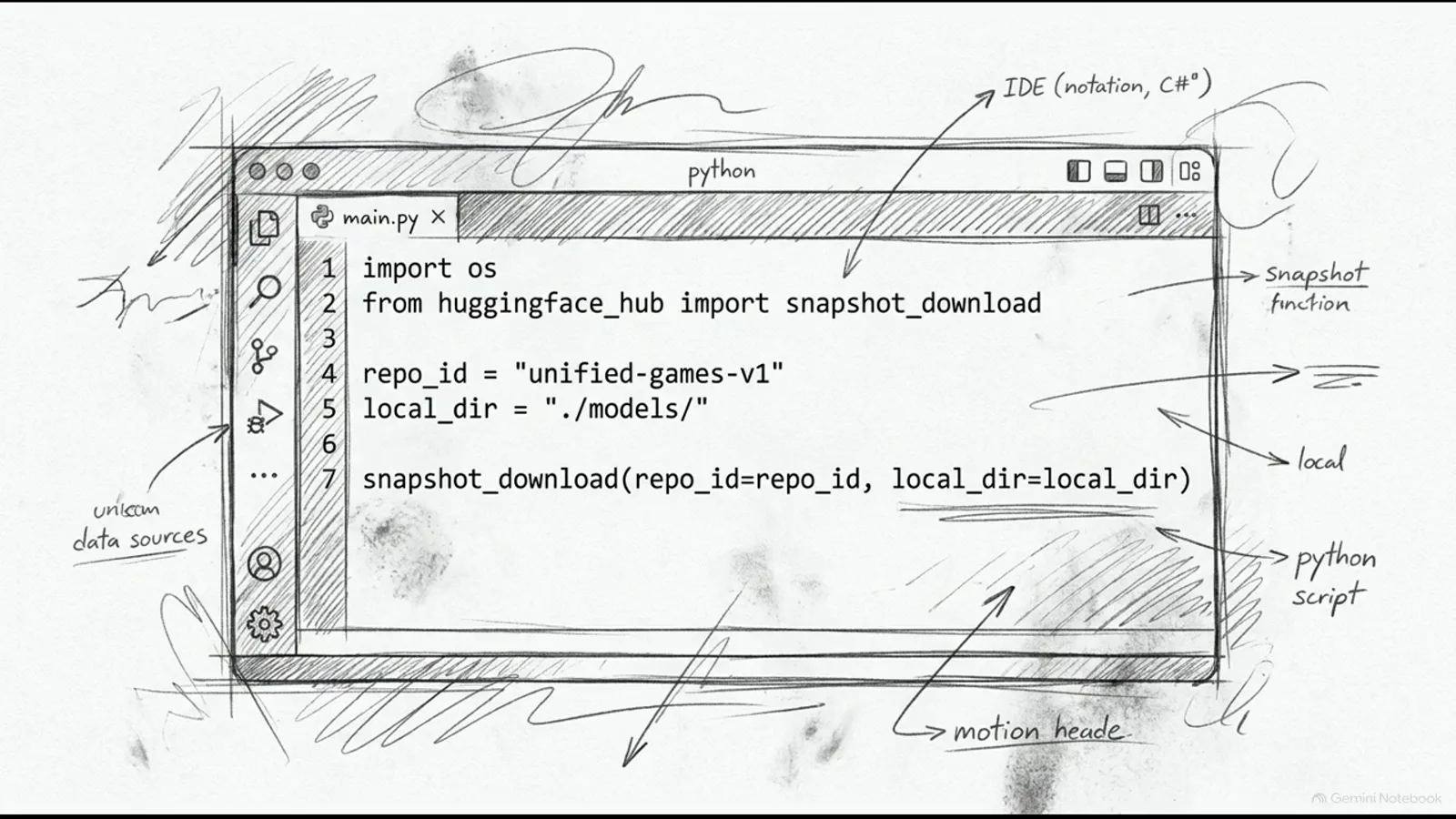
The on-screen snapshot script is simplified pseudo-code — in the real repo the repo_id is C-Tianyu/NanoJev and unified-games-v1 is the revision tag.Watch at 2:11 - 5
Filter the download to best.safetensors — or land an empty folder
Run the targeted filter script before downloading, the video says, because the Hugging Face API suppresses large file transfers unless the request explicitly allows them — miss that exception and your local directory comes back empty. The screen literally writes the line: allow_patterns = ['best.safetensors']. The repo's quick start confirms it and widens it: allow_patterns=["best.safetensors", "config.json", "tokenizer/*", "backbone_config/*"] — the highlighted safetensors payload plus config and tokenizer directories, everything else stays remote. On the authorization half of the warning, the ground has shifted since the video: its narration says large transfers need an authorized HF token, while the repo's current README states the model and dataset are public and downloadable without signing in. Either way the debug recipe is the same — an empty checkpoints/NanoJev directory means a wrong pattern or missing authorization, and both are in the download call, not the model.
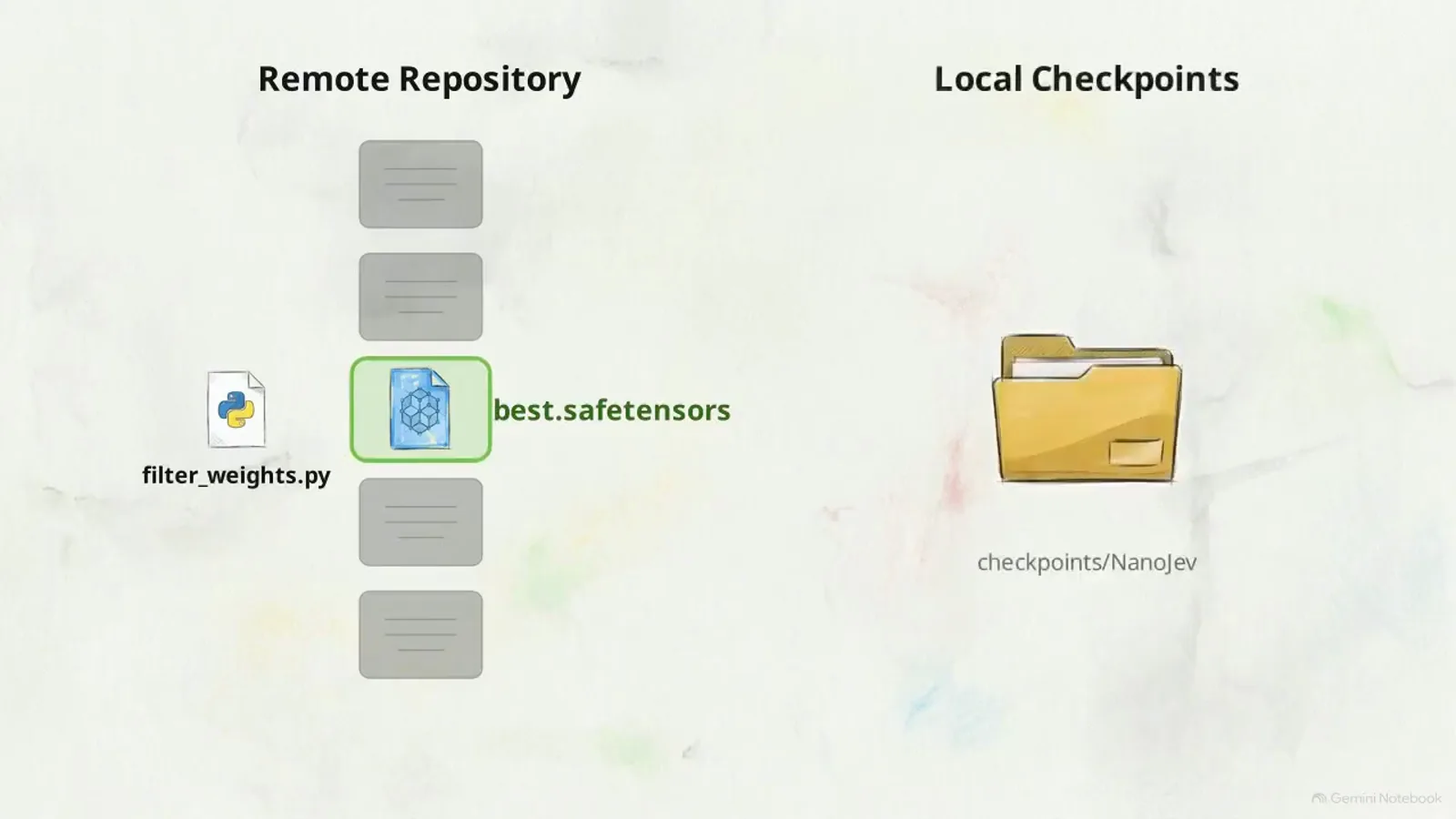
Filter first, download second: best.safetensors is the payload; the folder next to it stays empty until the pattern is right.Watch at 2:30 - 6
Two terminals: an inference engine on port 8765 and an HTML front-end
Validation runs as a split screen with two active terminal windows. The first process instantiates the PyTorch inference engine on a local port and keeps the weights loaded in VRAM — the video's sketched command reads python -m source.scripts.predict_toy_decisions --host 127.0.0.1 --port 8765 --precision bf16, then “Loading weights to VRAM...”. The second hosts the HTML presentation layer. In the actual repo the pair is: python scripts/serve_decisions.py --checkpoint-dir checkpoints/NanoJev-unified --web-root web --port 8765 --disable-native-triton, and python3 -m http.server 8080 --bind 127.0.0.1 --directory web for the front-end — decisions then go to POST http://127.0.0.1:8765/api/evaluate. The card that follows draws the architecture: PyTorch Backend on 8765, HTML Frontend on 8080, client in front. The port number on the illustration matches the real repo — 8765 is the number to remember.
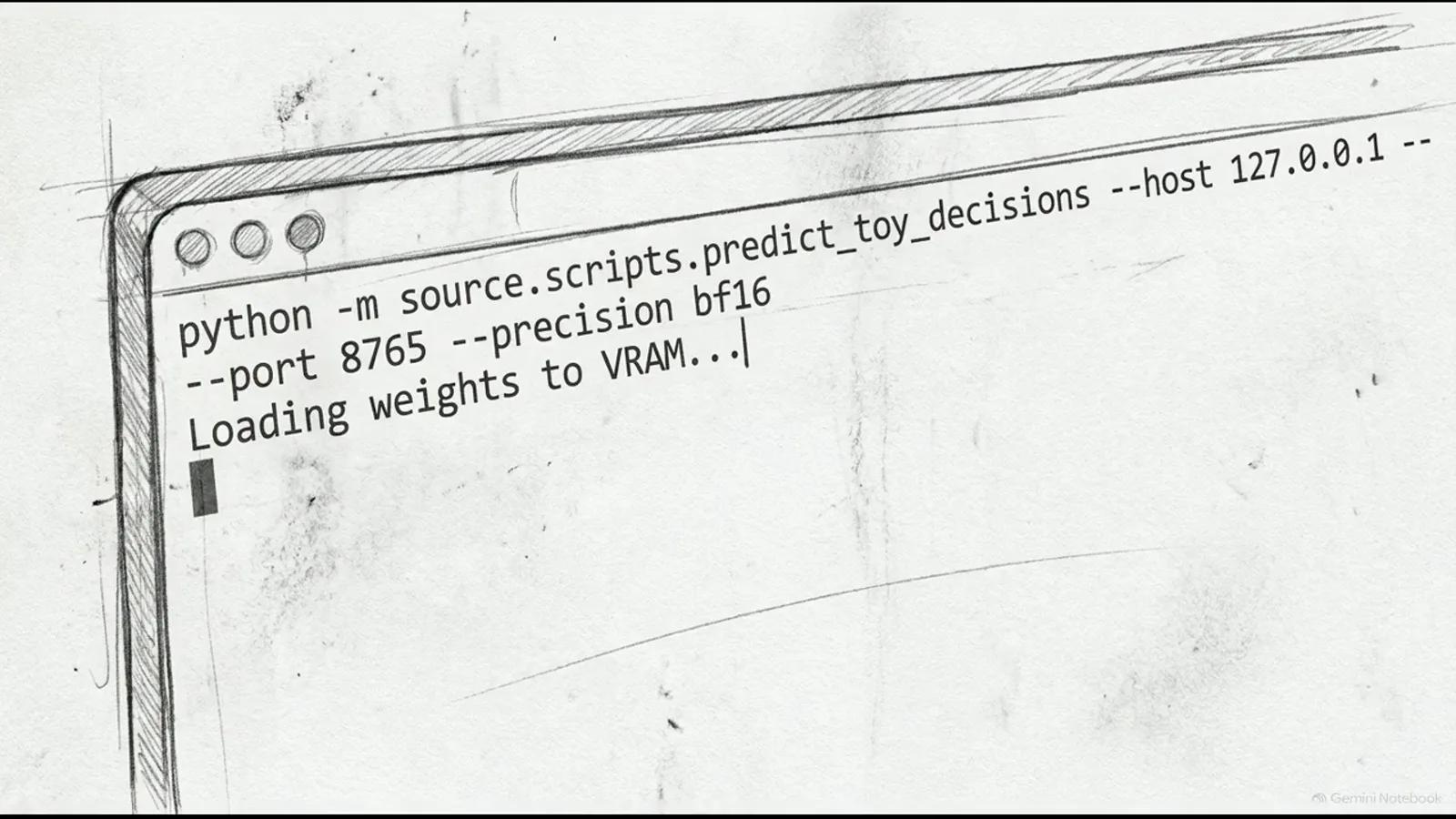
Terminal 1 keeps the weights hot: the sketched serve command binds 127.0.0.1:8765 — the repo's real entry is scripts/serve_decisions.py.Watch at 3:01 - 7
Proof of life: NanoJev driving a 50x50 maze in real time
Open the local dashboard address from your terminal output in a standard browser and you get the video's verification scene: NanoJev navigating a 50x50 maze, header reading Environment: 50x50 Maze Grid (OOD), with horizontal bar graphs updating dynamically for every directional move. In our captured frame the bars read North 97.2%, South 2.9%, East 3.7%, West 3.2%, with System One Latency: 47 ms — other moments of the same demo peak at North 99.6% and 34 ms. Either way the number stays under the 50 ms promise while the model steers a live emulator. That is the point of the exercise: successfully rendering real-time simulator control demonstrates that the parallel decision heads work without repeated-discretization latency — your CUDA stack, VRAM and weights are all verified in one glance. Only now, with hardware proven, does the video move from browser to text editor.
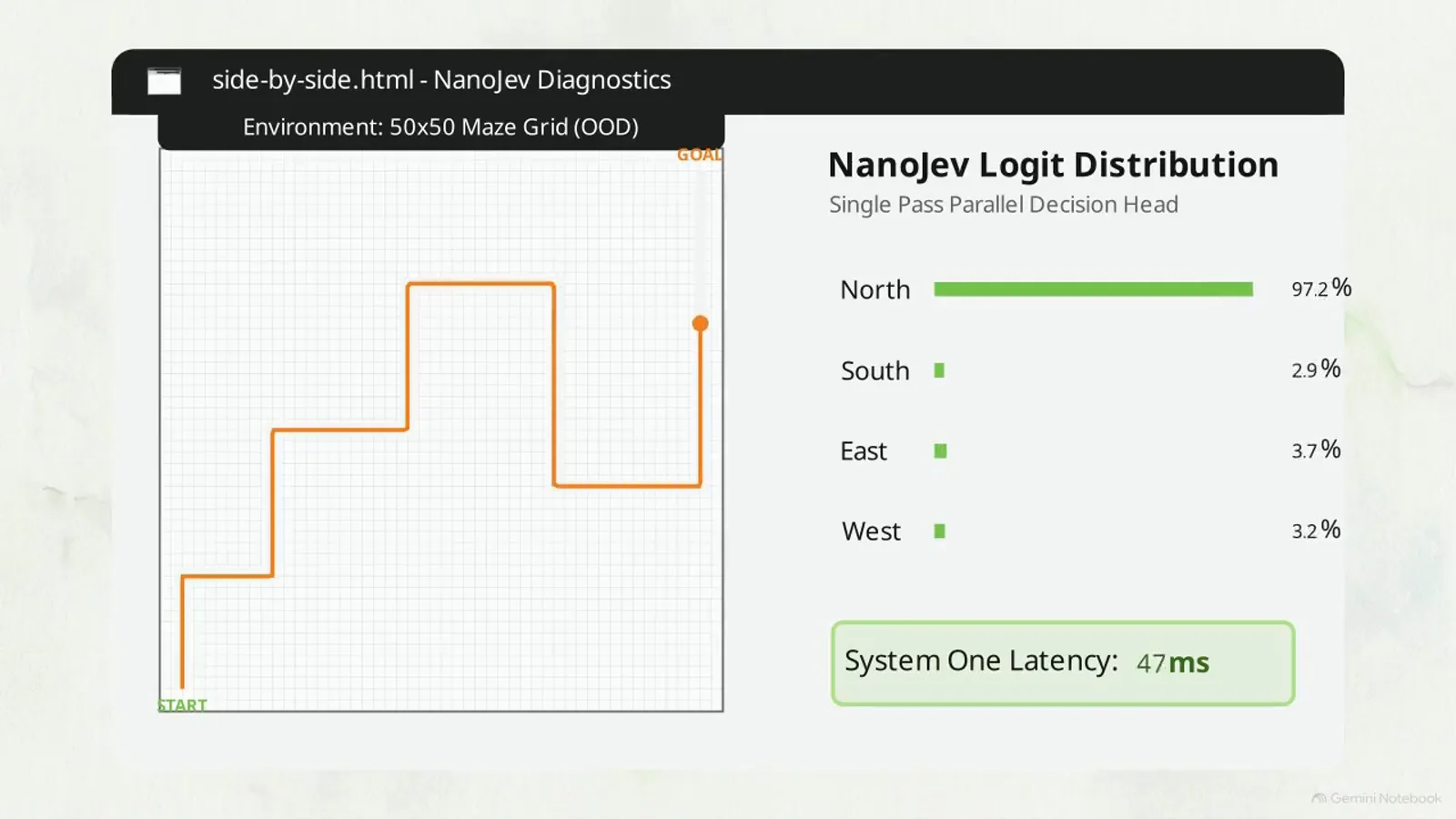
The verification screen: live direction confidences plus a 47 ms latency badge — real-time control as the hardware check.Watch at 3:33 - 8
From dashboard to script: sys.path and the entry contract
The routing script starts with plumbing: use the system path insertion command to point your environment at the downloaded artifacts folder before importing the prediction class — otherwise the import fails. The on-screen card writes exactly that: insert "checkpoints/NanoJev-unified/source/scripts", then from predict_toy_decisions import DecisionPredictor — note the card's checkpoint folder name matches the README's local_dir, checkpoints/NanoJev-unified. Once imported, the class imposes its entry contract, and this is the conceptual pivot of the whole video: NanoJev does not accept conversational prompts. There is no prompt to engineer. You must decouple context from logic — first build the shared state payload, the context the model will evaluate (the video's examples: application logs, code differences, parsed DOM trees), and only then hang questions off that state. Get the shape wrong and you are not calling the model; get it right and everything else is configuration.
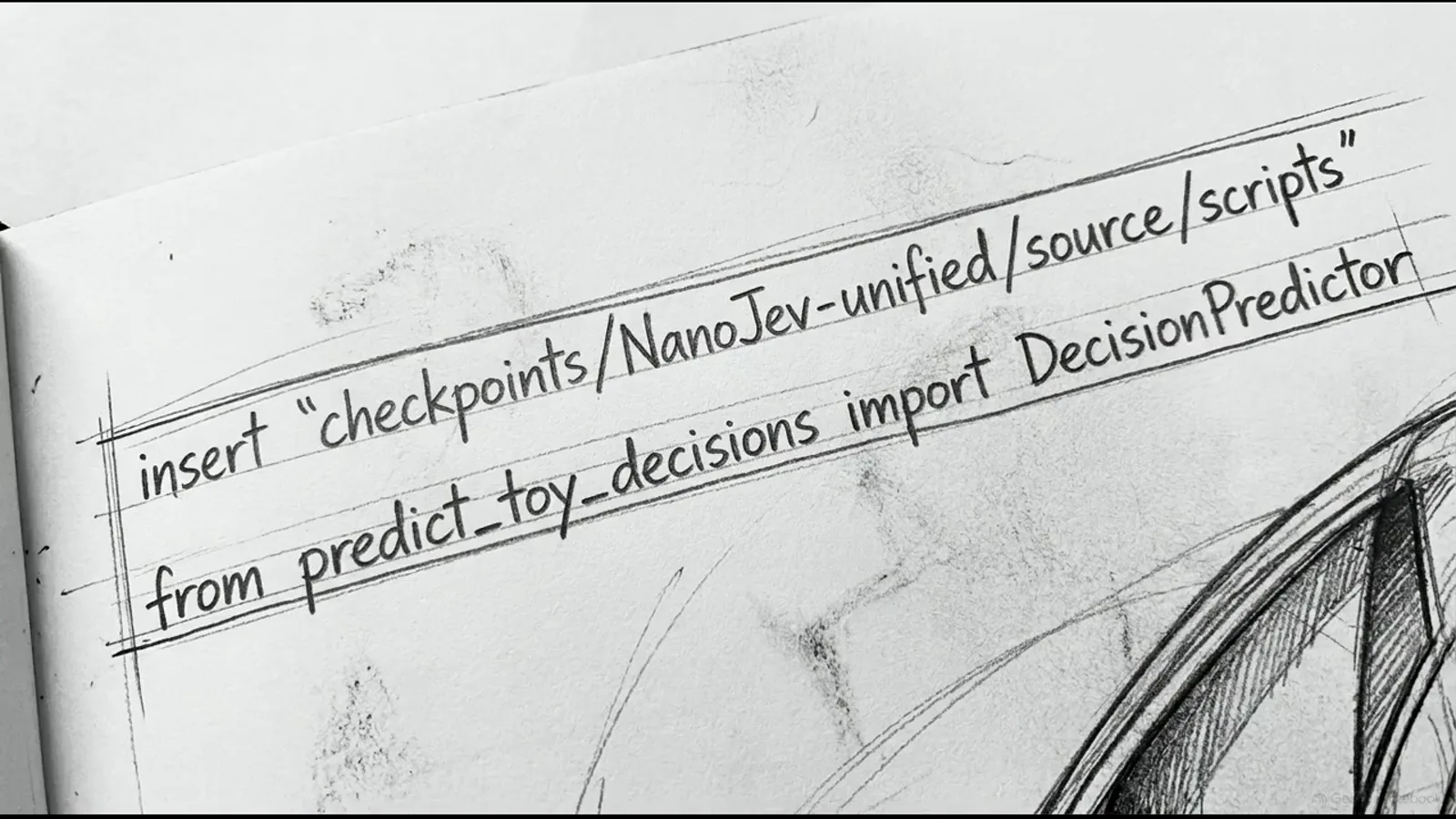
The two lines before everything else: point sys.path at the checkpoint folder, import the prediction class — then remember it takes no prompts.Watch at 4:02 - 9
One shared state, three typed questions, one forward pass
Against that shared state you define distinct queries, and they must be typed: categorical options, booleans, or ordered scores — the video's JSON card circles all three. The demo diagram shows the payload at work: one Shared State Payload fanning out to a Choice Head (categorical decision, 0.842), a Boolean Head (probability estimation, 0.991) and a Score Head (ordered evaluation, 0.740). Feeding strictly typed dictionaries lets the model evaluate multiple complex questions during a single forward step; the prediction class returns a nested dictionary where no text string was ever generated — normalized floating-point numbers mapped directly to the schema you requested. The repo README documents the same three heads precisely: Choice returns a distribution over 2-255 candidates via set attention and softmax, Boolean uses a sigmoid, Score returns a probability-weighted level over 2-10 ordered levels. No chain parsing, no string cleanup, no exit-token fees — the JSON comes out already numeric.
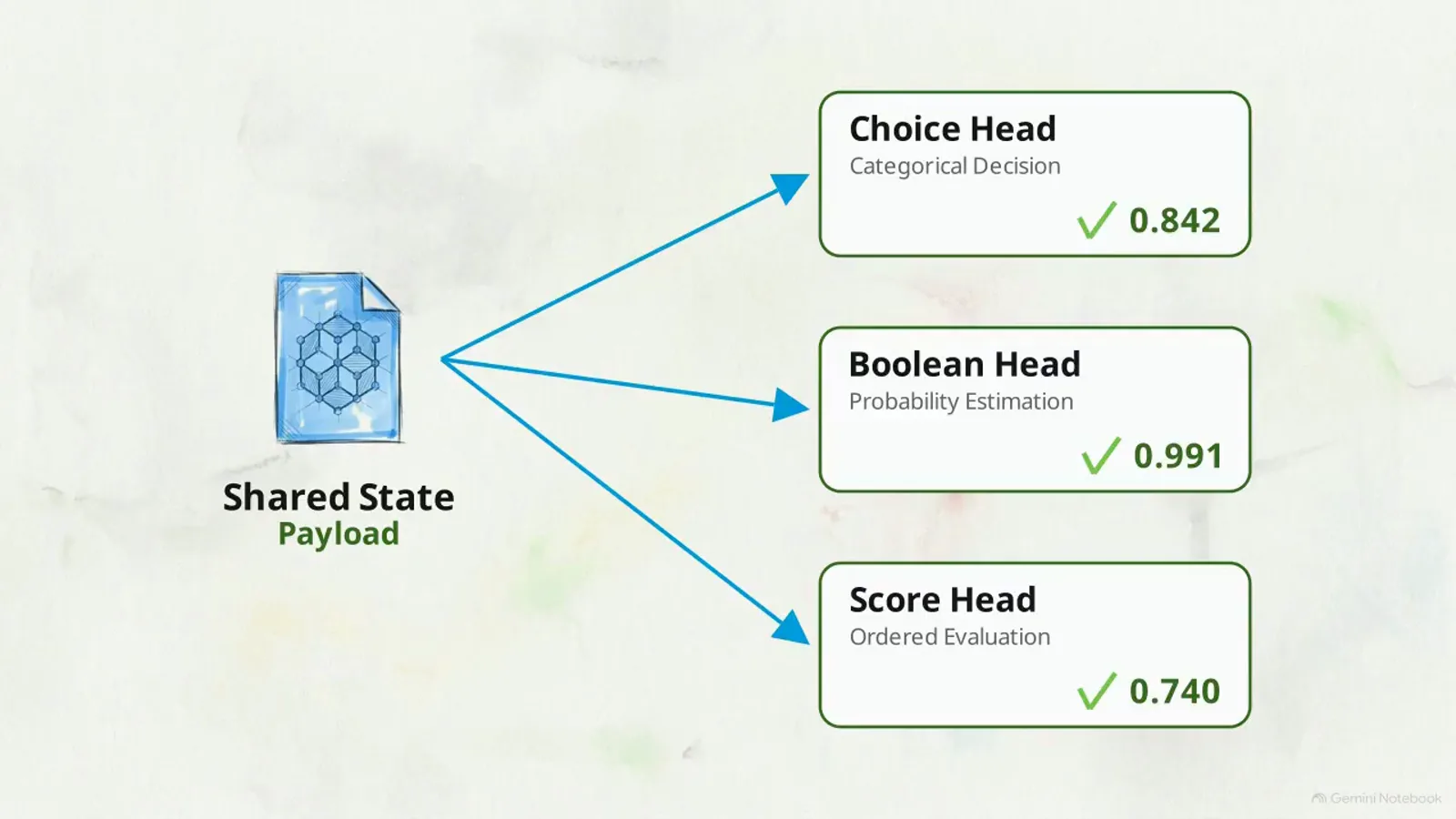
One forward pass, three answer shapes: choice 0.842, boolean 0.991, score 0.740 — the typed-question payload doing its thing.Watch at 4:43 - 10
The asymmetric-error rule: 85% autonomous, 50-85% human, under 50% frontier fallback
To use System 1 probabilities in an application, implement what the video calls the asymmetric error principle — a logic tree over your probability thresholds. The upper track turns green above 85% certainty: autonomous execution, zero human cost (the card labels it Autonomous — Zero-Token Cost). Scores between 50% and 85% cross the ambiguity threshold and activate human resolution — the Human Review branch. Below 50% means genuine uncertainty: redirect to a backed-up frontier model. The economics are the argument: treating model outputs as numerical gates filters out high-volume tasks without API fees, and reserves the expensive interventions — a person, or a big token-billing model — for exactly the cases that deserve them. This is the same threshold-routing shape Jev-class decision layers use in production; the video's contribution is showing the whole gate stack running on a 0.6B model on your own desk.
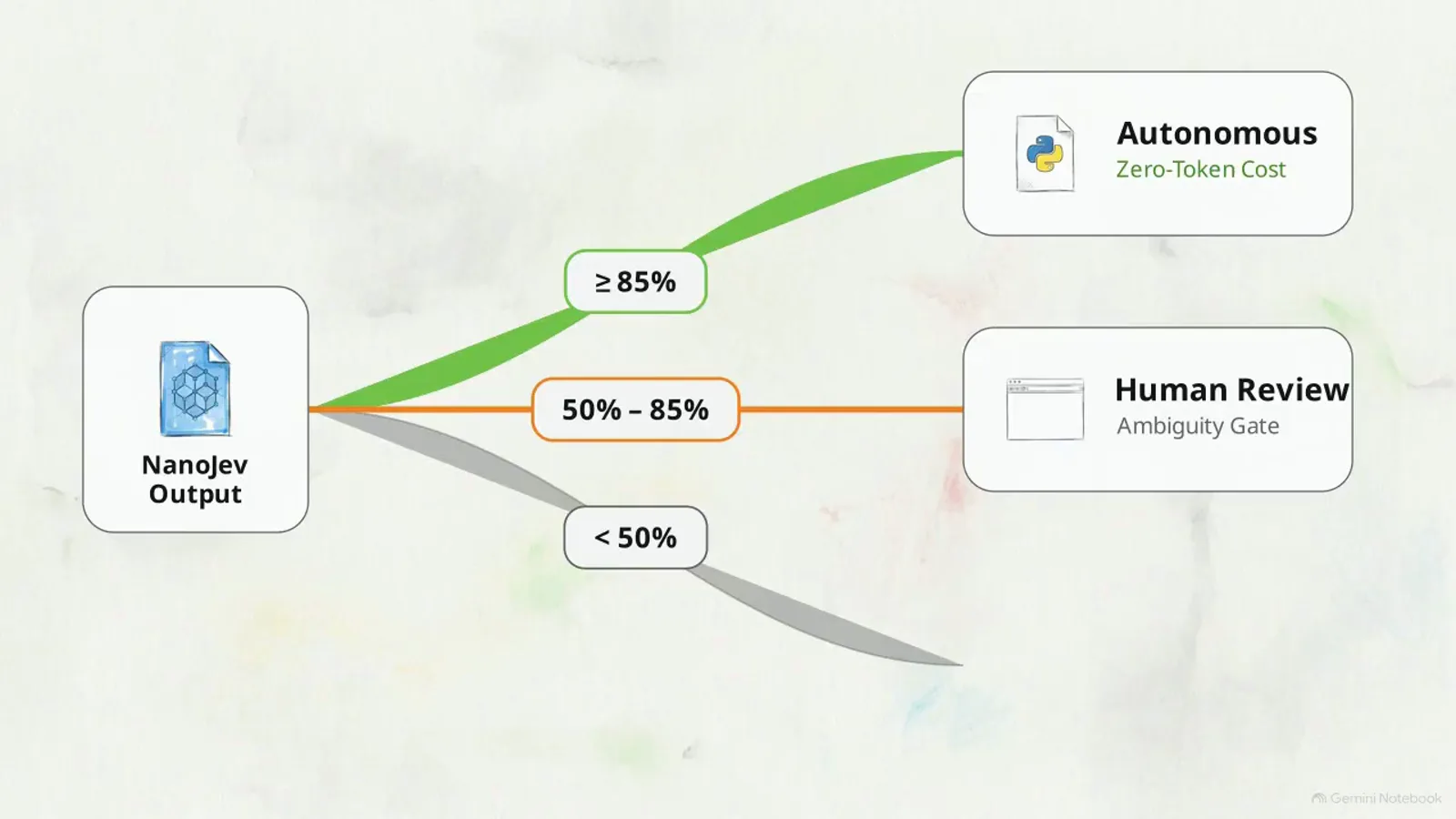
The video's routing recipe: numerical gates that let cheap confidence do the bulk work and spend humans only on real uncertainty.Watch at 5:15 - 11
The honest section: accuracy collapses outside game space
Before scaling this up, the video stops to evaluate the baseline training data — and it does not flatter the model. The unified checkpoint is heavily conditioned by physical positioning and the games' spatial mechanics; therefore its accuracy may vary when applied to semantically unrelated text. The chart shown is blunt: titled Accuracy Collapses on Semantic Text, it plots Spatial Navigation near 88% against a semantic-text bar that has essentially fallen off the axis. This is the section a promotional video would have cut, and it is the most useful thirty seconds here: maze-grade confidence bars do not transfer to documents, tickets or code. If your workload is spatial-state-like, the numbers above are yours to expect; if it is text-shaped, treat the demo numbers as belonging to a different problem entirely — and read the last step before giving up.
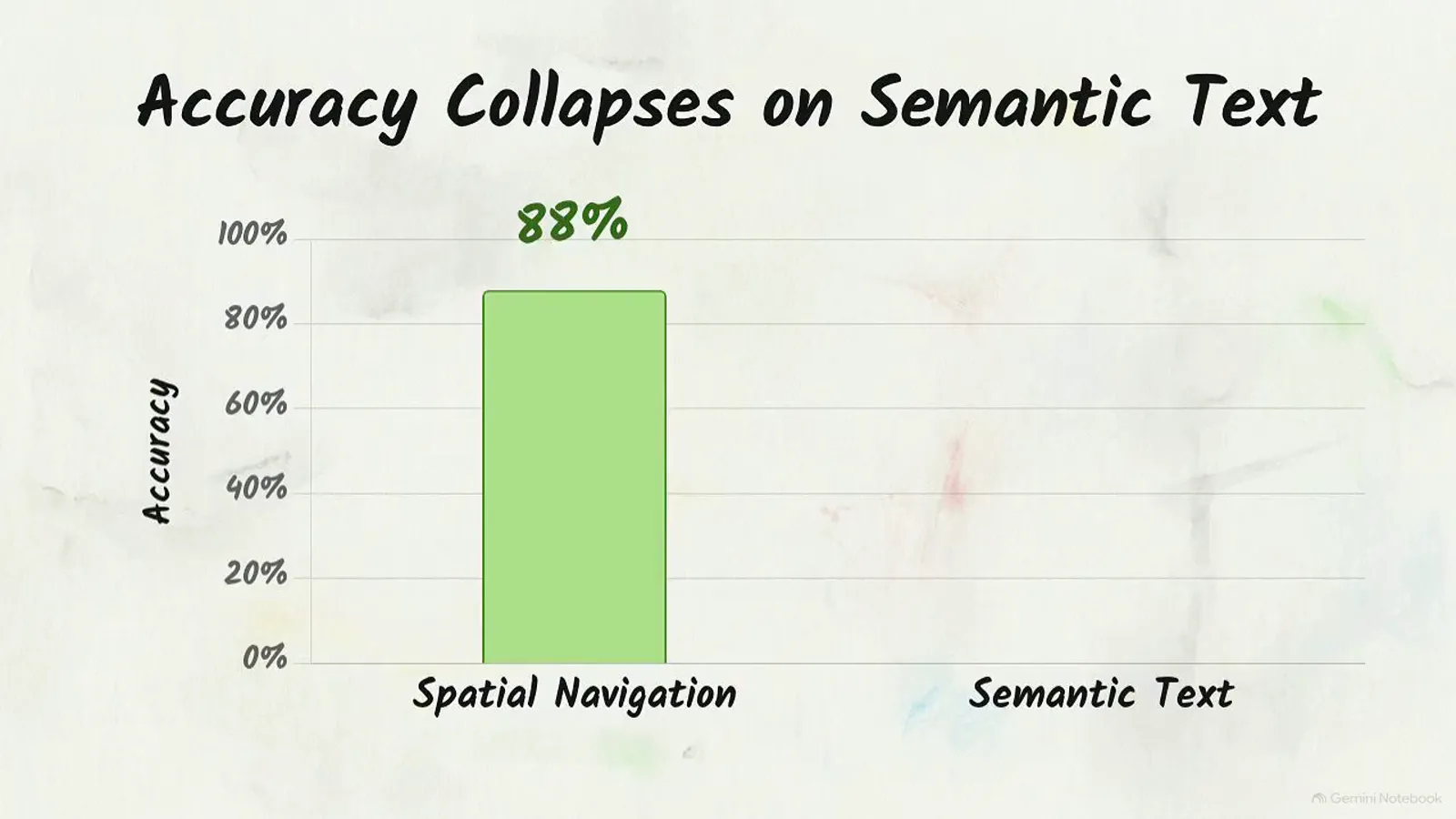
The slide a promo video would have cut: game-space accuracy does not transfer to semantic text — the video keeps it in.Watch at 6:03 - 12
The escape route: supervised fine-tuning on your own data
If your application needs a different experience, the video's answer is not a bigger prompt — it is your own supervised fine-tuning flow, initiated through the repository's monitoring scripts using your company-specific data. The closing card shows a monitor mid-run: Fine-Tuning Epoch 1/5, progress bar at 10%. That is the right mental model for every local System One model: the shipped checkpoint is a starting point conditioned on its training world, and the fine-tune is what retargets it to yours (the repo's roadmap lists RLCD post-training as future work; today's release is supervised). The final framing generalizes: mastering localized System One models gives you autonomous applications that react with the speed of traditional software — decisions in tens of milliseconds, structured JSON out, no token billing — provided you train the thing on the world it will actually judge.
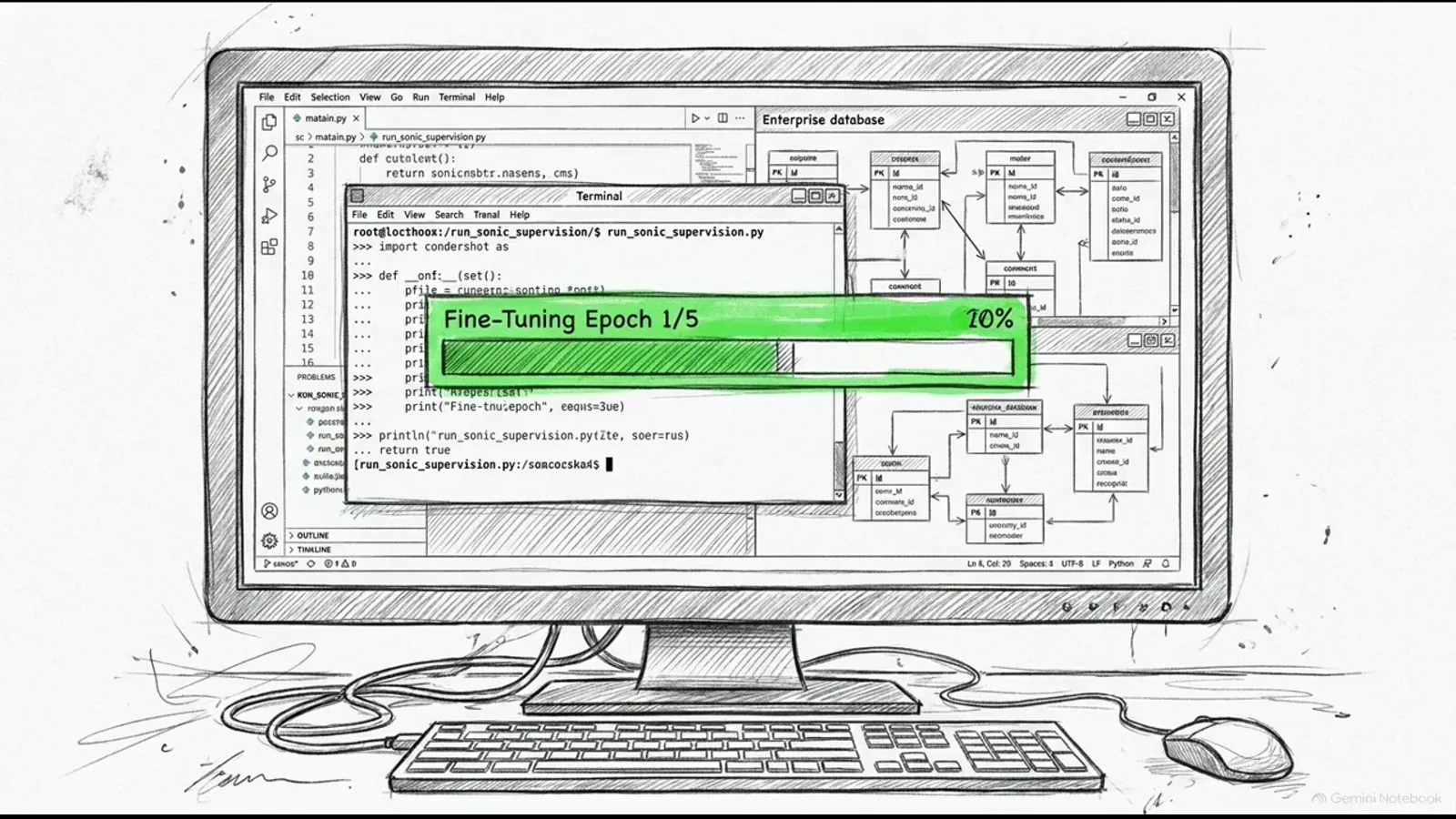
Epoch 1/5 begins: the video ends exactly where your own fine-tune starts — the repo ships the scripts.Watch at 6:08
Frequently asked questions
What is NanoJev?
NanoJev is an open-source nano replica of the Jev System One architecture: GitHub TianyuCodings/NanoJev for the code, Hugging Face C-Tianyu/NanoJev for the weights (plus the C-Tianyu/NanoJev-Data dataset). The repo describes it as a 0.6B parallel decision model — a Qwen3-0.6B backbone with decision heads — that takes states and questions in and returns complete probability distributions with zero output-token decoding. Because it has no vocabulary generation head, it cannot produce conversational text even if you want it to; it only estimates probabilities, in a single matrix pass measured at 34-47 ms in the video's demo.
Is NanoJev the same as nano-jev (sdmlai/nano-jev) on Hugging Face?
No — they are different projects from different publishers that happen to sound alike. The model covered here lives at the full paths github.com/TianyuCodings/NanoJev and huggingface.co/C-Tianyu/NanoJev ("A nano replica of Jev: parallel decisions, dynamic candidates, and an end-to-end training pipeline"). Always cite the full org/repo path when installing or citing: sdmlai/nano-jev is an unrelated model, and search results routinely mix the two.
What hardware and software does NanoJev need?
The video's requirements: Python 3.10+ and a dedicated NVIDIA GPU in a native CUDA environment. The repo pins torch==2.14.0 (with transformers==5.17.0) in requirements-toy.txt — there is no requirements.txt and no CPU variant; the other two files (requirements-vizdoom.txt, requirements-shooting-demo.txt) are for the game environments. On newer cards such as an RTX 5090, manually install a CUDA-compatible torch wheel or the model falls back to CPU and latency degrades from ~50 ms to over 400 ms. The video's 50 ms claims only hold on a working CUDA stack.
Why is my NanoJev checkpoints folder empty after snapshot_download?
Because the large weight file only downloads when your request explicitly allows it. The repo's quick start passes allow_patterns=["best.safetensors", "config.json", "tokenizer/*", "backbone_config/*"] with repo_id="C-Tianyu/NanoJev" and revision="unified-games-v1" — drop the best.safetensors pattern and the folder stays empty. The video also warns that Hugging Face suppresses large transfers without an authorized token; the repo's current README says the release is now public and downloadable without signing in. Either way: empty directory means wrong patterns or missing authorization — check the download call, not the model.
Can NanoJev answer free-form questions or generate text?
No — and that is architectural, not a fine-tuning away. NanoJev has no vocabulary generation head, so conversational output is impossible by construction; the video calls this the model's entry contract: it does not accept conversational prompts. You supply a shared state (logs, diffs, parsed DOM trees) and typed questions — categorical choice over candidate options, booleans, or ordered scores — and one forward pass returns normalized floating-point probabilities per option (demo: choice 0.842, boolean 0.991, score 0.740). If your task needs generated sentences, you need an LLM — NanoJev is the numerical gate in front of one.
Can I point the unified-games-v1 checkpoint at my own documents?
Not expectantly. The video is explicit that the unified checkpoint is heavily conditioned by physical positioning and the games' spatial mechanics: its own chart shows roughly 88% accuracy on spatial navigation collapsing to near zero on semantic text. For a text-shaped domain, plan a supervised fine-tuning flow with your own data using the repository's monitoring scripts (its closing card shows a Fine-Tuning Epoch 1/5 run). The two-service setup — inference engine on 8765, front-end on 8080 — survives the swap; that decoupling is exactly why the weights are downloaded separately from the code.
Related guides
Run Jev Locally Guide
The official model on your own hardware — the first-party route this community nano replica imitates at 0.6B scale.
ReadOpenJev CPU Inbox Guide
The other pole of the open-model matrix: a CPU-only decision app where NanoJev demands CUDA and pays 400 ms when it loses the GPU.
ReadJulia-1 Tutorial Guide
The pip-install CPU route for a small decision model — compare its trade-offs against NanoJev's native-CUDA requirement.
ReadOpen Jev Models Guide
The panorama of open Jev-family models, NanoJev included — see where a 0.6B game-trained replica sits in the lineup.
ReadBuild Your Own Jev Guide
When downloading someone else's checkpoint is not enough: the training axis behind NanoJev's fine-tuning escape route.
ReadNanoJev Alternatives Profile
The structured profile card for NanoJev — license, size, and how it compares to the rest of the decision-model field.
ReadPPLX Decider Guide
Same decision-model wave, opposite deployment: Perplexity's hosted Decider API instead of a local checkpoint.
ReadJEV-27B Local Guide
The heavyweight end of local decision models — a third-party 27B test to set against this 0.6B install.
ReadMore video walkthroughs
- Jev Classification Quickstart: OpenRouter API, Primitives & Real Probabilities
- Jev Architecture Explained: Why 70ms Decision Models Beat LLMs for Workflow Automation
- Ultra-Fast Browser Agents with Jev: 178ms DOM Loops & Dual Model Orchestration
- Open Jev Models Are Here: Semif, Nimble, Decider, DiffusionGemma & Laya Hands-On
- Jev vs LLM: Will Jev Replace LLMs? Krish Naik's Whiteboard Explainer
- Jev Trader Tutorial: Build a Subsecond AI Trading Bot on Monad
- Jev Model Router: Build a Privacy-Gated LLM Router with Jev & OpenJev
- Jev Tutorial for Beginners: State, Questions & the TypeScript SDK
- Run Jev Locally: Kev, SemIf & Von on Your Own GPU (OpenJev Guide)
- Jev RAG Reranker: Policy-Steered Reranking for Retrieval-Augmented Generation
- When to Use Jev: An Engineer's Audit of Claims, Gates, and Failure Modes
- LangChain + Jev Integration Tutorial: Routing, Guardrails & Evals
- Jev MCP Server: Connect Jev Decisions to Claude Code & Cursor
- Jev vs Luna: Independent Benchmarks Put "Better, Faster, Cheaper" to the Test
- Jev Agent Harness: Where the Decision Gate Sits in Your LLM Loop
- Jev Playground Walkthrough: The Hotdog Lesson, Criteria, and a Four-Console Token Test
- Jev Text Classification API: Zero-Shot CLI & REST with classifier.dev
- Jev API Examples: First Request, curl & All Three Question Types
- Jev Log Triage with Expanso Edge
- Jev Lead Enrichment with Treg: ICP and Signup Scoring
- Use Jev Decision Nodes in Heym for Model Routing
- Laya Tutorial: Open-Source AI Routing With Calibrated Probabilities (Laya vs Jev Setup)
- Train Your Own Jev: Fine-Tune a Jev-Style Decision Model for $5–$17 (What You Can and Cannot Train)
- Jev Tips: 8 Best Practices for Better Decisions (State, Questions, Criteria & Thresholds)
- Jev Context Compaction: Prune AI Agent Memory Without Generative Summaries
- Jev as an LLM Judge: Confidence-Gated Cascades at 0.36% of the Cost
- TypeSafe Computer Use: Local Desktop Automation with Jev, Step by Step
- Jev Resume Screening: Build an AI Resume Evaluator with the Jev JavaScript SDK
- Jev + Claude Code Guide: Voice-Controlled Browser Automation with Typed Decisions
- Jev + Codex: Install the TypeSafe Skill and Triage a Real Gmail Inbox
- Jev vs Ollama: Can Local AI Replace Hosted Jev Without Sending Your Data Away?
- Build Your Own Jev: Train a Free Open-Source Zero-Shot Classifier (That Plays Doom)
- CUA-S1-Forms: a 706K-Parameter Jev-Like Model That Fills GUI Forms on Your CPU
- NOC/SOC Alert Triage with Jev: Rules First, One Typed Question, a Policy Gate
- Ollama Decision Models: Run tev1 and Nimble Locally (Tested on an 8 GB Card)
- Jev Guardrails in Production: A Five-Step Playbook for Decision Automation
- A Session Drift Guard for Pi Agent: Let the Jev Model Propose, Let Code Decide
- 50 Tev1 Use Cases: What a Local Decision Model Can Actually Do (Tested on an 8 GB Laptop)
- Jev, Hands-On: Where the Official Claims Meet Independent Remeasurement
- Jev Ticket Classification in a Real App: the After-Insert Hook and the Calculated Field
- OpenJev RLCD: Run the Open-Source Calibrated Decision Model Locally (Full Guide)
- Clef-Flash vs Jev: I Tested Cloudflare's Decision Model Locally in Ollama (Q4_K_M)
- Clef-Flash Tutorial: Install and Run Cloudflare's 9B Multimodal Decision Model Locally on Ubuntu
- CLM-8B: the Contrastive Decision Model That Scores 1,024 Options in 44 ms (13x Faster Than Jev)
- Nox 4B Tutorial: Run the Decision 2.0 Model Locally and Put It Through Four Real Decisions (One Ends in a Fail)
- Julia-1 Tutorial: Install the Open-Source Jev Replacement in Pure Python (and Watch It Beat If-Statements 9 to 2)
- OpenJev 0.8B on CPU: I Built a Ticket-Routing Inbox and Calibrated the Thresholds
- Jev n8n Integration: the JevGate Community Node, Step by Step (Plus a Plain-HTTP Fallback)
- PPLX Decider Tutorial: Perplexity's Open 27B Decision Model, Its Decisions API, and a 12-Ticket Triage Run
- AutoTrust JEV-27B Tested Locally: Four Arms, 72 Cases, and One 0.969 Score That Was Wrong