
Guides / illustrated walkthrough
Jev + Codex: Install the TypeSafe Skill and Triage a Real Gmail Inbox
A Chinese-language walkthrough of wiring Jev into OpenAI Codex via the typesafe-ai/skills repo: Playground drills on the three question types, the TYPESAFE_API_KEY environment variable, and a live run that priority-sorts 30 Gmail messages in 1.19 seconds of API time.
Quick takeaway
This is the missing "wire it into my agent" tutorial, originally in Chinese: after a Playground crash course on Choice, Noul, and Score (an interview invitation classified as a work email at 100%, flagged need-reply at 98%, and scored high priority), the creator installs the official typesafe-ai/skills repo into OpenAI Codex by simply asking Codex to do it. The skill is documentation, not a bundled model — the agent still needs TYPESAFE_API_KEY in the environment, set with one echo >> ~/.zshrc line. The payoff is a real inbox run: Codex reads the 30 most recent Gmail messages, and Jev sorts them into priority tiers — newsletters and verification codes at the bottom, a single Google security alert on top at 98%. The Jev API finished its share in 1.19 seconds; the whole task took 1 minute 40 seconds, almost all of it Codex thinking. The skill detects and registers itself for Codex, Claude Code, OpenCode, Hermes, Gemini CLI, GitHub Copilot, and Antigravity from one install.
Video source
Jason's Efficiency Workshop (杰森的效率工坊)
Step-by-step walkthrough
- 1
What a decision model answers: probabilities, not prose
The video opens with the contrast that defines Jev: ask "will this stock go up or down" and a chat model writes an essay while Jev returns 72% up, 28% down — the driving-a-car-at-a-red-light argument for why A-or-B decisions should not start with 300 words of analysis. The first live demo analyzes a WhatsApp message from the creator's partner — "算了,你忙吧,我不打扰你了" ("fine, you're busy, I won't bother you") — and the response card reads like a relationship triage report: an 82% probability she does NOT want to end the conversation, "feels ignored" leading the intent breakdown at 76%, and a suggested next action: acknowledge you were not really listening before replying. A follow-up ("have I gained weight?") returns the equally honest verdict that no objective assessment was requested. The point of the jokes: intent, priority, and yes/no gates are decision problems, and Jev speaks them natively.
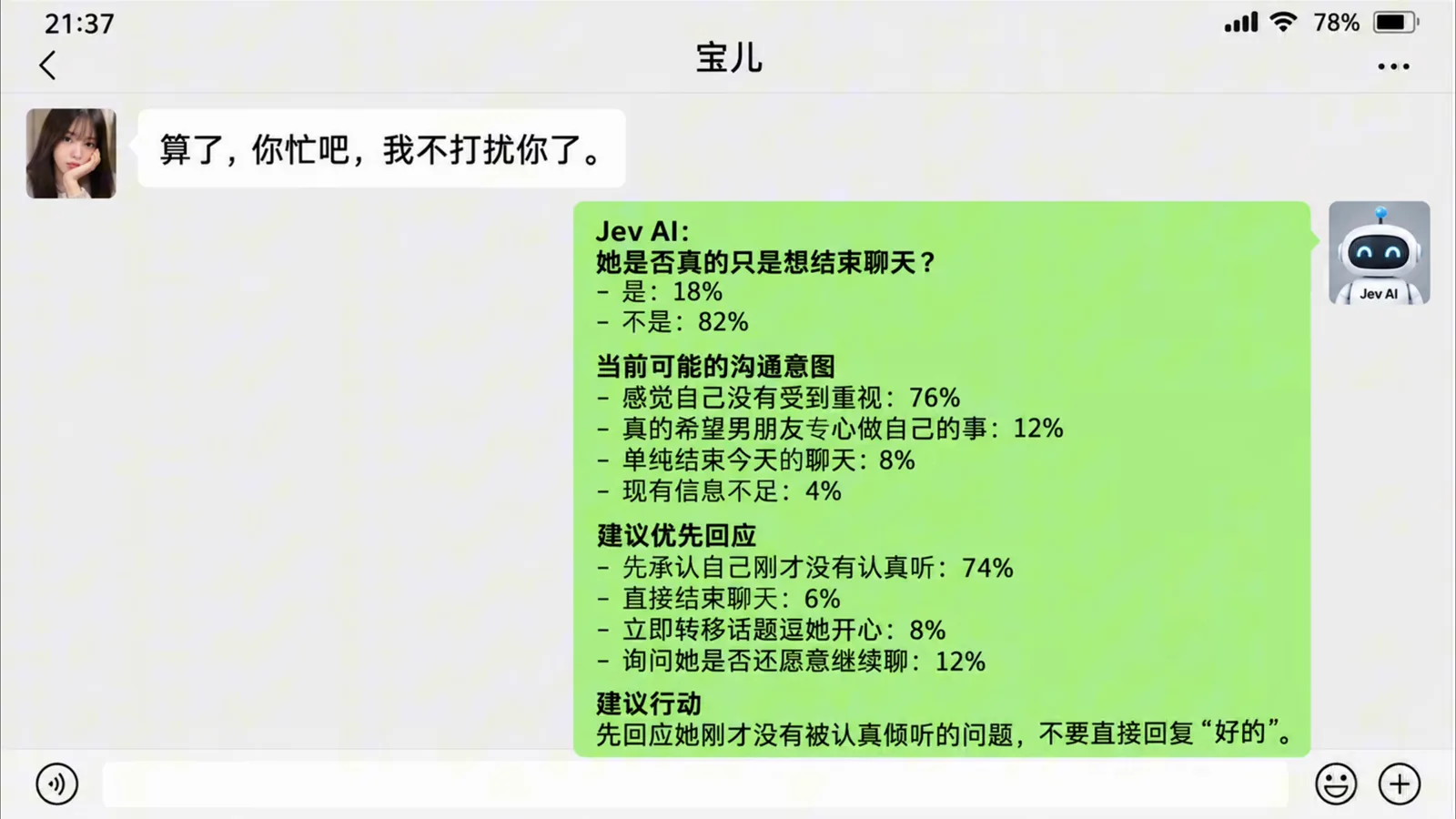
One chat message in, a probability report out: 82% "not actually ending the conversation", next action suggested.Watch at 0:42 - 2
From signup to Playground: the console in one look
Everything happens on typesafe.ai: register an account, open the API Console from the top-right corner, and the left navigation gives you the whole surface — Playground for experiments, Usage for consumption, API Keys for credentials, Documentation for the API contract. The home page doubles as a syllabus: the Learn to TypeSafe cards walk through NOUL ("Is hotdog a sandwich?"), CHOICE ("What color is the sky?"), and SCORE rating lessons, and a Quickstart panel already shows the agent-skill install commands this page comes back to later. The Playground input box takes a JSON state — the video frames it as "a prompt, but structured" — and the Questions panel below it is where typed questions get attached.
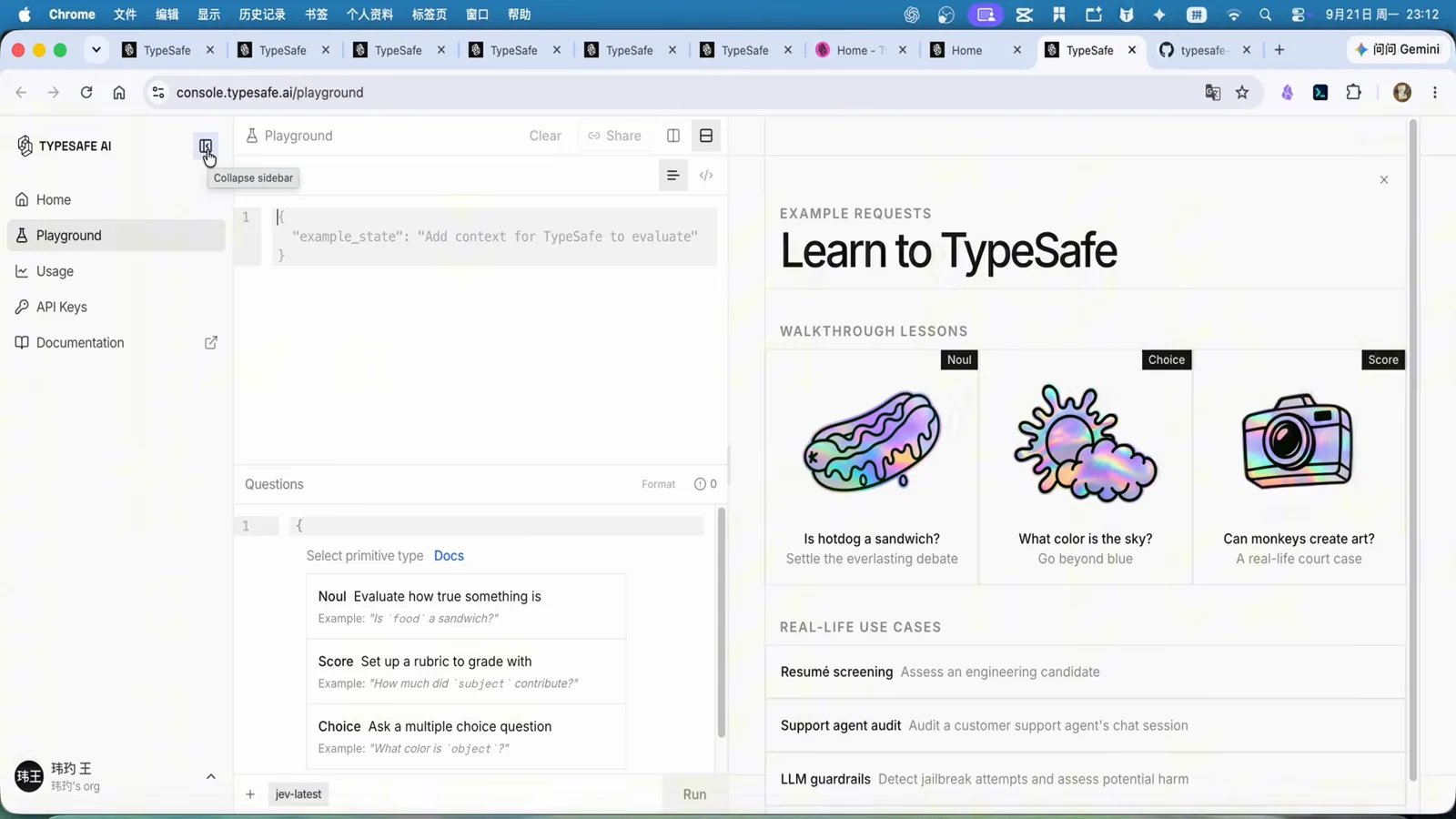
The API Console: Playground to test, API Keys to provision, Documentation for the contract — the whole integration surface is four nav items.Watch at 2:10 - 3
The three question types: Score, Choice, Noul
Before wiring any agent, the video drills the primitives on the interview-invitation email it pastes into the state field. Choice offers named options and the model picks one: email_category returns work with a 100% confidence bar and flat zeros for the alternatives. Noul is a true/false gate: need_reply comes back true at 98% because the message explicitly asks the recipient to confirm attendance. Score attaches a rating scale — the creator defines low, medium, and high — and the response distributes probability across the scale instead of picking a bare label. All three can ride in one request, which is exactly what the inbox experiment exploits later.
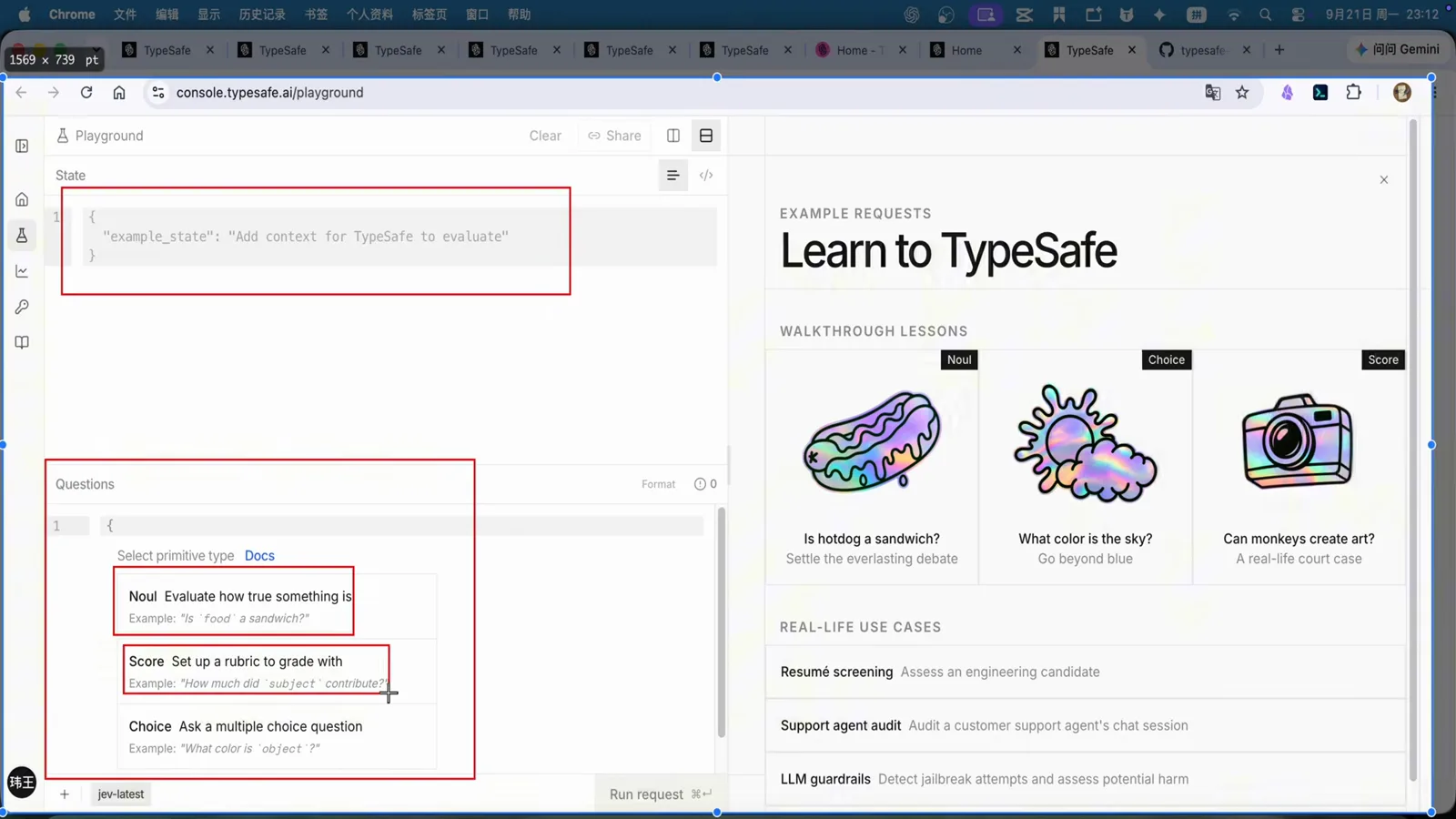
The Playground's own lesson cards: Noul judges truth, Choice picks an option, Score grades on your scale.Watch at 2:28 - 4
Choice in action: routing one email, 100% work
The email_choice question defines the criteria inline — work emails that need a serious reply, personal mail, newsletters, promotions — and runs against the interview invitation. The answer panel returns email_category: work at a flat 100%, with every other option pinned at zero and the overall confidence stamped on the response. That is the shape a mail client, a CRM, or an agent needs: not a paragraph about the email, but a routing key with a confidence number attached. The creator's framing for builders: if you have a large volume of mail or records to pre-sort, this single call replaces the "read everything with a big model" step.
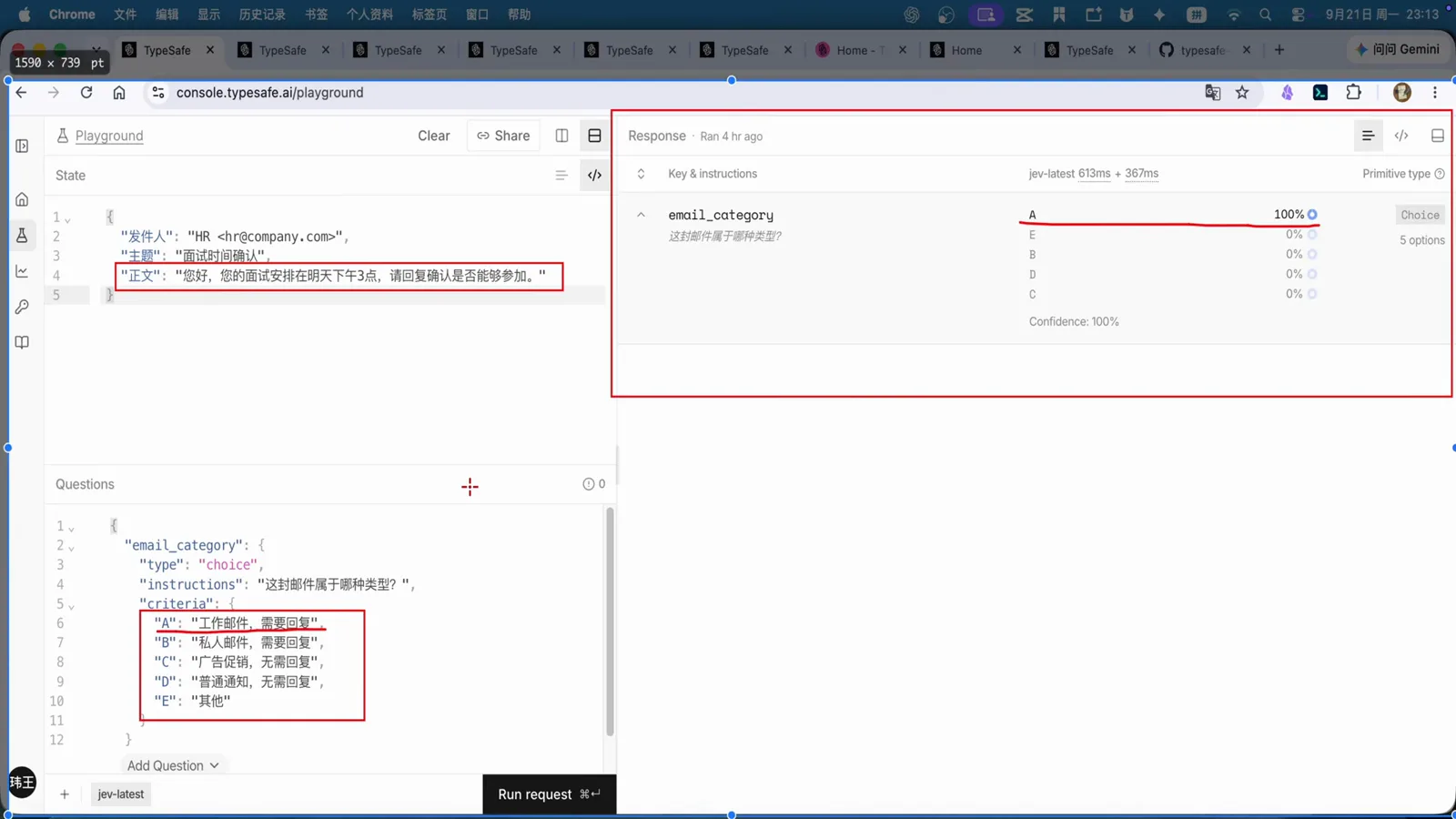
email_category → work, 100%. One typed call returns the routing key and its confidence.Watch at 3:05 - 5
Noul in action: does this need a reply? 98% true
The second question on the same email is a boolean: need_reply. The model answers true at 98% and shows its reasoning beside the answer — the message explicitly requests confirmation of attendance, which is about as unambiguous as a reply-requirement gets. This is the gate an automation actually branches on: below a threshold you auto-archive, above it you surface the mail to a human. The video's earlier WhatsApp demo was the same primitive aimed at messaage intent; here it is pointed at an inbox workflow.
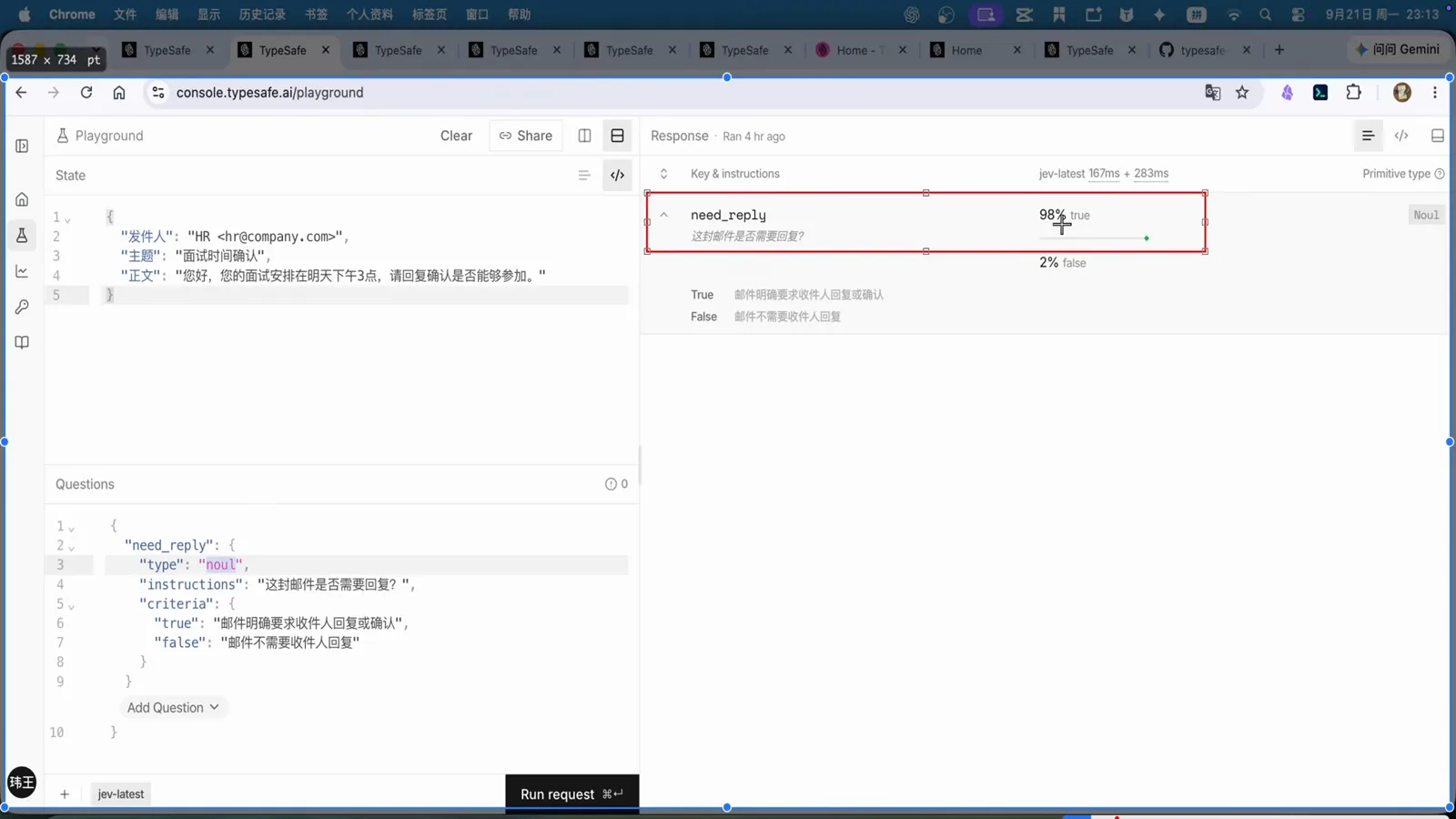
need_reply → true @ 98%: the boolean gate an automation can actually branch on.Watch at 3:25 - 6
Score in action: grading urgency on your own scale
The third primitive attaches a rubric. The creator defines a three-step priority scale and runs it against a cannot-login complaint email ("I keep trying the password and it still fails, please restore my account"). The response panel shows the priority question distributing probability across the three ratings with essentially all of it on the top rating and a 98%+ confidence stamp — exactly the kind of "deal with this now" signal a support queue needs before a human ever looks at it. Score is the primitive to reach for when "how much" matters, not just "which one".
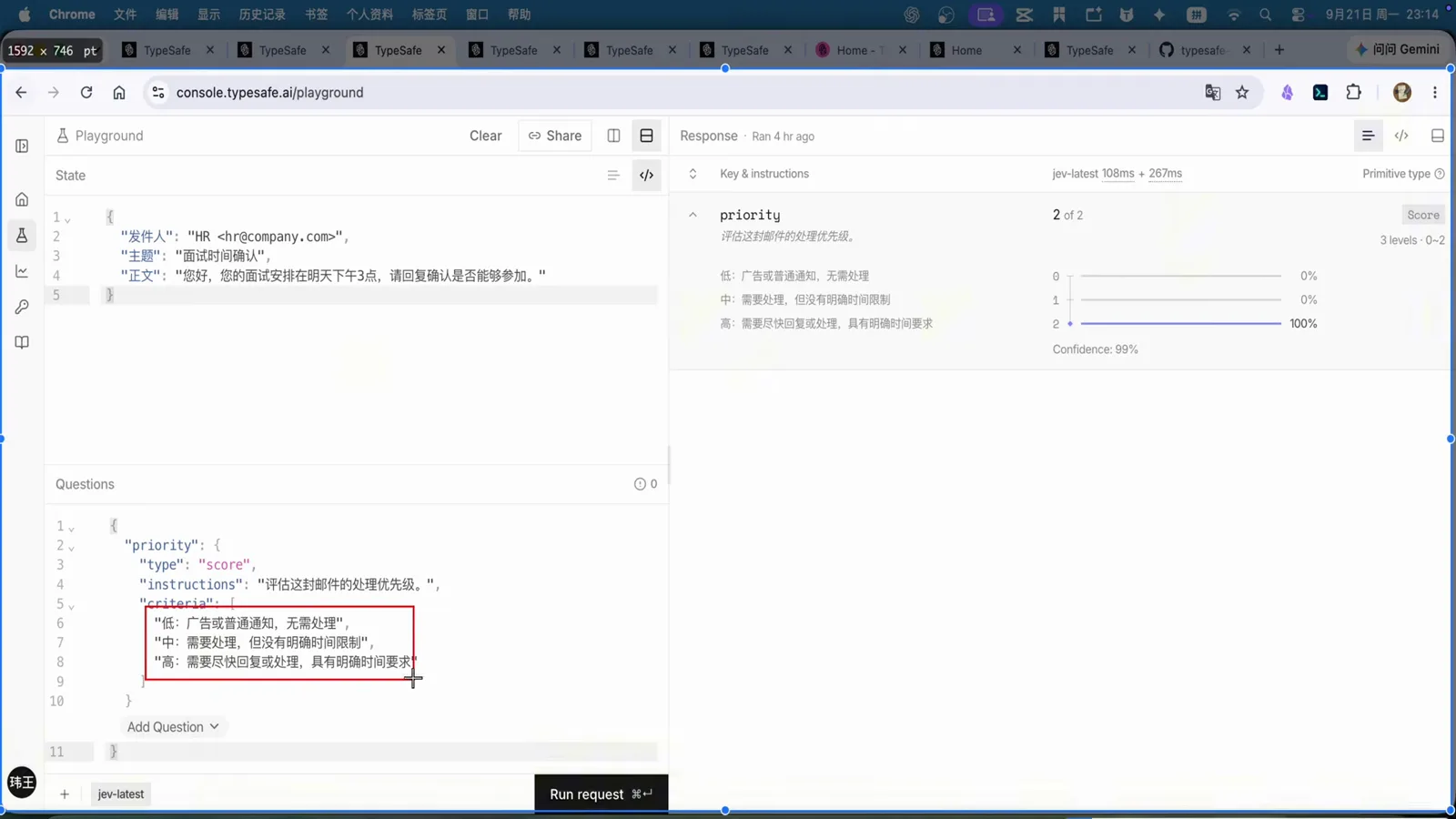
A complaint email scored against a low/medium/high rubric — the probability piles onto the top rating.Watch at 3:34 - 7
All three at once: one chat log, three questions, one response
To prove the primitives compose, the creator pastes a chat history into the state field and asks three differently-typed questions in a single request: is she upset with me (noul), how upset (score), and what does she actually want (choice over intent options). One response panel carries all three answers with their probabilities — very likely upset, feeling ignored, wants attentive listening. The video notes people have already wired this exact pattern into WeChat, and names the business versions that matter more: e-commerce customer service, complaint handling, and first-pass data screening. It also answers the obvious objection — yes, hand-writing JSON is unnatural, because these requests are meant to be emitted by agents, not typed by humans.
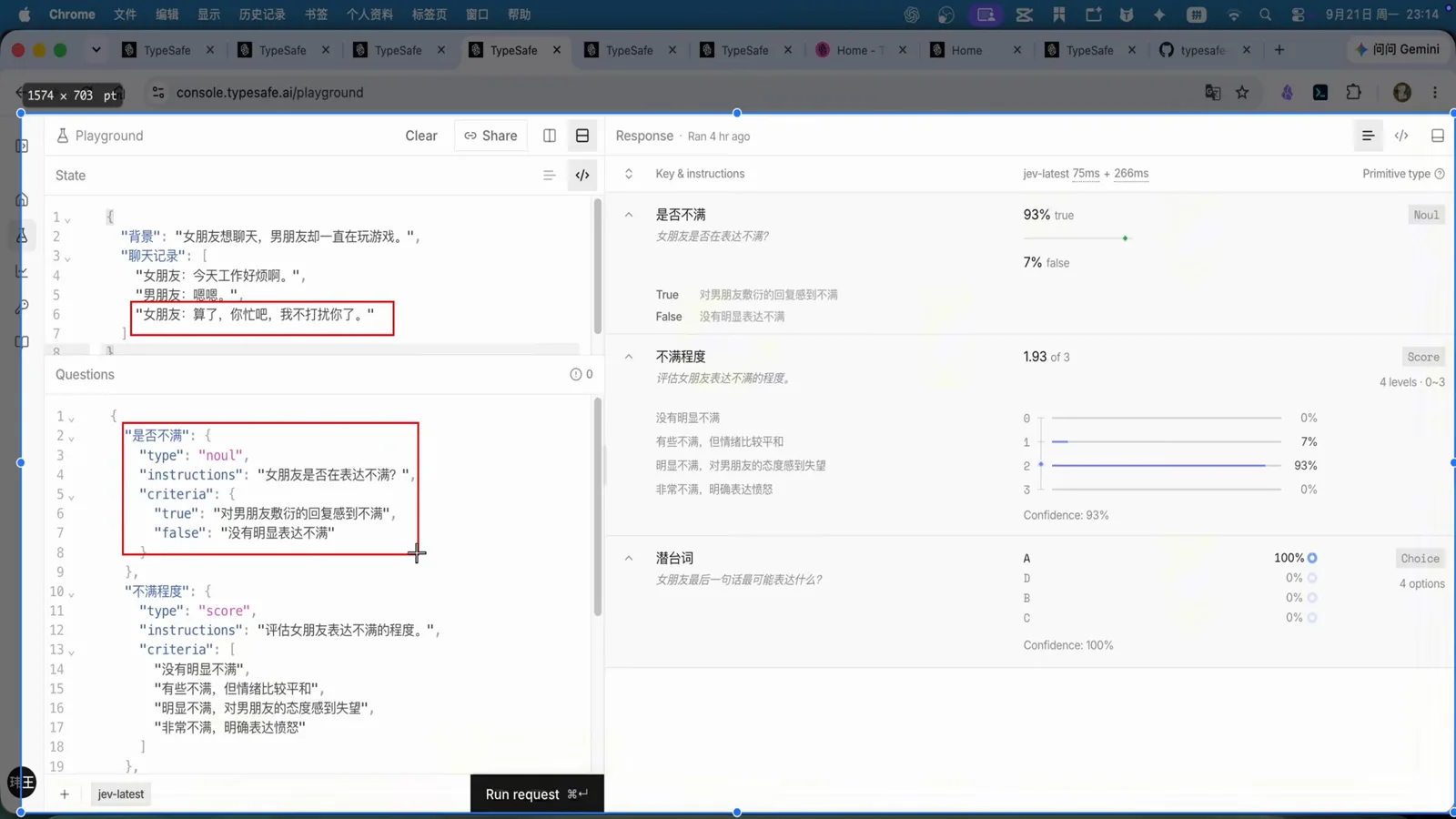
Three question types, one request: upset? (noul), how much (score), what does she want (choice).Watch at 3:52 - 8
Let Codex install the skill itself
The official skill lives at github.com/typesafe-ai/skills, and the installation method the video actually demonstrates is the laziest one that works: paste the repo URL into Codex and ask it to install the skill. Codex clones the repo, detects every compatible agent on the machine, and reports back a completion card: global install finished in 1 minute 32 seconds, covering Codex, Claude Code, OpenCode, Hermes, Gemini CLI, GitHub Copilot, and Antigravity, with everything shared at ~/.agents/skills/typesafe-ai and each tool's entry verified readable. Restart Codex and the skill is live. Prefer doing it by hand? The docs show the equivalent one-liner for any agent: npx skills add typesafe-ai/skills --skill typesafe-ai -g, where -g means user-level rather than project-only.
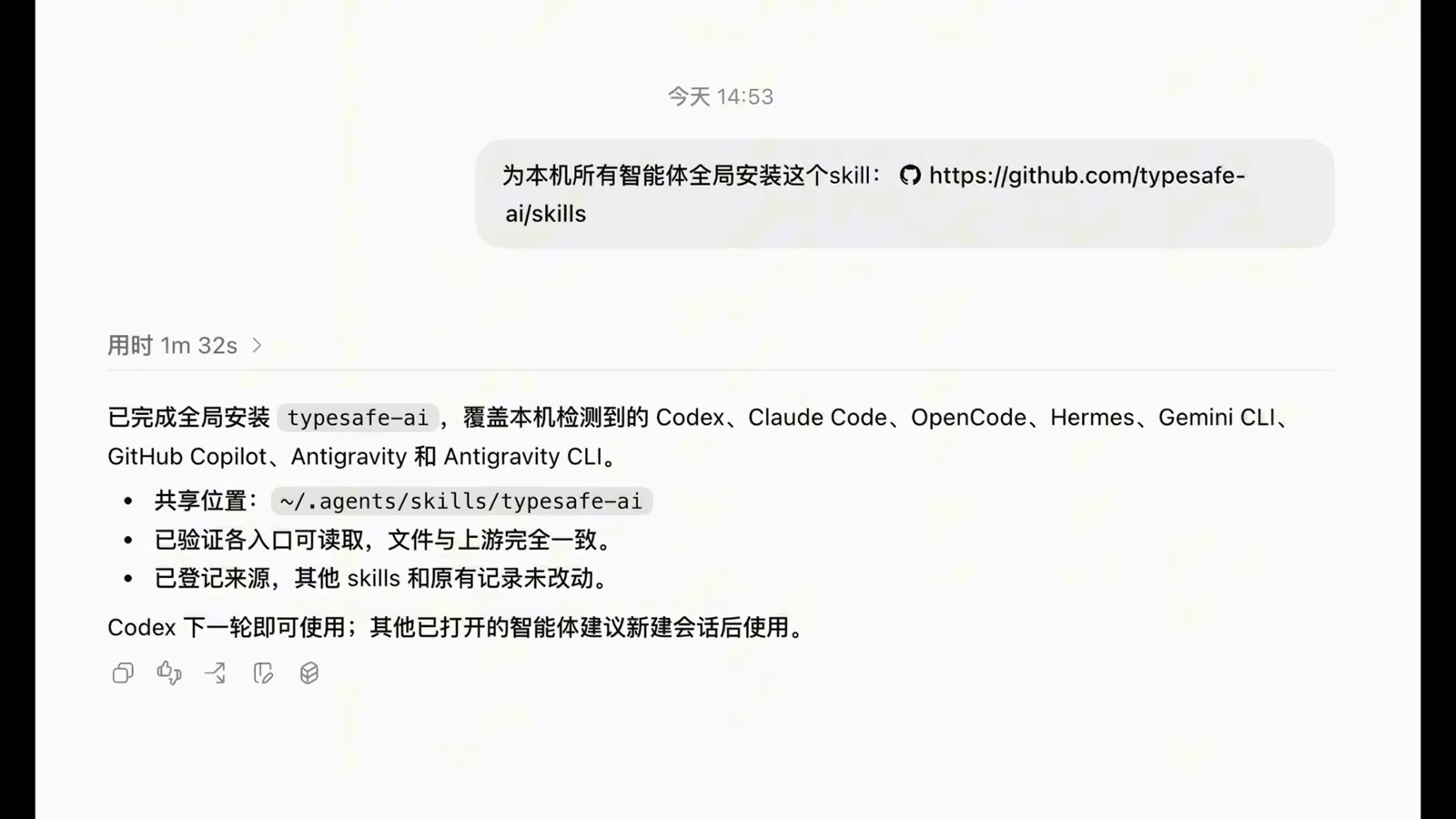
One install, eight agents: the skill registers itself for every compatible CLI it finds and shares one copy at ~/.agents/skills/typesafe-ai.Watch at 4:56 - 9
The part people get wrong: the skill is not the model
The video stops on the misconception before it costs anyone an evening: installing the skill teaches the agent HOW to call Jev — it ships no weights and includes no free quota. Real calls still need a credential, so the agent must find TYPESAFE_API_KEY in its environment. The docs page shown on screen gives the exact recipe: create a key on the API Keys page of the TypeSafe console, then append it to your shell profile with echo 'export TYPESAFE_API_KEY="我的key"' >> ~/.zshrc && source ~/.zshrc. From then on the agent decides on its own when a task needs a decision model — the skill's instructions tell it when to reach for Jev and how to build the evaluate call — and your only job is to keep the key valid. The Jev API is fully open, and OpenRouter works as an alternative channel if you would rather route through a gateway you already use.
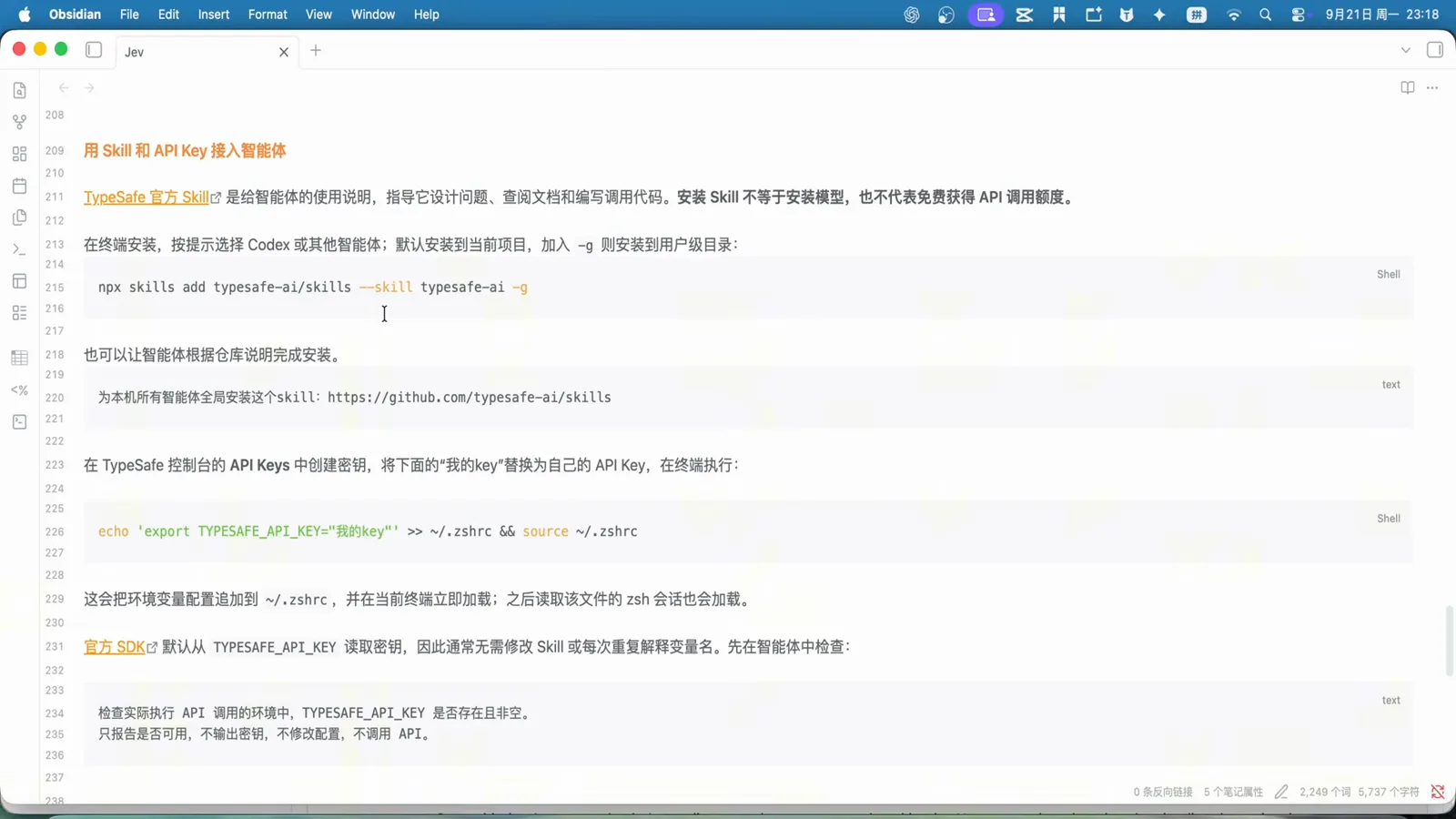
Two commands and you are done: install the skill for your agent, export TYPESAFE_API_KEY in your shell profile.Watch at 5:20 - 10
The payoff: 30 real Gmail messages, priority-sorted
The experiment that justifies the setup: Codex, already connected to Gmail, is asked to use the Jev skill to read the 30 most recent messages, sort them by priority, output a table, and report how long the work took. The inbox is realistically awful — newsletters, notifications, verification codes — and the table reflects it: row after row pinned at the bottom tiers, while one Google security alert is isolated at the top with a 98% score. Nothing was hand-labeled; every row's rating came from the same typed score question the Playground drills demonstrated. This is the "select A or B" workload the opening argued should never reach a long-context chat model.
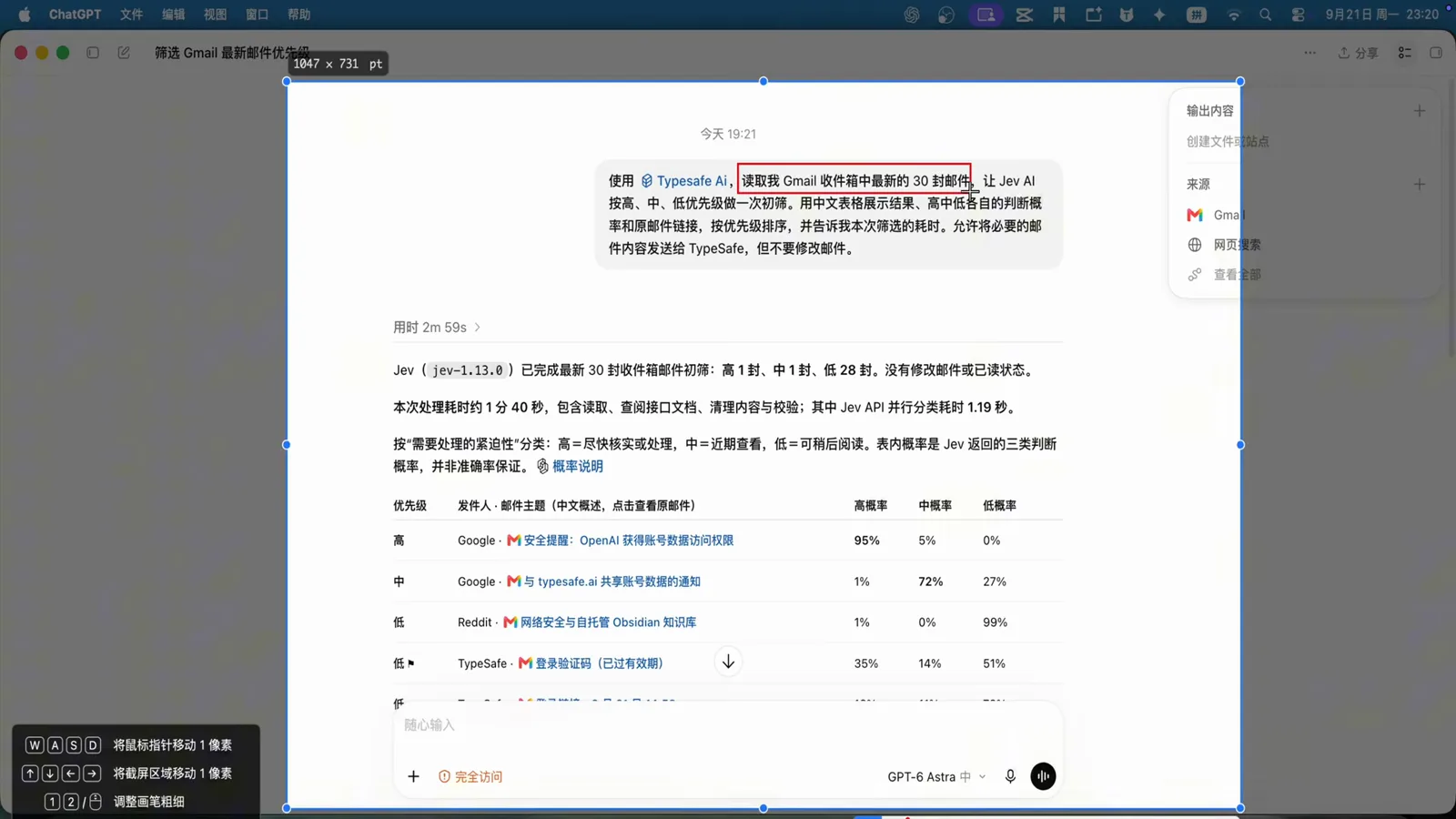
The real inbox run: 30 messages sorted, one security alert isolated at the top with 98%.Watch at 6:02 - 11
The bill: 1.19 seconds of Jev, 100 seconds of agent
The closing card separates the two clocks. The Jev API finished its share — the decision calls across 30 messages — in 1.19 seconds. The whole Codex task took 1 minute 40 seconds, and almost all of that was Codex itself: reading the mailbox, planning, and writing the table. Re-running the same 30 messages directly in the Playground returns answers near-instantly, confirming the model was never the bottleneck. The video's parting argument is the one to remember: attach a fast, cheap decision model to your agent workflow, and A-or-B questions stop costing big-model thinking time — whether that workflow is an AI customer-service line or a daily pass over your own inbox.
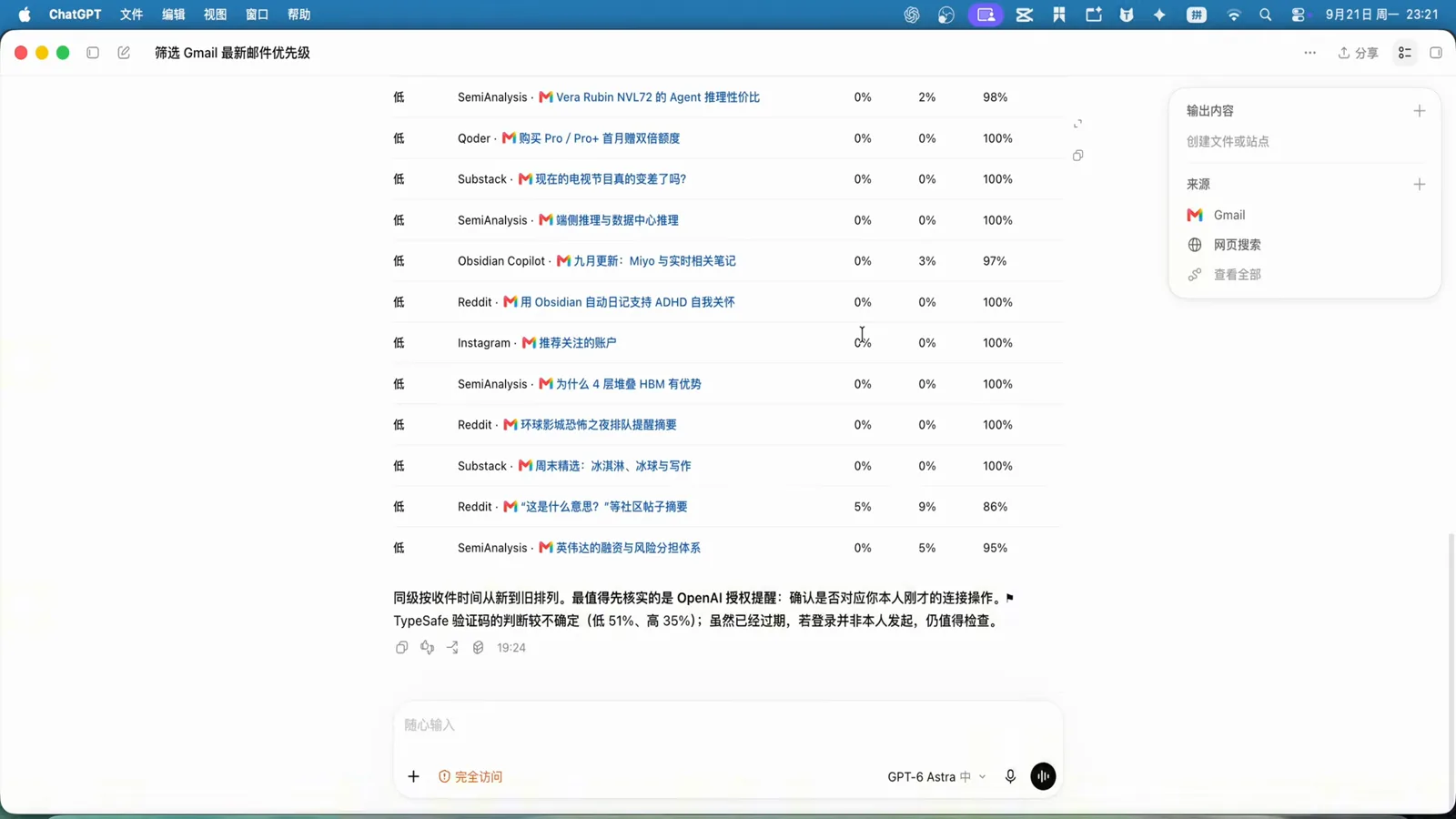
Jev: 1.19s for 30 decisions. The other ~99 seconds belonged to the agent, not the model.Watch at 6:42
Frequently asked questions
What is the Jev Codex skill?
It is the official agent-skill repository at github.com/typesafe-ai/skills: a set of instruction documents that teach a coding agent when a task calls for a typed decision and how to build the Jev evaluate call — which question types to use, how to structure the JSON state, and how to read the confidence numbers back. As the video stresses, it is documentation and tooling, not a bundled model: installing it changes what your agent knows, not what it can compute.
Does installing the skill make Jev free to use?
No — and the video calls this out explicitly. The skill only guides the agent; every real call still authenticates with your TYPESAFE_API_KEY and bills against your account. You create the key on the API Keys page of the TypeSafe API Console and expose it through the environment (echo 'export TYPESAFE_API_KEY="..."' >> ~/.zshrc && source ~/.zshrc). If you would rather not use the first-party endpoint, Jev is also reachable through platforms like OpenRouter.
How do I install the Jev skill for Codex?
Two routes, both shown in the video. The zero-effort route: paste https://github.com/typesafe-ai/skills into Codex and ask it to install the skill — it clones, registers itself for every compatible agent it detects (the video's machine covered Codex, Claude Code, OpenCode, Hermes, Gemini CLI, GitHub Copilot, and Antigravity in 1m32s), and you restart Codex. The manual route for any agent: npx skills add typesafe-ai/skills --skill typesafe-ai -g, where -g installs to the user-level directory (~/.agents/skills/typesafe-ai) instead of the current project.
What is the Gmail triage demo actually doing?
Codex reads the 30 most recent messages of a real inbox, then for each one asks Jev typed questions — what kind of mail is this, does it need a reply, how urgent is it on a low/medium/high scale — and assembles the answers into a priority table. In the video's inbox, newsletters and verification codes pile up in the bottom tiers while a single Google security alert is scored 98% and flagged high priority. The design generalizes to any A-or-B-heavy stream: customer-service tickets, form submissions, data records before analysis.
How fast was Jev in the email triage run?
The Jev API completed its decision calls across all 30 messages in 1.19 seconds. The end-to-end Codex task took 1 minute 40 seconds — nearly all of it the agent's own reading, planning, and table-writing, which is exactly why offloading decisions to a decision model pays. The same 30 messages pasted into the Playground answer near-instantly, confirming the model is never the slow part of this pipeline.
Codex or Claude Code for the Jev skill?
Both work from the same install — the skill registers itself for every compatible agent it detects, and the demo machine ended up covering eight CLIs at once. The division we use on this site: this page is the Codex-side walkthrough with the Gmail workflow, while our Jev + Claude Code guide covers the Claude Code side of the same integration (voice in, Jev decision, browser out). Install once, then use whichever agent is in front of you.
Related guides
Jev + Claude Code: Agent Orchestration Guide
The Claude Code sibling of this walkthrough — voice in, Jev decision, browser out. This page is the Codex side; that one is the Claude Code side.
ReadJev API Reference & Integration Guide
What the skill calls under the hood: endpoints, the evaluate payload, key management, and failure handling for production integrations.
ReadSupport Ticket Routing Recipe
The production-grade version of the inbox demo: typed routing for customer-service queues with confidence-gated escalation to humans.
ReadTev1 Use Cases: 50 Local Decision Model Tests
Fifty more decision shapes you can wire into an agent workflow — routing, guardrails, triage — running locally at $0 per call.
ReadMore video walkthroughs
- Jev Classification Quickstart: OpenRouter API, Primitives & Real Probabilities
- Jev Architecture Explained: Why 70ms Decision Models Beat LLMs for Workflow Automation
- Ultra-Fast Browser Agents with Jev: 178ms DOM Loops & Dual Model Orchestration
- Open Jev Models Are Here: Semif, Nimble, Decider, DiffusionGemma & Laya Hands-On
- Jev vs LLM: Will Jev Replace LLMs? Krish Naik's Whiteboard Explainer
- Jev Trader Tutorial: Build a Subsecond AI Trading Bot on Monad
- Jev Model Router: Build a Privacy-Gated LLM Router with Jev & OpenJev
- Jev Tutorial for Beginners: State, Questions & the TypeScript SDK
- Run Jev Locally: Kev, SemIf & Von on Your Own GPU (OpenJev Guide)
- Jev RAG Reranker: Policy-Steered Reranking for Retrieval-Augmented Generation
- When to Use Jev: An Engineer's Audit of Claims, Gates, and Failure Modes
- LangChain + Jev Integration Tutorial: Routing, Guardrails & Evals
- Jev MCP Server: Connect Jev Decisions to Claude Code & Cursor
- Jev vs Luna: Independent Benchmarks Put "Better, Faster, Cheaper" to the Test
- Jev Agent Harness: Where the Decision Gate Sits in Your LLM Loop
- Jev Playground Walkthrough: The Hotdog Lesson, Criteria, and a Four-Console Token Test
- Jev Text Classification API: Zero-Shot CLI & REST with classifier.dev
- Jev API Examples: First Request, curl & All Three Question Types
- Jev Log Triage with Expanso Edge
- Jev Lead Enrichment with Treg: ICP and Signup Scoring
- Use Jev Decision Nodes in Heym for Model Routing
- Laya Tutorial: Open-Source AI Routing With Calibrated Probabilities (Laya vs Jev Setup)
- Train Your Own Jev: Fine-Tune a Jev-Style Decision Model for $5–$17 (What You Can and Cannot Train)
- Jev Tips: 8 Best Practices for Better Decisions (State, Questions, Criteria & Thresholds)
- Jev Context Compaction: Prune AI Agent Memory Without Generative Summaries
- Jev as an LLM Judge: Confidence-Gated Cascades at 0.36% of the Cost
- TypeSafe Computer Use: Local Desktop Automation with Jev, Step by Step
- Jev Resume Screening: Build an AI Resume Evaluator with the Jev JavaScript SDK
- Jev + Claude Code Guide: Voice-Controlled Browser Automation with Typed Decisions
- Jev vs Ollama: Can Local AI Replace Hosted Jev Without Sending Your Data Away?
- Build Your Own Jev: Train a Free Open-Source Zero-Shot Classifier (That Plays Doom)
- CUA-S1-Forms: a 706K-Parameter Jev-Like Model That Fills GUI Forms on Your CPU
- NOC/SOC Alert Triage with Jev: Rules First, One Typed Question, a Policy Gate
- Ollama Decision Models: Run tev1 and Nimble Locally (Tested on an 8 GB Card)
- Jev Guardrails in Production: A Five-Step Playbook for Decision Automation
- A Session Drift Guard for Pi Agent: Let the Jev Model Propose, Let Code Decide
- 50 Tev1 Use Cases: What a Local Decision Model Can Actually Do (Tested on an 8 GB Laptop)
- Jev, Hands-On: Where the Official Claims Meet Independent Remeasurement
- Jev Ticket Classification in a Real App: the After-Insert Hook and the Calculated Field
- OpenJev RLCD: Run the Open-Source Calibrated Decision Model Locally (Full Guide)
- Clef-Flash vs Jev: I Tested Cloudflare's Decision Model Locally in Ollama (Q4_K_M)