
Guides / illustrated walkthrough
50 Tev1 Use Cases: What a Local Decision Model Can Actually Do (Tested on an 8 GB Laptop)
A catalog run of 50 tasks on tev1 through Ollama 0.35 — support-ticket and model routers, moderation and PII guardrails, log triage at 97 ms, resume checks, and game-playing agents — with per-task hit counts and latency from an RTX 4060 8 GB laptop at $0 per request.
Quick takeaway
This is the use-case catalog for local decision models: fifty tasks run on tev1 (Together AI) through Ollama 0.35, on a laptop with an 8 GB RTX 4060, at $0 per request. Across the 44 text tests, the 0.8B model (812 MB) scored about 73% at 190 ms average while the 4B (4.5 GB) reached 91% at 360 ms — and the wins are concrete: support-ticket routing at 7/8 in ~290 ms with three questions answered in parallel, moderation at 6/8 in ~240 ms, log triage at 8/8 in 97 ms, phishing detection at 6/6 in ~200 ms with data that never leaves the machine. The video is equally honest about the edges: the shell-command risk gate scored 5/8 ("I would not trust it on that alone"), a meeting-priority filter went 2/6 and was kept in deliberately to show where the model fails, and "bigger" sometimes hurt — the 4B did worse than the 0.8B at checking whether commit messages match their content. Where accuracy matters (smart-home intents, language ID, sentiment, credential/PII detection), stepping up from 0.8B to 4B was the difference between failing and perfect scores. Final line of the video: 50 decisions, $0.00.
Video source
Prompt Engineer 48
Step-by-step walkthrough
- 1
The opening claim: 50 tasks, one 8 GB laptop, $0 per call
The title card states the whole experiment before anything runs: TEV1 LAB, 50 use cases, "one tiny decision model, running on my laptop" — with the hardware and cost printed as spec chips: 0.8B at 812 MB, 4B at 4.5 GB, an RTX 4060 with 8 GB of VRAM, and $0.00 per call. Tev1 is a decision-making model from Together AI: you give it text plus a few typed questions — a choice between options, a yes-or-no, or a rating — and it returns each answer together with a probability. Through Ollama 0.35 it lives at the /v1/systemone endpoint in two sizes, 0.8B and 4B. Fifty demos later, the cost counter never moves off zero.
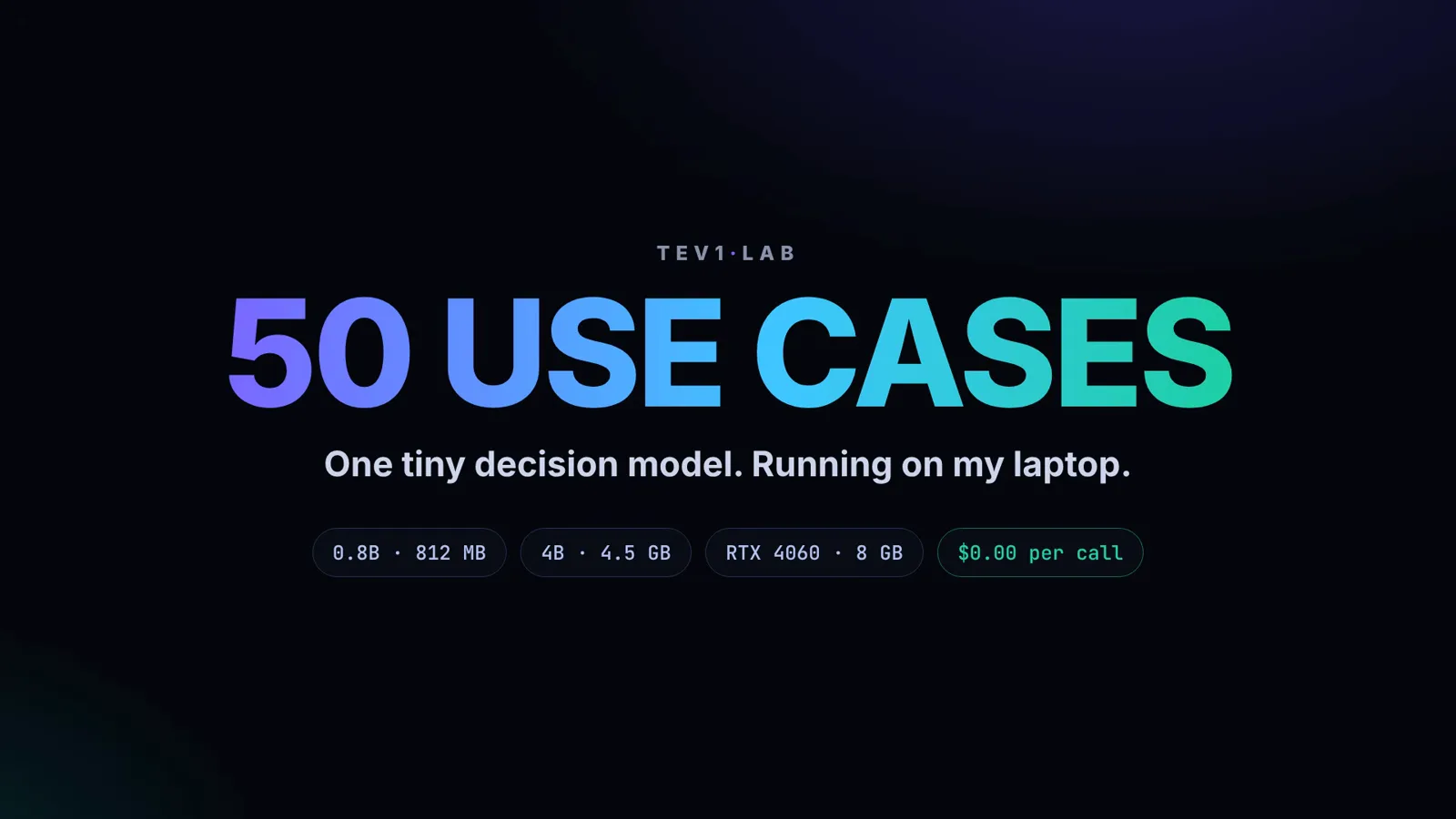
The whole experiment in one card: 0.8B or 4B, an 8 GB card, $0.00 per call.Watch at 0:06 - 2
State in, typed answer out: the request shape behind all 50
Every one of the fifty demos sends the same shape, shown on screen before the catalog starts: a POST to /v1/systemone with model "tev1", a state ("I was charged twice, please refund"), and a questions object mixing all three types — team as a choice between billing, tech, and sales; refund as a yes-or-no; urgency as a score from 0 to 3. One request evaluates all three in parallel and returns team billing 0.99, refund yes 0.97, urgency 1.2 out of 3. Nothing is generated — the answers and their probabilities come back in a single pass, which is why every demo in this video resolves in a split second.
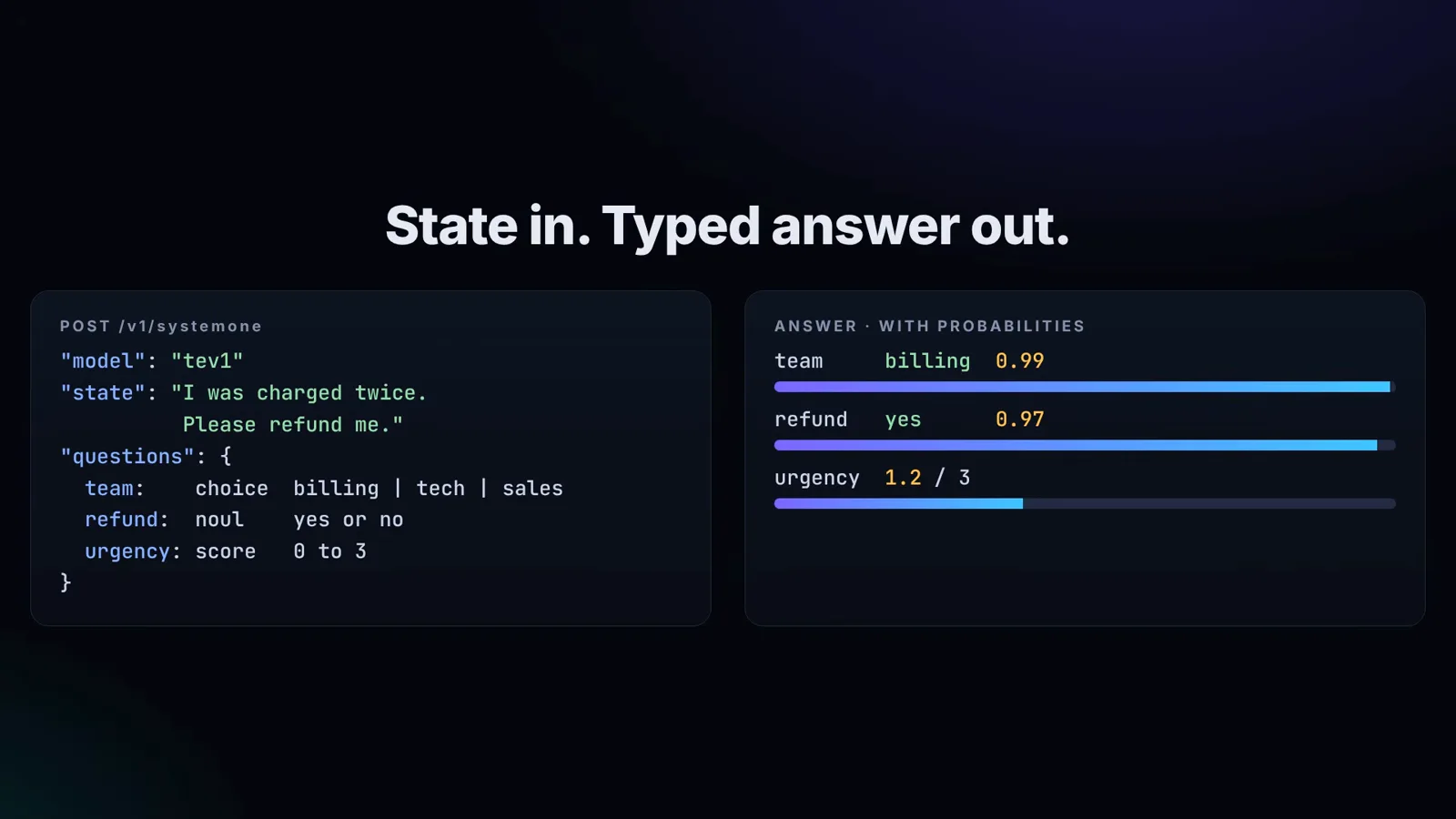
One state, three typed questions, three answers with probabilities — billing 0.99, yes 0.97, urgency 1.2/3.Watch at 0:24 - 3
Routing: five dispatchers that read intent, not keywords
The catalog opens with routing, the canonical decision-model job. Support tickets are routed to billing, technical, accounts, or sales while two more questions check for a refund request and score urgency — the small model took 7 of 8 at about 290 ms with all three answers per ticket in one call. An incoming-mail sorter files letters as for-action, information, promotional, or checks: 6/8 at ~225 ms. As an LLM router it picks small, medium, or large per request — 6/8, and the frame worth pausing on, because saving the big model for genuinely hard questions is the whole economics pitch. Choosing an agent skill (web search, calendar, code, email) hit 7/8 at ~90 ms, and an IT helpdesk router (hardware, network, software, access) scored 7/8 at ~210 ms. Sales lead qualification with yes/no questions about budget and intent went a perfect 6/6.
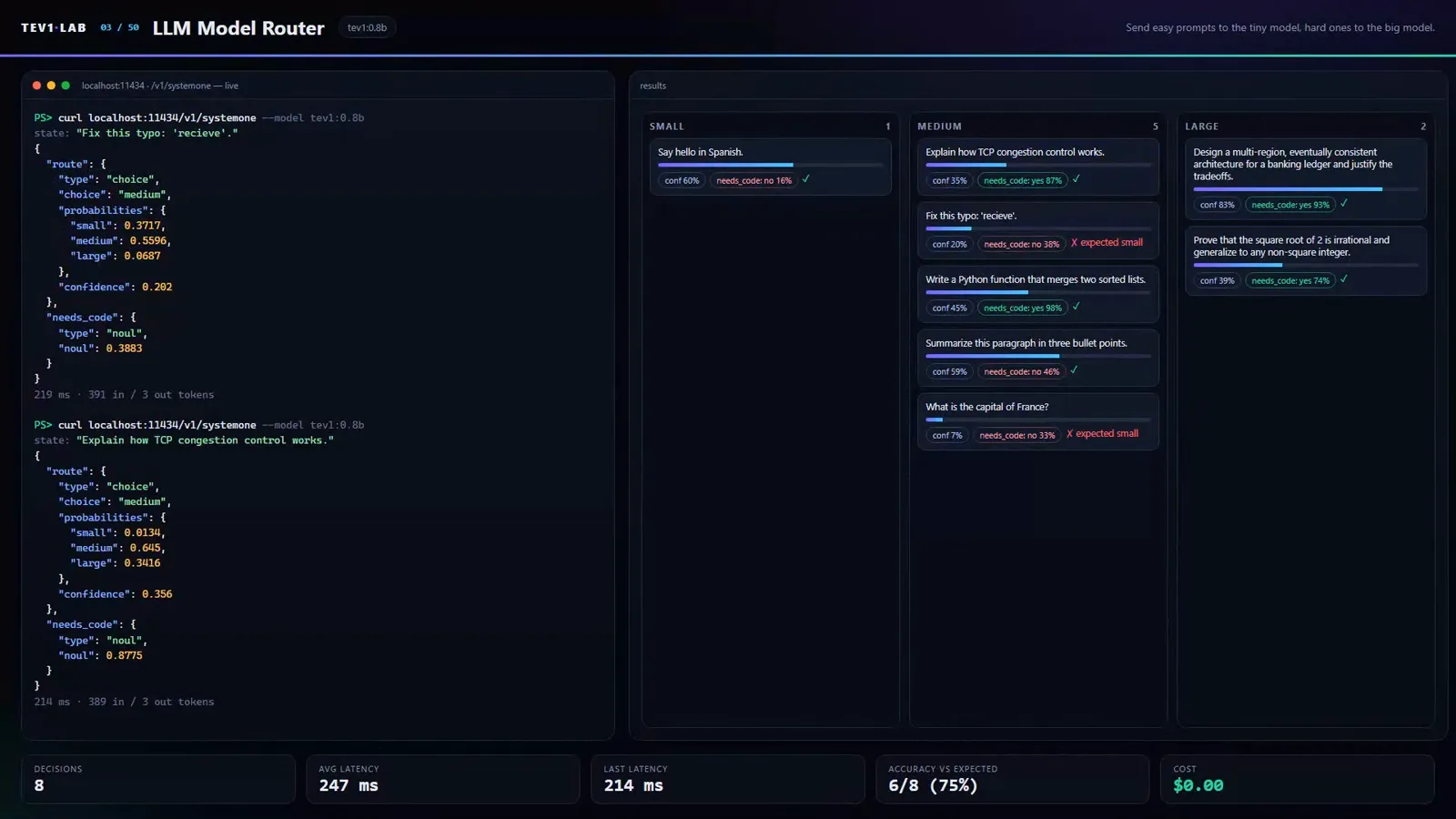
Model router: 6/8 at ~250 ms — route cheap questions to small models before they ever reach a big one.Watch at 1:12 - 4
Smart home and voice: where 0.8B fails and 4B is mandatory
The clearest size lesson in the video. "It's so dark in here" contains no command vocabulary at all, yet the model must map it to turn-on-the-lights — the 0.8B managed only 3 of 8 phrases, so the creator switched to the 4B, which went 8 for 8 on the same card. Voice commands (play, pause, next track, volume up) scored 5/8 on the small model, but each answer came back in under 80 milliseconds — fast enough to sit inside a voice-assistant loop where every word triggers a decision. This is the group that justifies keeping both model sizes installed: 812 MB when latency and memory dominate, 4.5 GB when the mapping is fuzzy.
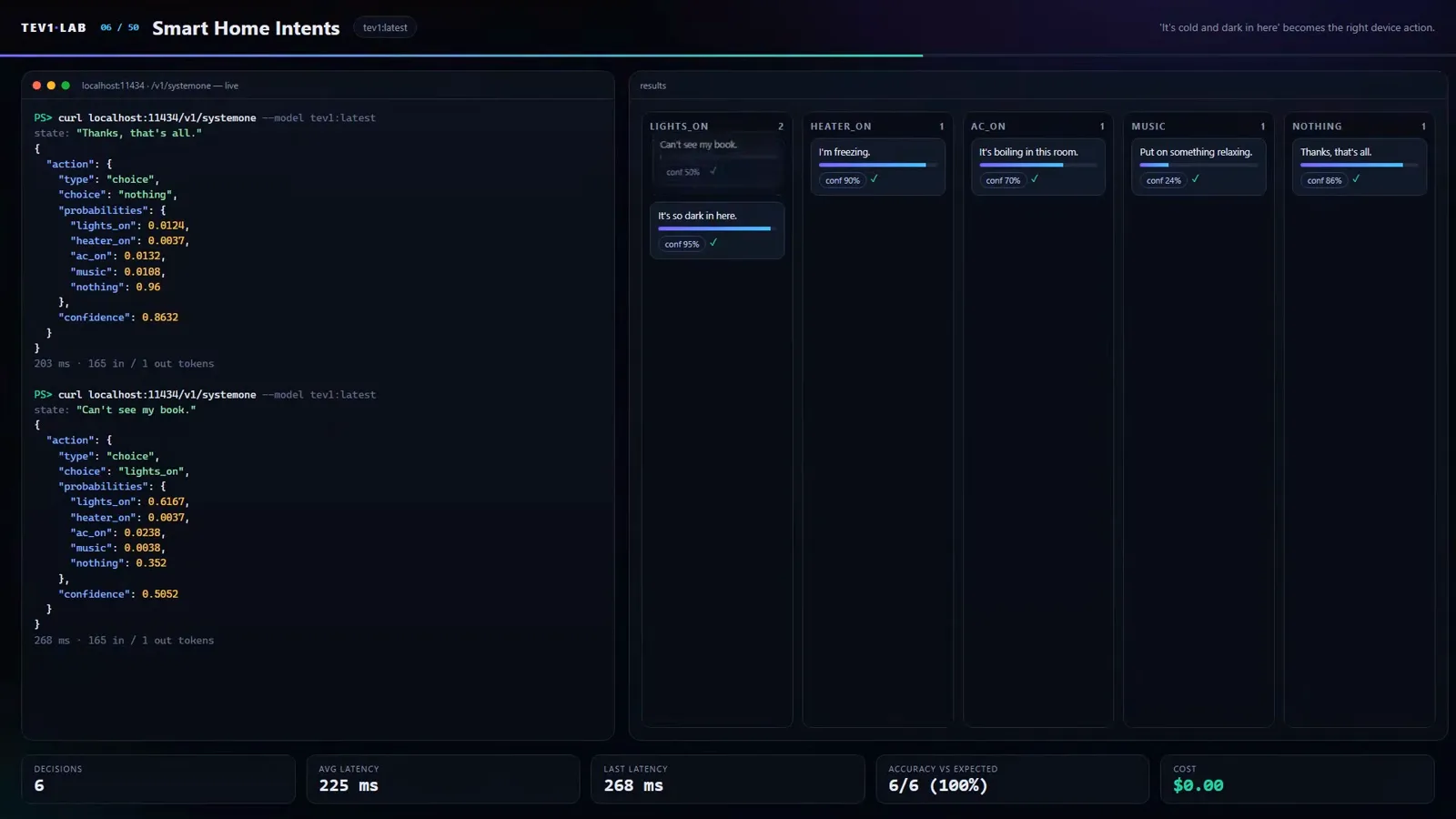
"It's so dark in here" → lights on: 0.8B went 3/8, the 4B ran the table at 8/8.Watch at 1:34 - 5
Guardrails: moderation, injection checks, credential and PII leaks
The security block is where local inference stops being a cost trick and becomes a privacy feature. Content moderation labels comments okay, spam, insult, or threat plus a toxicity score: 6/8 at ~240 ms. A prompt-injection check — is there a hidden instruction trying to control the AI? — scored 5/6, and because it runs locally, nothing leaves your machine. Credential-leak detection and PII detection both show the size split: 3/6 on 0.8B, a clean 6/6 on 4B (PII at ~500 ms). Phishing verification went 6/6 in ~200 ms, which the narrator calls very good for a model under a gigabyte. Two honest caveats: the shell-command risk gate that screens commands before an agent executes them scored 5/8 — "I would not trust it on that alone" — and the output-protection barrier assigning skip, check, or block to model responses took 5/6.
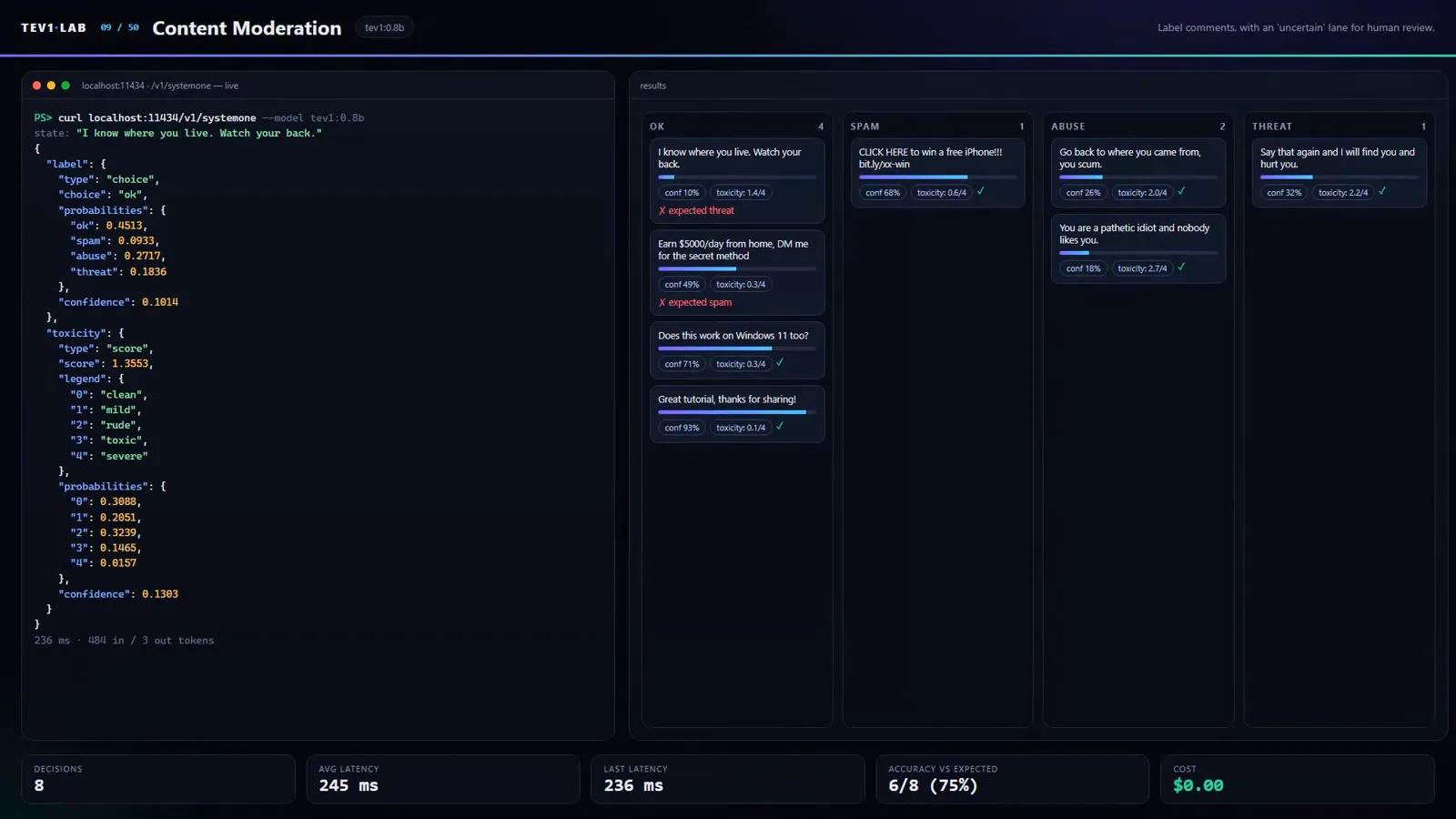
Moderation at 6/8 (~240 ms) — one forward pass returns the label and the toxicity number.Watch at 2:06 - 6
Text analysis: four questions about one review in a single query
Sentiment analysis shows the multi-question pattern at its densest: one review, one request, four questions about quality, price, and support, all answered together — 0.8B got 3/5, the 4B went 5/5, taking about 780 ms because of the four-question batch. Language identification had the biggest size gap in the whole video: 2/8 on the small model, 8/8 on 4B. News classification by topic was the inverse — a perfect 8/8 on 0.8B at ~100 ms. Resume screening against criteria like "3 years of Python experience" passed 6/6 at ~240 ms, clickbait detection took 6/8, tone-and-politeness checks 5/6, and emotion tagging (joy, anger, sadness, fear) 5/6 at ~100 ms. One tie worth noting: breaking-news push-notification priority scored 4/6 on both sizes — the larger model did not help at all.
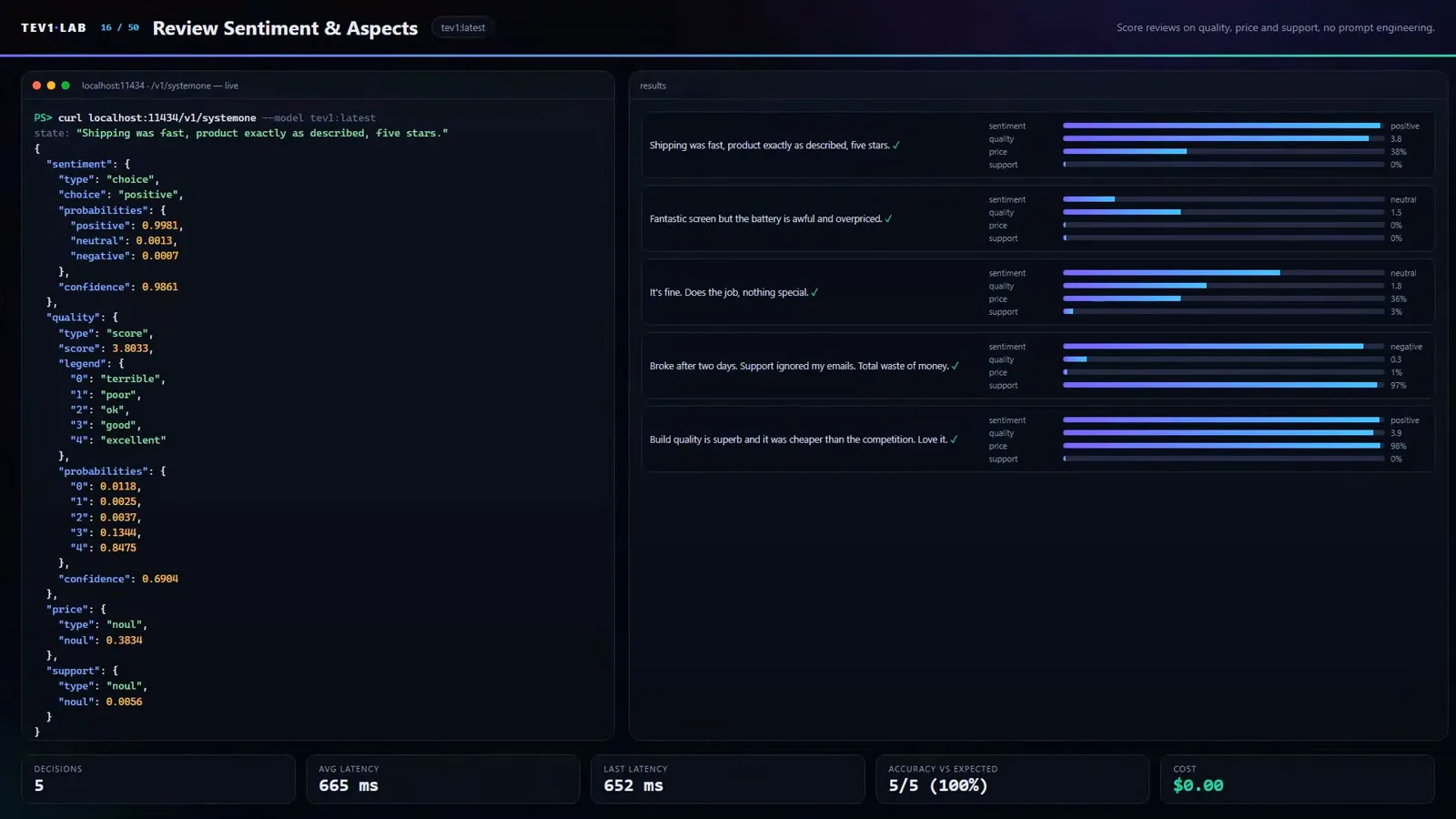
One review, four questions, one request — the 4B cleared it 5/5 at ~780 ms.Watch at 3:06 - 7
Retrieval and logs: the fastest decision of the entire run
The speed record lands here. Sorting log lines into noise, warning, or error hit 8/8 at 97 milliseconds per decision — the narrator's point being you can scan enormous log volume for free, and the frame shows the 0.8B labeling "FATAL: out of memory, killing worker 3" as error at 0.97 confidence. Search reranking (does this snippet answer "how to reset router settings"?) went 6/6; semantic code search — does this code retry a network request on error, matched by meaning rather than keywords — took 5/6. Scientific-paper screening against an abstract like "small language models on local hardware" jumped from 2/6 to 6/6 after the switch to 4B. Duplicate bug-report detection improved 3/6 → 5/6, and automatic tagging of notes and bookmarks scored a clean 8/8 at ~118 ms.
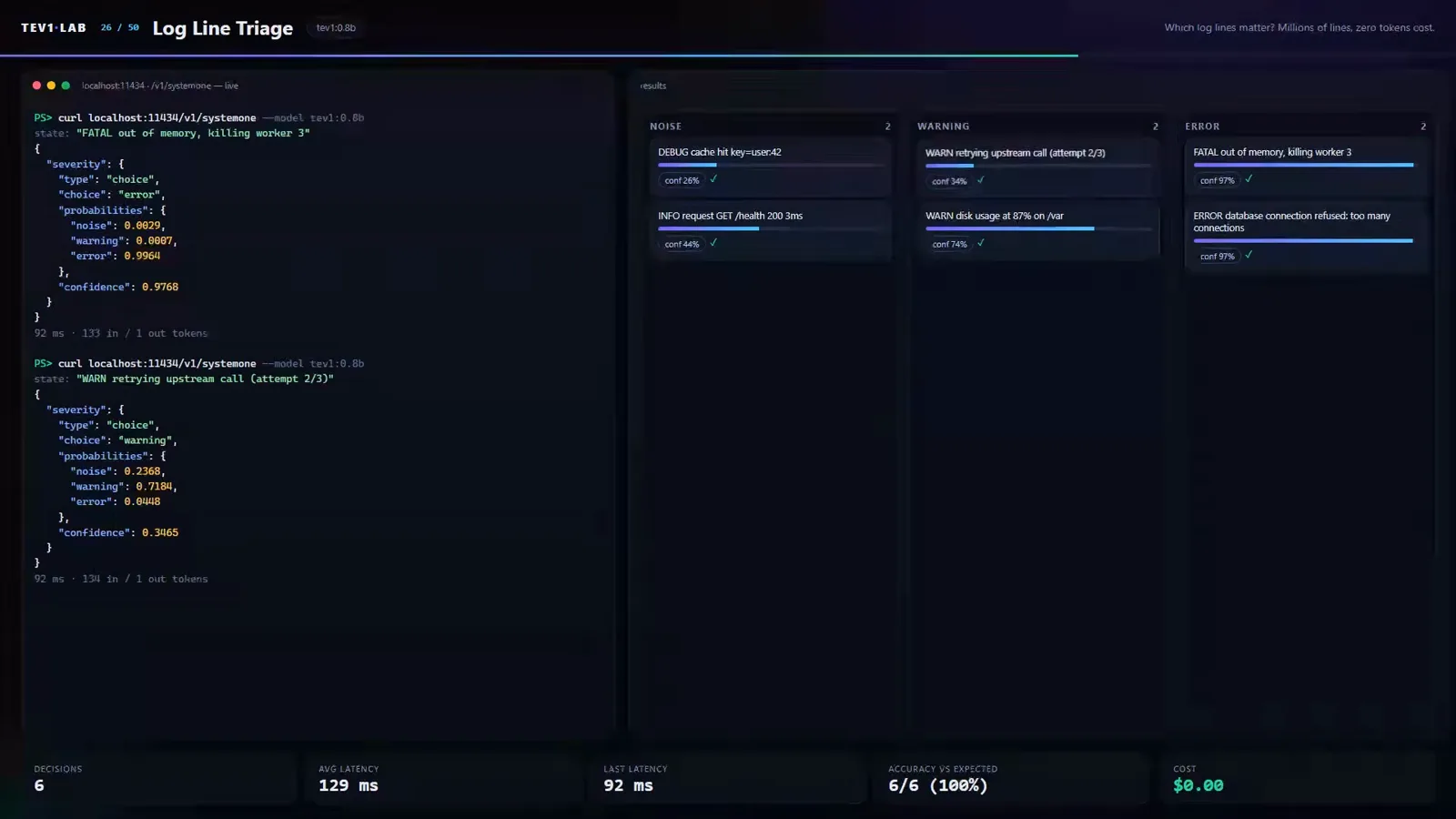
8/8 at 97 ms per line on the 0.8B — log triage is the cheapest useful decision in the video.Watch at 4:31 - 8
Games and agent governance: one typed decision per move
The most visual section turns the model into a game loop where every move is a single decision. Tic-tac-toe shows the probabilities for every cell on the left panel while playing as X against a random player — the scoreboard reads 10 wins, 0 losses. Snake gets a brief state report (where the food is, which directions are deadly) and picks a direction; a Pac-Man-style maze dodges two ghosts; Pong chooses up, stand, or down each step; the dinosaur runner picks run, jump, or crouch; and a highway racer — like Ollama's own demo — steers left, straight, or right, crashing sometimes but always keeping moving. The agent-governance tests are deliberately sober: picking which numbered element a browser agent should click scored 3/4 (the 4B managed only 2/4 — a tiny sample, treat with skepticism), did-the-agent-finish checked 4/6 on both sizes, loop detection 4/6, context compression just 3/6 ("I won't pretend that it works well"), and tool-call approval 4/6 on 4B — "not bad, but I would not rely on it."
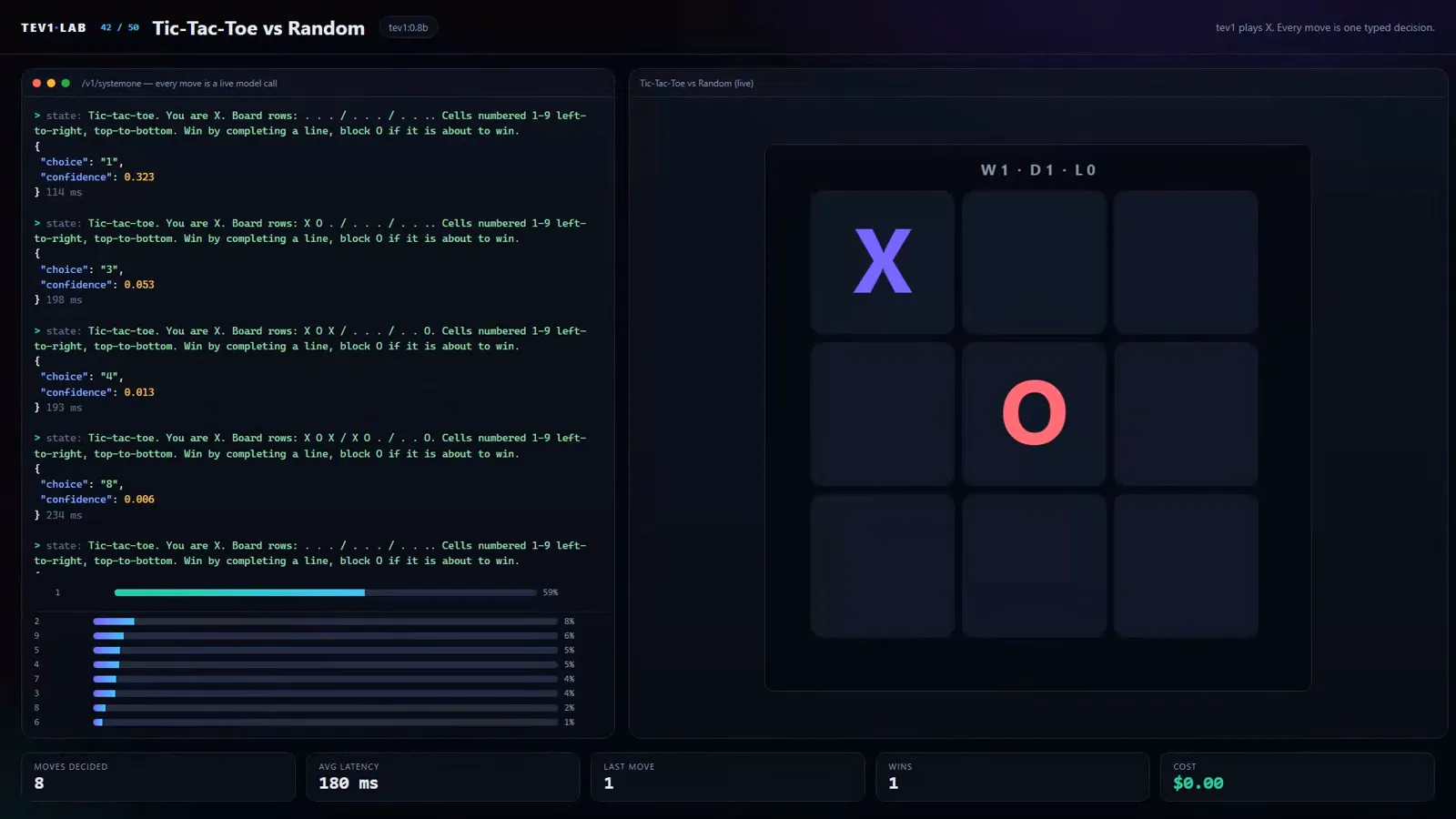
Every cell a probability, every move a decision: X vs a random player, 10–0.Watch at 6:45 - 9
The scoreboard: 44 text tests, 73% vs 91%, zero dollars
The final scoreboard freezes all fifty cards on one screen — routers, guardrails, text analysis, retrieval, agent governance, and the games — with the totals in the header: across 44 text tests the 0.8B scored about 73% at 190 ms average, the 4B scored 91% at 360 ms, total cost $0.00. The video closes on a card reading "50 decisions. $0.00 — tev1 by Together AI, running through Ollama." Three takeaways travel well beyond this run. First, the 4B upgrade is decisive exactly where intent is fuzzy (smart home, language ID, sentiment, credential and PII detection, paper screening). Second, bigger is not always better — the 4B actually lost to the 0.8B at checking whether commit messages match their content (3/6 vs 4/6), and tied it at 4/6 on breaking-news priority. Third, the failures stay on screen on purpose: a meeting-priority filter at 2/6 is kept in "because it shows where the model goes wrong" — the right instinct before you wire any of this into production.
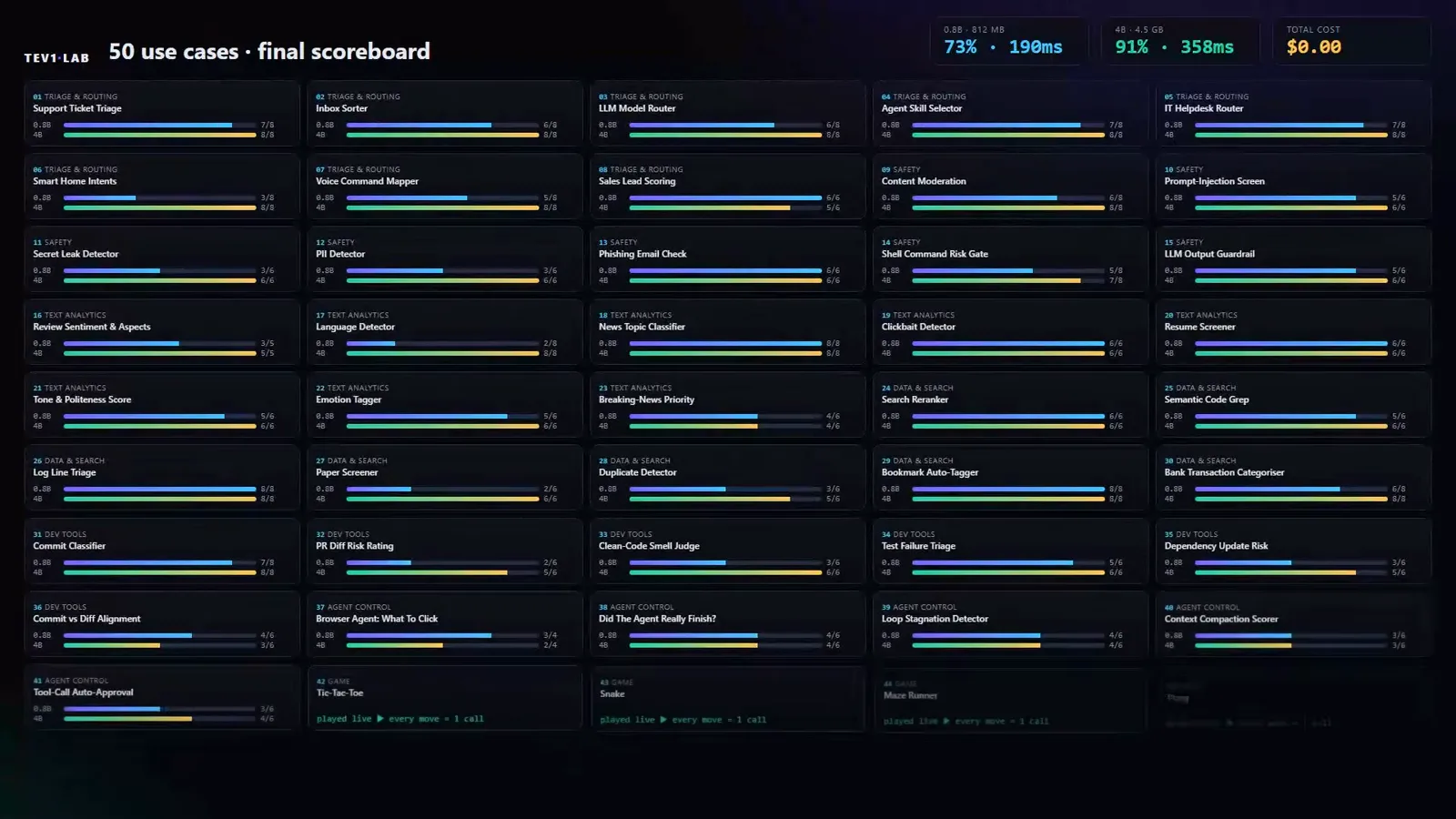
All 50 on one screen: 0.8B 73% @ 190 ms, 4B 91% @ ~360 ms, $0.00 total.Watch at 9:05
Frequently asked questions
What is Tev1?
Tev1 is a decision-making model from Together AI designed for typed decisions rather than text generation. You send a piece of text (the state) plus typed questions — a choice between named options, a yes-or-no, or a numeric rating — and it returns each answer with a probability in a single pass. Through Ollama 0.35 it runs locally at the /v1/systemone endpoint in two sizes: 0.8B (812 MB) and 4B (4.5 GB). The video above runs it through 50 real tasks; our Ollama decision models guide covers the install, the request shape, and a head-to-head benchmark.
Is Tev1 free to use?
Running it locally through Ollama, yes — every request in the video cost $0, and the full 50-use-case run finished at a total of $0.00. Your only costs are the hardware (an 8 GB VRAM card is enough for the 4B) and electricity. That is the local route's whole pitch against hosted decision APIs: no per-call bill, no API key, and no data leaving the machine — which is exactly what makes the video's credential-leak, PII, and prompt-injection demos practical for sensitive data.
Tev1 vs Nimble: which local decision model should I pick?
This video only tests tev1, but our companion guide benchmarks both on the same channel's setup. There, tev1 4B scored 100% on 30-ticket team routing at 470 ms while fitting entirely in 4.7 GB of VRAM, while Nimble 9B (Bespoke Labs) reached 96.7% but took about 1.5 s per call because a ~10 GB footprint spills roughly 40% of compute onto the CPU of an 8 GB card. Practical read for consumer hardware: tev1 is the default pick on 8 GB cards; Nimble only becomes interesting with 12 GB or more.
What can you build with Ollama decision models like tev1?
The 50-use-case catalog groups into five families. Routers: support tickets (7/8, ~290 ms), mail sorting, LLM model selection, agent skill choice (7/8, ~90 ms), IT helpdesk. Guardrails: comment moderation (6/8, ~240 ms), prompt-injection checks (5/6), credential/PII detection (6/6 on 4B), phishing detection (6/6, ~200 ms), shell-command risk gates (5/8 — too weak to trust alone). Text analysis: review sentiment, language ID (8/8 on 4B), news classification (8/8, ~100 ms), resume screening (6/6, ~240 ms). Retrieval: search reranking (6/6), log triage (8/8, 97 ms), note tagging (8/8). And agent/game loops: tool-call approval, loop detection, and one-decision-per-move games from tic-tac-toe to a highway racer.
How fast is Tev1 on local hardware?
Averages from the 44-test scoreboard: 190 ms per decision on the 0.8B and 360 ms on the 4B — both through an RTX 4060 laptop GPU. Individual tasks ranged widely: voice commands answered in under 80 ms, log-line triage at 97 ms, news classification at ~100 ms, and agent skill selection at ~90 ms on the fast end; multi-question batches are slower, with four-question review sentiment at ~780 ms and PII detection at ~500 ms on the 4B. Even the slowest task stays well inside the range where a decision can sit on a hot path — the games section fires one per move.
When should you use a local decision model — and when not?
Use one when the answer space is predefined and privacy or cost matters: the video's security demos (prompt-injection checks, credential and PII detection, banking-transaction classification) are only comfortable locally because nothing leaves the machine, and at $0 per call you can afford to run decisions on high-volume data like logs. Be skeptical where the video itself is: a 5/8 shell-command risk gate is not safe to auto-execute on, the 4/6 tool-call approval "should not be relied on," context compression scored 3/6 on both sizes, and a meeting-priority filter failed at 2/6 — kept in the video deliberately to show the failure modes. And check the size trade per task: 0.8B where latency and memory dominate, 4B where fuzzy intent (smart home, language ID) demands it — remembering the 4B still lost to the 0.8B on commit-message checks. Validate on your own labeled data before automating anything.
Related guides
Ollama Decision Models: Install tev1 and Benchmark It
The setup-and-benchmarks companion to this page: pulling tev1 and Nimble, learning the /v1/systemone request shape, and a 30-ticket head-to-head against a JSON-forced chat model. This page is the use-case breadth axis; that one is the install-and-measure axis.
ReadWhen to Use Jev: a Decision Framework
The selection logic behind the catalog: which of these 50 shapes belong on typed decisions, and which should stay in ordinary code.
ReadExpense Categorization Recipe
One of the video's routing shapes landed in a product: a working expense-categorization pipeline you can copy, from state design to threshold handling.
ReadJev vs Ollama: Local vs Cloud Typed Decisions
This video runs everything locally at $0 per call — the framework for when that beats the hosted API on accuracy, latency, and privacy.
ReadMore video walkthroughs
- Jev Classification Quickstart: OpenRouter API, Primitives & Real Probabilities
- Jev Architecture Explained: Why 70ms Decision Models Beat LLMs for Workflow Automation
- Ultra-Fast Browser Agents with Jev: 178ms DOM Loops & Dual Model Orchestration
- Open Jev Models Are Here: Semif, Nimble, Decider, DiffusionGemma & Laya Hands-On
- Jev vs LLM: Will Jev Replace LLMs? Krish Naik's Whiteboard Explainer
- Jev Trader Tutorial: Build a Subsecond AI Trading Bot on Monad
- Jev Model Router: Build a Privacy-Gated LLM Router with Jev & OpenJev
- Jev Tutorial for Beginners: State, Questions & the TypeScript SDK
- Run Jev Locally: Kev, SemIf & Von on Your Own GPU (OpenJev Guide)
- Jev RAG Reranker: Policy-Steered Reranking for Retrieval-Augmented Generation
- When to Use Jev: An Engineer's Audit of Claims, Gates, and Failure Modes
- LangChain + Jev Integration Tutorial: Routing, Guardrails & Evals
- Jev MCP Server: Connect Jev Decisions to Claude Code & Cursor
- Jev vs Luna: Independent Benchmarks Put "Better, Faster, Cheaper" to the Test
- Jev Agent Harness: Where the Decision Gate Sits in Your LLM Loop
- Jev Playground Walkthrough: The Hotdog Lesson, Criteria, and a Four-Console Token Test
- Jev Text Classification API: Zero-Shot CLI & REST with classifier.dev
- Jev API Examples: First Request, curl & All Three Question Types
- Jev Log Triage with Expanso Edge
- Jev Lead Enrichment with Treg: ICP and Signup Scoring
- Use Jev Decision Nodes in Heym for Model Routing
- Laya Tutorial: Open-Source AI Routing With Calibrated Probabilities (Laya vs Jev Setup)
- Train Your Own Jev: Fine-Tune a Jev-Style Decision Model for $5–$17 (What You Can and Cannot Train)
- Jev Tips: 8 Best Practices for Better Decisions (State, Questions, Criteria & Thresholds)
- Jev Context Compaction: Prune AI Agent Memory Without Generative Summaries
- Jev as an LLM Judge: Confidence-Gated Cascades at 0.36% of the Cost
- TypeSafe Computer Use: Local Desktop Automation with Jev, Step by Step
- Jev Resume Screening: Build an AI Resume Evaluator with the Jev JavaScript SDK
- Jev + Claude Code Guide: Voice-Controlled Browser Automation with Typed Decisions
- Jev vs Ollama: Can Local AI Replace Hosted Jev Without Sending Your Data Away?
- Build Your Own Jev: Train a Free Open-Source Zero-Shot Classifier (That Plays Doom)
- CUA-S1-Forms: a 706K-Parameter Jev-Like Model That Fills GUI Forms on Your CPU
- NOC/SOC Alert Triage with Jev: Rules First, One Typed Question, a Policy Gate
- Ollama Decision Models: Run tev1 and Nimble Locally (Tested on an 8 GB Card)
- Jev Guardrails in Production: A Five-Step Playbook for Decision Automation
- A Session Drift Guard for Pi Agent: Let the Jev Model Propose, Let Code Decide
- Jev, Hands-On: Where the Official Claims Meet Independent Remeasurement
- Jev Ticket Classification in a Real App: the After-Insert Hook and the Calculated Field