
Guides / illustrated walkthrough
Jev Ticket Classification in a Real App: the After-Insert Hook and the Calculated Field
A step-by-step breakdown of the official DaDABIK walkthrough: wire Jev ticket classification into a real application twice — an after-insert operational hook that writes category, priority, and confidence back to the database, and a calculated field that classifies while the form is being filled. Includes the honest 50-ticket test (47/50 matched), the 0.9 confidence review rule, and a total bill of $0.003.
Quick takeaway
DaDABIK’s official channel built a small IT support ticket system where employees never pick a category or priority — Jev does. Two wiring patterns carry it: an after-insert operational hook that classifies once and writes category, priority, and both confidences back to the tickets table, and a calculated field that re-classifies while the form is being filled, fast enough that there is almost no perceived waiting. In the video’s only accuracy test, 50 generated tickets produced 47 category matches (the 3 misses were account_access vs software twice, other vs software once), and the example policy routes any answer with confidence below 0.9 to manual review. Pricing makes the experiment cheap: $0.042 per million input tokens with output free — the whole demo, 50 classified tickets included, cost $0.003.
Video source
DaDABIK
Step-by-step walkthrough
- 1
Two tickets, one word apart — and the fields fill themselves
The video opens on a finished result. "My monitor is broken" is submitted, and the tickets table almost immediately shows hardware and high priority. Change one thing — "One of my two monitors is broken" — and the category stays hardware but priority drops to medium, because there is still a way to work. Nothing in the form is hardcoded: those values are generated by Jev, the classification model TypeSafe AI released in September 2026. The rest of the walkthrough shows the two wiring patterns behind that behavior inside a real application.
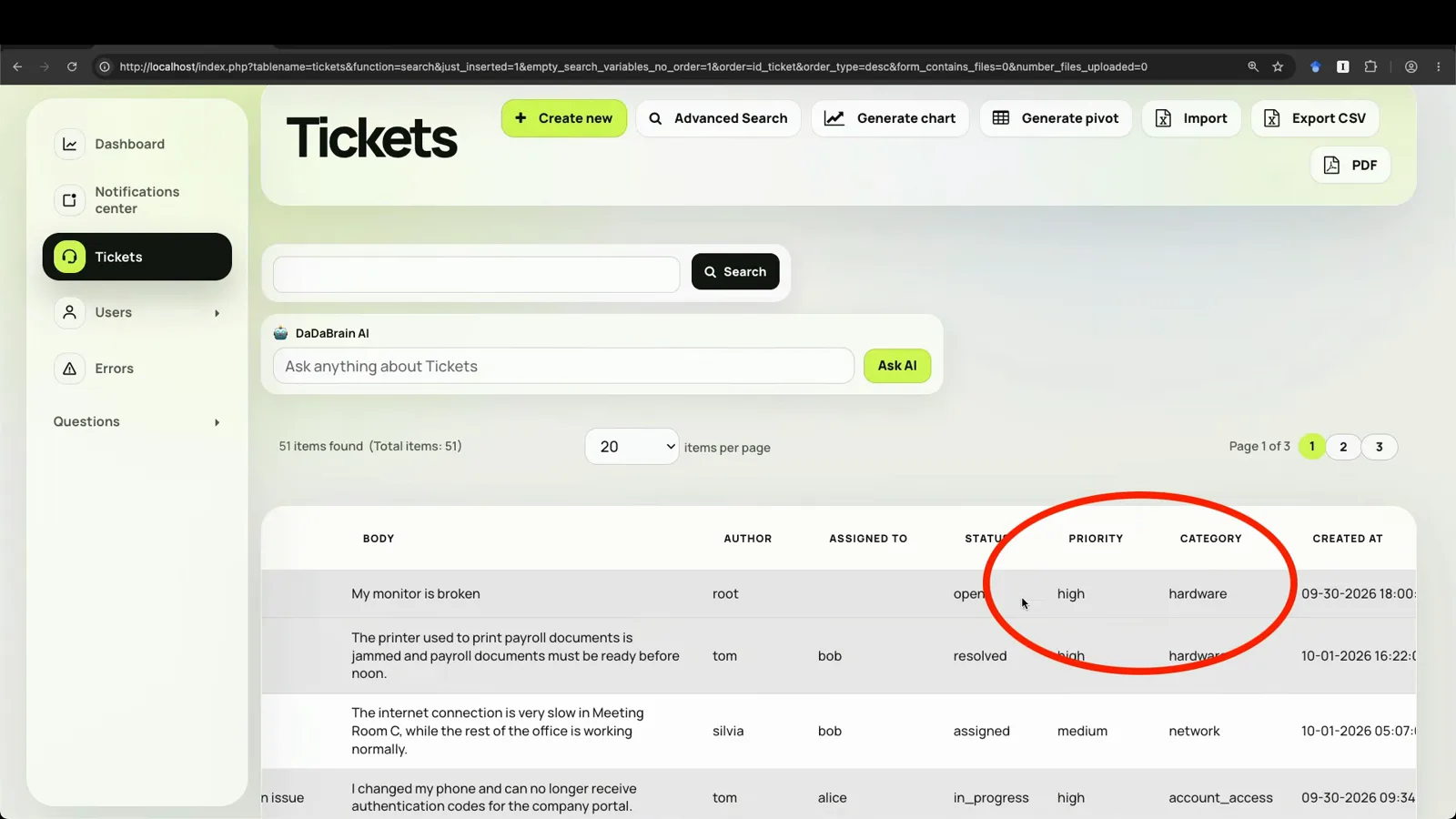
The demo before the explanation: category and priority are already Jev’s output.Watch at 0:10 - 2
What Jev returns: a category, a priority, and a confidence
An early diagram states the whole contract. Input: the application state — subject ("My monitor is broken") and body ("It suddenly stopped working this morning"). Jev holds predefined categories (hardware, software, network, account access, other) and a priority scale from low to critical. Output: structured data for the application — category hardware, priority high, confidence 0.93. Jev is not a text generator; it exists to classify things into options you define, which is exactly the shape of this problem.
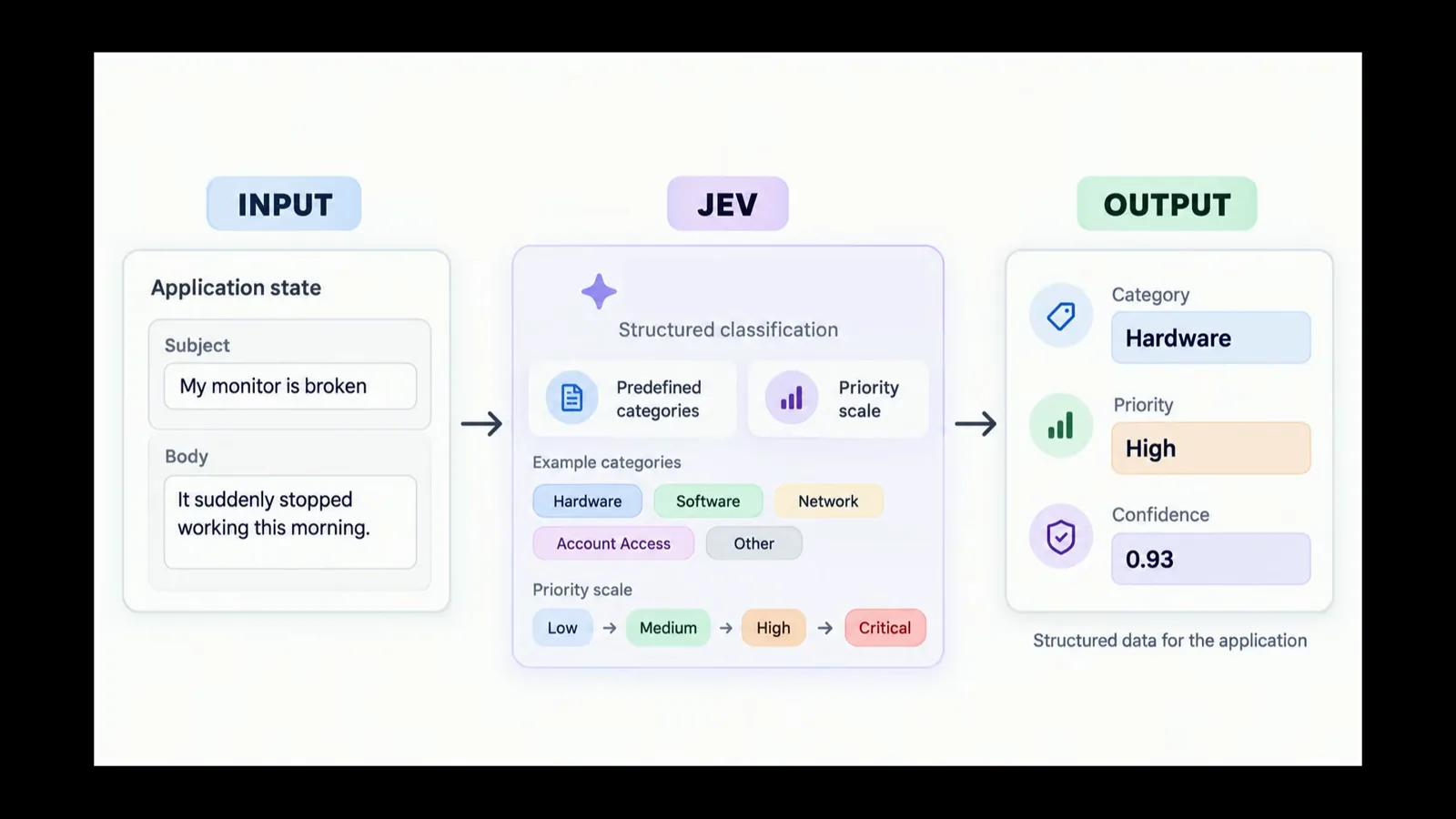
State in, typed answers out — confidence rides along with every answer.Watch at 1:35 - 3
Wiring one: register an after-insert hook on the tickets table
The host app is a deliberately small DaDABIK internal tool — about an hour of no-code work — with three user groups: employees open tickets, managers assign them to IT staff, IT staff resolve them. Employees never touch category or priority. When a ticket is inserted, DaDABIK fires an operational hook: one line registers dadaBik_classify_ticket_with_jev as the after-insert handler for the tickets table. The standard insert form, validation, and permissions are untouched — the hook simply runs after creation, receives the new record’s ID, fetches the ticket, and starts building the payload.
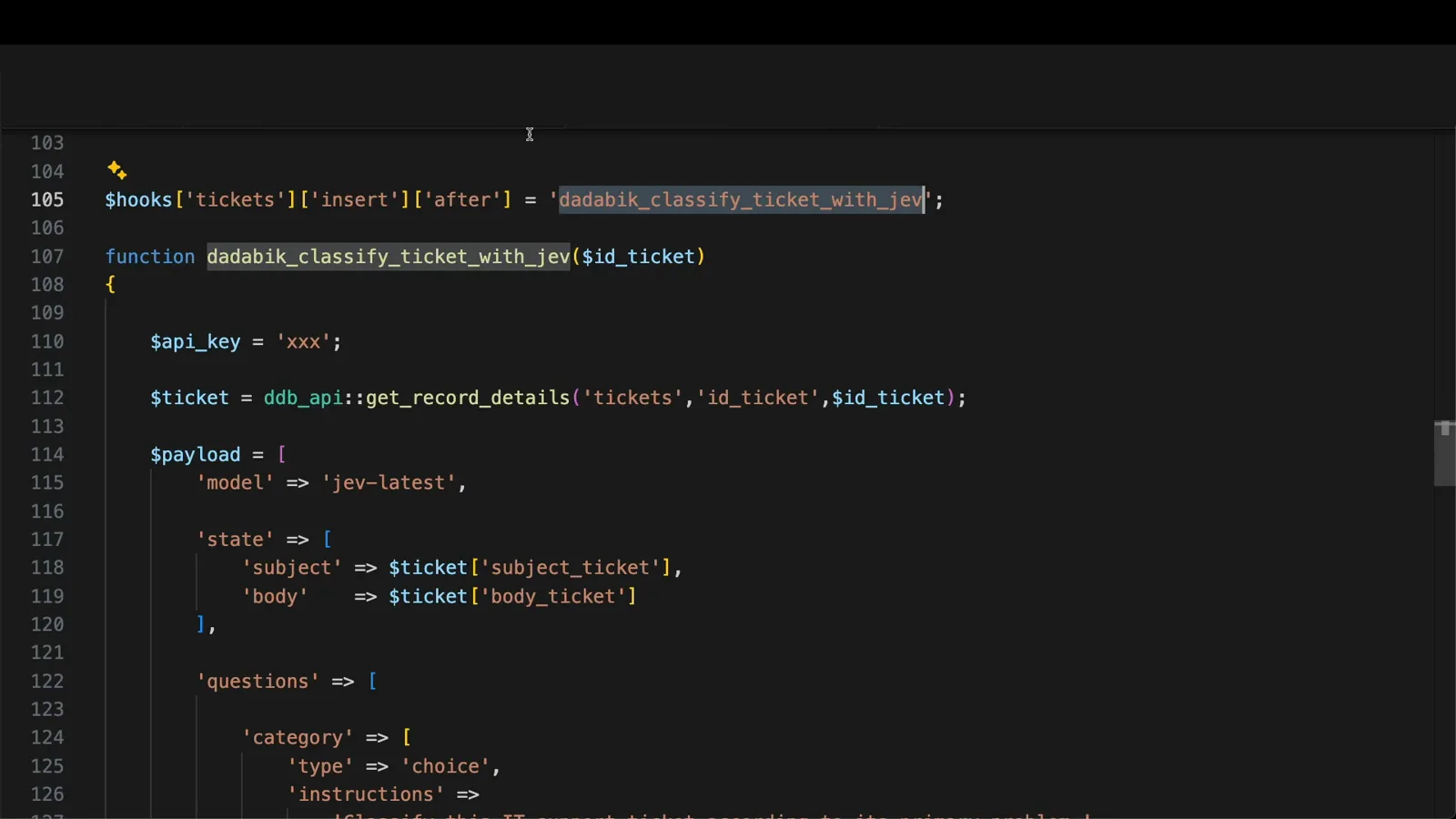
One line of configuration — form, validation, and permissions stay standard.Watch at 5:20 - 4
Ask two typed questions: a choice for category, a score for priority
The function builds one payload: model jev-latest, state carrying the ticket’s subject and body, and two questions. Category is type choice — "Classify this IT support ticket according to its primary problem" — with five options (hardware, software, network, account_access, other), each described in a short sentence. Priority is type score, not choice, because its options have an intrinsic order: medium is more serious than low, critical is the highest. Its instructions ask for operational priority based on business impact, number of affected users, availability of workarounds, and urgency — with low, medium, high, and critical each described.
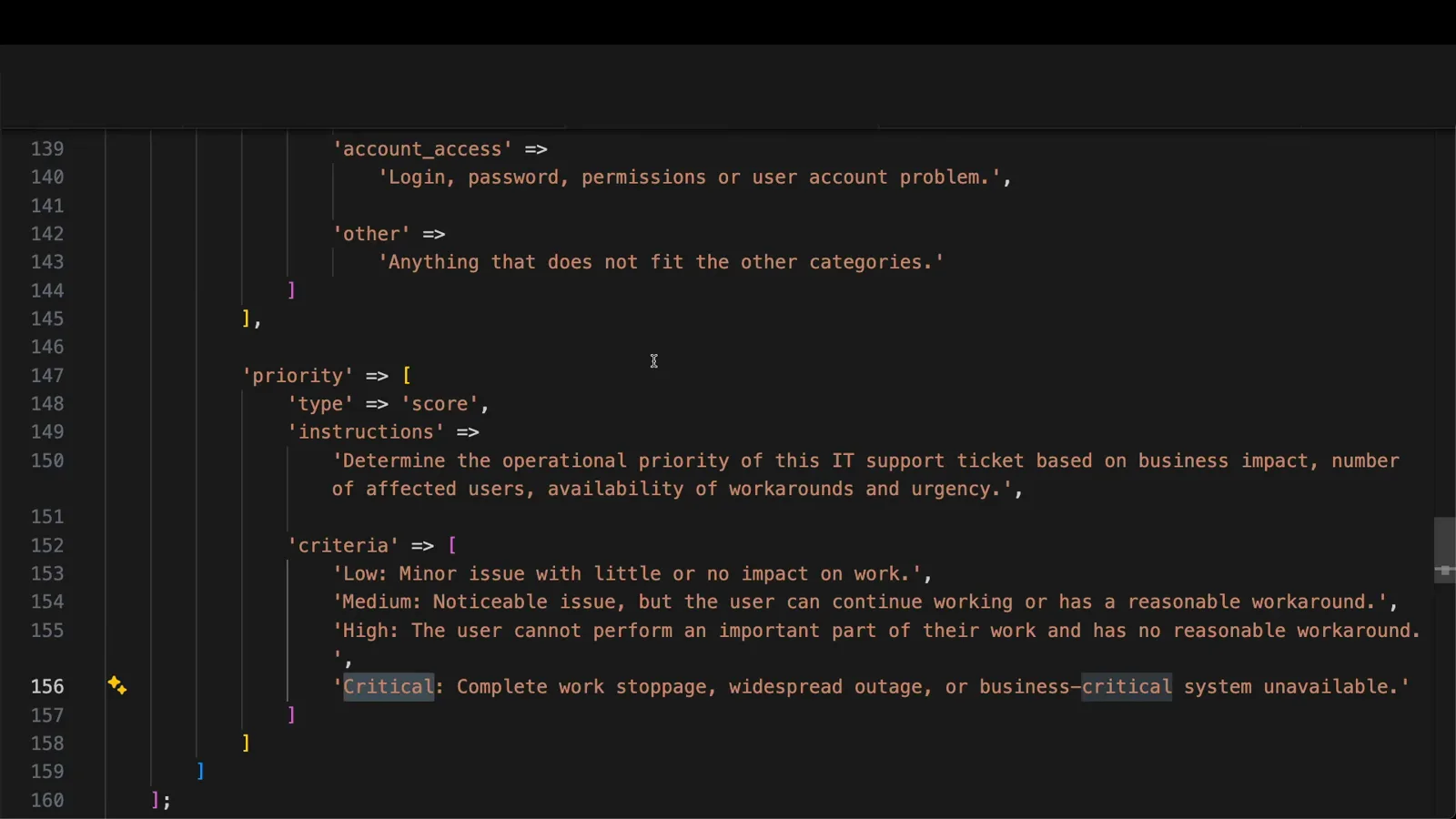
Choice picks one of five categories; score fits the ordered priority scale.Watch at 8:25 - 5
Read the answers — and round the score back into a label
The response is parsed with plain array reads: answers.category.choice holds the label (network, software, hardware...), and answers.category.confidence holds a value between zero and one saying how much to trust it — the video’s example rule sends anything below 0.9 to manual review, decided case by case. Priority needs two extra lines, because a score comes back as a number, not a label: anything from 0 to 3, including 0.2 or 1.7. The code rounds it, maps it through a levels array into low, medium, high, or critical, and update_records writes category, priority, and both confidences back onto the ticket row.
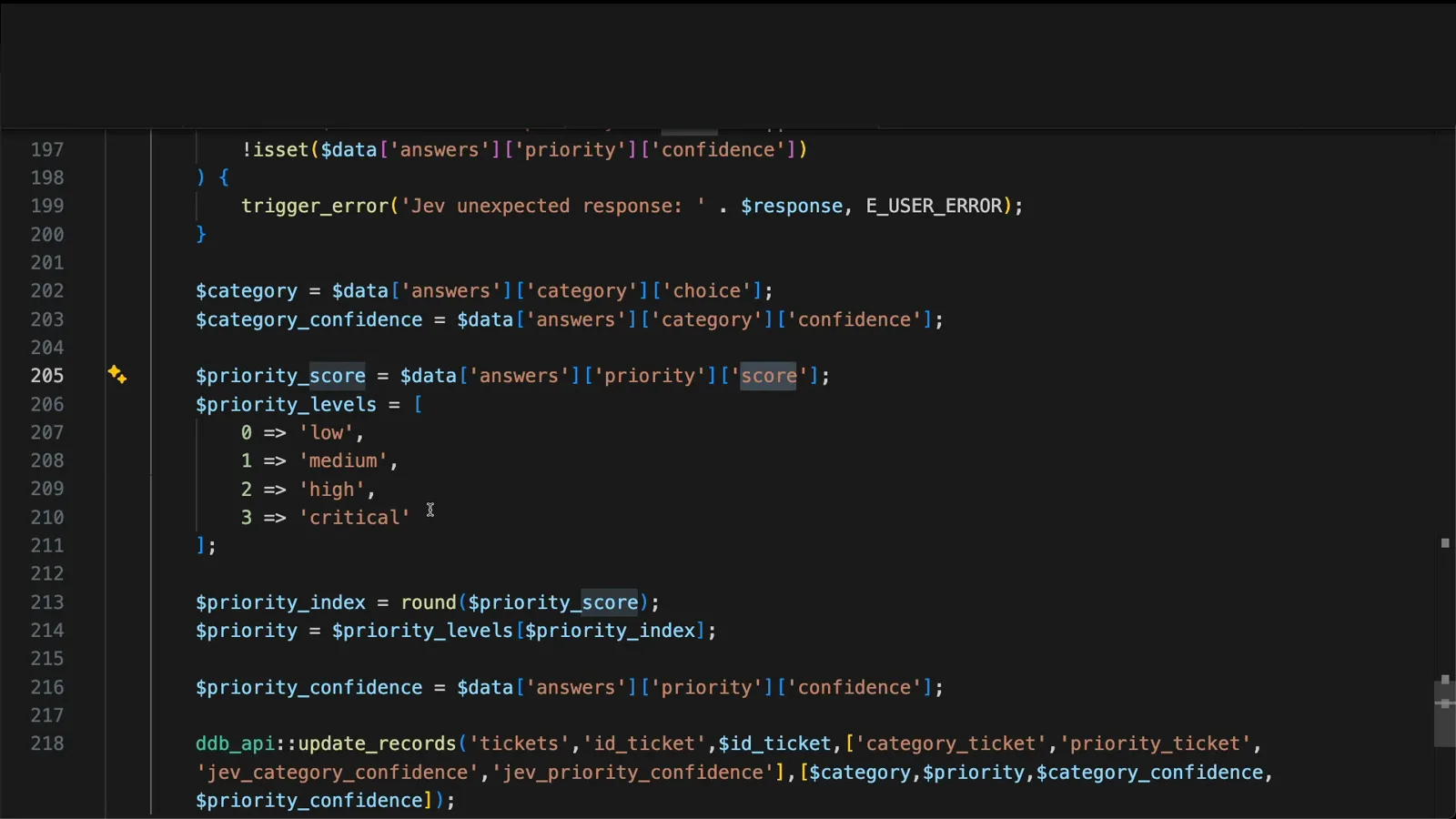
Confidence gates review; round() turns a 1.7 back into a priority label.Watch at 11:17 - 6
From here on, nothing is AI-specific — just fields
The quiet thesis of the video lands right after the parsing code: from this point on, DaDABIK treats those values as ordinary database fields. They can be searched, filtered, charted, used in dashboards, or fed to notifications. The advanced search now includes the JEV confidence columns; the AI simply became another source of structured data inside the internal tool — which is why the existing permissions, filters, reports, and workflows keep working without modification.
Once written back, Jev’s answers behave like any other column in the table.Watch at 14:40 - 7
Wiring two: classified while you type
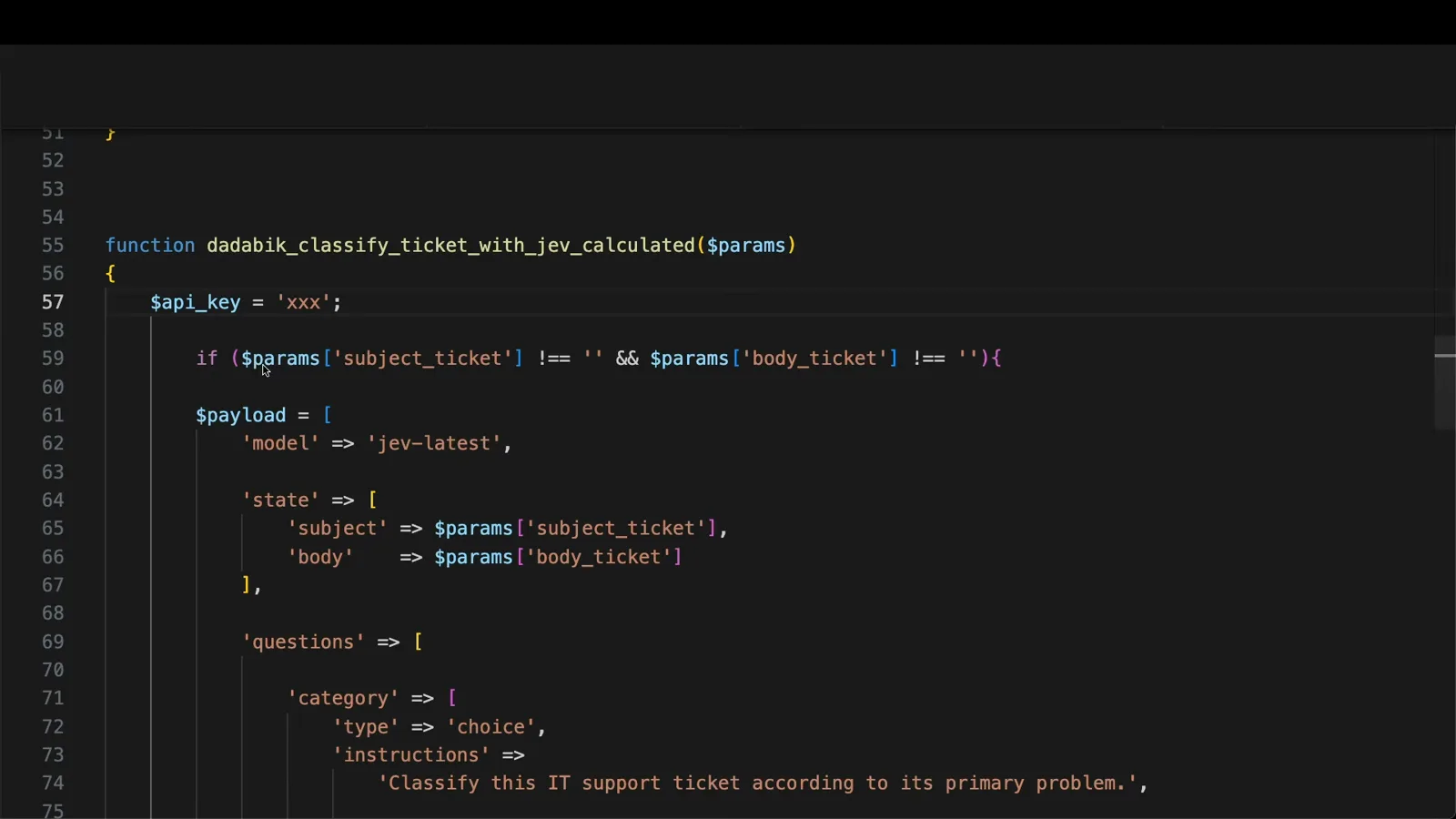
Everything so far ran after submission. DaDABIK also has calculated fields — values produced by a custom function and recalculated while the insert or edit form changes, and that function may call an external API. A near-identical function, dadaBik_classify_ticket_with_jev_calculated, takes the subject and body as parameters, guards against empty fields, and asks the same category question; it is attached to the category field in the form configurator and the field is made visible on the insert form. Typing "Outlook crashes when I try to open it" classifies it as software before the sentence is finished — almost no perceived waiting time. The point is latency: Jev is fast enough to live inside an interactive form, not just a background process.
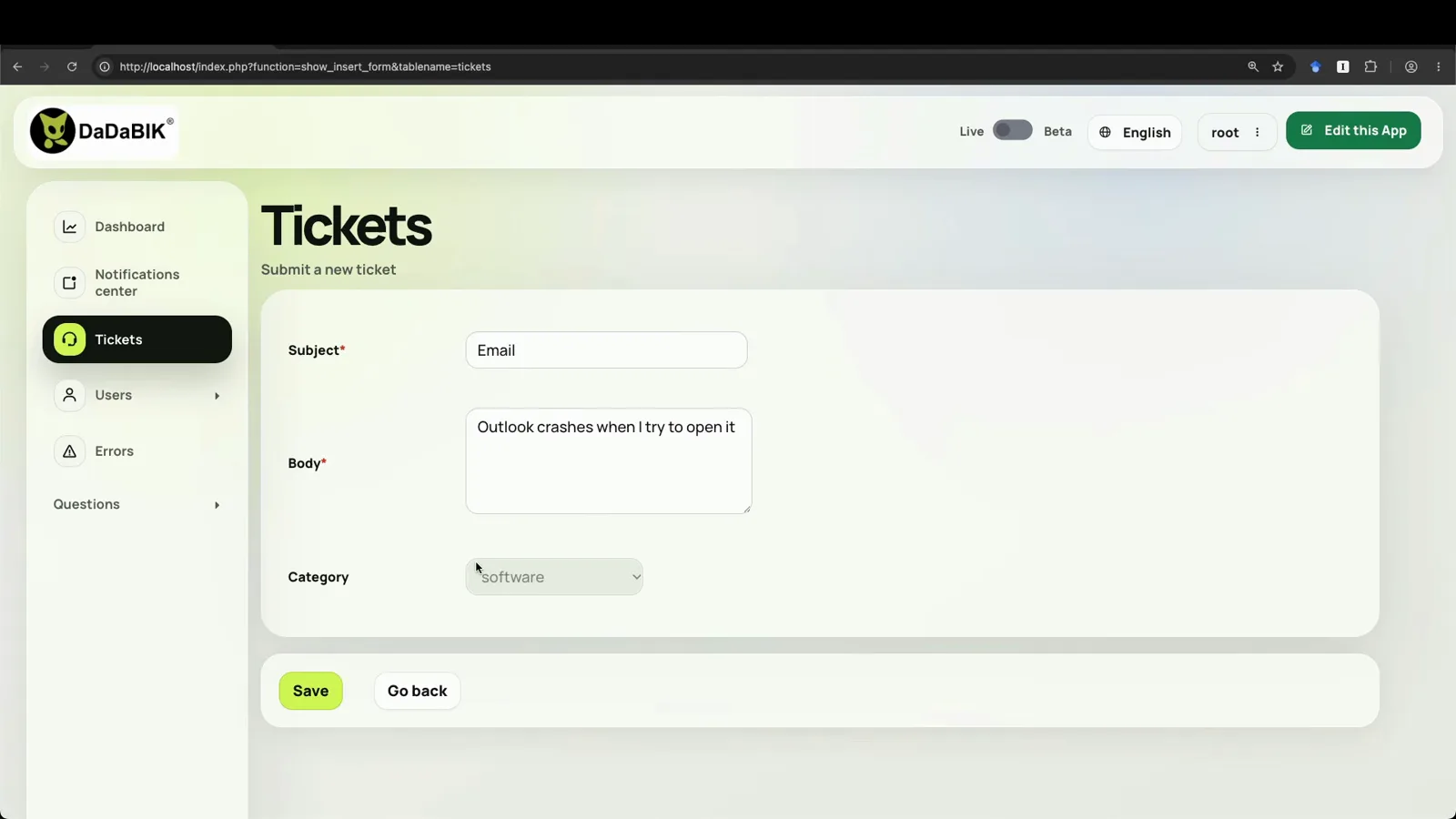
The category updates as the description changes — no spinner in sight.Watch at 15:50 - 8
A 50-ticket reality check, limits included
The accuracy section refuses to overclaim: this is a small demo, not a benchmark, and no comparison against other models is offered. The one test: 50 support tickets generated by ChatGPT were inserted into the system, and in only 3 cases did the assigned category differ from the creator’s manual judgment — twice Jev chose account_access where he would have picked software, and once other instead of software. Priority seemed mostly right, though without precise data. The key caveat stands: type safety guarantees the answer respects the defined structure — it does not guarantee the classification itself is always correct.
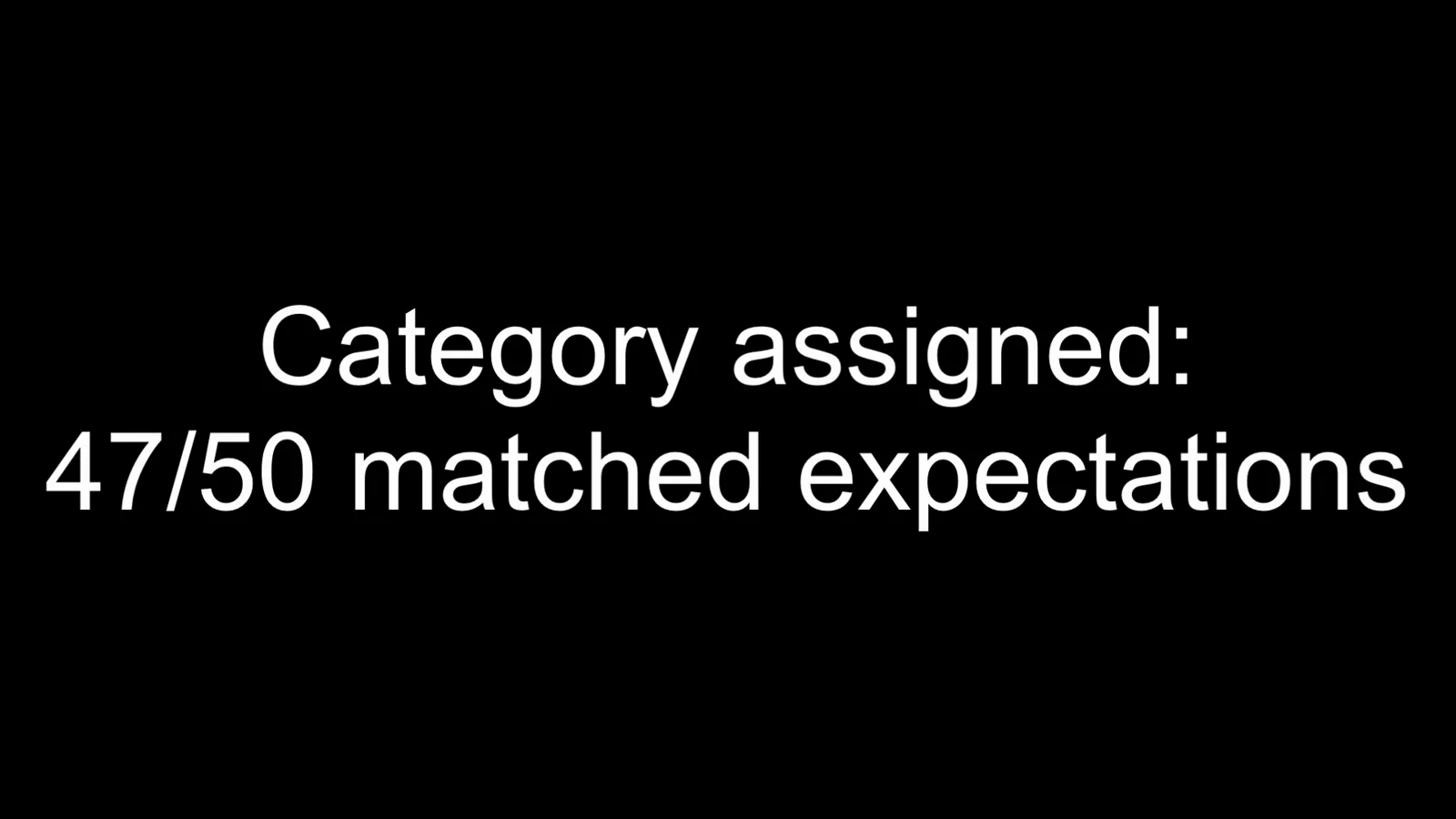
47/50 on generated tickets — a demo-sized signal, not a benchmark.Watch at 20:40 - 9
The bill: $0.042 per million input tokens, output free
At recording time, TypeSafe priced Jev input at $42 per billion tokens — $0.042 per million — and output tokens are free. The console adds the practical scale: the creator opened the account the day before, bought $5 of credits for testing, and had spent $0.003 after building the integration and running every test in the video, 50-ticket batch included.
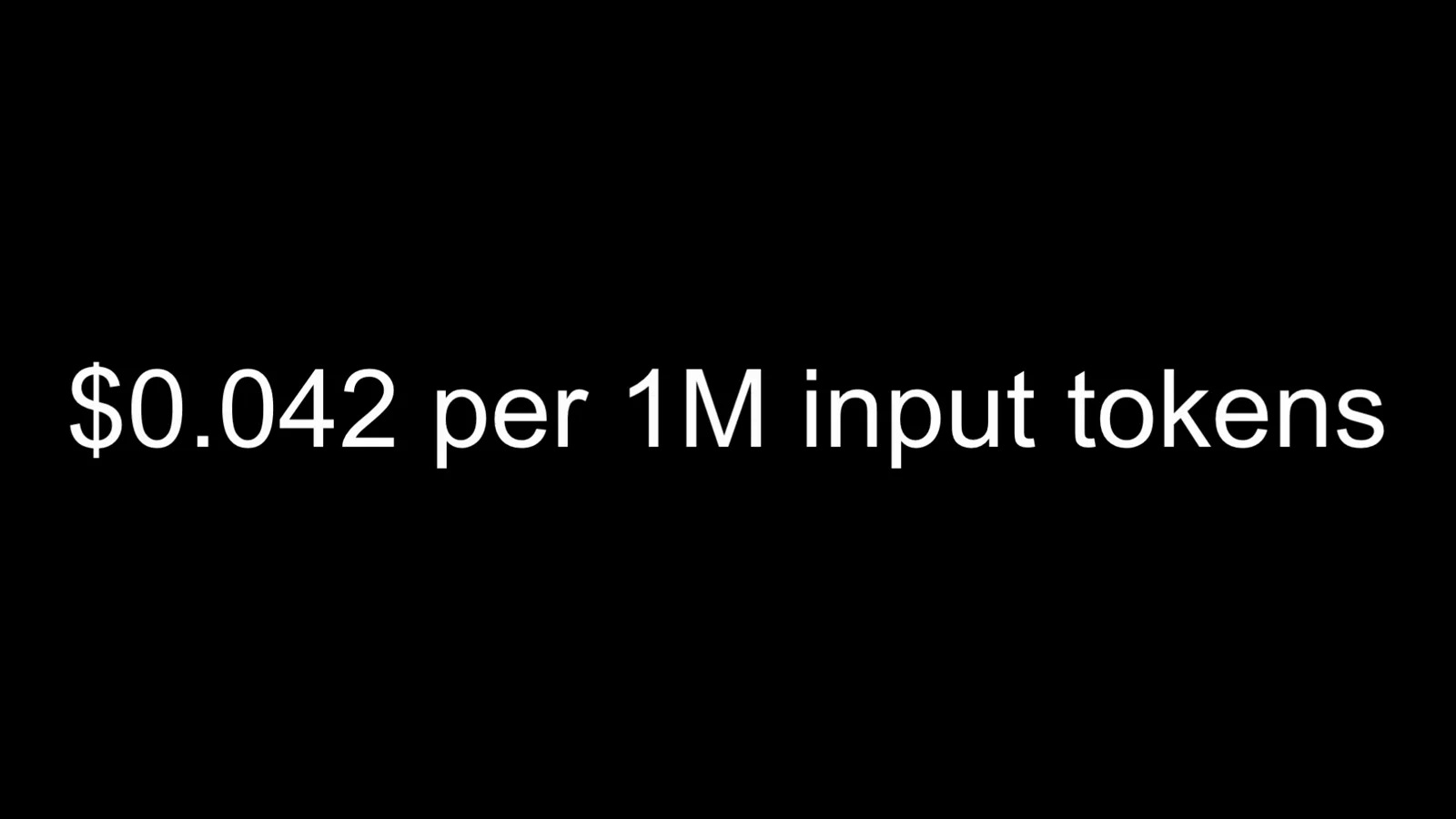
The whole demo, 50 classified tickets included, cost a third of a cent.Watch at 21:50 - 10
Where the pattern goes next
The closing generalizes the pattern: anywhere unstructured information enters an application and must become structured data — CRM leads by intent and urgency, customer feedback scored for dissatisfaction, expense approvals flagging ambiguous cases for review, documents filed into a predefined taxonomy — the same two wirings work, and because results land as normal fields, existing permissions, filters, reports, and workflows use them immediately. A local ML classifier would demand a labeled dataset, training, validation, and retraining; a general LLM would mean prompting for JSON and parsing it. Here nothing was trained and the integration took a couple of hours — "don’t treat it as a production-ready integration", but as proof of how quickly typed decisions drop into a real app.

AI as just another structured data source inside your internal tool.Watch at 24:30
Frequently asked questions
What is Jev ticket classification?
Using Jev — TypeSafe AI’s first public model, released September 2026 — to sort support tickets into predefined buckets instead of generating text. In the DaDABIK demo, each ticket’s subject and body go in as the state, and two typed questions come back: a category (choice among hardware, software, network, account_access, other) and an operational priority (score: low, medium, high, critical), each answer carrying a confidence between 0 and 1.
How do you classify support tickets automatically?
Register an after-insert operational hook on the tickets table. The hook function reads the new record, builds one payload (model jev-latest; state = subject and body; questions = category choice plus priority score), posts it to the TypeSafe systemone endpoint, parses answers.category.choice and its confidence, rounds the priority score into a label, and writes everything back with update_records. The employee’s form never changes — the values simply appear on the ticket.
Does it need training data?
No — nothing in the video was trained. The honest contrast given: if you have a stable classification problem and thousands of good labeled examples, a local ML classifier can be faster, more private, and cheaper to run, but you must build the dataset, choose and train a model, validate, deploy, and retrain whenever categories change. Here you write option descriptions instead, and changing a category is editing text.
What happens at low confidence?
Every answer includes a confidence value between zero and one. The video demonstrates an example rule: below 0.9, the ticket goes to manual review — explicitly a tunable example, not a recommendation, since the right threshold is case-by-case. Mechanically the gate is an ordinary if-statement in the hook, and because the confidence is stored as a field, you can also filter or chart it afterwards.
How much does it cost to classify tickets with Jev?
Input is priced at $42 per billion tokens — $0.042 per million — and output tokens are free. The creator’s console: $5 of credits purchased the day before recording, $0.003 spent after the whole demo, including classifying 50 generated tickets. For typical ticket sizes that works out to fractions of a cent per hundred tickets.
After-insert hook or calculated field — which wiring should I use?
They solve different timing problems with the same payload. The hook runs once after submission: right for enrichment, dashboards, notifications, and anything downstream of the ticket. The calculated field recalculates while the form changes: right when the submitter should watch the classification appear live — the video shows it keeping up with typing with almost no perceived wait. Pick by when the answer is needed, not by capability.
Related guides
Support Ticket Routing Recipe
The scenario-level sibling: queue routing with confidence-based fallback, platform-independent.
ReadJev Text Classification API Guide
The single-request contract in depth: CLI and REST payloads for Choice, Score, and Noul questions.
ReadExpense Categorization Recipe
The same state-in, typed-decision-out pattern landing in a finance workflow.
ReadJev API Examples Guide
Copy-paste request shapes for the endpoint this hook calls with curl.
ReadMore video walkthroughs
- Jev Classification Quickstart: OpenRouter API, Primitives & Real Probabilities
- Jev Architecture Explained: Why 70ms Decision Models Beat LLMs for Workflow Automation
- Ultra-Fast Browser Agents with Jev: 178ms DOM Loops & Dual Model Orchestration
- Open Jev Models Are Here: Semif, Nimble, Decider, DiffusionGemma & Laya Hands-On
- Jev vs LLM: Will Jev Replace LLMs? Krish Naik's Whiteboard Explainer
- Jev Trader Tutorial: Build a Subsecond AI Trading Bot on Monad
- Jev Model Router: Build a Privacy-Gated LLM Router with Jev & OpenJev
- Jev Tutorial for Beginners: State, Questions & the TypeScript SDK
- Run Jev Locally: Kev, SemIf & Von on Your Own GPU (OpenJev Guide)
- Jev RAG Reranker: Policy-Steered Reranking for Retrieval-Augmented Generation
- When to Use Jev: An Engineer's Audit of Claims, Gates, and Failure Modes
- LangChain + Jev Integration Tutorial: Routing, Guardrails & Evals
- Jev MCP Server: Connect Jev Decisions to Claude Code & Cursor
- Jev vs Luna: Independent Benchmarks Put "Better, Faster, Cheaper" to the Test
- Jev Agent Harness: Where the Decision Gate Sits in Your LLM Loop
- Jev Playground Walkthrough: The Hotdog Lesson, Criteria, and a Four-Console Token Test
- Jev Text Classification API: Zero-Shot CLI & REST with classifier.dev
- Jev API Examples: First Request, curl & All Three Question Types
- Jev Log Triage with Expanso Edge
- Jev Lead Enrichment with Treg: ICP and Signup Scoring
- Use Jev Decision Nodes in Heym for Model Routing
- Laya Tutorial: Open-Source AI Routing With Calibrated Probabilities (Laya vs Jev Setup)
- Train Your Own Jev: Fine-Tune a Jev-Style Decision Model for $5–$17 (What You Can and Cannot Train)
- Jev Tips: 8 Best Practices for Better Decisions (State, Questions, Criteria & Thresholds)
- Jev Context Compaction: Prune AI Agent Memory Without Generative Summaries
- Jev as an LLM Judge: Confidence-Gated Cascades at 0.36% of the Cost
- TypeSafe Computer Use: Local Desktop Automation with Jev, Step by Step
- Jev Resume Screening: Build an AI Resume Evaluator with the Jev JavaScript SDK
- Jev + Claude Code Guide: Voice-Controlled Browser Automation with Typed Decisions
- Jev vs Ollama: Can Local AI Replace Hosted Jev Without Sending Your Data Away?
- Build Your Own Jev: Train a Free Open-Source Zero-Shot Classifier (That Plays Doom)
- CUA-S1-Forms: a 706K-Parameter Jev-Like Model That Fills GUI Forms on Your CPU
- NOC/SOC Alert Triage with Jev: Rules First, One Typed Question, a Policy Gate
- Ollama Decision Models: Run tev1 and Nimble Locally (Tested on an 8 GB Card)
- Jev Guardrails in Production: A Five-Step Playbook for Decision Automation
- A Session Drift Guard for Pi Agent: Let the Jev Model Propose, Let Code Decide
- 50 Tev1 Use Cases: What a Local Decision Model Can Actually Do (Tested on an 8 GB Laptop)
- Jev, Hands-On: Where the Official Claims Meet Independent Remeasurement