
Guides / illustrated walkthrough
Jev API Examples: First Request, curl & All Three Question Types
Every Jev API example you need on one page: the sample curl command, the state + questions payload, Noul/Choice/Score stacked in a single call, and typed answers read straight from real terminal output. Facts cross-checked against azamsharp’s 28-minute API walkthrough.
Quick takeaway
Every example on this page hits one endpoint: POST https://api.typesafe.ai/v1/systemone with Authorization: Bearer $TYPESAFE_API_KEY and Content-Type: application/json. The payload carries a state (the text to judge), model “jev-latest”, and a questions object where each entry declares its type — noul for a yes/no probability, choice for picking from described options, score for a position on a described scale. The demo stacks all three in one call — is_refund_request, urgency_rating, department_routing — and two runs tell the whole story: state “i cannot open” returns noul 0.1, score 0.93, choice technical; state “i need refund ASAP” jumps to noul 0.98, score 1.39 (probabilities 0.6 Medium / 0.4 High), choice billing at confidence 1.0. Each answer costs about 442 input / 75 output tokens on model jev-1.13.0, and the creator’s Usage dashboard shows $0.0008 of spend after a week of calls. Facts were cross-checked against azamsharp’s 28-minute walkthrough “Getting Started with JEV: API Keys, HTTP Requests, JavaScript & Python SDKs”, which adds that a new key ships with roughly $5 of monthly credit and the secret is displayed exactly once.
Video source
United Top Tech
Step-by-step walkthrough
- 1
Create an API key — no key, no call
Everything starts at console.typesafe.ai → API Keys → Create key. The console lists each key with a name, an Active status, a masked secret (apikey_228c…a2c0 in the video), and its creation date, and notes that keys are organization-scoped — they keep working even after the creator is removed. Two things to know before you click: the full secret is shown exactly once at creation, so copy it into a safe place immediately; and a fresh account ships with about $5 of monthly credit, which is a lot of decisions at Jev prices. The same dashboard has a Usage tab where you can watch spend, tokens, and request counts per key.
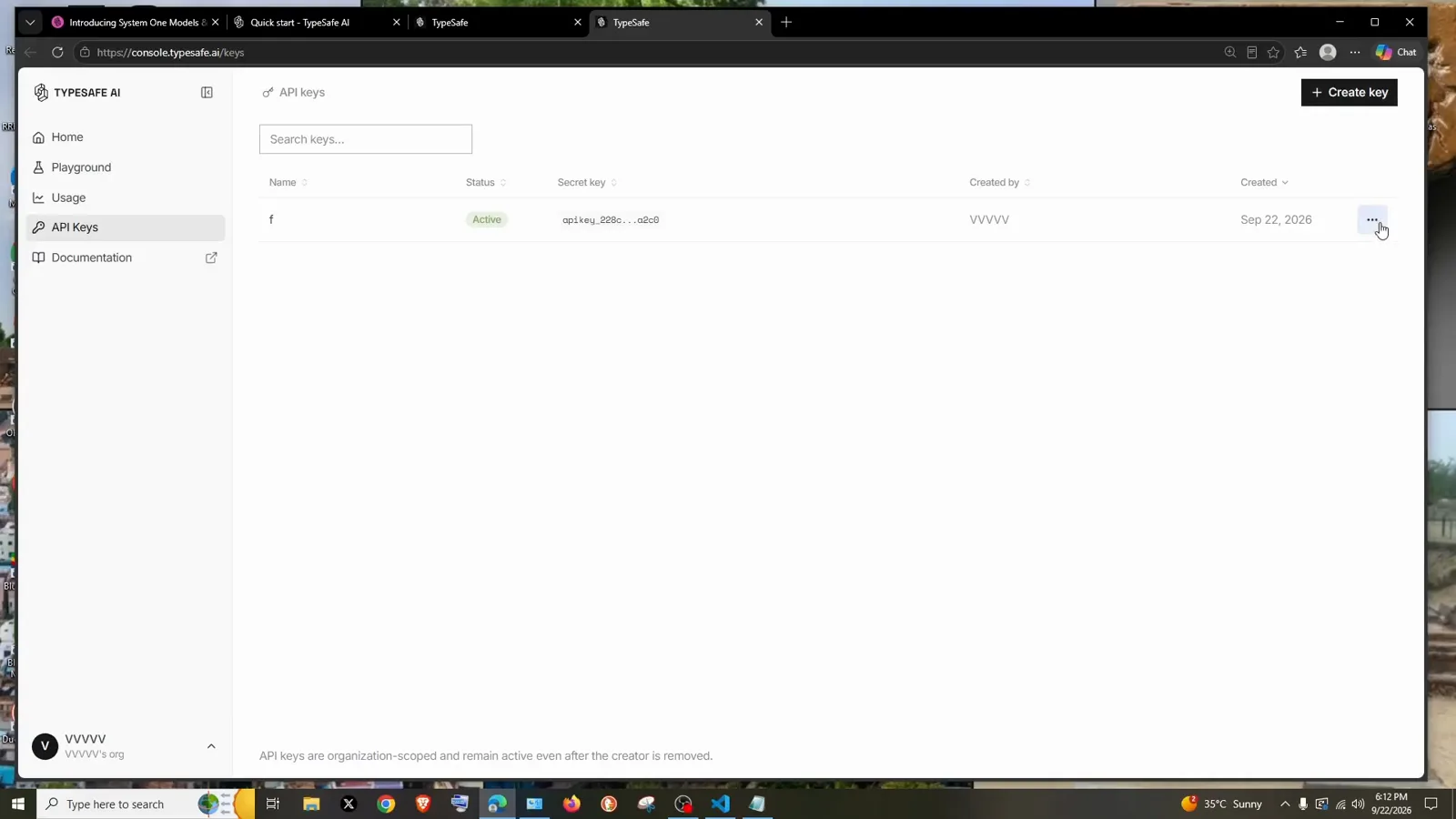
One key, organization-scoped, shown once — save it on creation.Watch at 0:54 - 2
Copy the sample cURL and fire the first request from a terminal
The quickstart’s “Call it: the API” section shows the whole contract in one screen: POST https://api.typesafe.ai/v1/systemone, an Authorization: Bearer <API_KEY> header, Content-Type: application/json, and a ready-made sample cURL command that reads a $TYPESAFE_API_KEY environment variable and pipes the JSON body through a heredoc. The minimal body has exactly three keys: state (the text to judge — here “Hi, I’ve been trying to connect my Stripe account for 3 days…”), model (“jev-latest”), and questions — one entry, urgency, with type “noul” and the instruction “Does this message express urgency?”. Paste it into any terminal, swap in your key, and you have your first Jev answer. Because this is plain HTTP, curl, Postman, or any HTTP client works — which is also the route for languages without an SDK.
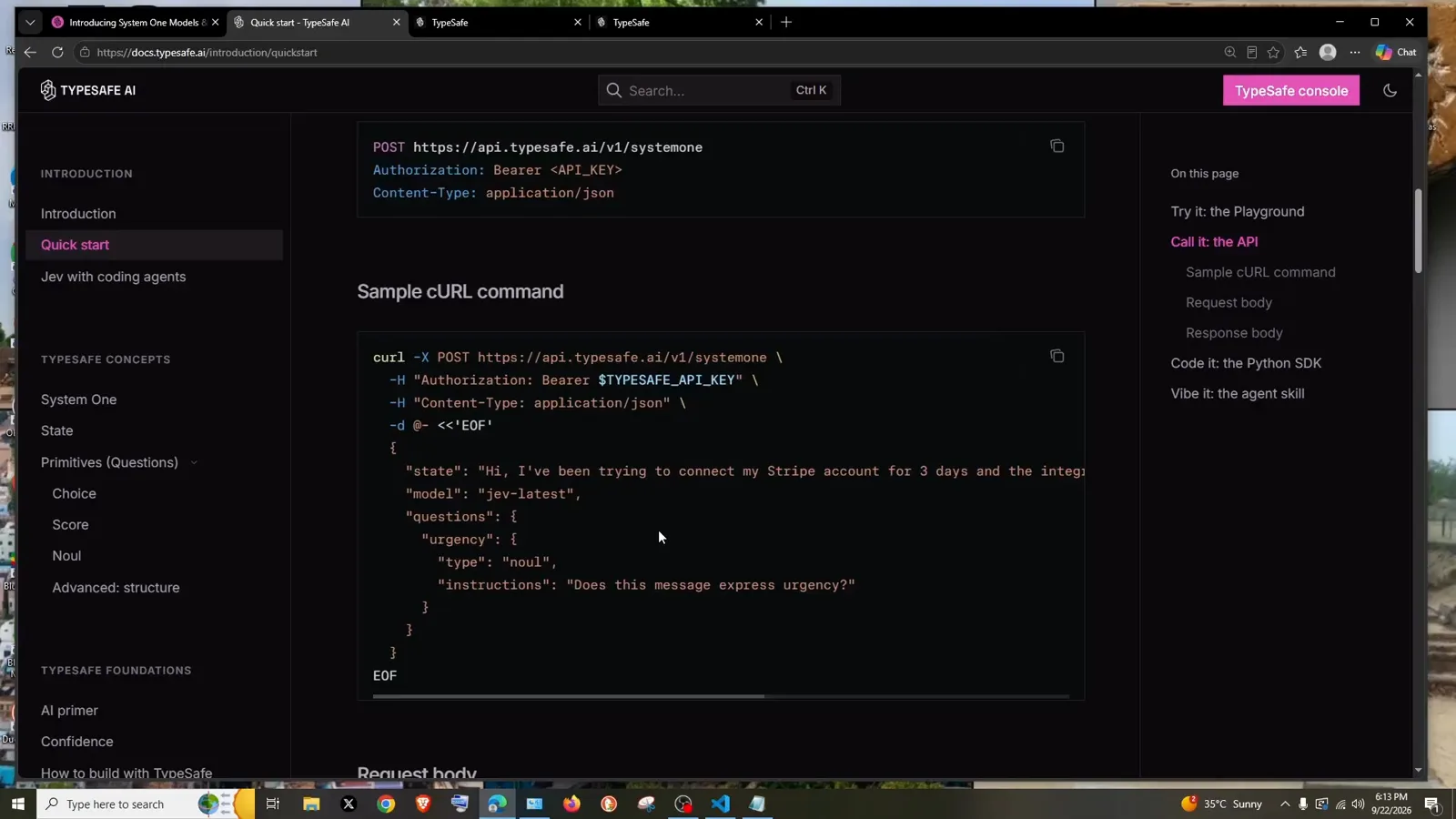
Endpoint + two headers + a three-key body: the entire request.Watch at 1:12 - 3
Anatomy of the request body: one state, a map of typed questions
The docs’ full Request body example shows how the payload scales. The state is still one string to judge; questions is a map where every key you define comes back as an answer. Each question declares type plus instructions, and the criteria shape follows the type: department is a choice whose criteria is an object — billing “Payment or subscription issues”, technical “Bugs or integration problems”, sales “Pricing or account questions”; frustration is a score whose criteria is an ordered array — “Calm, just stating facts”, “Frustrated but civil”, “Very angry, strong language” — because a score returns a position on that scale; is_urgent is a noul with just an instruction, “The message conveys urgency or time-sensitivity”. Write instructions and criteria descriptions carefully: they are the rubric the model judges against, and all questions are evaluated independently in the same call.
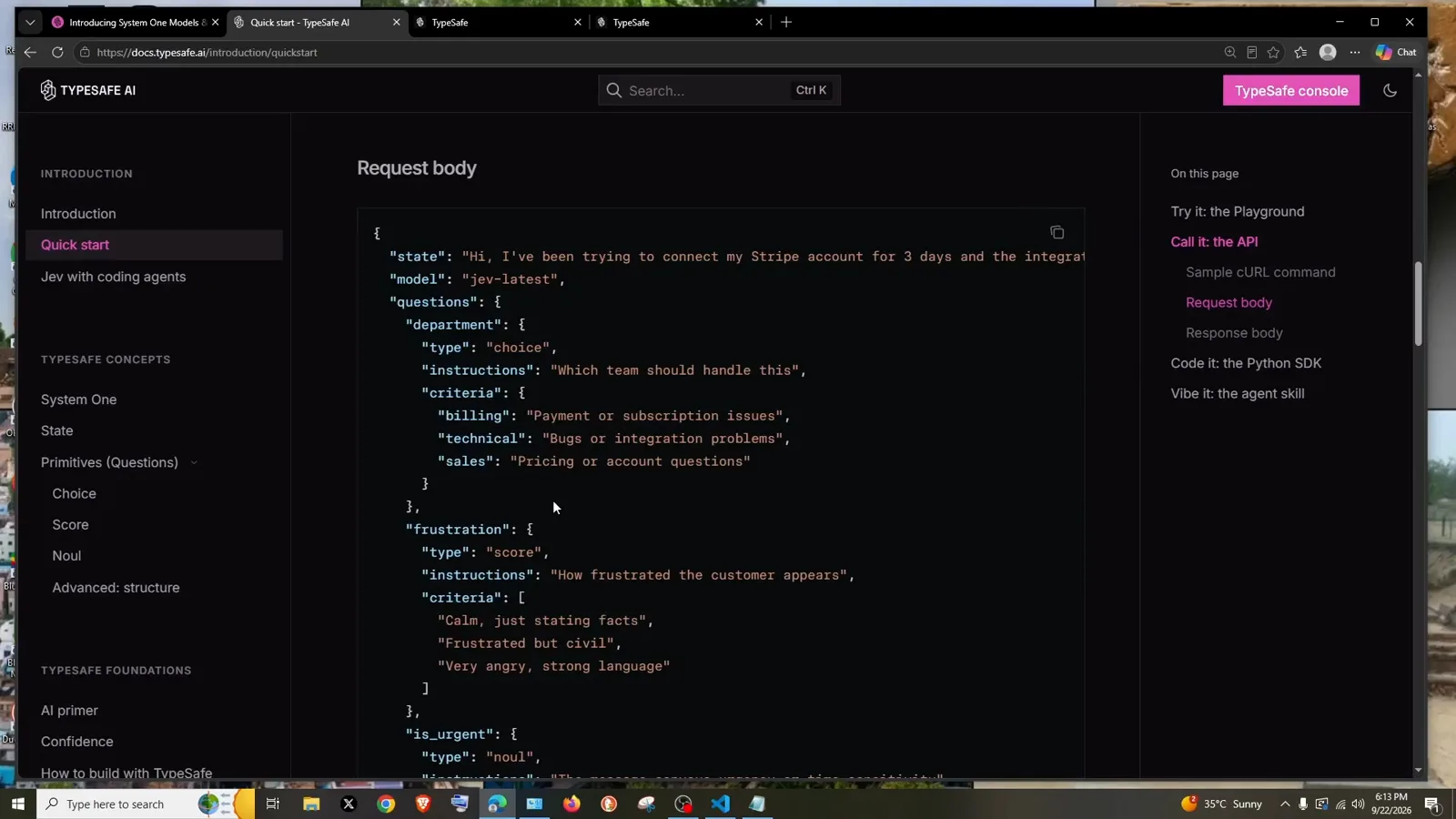
Choice criteria are an object; score criteria are an ordered array.Watch at 1:36 - 4
Fire the first minimal call with Python requests
In VS Code the video builds the same request in plain Python — no SDK: import requests, an api_key variable, then response = requests.post("https://api.typesafe.ai/v1/systemone", headers={...}, json={...}). The headers are the same two from the curl block — Authorization with your Bearer key and Content-Type application/json — and the payload starts minimal: state “Hi, I’ve been trying to connect my Stripe account for 3 days…”, model “jev-latest”, and a single urgency question with type “noul”. The author literally pastes the cURL headers first and converts them line by line, which is a honest way to see that the SDK-free version is just the curl command wearing Python syntax. print(response.json()) at the end and you can run it with python new.py.
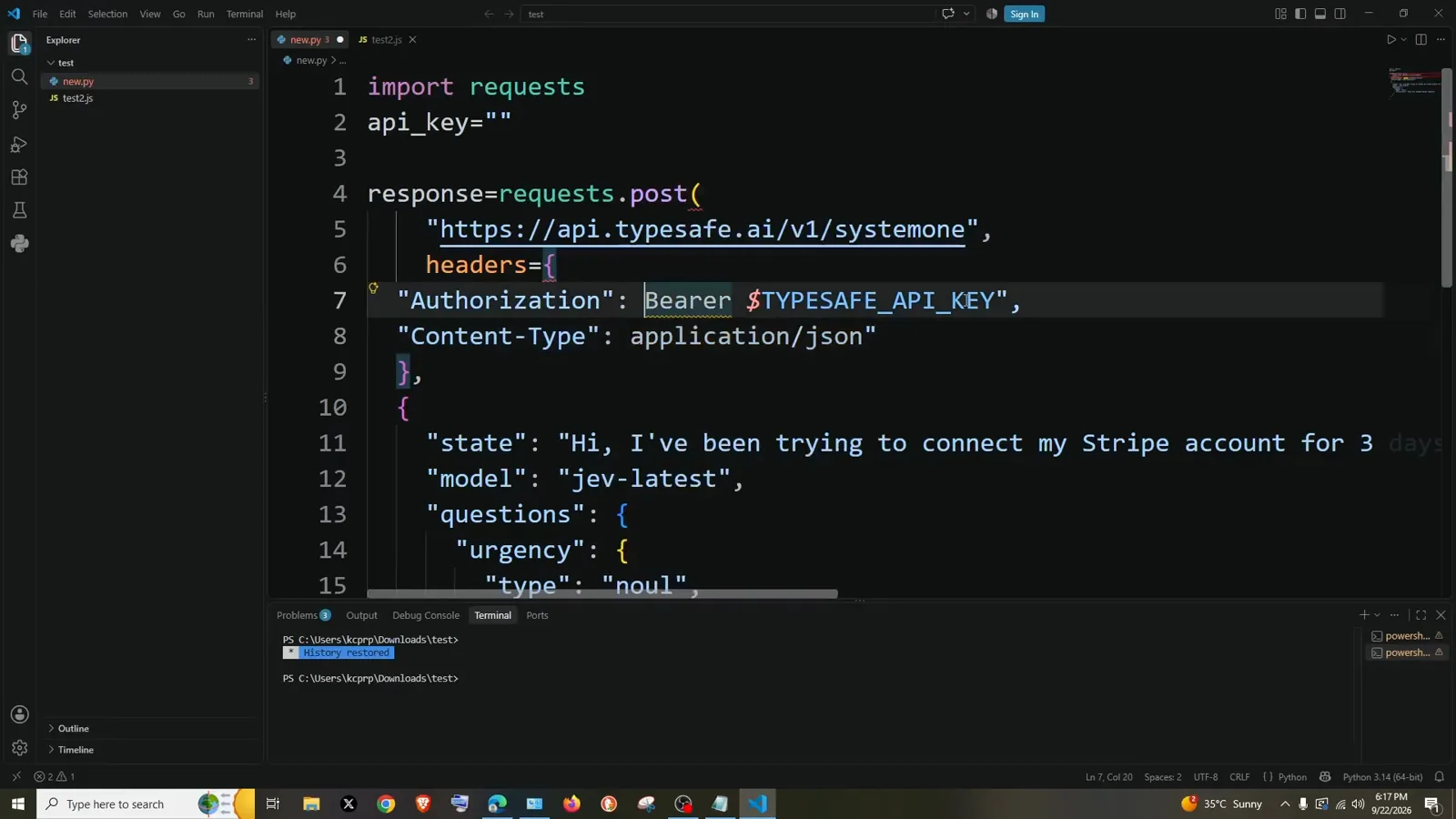
The curl command, translated line by line into requests.post.Watch at 3:44 - 5
Ask all three question types in one payload
For the real demo the author drafts a richer payload and pastes it over the minimal one. State becomes “i cannot open”; questions now stack all three primitives under one call: is_refund_request is a noul asking “Is the customer asking to get their money back?”; urgency_rating is a score — “Rate how critically urgent this message is based on potential business impact” — with three described levels, “Low (general question, no immediate rush)”, “Medium (customer has an issue but isn’t losing money)”, “High (system down, or active financial loss)”; department_routing is a choice — “Which internal team is best equipped to handle this request?” — with billing, technical, and sales each described. One POST, three judgments, because every question rides the same request and is scored independently.
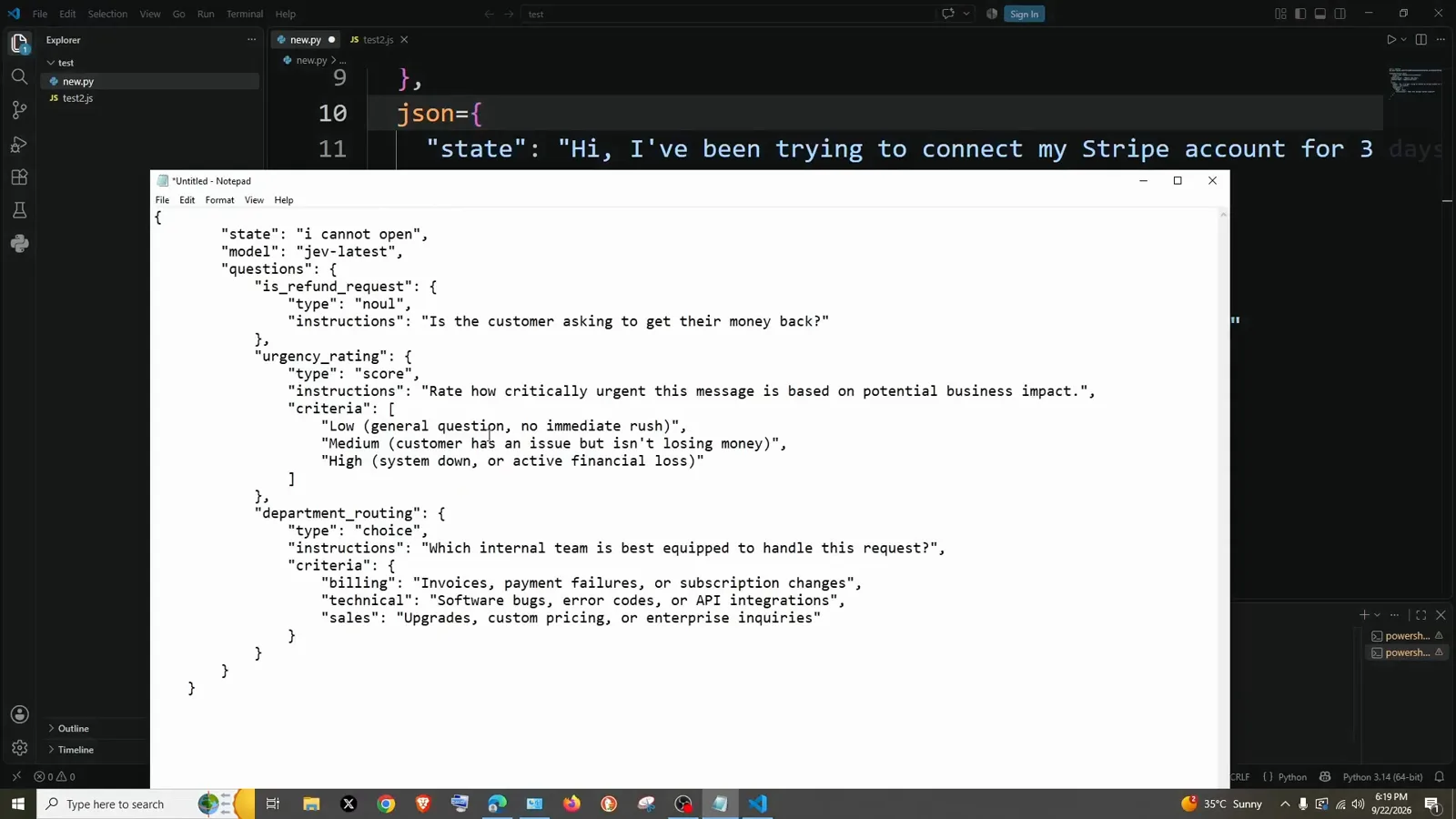
Noul + score + choice: three judgments, one POST.Watch at 4:56 - 6
Read the typed answers: probability, score with legend, choice with confidence
Two runs against this payload show how the answers move. With state “i cannot open”: is_refund_request.noul = 0.1 (barely a refund request), urgency_rating.score = 0.93 with confidence 0.64 (probabilities favor level 1 at 0.76 over 0.16 and 0.08), department_routing.choice = “technical” with confidence 1.0. Change the state to “i need refund ASAP” and rerun: noul jumps to 0.98, score to 1.39 — legend says 1 is Medium and 2 is High, and the probabilities split 0.6 / 0.4 between them — while choice flips to “billing” at confidence 1.0 (technical 0.0, sales 0.0). Model jev-1.13.0 answers in the same shape every time: noul returns just the probability, score returns value + confidence + legend + per-level probabilities, choice returns the winner + confidence + full distribution. Each call spent ~442 input / 75 output tokens.
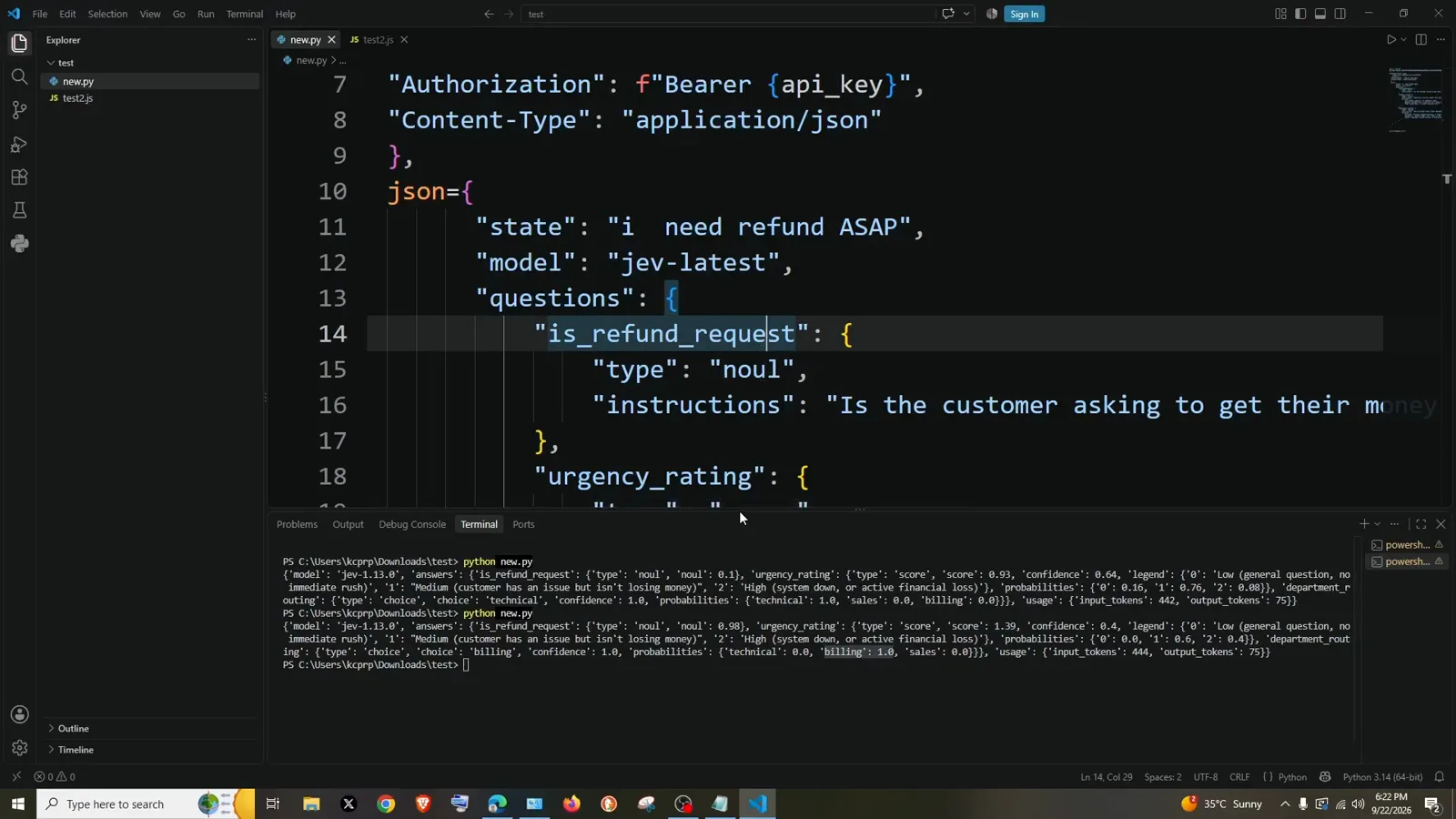
Same payload, two states — the numbers move with the evidence.Watch at 7:28 - 7
The identical call from Node with fetch
JavaScript only needs syntax changes: wrap the call in an async function (jevCall), swap requests.post for await fetch with method: "POST", keep the same two headers — Authorization: `Bearer ${api_key}` in a template literal, Content-Type: application/json — and pass the unchanged payload through body: JSON.stringify(...). console.log(await response.json()) prints it; when the top-level log truncates nested objects, console.dir(await response.json(), { depth: null }) expands everything. node test2.js returns the familiar shape: model jev-1.13.0, is_refund_request noul 0.98, urgency_rating score 1.37 at confidence 0.43 — a hair different from the Python run because each request is sampled fresh, and the answer structure is identical either way. The same payload now works in Express route handlers, serverless functions, or any Node script.
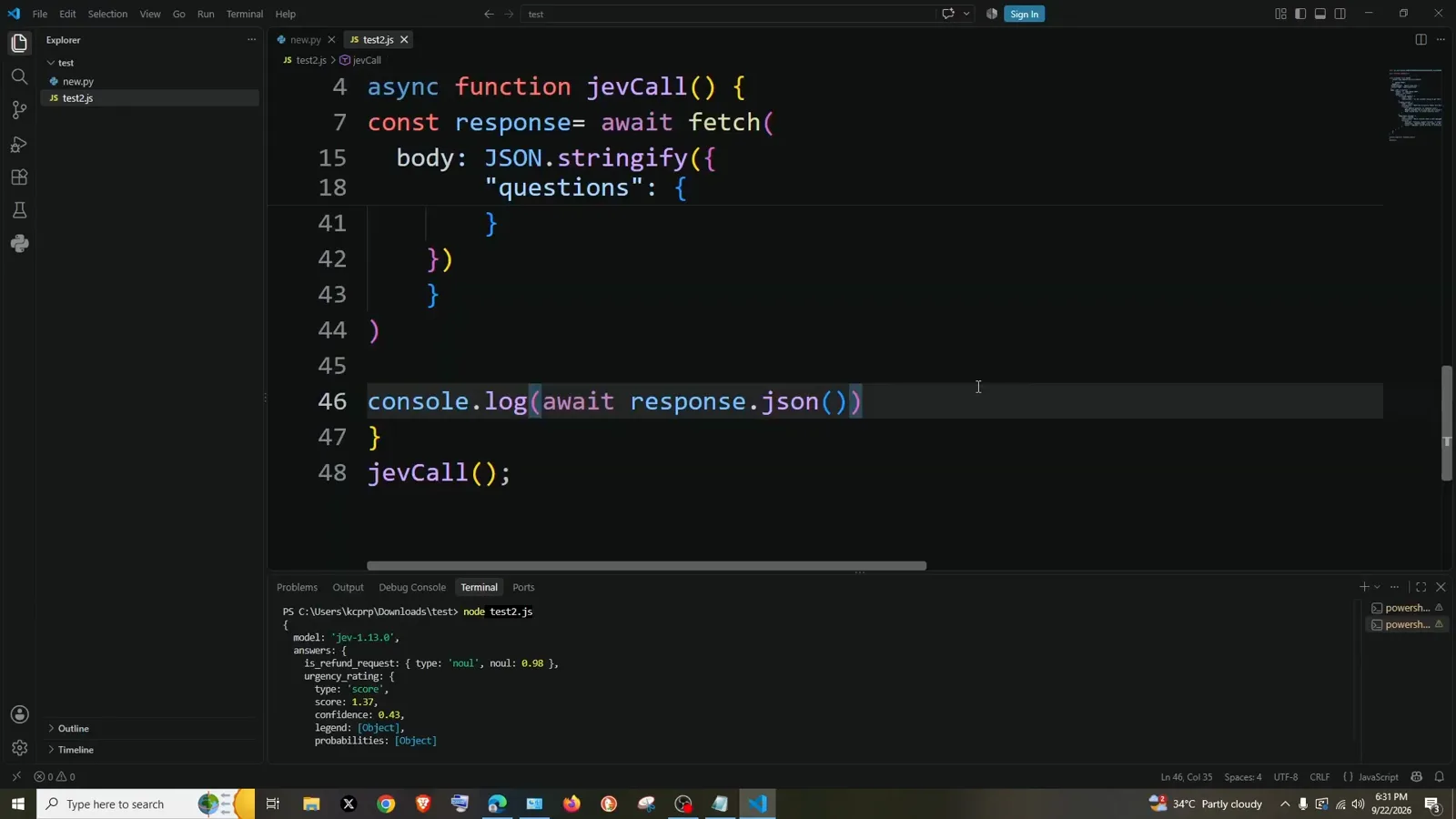
Same endpoint, same payload — fetch with a template-literal Bearer header.Watch at 11:14 - 8
Check the Usage page — a week of calls rounds to nothing
Back in the console, the Usage tab totals everything: Spend $0.0008, Tokens 21,314, Requests 47 over the last seven days, charted hourly and broken down per API key. That is the entire cost of building and debugging every example on this page, several times over. It matches the economics the founder tweeted when Jev launched on September 15, 2026 — 20–200× faster and 40–400× cheaper than LLM calls — and why the ~$5 monthly credit that ships with a new account is effectively years of hobby usage. Watch this page while you tune thresholds: if a question stops earning its keep in the answers, delete it from the payload; tokens scale with input size, not with question count.
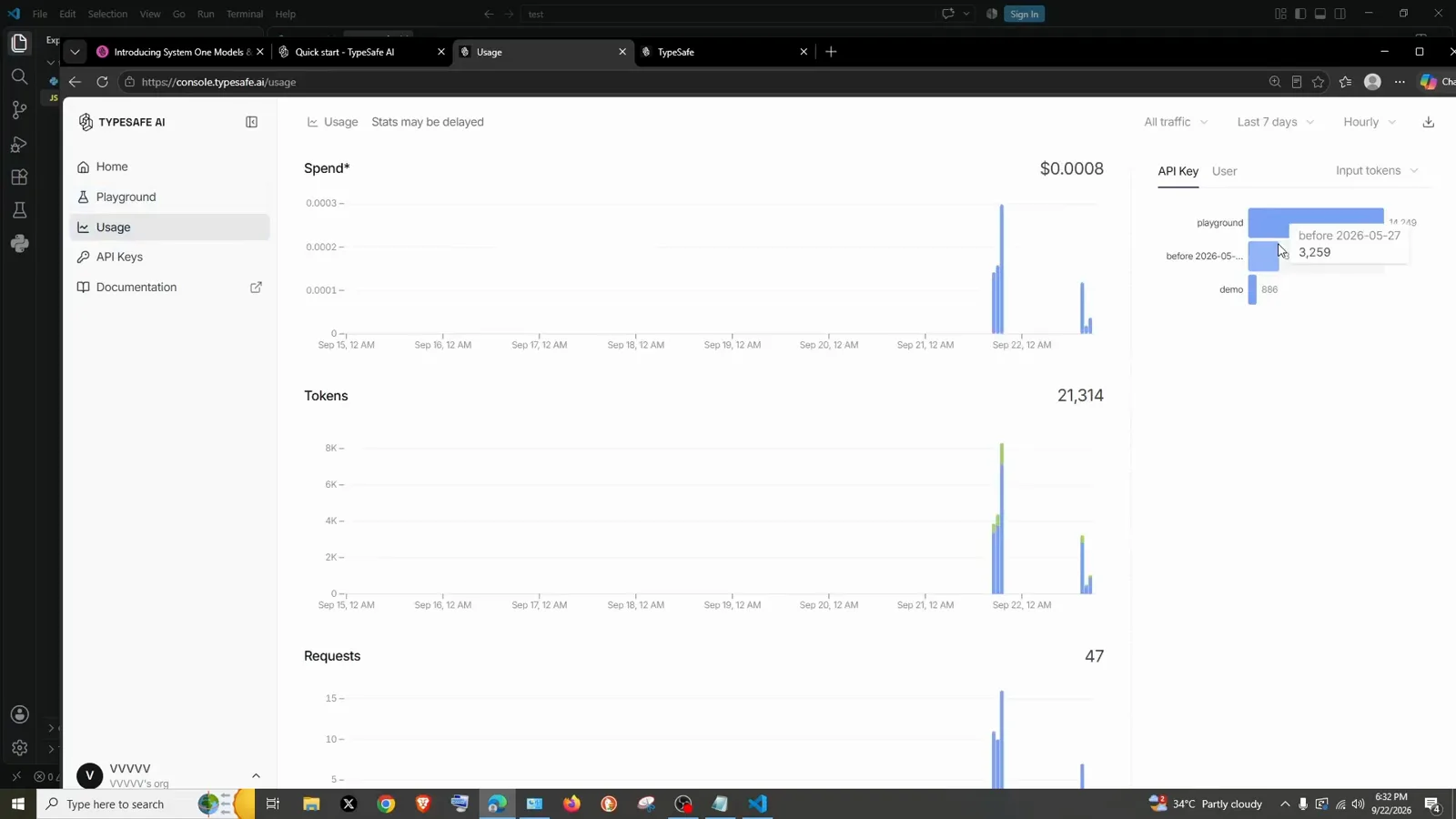
$0.0008 for a week of development calls — pricing is not the bottleneck.Watch at 11:46
Frequently asked questions
What is the Jev API endpoint for a first test call?
POST https://api.typesafe.ai/v1/systemone. Send two headers — Authorization: Bearer with your TYPESAFE_API_KEY and Content-Type: application/json — and a JSON body with three keys: state (the text to judge), model (“jev-latest”), and questions. Jev is served through other gateways too — the site’s Jev API reference compares the TypeSafe endpoint with Vercel AI Gateway and OpenRouter — but the raw endpoint is the one every example here uses, and it is what the official quickstart’s sample cURL command targets.
How do I call the Jev API with curl?
Use the quickstart’s sample as-is: curl -X POST https://api.typesafe.ai/v1/systemone -H "Authorization: Bearer $TYPESAFE_API_KEY" -H "Content-Type: application/json" -d @- <<'EOF' ‖ { "state": "...", "model": "jev-latest", "questions": { "urgency": { "type": "noul", "instructions": "Does this message express urgency?" } } } ‖ EOF. Export TYPESAFE_API_KEY first so your key never lands in shell history, and remember the Bearer header needs the literal word Bearer, a space, then the key. The same request works unchanged in Postman — set the two headers and paste the JSON as a raw body.
Which question types can I put in the Jev questions object?
Three, and they can all ride one call. noul answers yes/no with a probability (give it instructions). choice picks one option from your criteria — an object mapping each label to a description, like billing / technical / sales. score returns a position on a scale — its criteria is an ordered array of level descriptions, “Low (…)”, “Medium (…)”, “High (…)”, because the answer indexes into that order. Every question is judged independently against the same state, so stacking is_refund_request, urgency_rating, and department_routing in one payload costs one request and returns all three answers at once.
How do I read a Jev API response?
The response carries model (jev-1.13.0 in the video), answers keyed by your question names, and usage with input/output tokens. A noul answer is just the probability — 0.1 for “i cannot open”, 0.98 for “i need refund ASAP”. A score answer returns the value (0.93 → 1.39 between runs), a confidence, the legend you defined, and per-level probabilities. A choice answer returns the winning option, a confidence, and the full distribution — “billing” at confidence 1.0 with technical 0.0 and sales 0.0. Branch on the probability or confidence the way you would any threshold in an if statement.
Do I need an SDK to call the Jev API?
No — the API is plain HTTPS + JSON, which is exactly why the video can build it with curl, Python requests, and JavaScript fetch without installing anything. Official SDKs exist for Python and JavaScript/TypeScript and are worth adopting once your payload stabilizes, but for a first test, another language, or an environment without package installs, the raw HTTP call shown here is complete. Keep the key in an environment variable (TYPESAFE_API_KEY), target the /v1/systemone endpoint, and set model to “jev-latest”.
Related guides
Jev API Reference
The evaluate endpoint, auth headers, and gateway alternatives compared side by side.
ReadJev Classification Quickstart
The OpenRouter-flavored quickstart that pairs with these raw-HTTP examples.
ReadAgent Routing Recipe
Turn the choice answers from this guide into a typed routing gate with thresholds.
ReadJev Model Router Guide
Build a privacy-gated router that branches on Jev decisions at runtime.
ReadJev Playground
Try state + questions payloads in the browser before writing any code.
ReadJev API Errors & Rate Limits
What a 429 means, how to read Retry-After, and backoff code that survives bursts.
ReadMore video walkthroughs
- Jev Classification Quickstart: OpenRouter API, Primitives & Real Probabilities
- Jev Architecture Explained: Why 70ms Decision Models Beat LLMs for Workflow Automation
- Ultra-Fast Browser Agents with Jev: 178ms DOM Loops & Dual Model Orchestration
- Open Jev Models Are Here: Semif, Nimble, Decider, DiffusionGemma & Laya Hands-On
- Jev vs LLM: Will Jev Replace LLMs? Krish Naik's Whiteboard Explainer
- Jev Trader Tutorial: Build a Subsecond AI Trading Bot on Monad
- Jev Model Router: Build a Privacy-Gated LLM Router with Jev & OpenJev
- Jev Tutorial for Beginners: State, Questions & the TypeScript SDK
- Run Jev Locally: Kev, SemIf & Von on Your Own GPU (OpenJev Guide)
- Jev RAG Reranker: Policy-Steered Reranking for Retrieval-Augmented Generation
- When to Use Jev: An Engineer's Audit of Claims, Gates, and Failure Modes
- LangChain + Jev Integration Tutorial: Routing, Guardrails & Evals
- Jev MCP Server: Connect Jev Decisions to Claude Code & Cursor
- Jev vs Luna: Independent Benchmarks Put "Better, Faster, Cheaper" to the Test
- Jev Agent Harness: Where the Decision Gate Sits in Your LLM Loop
- Jev Playground Walkthrough: The Hotdog Lesson, Criteria, and a Four-Console Token Test
- Jev Text Classification API: Zero-Shot CLI & REST with classifier.dev