
Guides / illustrated walkthrough
Jev + Claude Code Guide: Voice-Controlled Browser Automation with Typed Decisions
A step-by-step walkthrough of Prompt Engineer 48’s 18:25 build: install the TypeSafe agent skill in Claude Code, watch typed Jev decisions route a Stripe ticket, and see a spoken command drive Chrome at P=0.78 with a click in 1176 ms.
Quick takeaway
Prompt Engineer 48’s 18:25 video makes the agent-integration case for Jev in four moves. First the indictment: every “LLM as decision engine” is the same loop — Prompt, Parse, Pray, Babysit — and RLHF’s people-pleasing training leaves you mode dropping, overconfidence, and a human babysitting the automation. Then the contract: Jev System One takes a state plus typed questions and returns typed answers, a full probability distribution, and a confidence number — “LLMs produce words for people. Jev produces typed decisions.” The proof is on screen: a terminal race where uv run typesafe-race gets 28 typed answers in 0.114 s for $0.000081 while an autoregressive OpenAI model is still waiting for its first token; a playground where “Hi, my stripe is failing” wavers between payment (86%, confidence 79%) until one added word — “billing” — collapses the choice to 100% at confidence 99%; and a pricing slide at $0.042 per million input tokens with output free, 238x lower input price than Claude Fable 5.1. Then the Claude Code integration: the TypeSafe agent skill installs with claude plugin marketplace add typesafe-ai/skills + claude plugin install typesafe@typesafe-ai, handing the coding agent the three question types and architectural patterns. The payoff project, voice-chrome, is a pipeline of mic → faster-whisper (local GPU) → Jev (~400 ms) → Command dataclass (typed, validated) → Playwright → real Chrome — no prompt engineering, no JSON parsing, no retry loop — and in the final demo the spoken “Click on videos” is gated at ADDRESSED TO BROWSER P=0.78, picks click_link at 0.62, and clicks in 1176 ms.
Video source
Prompt Engineer 48
Step-by-step walkthrough
- 1
Open with the problem: text models make terrible decision engines
The video opens on a live demo — the presenter speaks, and Chrome obeys — then spends its first two minutes on why the obvious alternative fails. The slide at 1:35 names the loop every integration team knows: 1. Prompt (“beg the model, in English, to answer in JSON”), 2. Parse (“strip the markdown fence; retry when it apologises instead”), 3. Pray (“no calibrated confidence, so you cannot tell a sure answer from a guess”), 4. Babysit (“so you keep a human in the loop — and the automation never actually ships”). The footnote carries TypeSafe’s thesis: RLHF tuned models to please people, and that training created mode dropping, overconfidence and unreliability — fine for chat, fatal for software.
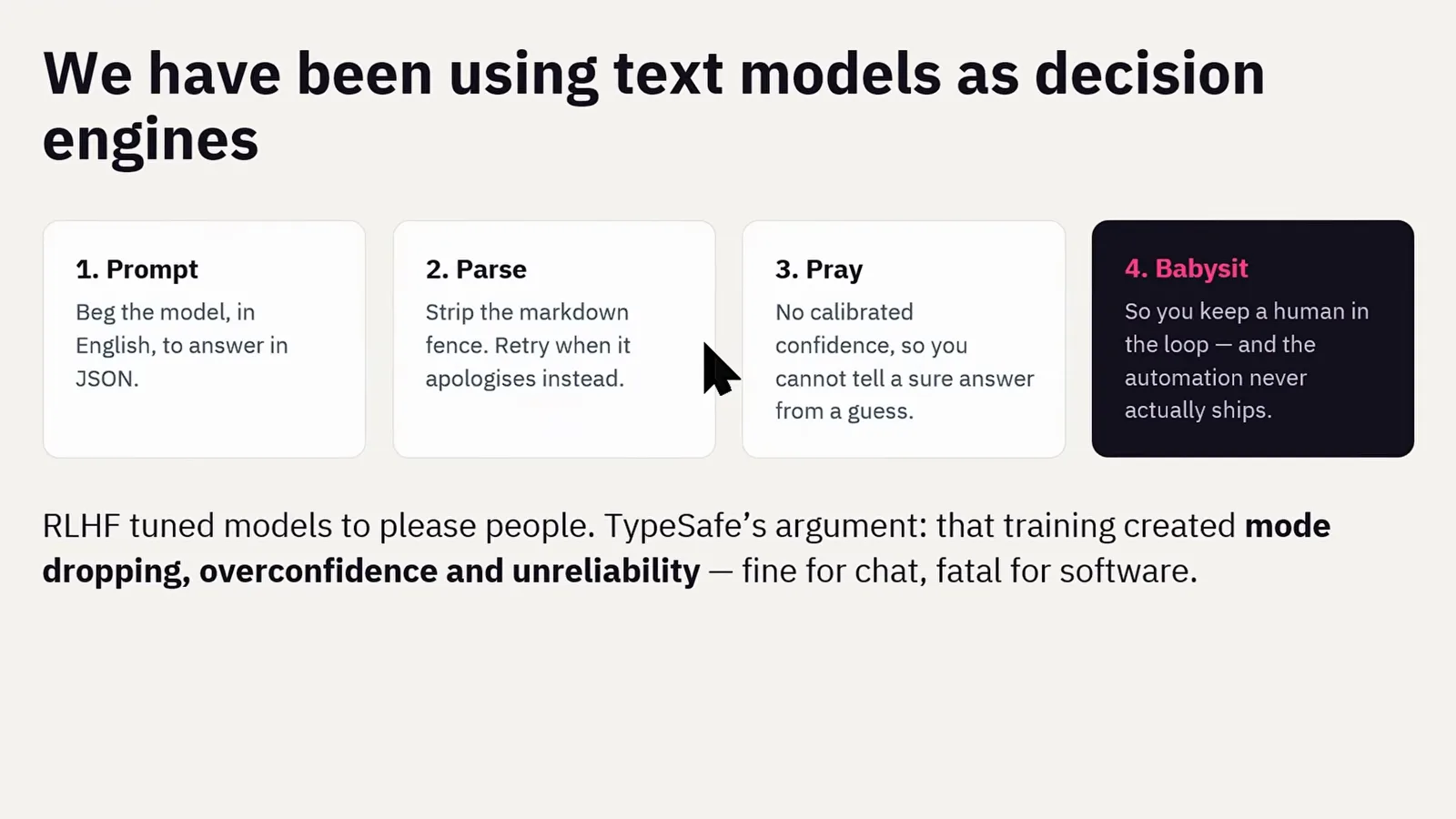
Prompt, parse, pray, babysit — the four-step loop Jev was built to delete.Watch at 1:35 - 2
Jev in one slide: send state and typed questions, get typed decisions
The core slide defines the whole contract. What you send: a state — the ticket, the email, the row, the page, the app’s current facts — plus a set of typed questions about it. What comes back: typed answers, a full probability distribution, and a confidence number. No prose, no reasoning trace, nothing to parse. The quote beneath it does the positioning in one line — “LLMs produce words for people. Jev produces typed decisions.” — with code owning the workflow while the model supplies programmable common sense. The presenter frames this as backing Diogo Almeida’s TypeSafe bet (chapter 1:57): a model trained for calibrated decisions rather than people-pleasing chat, so the confidence number it prints is one your code can branch on.
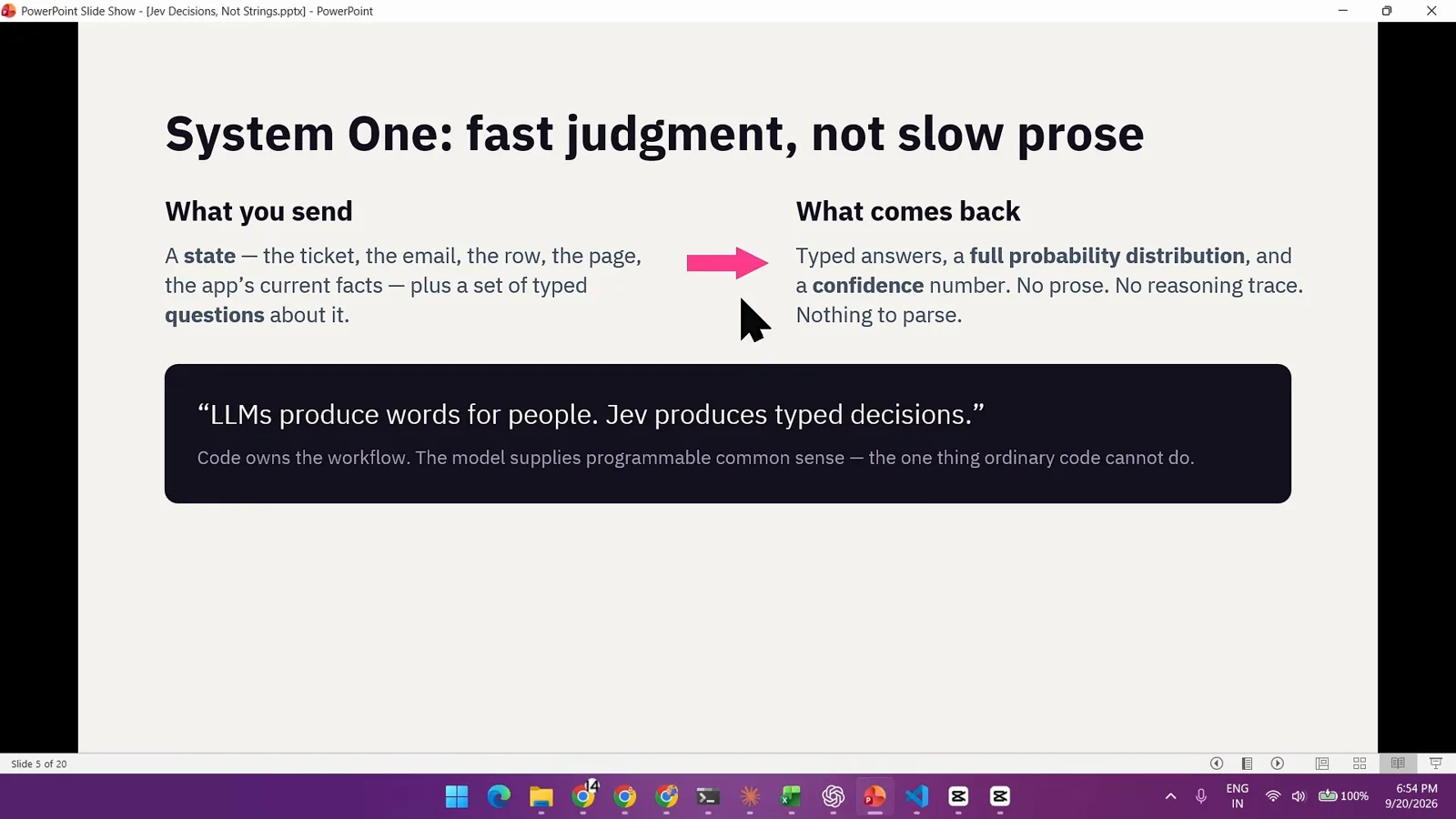
“LLMs produce words for people. Jev produces typed decisions.” — the slide that frames the video.Watch at 4:43 - 3
Watch the race: 28 typed answers in 0.114 s while the LLM waits for token one
In the benchmark clip played mid-video, two terminals run uv run typesafe-race side by side. The left pane asks the parallel TypeSafe API and instantly fills with 28 typed answers — noul gates like “Revenue currently impacted?” at 0.85, a choice like “Which primary department?” = technical at confidence 1.0, scores like “Churn likelihood level?” at 1.6 — finishing at a cost of $0.000081 in 0.114 s. The right pane, pointed at the autoregressive OpenAI API (gpt-5.6-terra), is still stuck on “Waiting for first token…”. This one frame is the JSON-output / confidence / latency chapter in full: a whole screen of decisions lands before a chat model emits a single character.
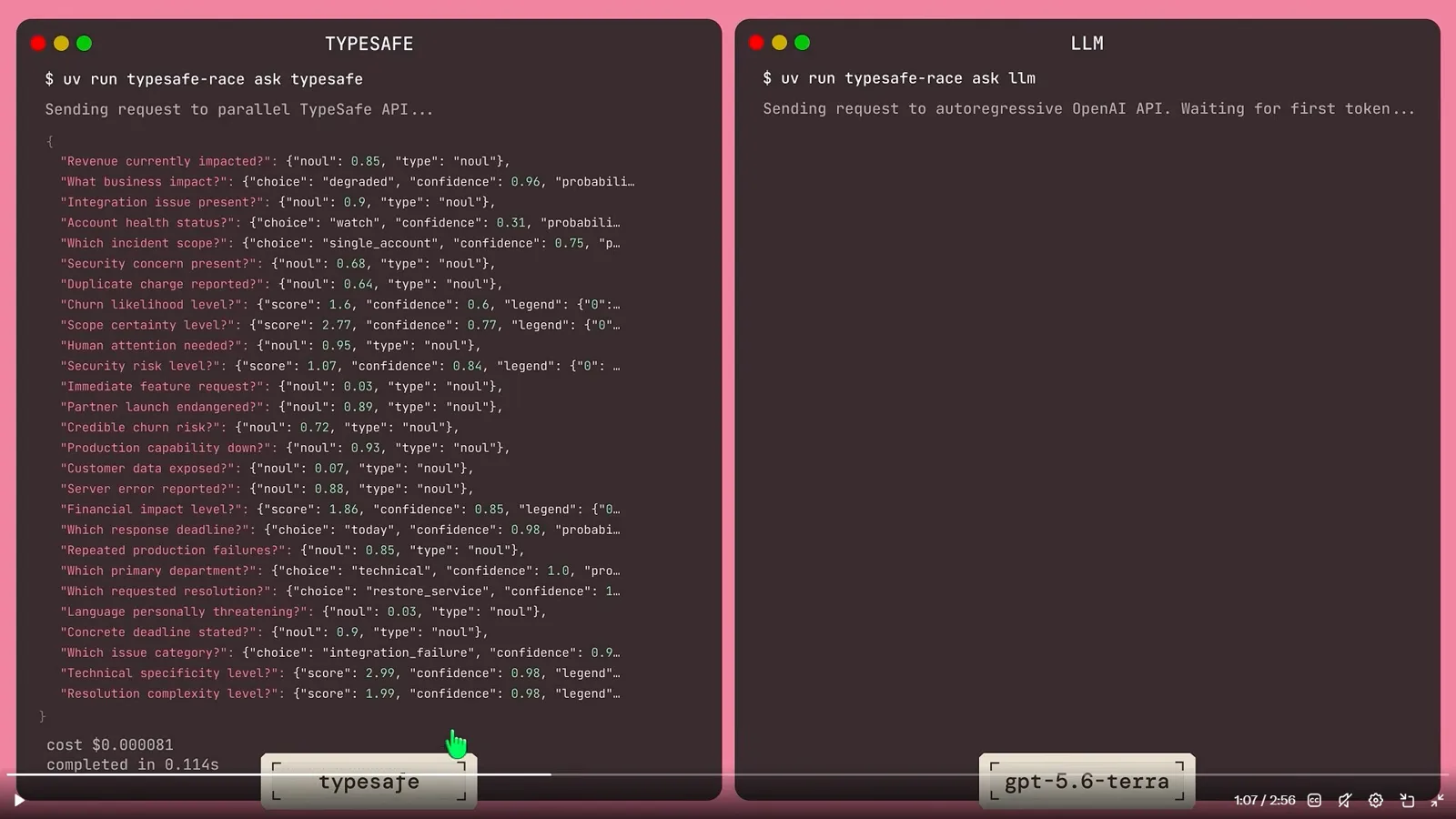
28 decisions, $0.000081, 114 ms — the LLM pane is still waiting for token one.Watch at 2:45 - 4
Learn the entire API surface: Choice, Noul, Score — then grab a free key
Chapter 4:13 puts the whole API on one slide. Choice returns the winning option, the probability of every option, and a confidence — built for routing, triage, intent. Noul returns a single 0–1 probability that a condition holds; there is no separate confidence because the number is the answer — built for guardrails, flags, checks. Score returns a probability-weighted position on ordered rubric levels you define in words — ranking, quality, risk. The slide’s selection rule: pick by what the answer means, not by what is easiest to prompt — a Noul near 0.5 means “equally likely yes or no”, never “medium”. Chapter 3:06, right before it, covers the on-ramp: typesafe.ai’s free tier and an API key from the console are enough to reproduce every demo in the video.
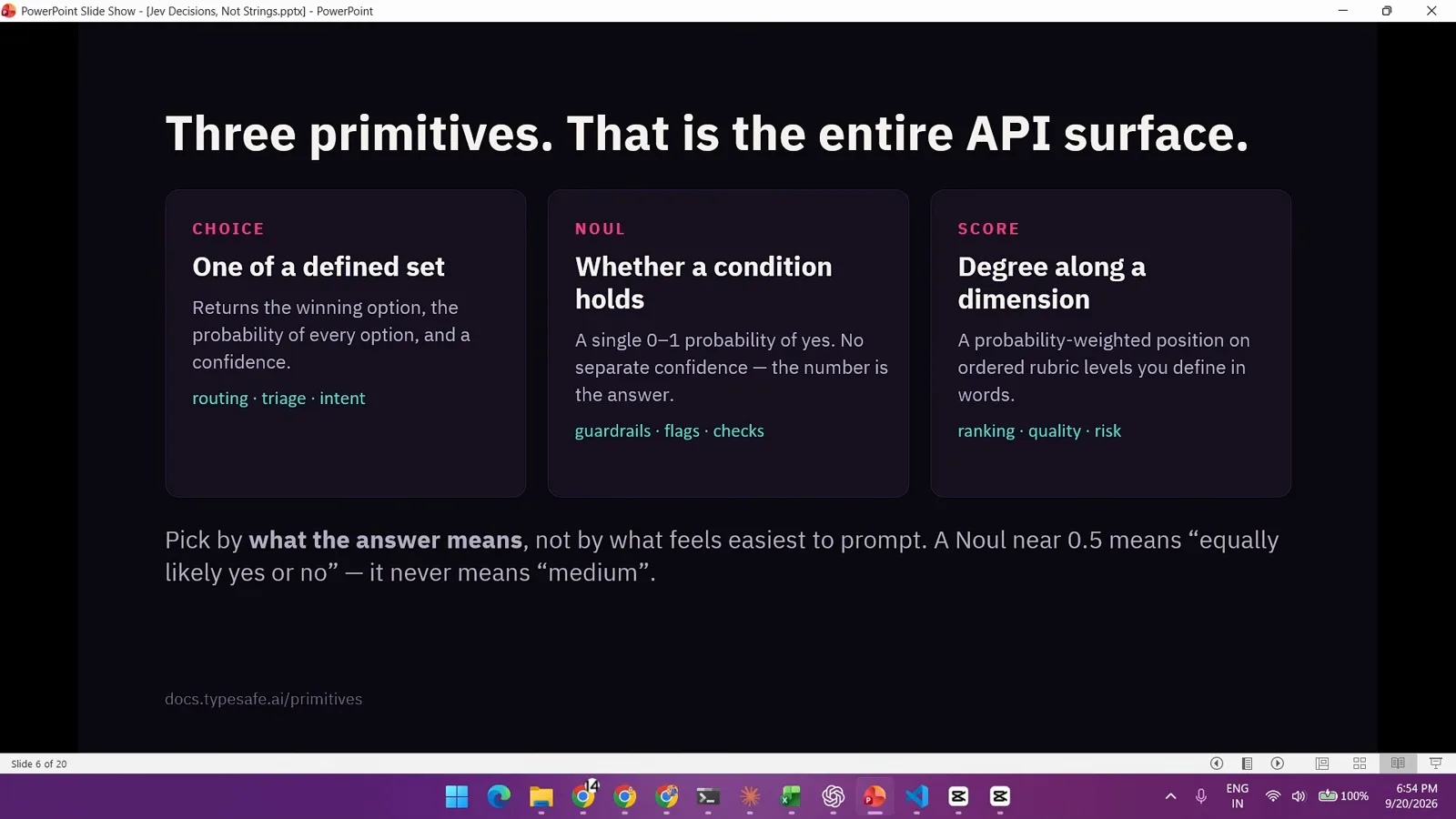
Three primitives are the entire API surface — pick by what the answer means.Watch at 4:52 - 5
Playground: ask “does this message express urgency?” on a Stripe complaint
In the console playground at console.typesafe.ai, the author pastes the state — “Hi, my stripe is failing. Please help ASAP. I am losing numerous high value clients.” — and defines three typed questions: urgency (noul, “Does this message express urgency?”), Problem Type (choice over accounts / billing / payment), and Severity (score over Low / Middle / High). The response from jev-latest: urgency 98% true; Problem Type payment at 86% with billing 13% and accounts 1% — overall confidence 79%; Severity 2 of 2 at 100%. The interesting part is the wobble: the distribution visibly hesitates between payment and billing, and that readable uncertainty is exactly what you want from a decision model.
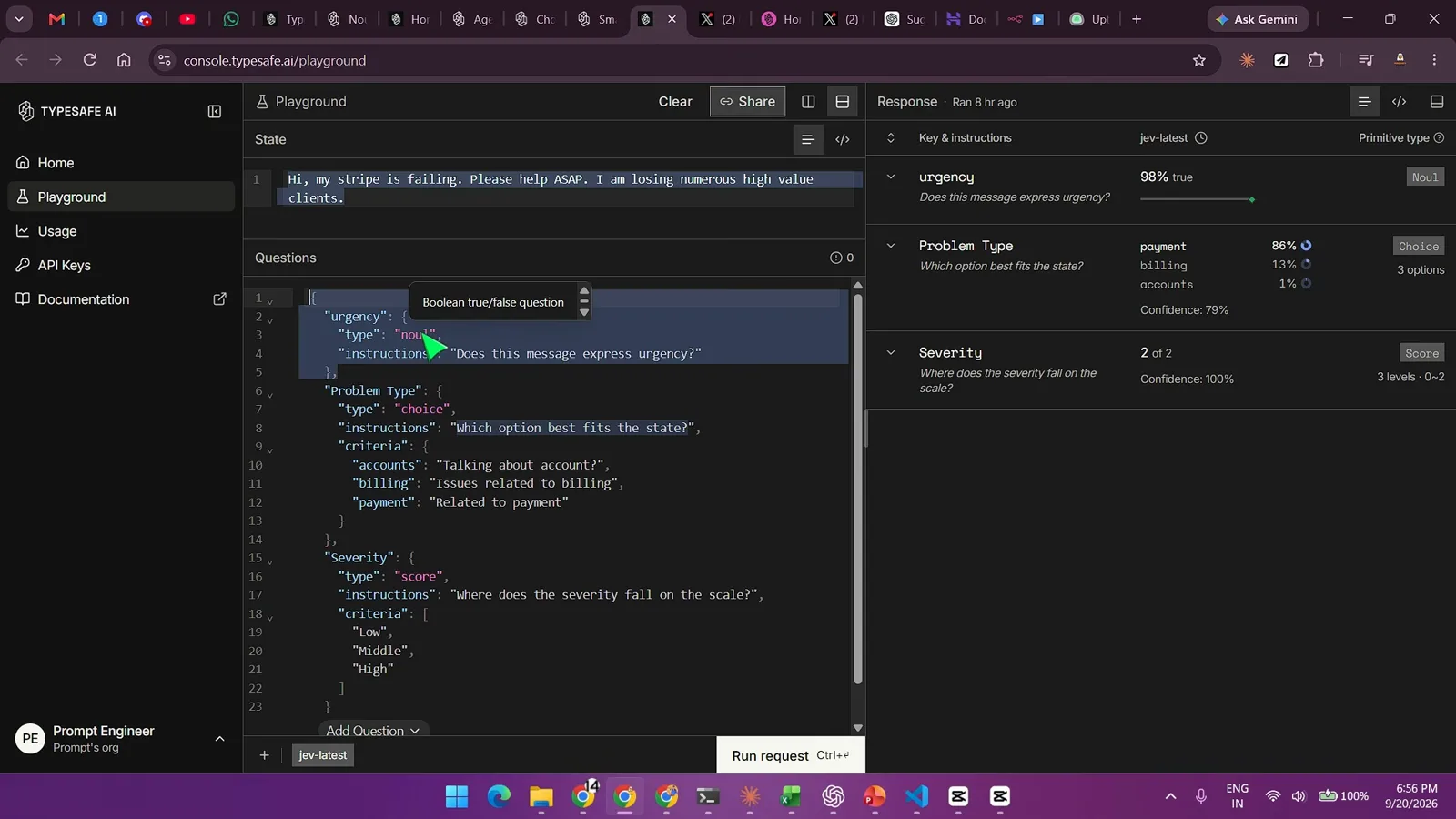
The choice distribution wavers between payment and billing — you can see the hesitation.Watch at 6:35 - 6
One word flips the route: “stripe billing is failing”
The rerun adds a single word — “Hi, my stripe billing is failing…” — and the choice collapses: Problem Type billing at 100% with confidence 99%, urgency 96% true, Severity still 2 of 2 at 100%. This is chapter 8:00’s real Stripe-ticket routing point: the same three typed questions sort tickets into queues, and when the state actually carries the signal, an 86/13/1 split sharpens into 100/0/0. In production the confidence number is the threshold — auto-route when it is high, escalate to a human when it is not, and both branches are one if statement.
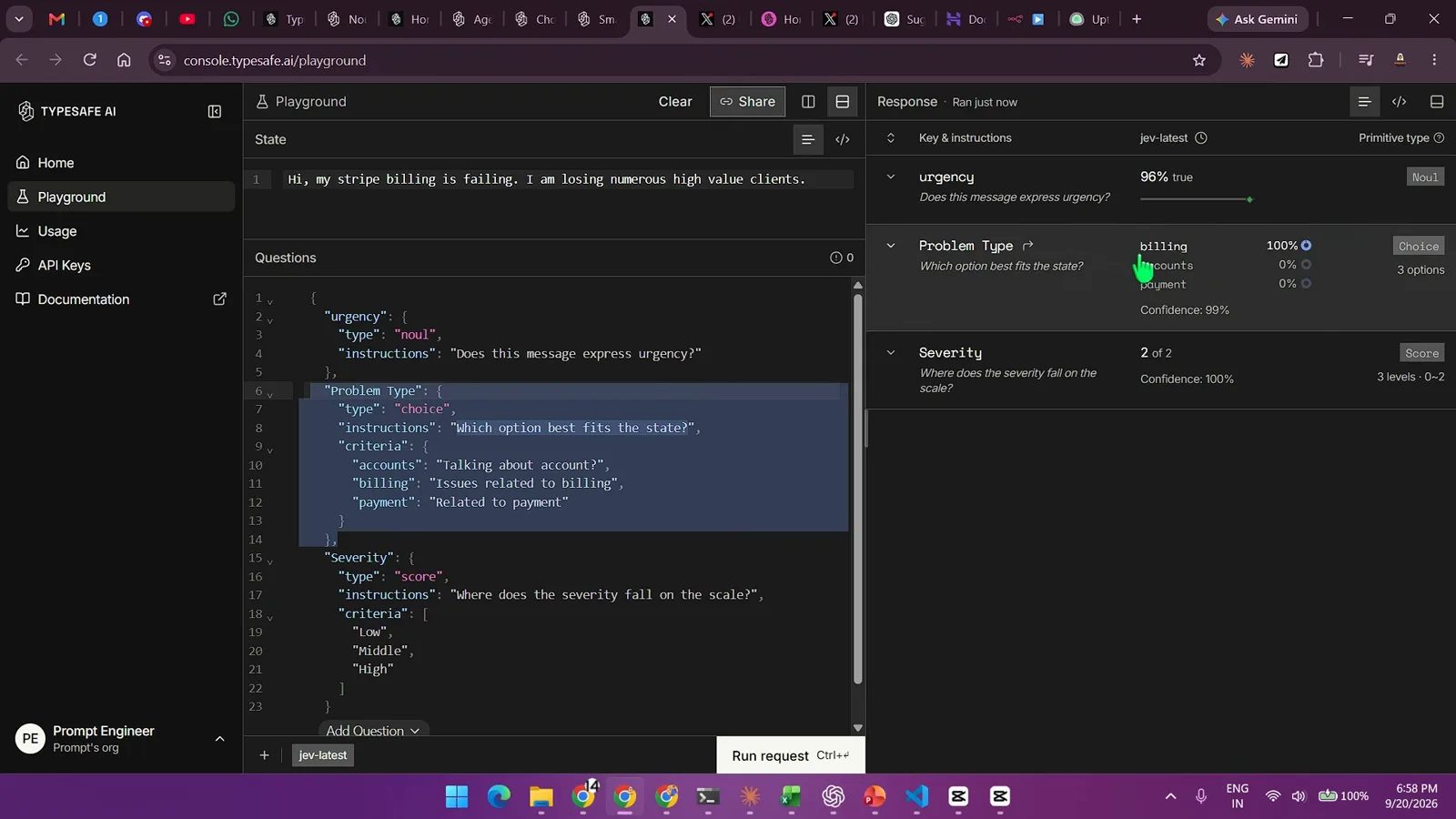
Add “billing” and the 86/13 wobble becomes a 100-percent routing decision.Watch at 8:20 - 7
What it costs: $0.042 per million input tokens, output free
The pricing slide shown at 12:22 lists Jev (TypeSafe AI) at $0.042 per million input tokens — $42 per billion — with output tokens FREE, against a field where GPT-6 Astra and Claude Fable 5.1 list $10.00 input / $50.00 output per million. The slide’s own headline: 238x lower input price than Claude Fable 5.1. (The video’s description rounds the pitch to 193x faster and 244x cheaper; 238x is the on-screen chart’s claim.) Chapter 11:07 pairs the cost talk with honest limitations: this is a decision model, not a writer — it classifies, routes, and scores at ~400 ms, and your code does the acting.
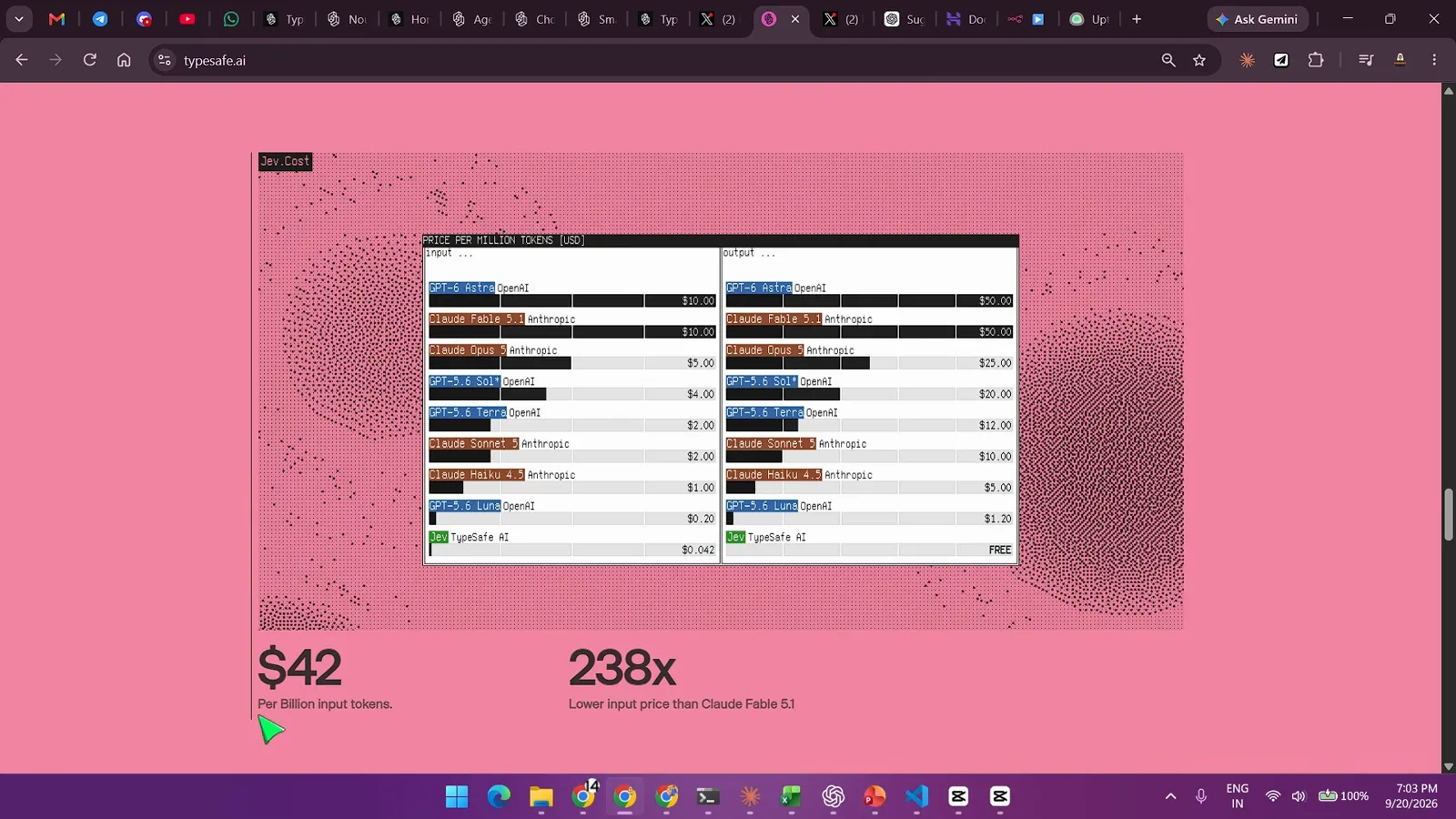
Decision tokens are priced like a utility, not like chat — $42 per billion input.Watch at 12:22 - 8
Install the TypeSafe agent skill in Claude Code
Chapter 13:01 is the Claude Code integration proper. docs.typesafe.ai/agent-skill ships a drop-in skill for Claude Code, Codex, and other agent environments — it hands your AI coding agent full context on the TypeSafe API: the three question types, the architectural patterns, and best practices for structuring evaluations. Installation is two terminal commands: claude plugin marketplace add typesafe-ai/skills, then claude plugin install typesafe@typesafe-ai (the manual route is copying the skills/typesafe-ai directory into your agent’s skills folder — pick one method to avoid duplicate copies). The doc’s common-issues list is worth reading before your first run: the agent not using the skill, routing not working as expected, confidence thresholds everywhere, and agents inventing request or response fields.
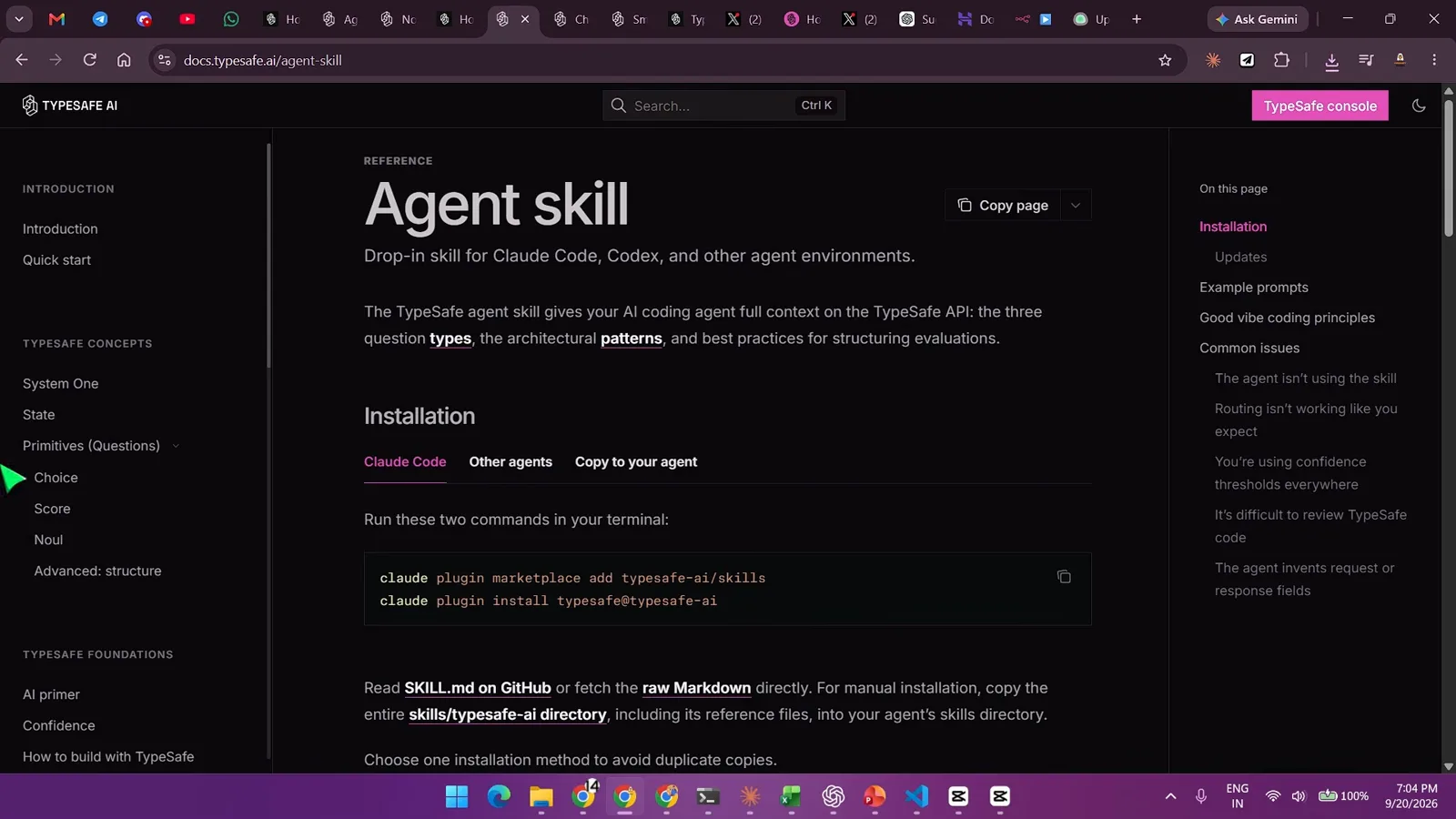
Two commands give Claude Code the full TypeSafe API context.Watch at 13:34 - 9
The architecture: mic to Whisper to Jev to Playwright to Chrome
The voice-chrome README shown at 15:06 is the whole blueprint in one line: mic → faster-whisper (local GPU) → Jev (~400 ms) → Command dataclass (typed, validated) → Playwright → Chrome. “No prompt engineering. No JSON parsing. No retry loop. Jev returns an enum, a probability distribution and a confidence number, and ordinary if statements do the rest.” The README’s comparison table draws the line against typical LLM tool-calling: instead of free text you must parse, the agent loop receives a typed Command. Whisper transcribes; Jev decides which command the utterance is — and whether it was meant for the browser at all; Python executes against a real Chrome over the DevTools protocol.
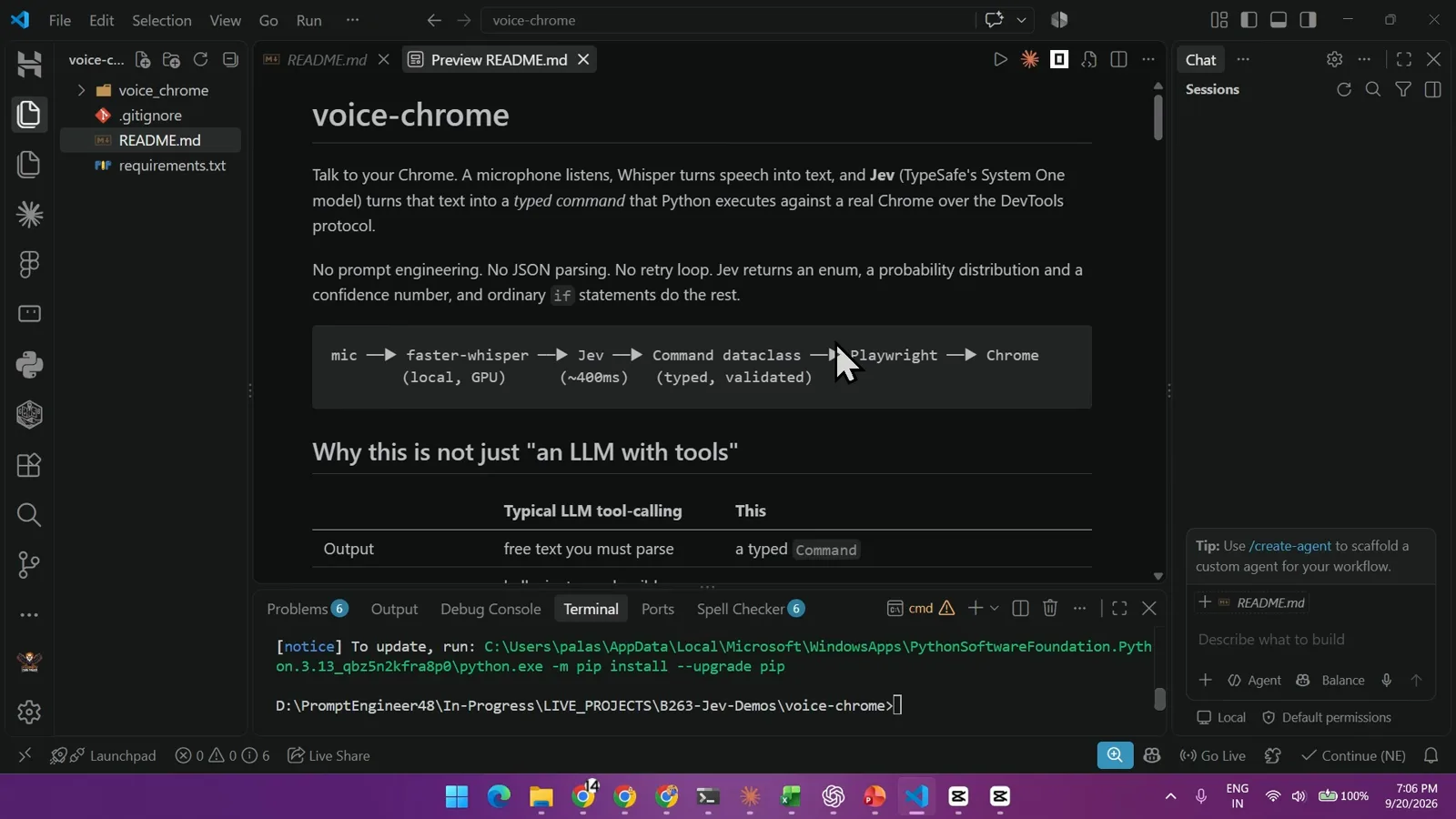
A typed Command dataclass replaces prompt parsing at the heart of the loop.Watch at 15:06 - 10
The payoff: “Click on videos” — spoken, gated at P=0.78, clicked in 1176 ms
In the full demo at 15:25, the author is browsing YouTube and simply says — “Click on videos.” The HUD shows what Jev decided: the utterance was ADDRESSED TO BROWSER at P=0.78 (the gate that keeps the agent from obeying speech meant for a human), with action probabilities click_link 0.62, scroll_to_section 0.33, media 0.03, scroll 0.01, none 0.01 — and the browser clicked through to the “Claude Code + Ollama = FULL LOCAL AI AGENT” video in 1176 ms. The closing chapters (17:01) run the same shape through two more demos — a fitting-room flow and a news filter — before the outro. Every one of them is state in, typed decision with a probability out, code acting on it.
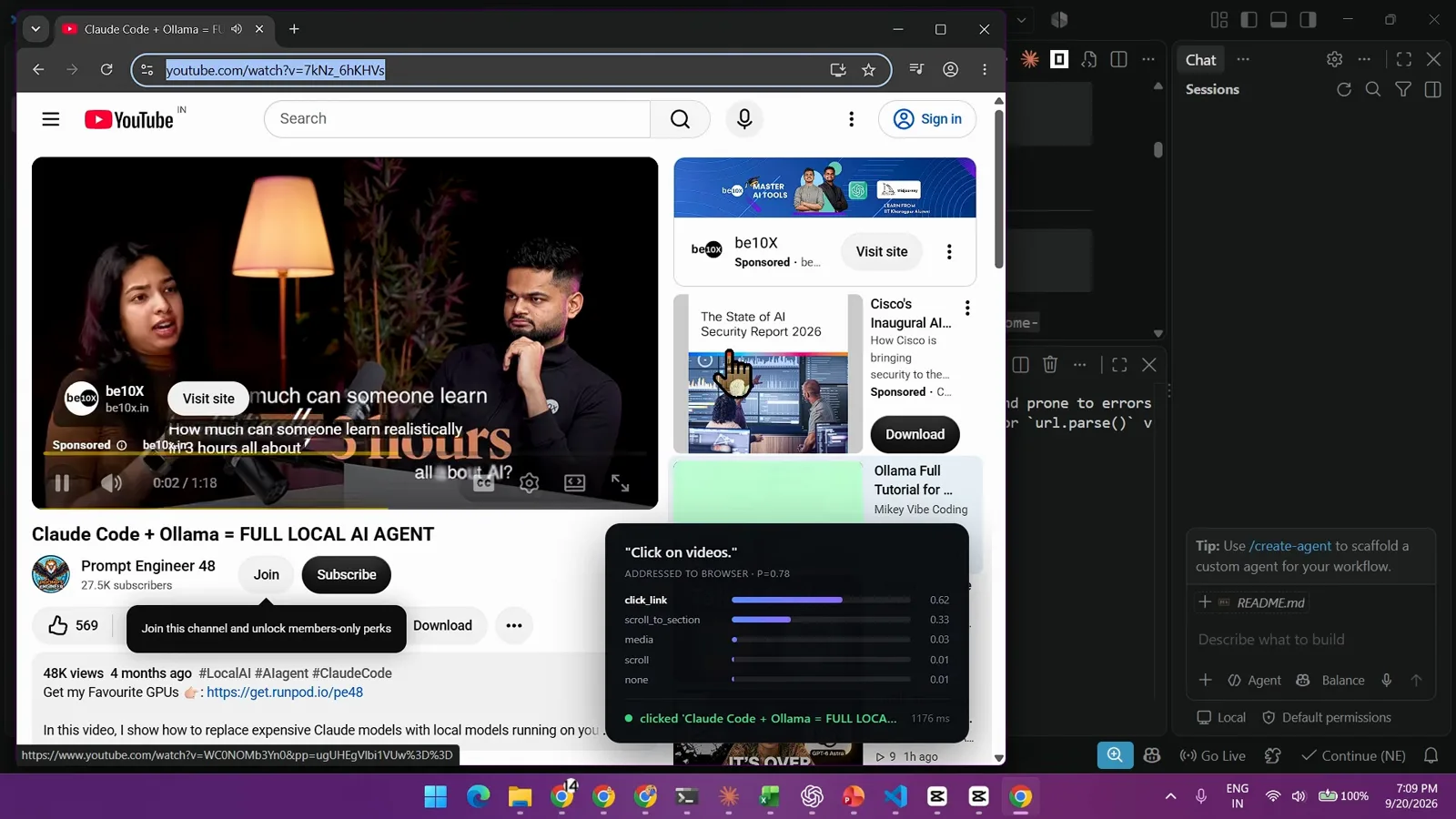
The gate, the action distribution, and the click — one spoken sentence, end to end.Watch at 15:55
Frequently asked questions
What is the Jev Claude Code integration?
The official path shown in the video is the TypeSafe agent skill: install it into Claude Code with claude plugin marketplace add typesafe-ai/skills followed by claude plugin install typesafe@typesafe-ai, and your coding agent gains the three Jev question types, architectural patterns, and evaluation best practices — everything it needs to wire typed decisions into whatever it builds, which in this video is a voice-controlled browser agent.
How fast and cheap are Jev decisions?
In the video’s terminal race, 28 typed answers came back in 0.114 s at a cost of $0.000081 while an autoregressive LLM was still waiting for its first token. The pricing slide lists $0.042 per million input tokens with output free — 238x lower input price than Claude Fable 5.1 as charted on screen. All figures are as shown in the video; check typesafe.ai for current pricing.
Why not just let the LLM choose the browser action?
Because a text model puts you back in the Prompt / Parse / Pray / Babysit loop: no calibrated confidence, retries on malformed JSON, and a human babysitting every run. Jev returns a typed Command with a probability distribution and confidence, so ordinary if statements act on it — and a noul gate like ADDRESSED TO BROWSER at P=0.78 stops the agent from executing speech that was meant for a person.
What does P=0.78 in the voice HUD mean?
It is the model’s probability that the spoken sentence was addressed to the browser rather than to another person in the room — the gate checked before any action probabilities (click_link 0.62, scroll_to_section 0.33 in the demo) are considered. The numbers are demo values from the video, but the pattern is the guardrail every voice agent needs: below your threshold, do nothing.
Related guides
Jev MCP Guide
The other official Claude Code path: connect Jev over MCP instead of the agent skill.
ReadJev Browser Agent Guide
SDK-level browser automation: 178 ms DOM loops and dual-model orchestration without voice.
ReadJev Agent Harness Guide
Wrap any agent in typed decision gates before it is allowed to act.
ReadLangChain Integration Guide
Drop Jev decisions into a LangChain orchestration graph.
ReadThe Jev API
System One, question shapes, and answer fields — the primitives behind every demo in this video.
ReadMore video walkthroughs
- Jev Classification Quickstart: OpenRouter API, Primitives & Real Probabilities
- Jev Architecture Explained: Why 70ms Decision Models Beat LLMs for Workflow Automation
- Ultra-Fast Browser Agents with Jev: 178ms DOM Loops & Dual Model Orchestration
- Open Jev Models Are Here: Semif, Nimble, Decider, DiffusionGemma & Laya Hands-On
- Jev vs LLM: Will Jev Replace LLMs? Krish Naik's Whiteboard Explainer
- Jev Trader Tutorial: Build a Subsecond AI Trading Bot on Monad
- Jev Model Router: Build a Privacy-Gated LLM Router with Jev & OpenJev
- Jev Tutorial for Beginners: State, Questions & the TypeScript SDK
- Run Jev Locally: Kev, SemIf & Von on Your Own GPU (OpenJev Guide)
- Jev RAG Reranker: Policy-Steered Reranking for Retrieval-Augmented Generation
- When to Use Jev: An Engineer's Audit of Claims, Gates, and Failure Modes
- LangChain + Jev Integration Tutorial: Routing, Guardrails & Evals
- Jev MCP Server: Connect Jev Decisions to Claude Code & Cursor
- Jev vs Luna: Independent Benchmarks Put "Better, Faster, Cheaper" to the Test
- Jev Agent Harness: Where the Decision Gate Sits in Your LLM Loop
- Jev Playground Walkthrough: The Hotdog Lesson, Criteria, and a Four-Console Token Test
- Jev Text Classification API: Zero-Shot CLI & REST with classifier.dev
- Jev API Examples: First Request, curl & All Three Question Types
- Jev Log Triage with Expanso Edge
- Jev Lead Enrichment with Treg: ICP and Signup Scoring
- Use Jev Decision Nodes in Heym for Model Routing
- Laya Tutorial: Open-Source AI Routing With Calibrated Probabilities (Laya vs Jev Setup)
- Train Your Own Jev: Fine-Tune a Jev-Style Decision Model for $5–$17 (What You Can and Cannot Train)
- Jev Tips: 8 Best Practices for Better Decisions (State, Questions, Criteria & Thresholds)
- Jev Context Compaction: Prune AI Agent Memory Without Generative Summaries
- Jev as an LLM Judge: Confidence-Gated Cascades at 0.36% of the Cost
- TypeSafe Computer Use: Local Desktop Automation with Jev, Step by Step
- Jev Resume Screening: Build an AI Resume Evaluator with the Jev JavaScript SDK
- Jev vs Ollama: Can Local AI Replace Hosted Jev Without Sending Your Data Away?