
Guides / illustrated walkthrough
Ollaya Guide: Install the "Ollama for Decision Models" Runner, Read Every Vendor-Reported Number, and Run the CPU Test It Leaves Open
LocalLayer's Ollaya walkthrough turned into a step-by-step page: what the Rust CLI + daemon actually is (and why it is not Ollama), the one-line install, /v1/systemone wire compatibility with hosted Jev clients, the HN traction and its skeptics, the model lineup, benchmarkheaven caveats, MCP tool calls — with every latency figure labeled vendor-reported and the CPU number left as the exercise the video intends.
Quick takeaway
This is LocalLayer's nine-and-a-half-minute tour of Ollaya, the local runner for open decision models — and the first thing to fix is the name. Ollaya is not Ollama: Ollama is the general LLM runtime you already know; Ollaya is a decision-model runner that describes itself as "Ollama for decision models" (the repo description reads: pull and serve Laya, decider, NLI and GliClass behind a TypeSafe-compatible API). The confusion is measurable — auto-generated transcripts of this very video render the brand as "Ollama," "O LLaMA" and even "Ought to lie" — so every fact below comes from the on-screen cards, not the transcript. Architecture: a Rust CLI plus a resident background daemon; the CLI sends requests to the daemon, the daemon exposes a local HTTP API, the runtime is Apache-2.0, and bundled models carry MIT (llama.cpp, NLI) or Apache-2.0 (Laya, Decider, Kev) licenses. At recording time the repo showed 105 commits on main, 386 stars, 14 forks, 6 open issues, stats as of Sep 27, 2026 (the transcript's "September 26, 2024" year is a mis-render). Install: curl -fsSL https://ollaya.dev/install.sh | sh — one script, no compilation. First run: ollaya run laya --preset triage "I was charged twice for my subscription this month and want a refund." returns department: billing (confidence 0.78). The numbers, all vendor-reported and labeled as such by the video itself: laya:en on an RTX 4090 answers in 8-10 ms including the full HTTP round trip (un-warmed first call 8.1 ms), decider 2B averages ~190 ms in the same configuration — model size matters — while the TypeSafe hosted Jev API quotes 236-276 ms per billed call. Migration is a URL change: existing hosted-API clients keep working against the local daemon because the streaming format matches exactly — native endpoint /v1/systemone, /v1/decisions documented as an exact alias, auth header Bearer local (the transcript garbles these into chat-completions paths; the cards are the authority). Since 2026-10-01 there is a second way to run decisions locally: Ollama 0.35 announced native Jev-like decision support and serves tev1 and Nimble through its own /v1/systemone (tested in our Ollama decision-models guide). The two converge on the wire; they differ in identity — Ollaya is decision-first with a curated decision-model menu and OLLAYA_DEVICE device switching, Ollama is a general runtime that grew a decisions endpoint — so pick by model menu and runner ergonomics, and read the hosted-vs-local comparison first if you are still deciding whether to go local at all. Traction: one Hacker News thread (item 49848269, submitter Ardakilic) captured at a live 586 points / 139 comments and earlier at 489 / 122 after 18 hours — same thread, two time points, still climbing — while a same-week third-party Web UI post stalled at 5 points. Skeptics: HN user hbrn — "Decision model is just marketing jargon. Decision model = classifier." The video answers by opening the box: nli 435M and qwen3guard 600M are plain classifiers; kev 9B and winnow 12B are decoders repurposed to score choices instead of writing sentences; above them sits one contract — a written question plus input state, one forward pass, a calibrated probability map out, no decoding loop — with a laya router picking laya:en or laya:multilingual and, per the docs, adding no measurable latency because it never touches the model. Benchmarks: benchmarkheaven.com is third-party, unaudited and drifting — Jev 1.13.0 leads capability at 64.7 and sits second on composite at 63.3; Laya (ModernBERT-Large, 421M parameters, credited on the leaderboard card to Convai Innovations; Ollaya packages it, did not train it, and the table labels it a Jev rebuild) ranks #41 on both lists at 49.9 / 30.3, priced around $0.0029 per 1,000 decisions — near-zero cost and single-digit latency bought with much lower capability. The HN thread quoted 63.29 / 30.25; a later live recheck read 63.3 / 30.3 — consistent within rounding. Workflow wins: one daemon covers ticket triage (ticket text → department, urgency, refund), shell-command filtering (shell command → allow/block label — a real HN commenter runs it because the label set changes too often to justify fine-tuning a dedicated classifier) and agent tool calls (routing question → typed choice), plus MCP, so agent frameworks like Claude Code substitute one MCP tool call for a full LLM call and receive a typed option instead of generated text. The end-to-end demo fires the duplicate-charge ticket once and gets department billing at confidence 0.78 with urgency and refund fields in the same JSON, plus timing fields in nanoseconds: eval_duration, load_duration, total_duration. And the ending is deliberately unfinished: because no vendor publishes CPU-only numbers, the video runs OLLAYA_DEVICE=cpu ollaya run laya:en on the same ticket, on camera, and refuses to read the number out — the closing card says "Run the CPU test. What's your eval_duration?" This page keeps the discipline: no CPU figure appears here either. The number that closes the gap is the one on your machine.
Video source
LocalLayer
Step-by-step walkthrough
- 1
Meet Ollaya — and no, it is not Ollama
Fix the identity before anything else, because the name is doing heavy lifting. Ollaya is a decision-model runner: a CLI written in Rust plus a resident background daemon that stays on your machine, takes requests from the CLI, and exposes everything through a local HTTP API. Its README pitches itself in one line — "Open decision models locally, the way Ollama runs LLMs" — and the repo description goes further: pull and serve Laya, decider, NLI and GliClass behind a TypeSafe-compatible API. Ollama for decision models. That slogan is exactly why this page exists: automated transcripts of this very video render the brand as "Ollama," "O LLaMA" and even "Ought to lie," and search results routinely blur the two. So, plainly: Ollama is the general-purpose LLM runtime; Ollaya is the tool this guide installs, and it speaks decisions, not chat. The runtime is Apache-2.0, the project lives at github.com/ollaya-dev/ollaya with ollaya.dev as its site, and at recording time the repo showed 105 commits on main, 386 stars, 14 forks and 6 open issues, stats as of Sep 27, 2026 — recent and moving, which matters for a tool this young.
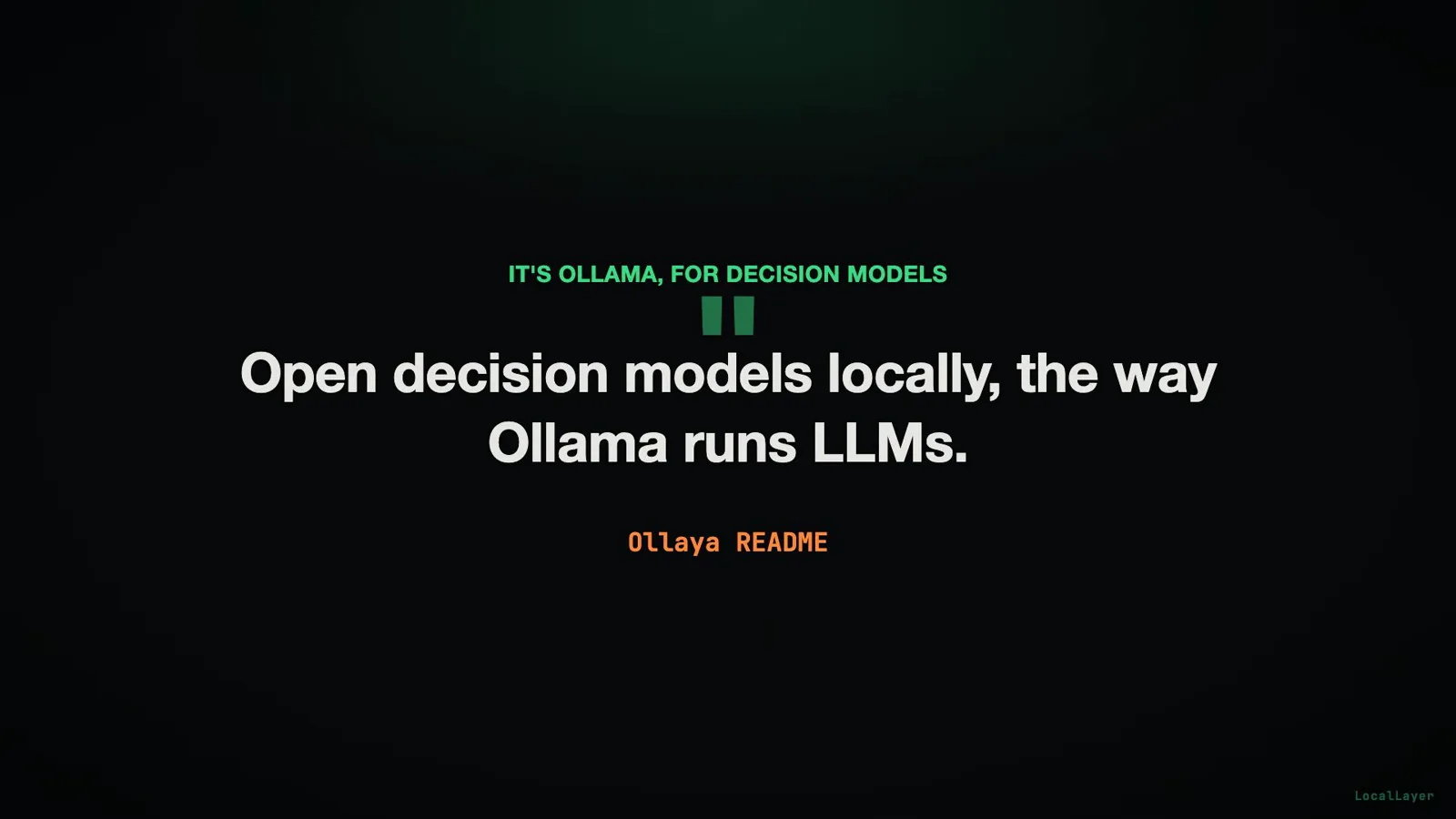
The line that names the confusion: the README pitches itself against Ollama on purpose.Watch at 1:28 - 2
The pitch: 236-276 ms of hosted latency becomes 8-10 ms local — every figure vendor-reported
The opening card is the whole argument in one row. On the left, the TypeSafe hosted Jev API quoting 236-276 ms per call. On the right, Ollaya running laya:en on an RTX 4090 at 8-10 ms — and note the chips underneath: the cloud figure and the local figure are both full round trips, so the comparison is honest about including HTTP overhead, not just on-card compute. Two qualifications keep it honest in the other direction. First, the first, un-warmed query came in at 8.1 ms — the steady range holds only on a loaded daemon. Second, not every model is that fast: decider 2B averages about 190 ms in the same configuration (the auto-transcript renders this as "Mistral 7B"; the card says decider 2B), so the 8-10 ms belongs to the small classifier-class models, not to the whole menu. And the video stamps the most important label itself: "Every number here is vendor-reported." None of these figures are the channel's measurements, and none are ours — they come from Ollaya's own site, set against the hosted API's per-call billing.
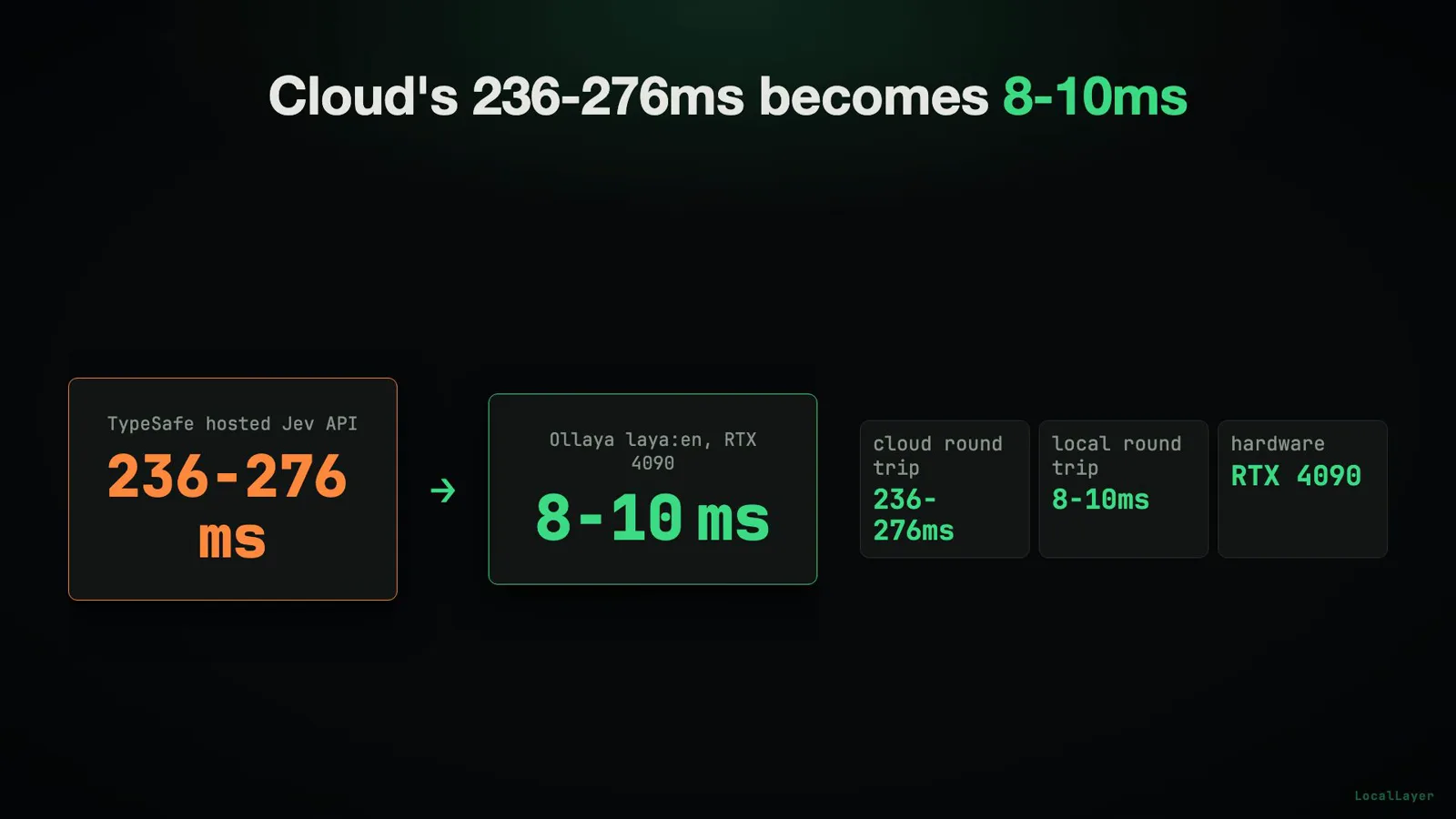
The whole pitch on one card — with the round-trip chips that make 8-10 ms a fair number.Watch at 0:30 - 3
Install in one line, run your first decision
No compiler, no virtual environment, no model zoo scavenger hunt: the video's terminal shows the whole on-ramp as a single script — curl -fsSL https://ollaya.dev/install.sh | sh — followed immediately by a real query: ollaya run laya --preset triage "I was charged twice for my subscription this month and want a refund." The answer prints on the next line: department: billing (confidence 0.78). Look at the shape of that exchange, because it is the product: one local command takes a state-shaped text plus a task preset, and returns a typed decision with its confidence attached — no chat completion, no prompt engineering, no streaming text to parse. This is also your first sanity check: if the install script ran and this command prints a department and a confidence, the daemon is up, the laya:en weights are in place, and every later step is just more elaborate ways of asking the same daemon for decisions.
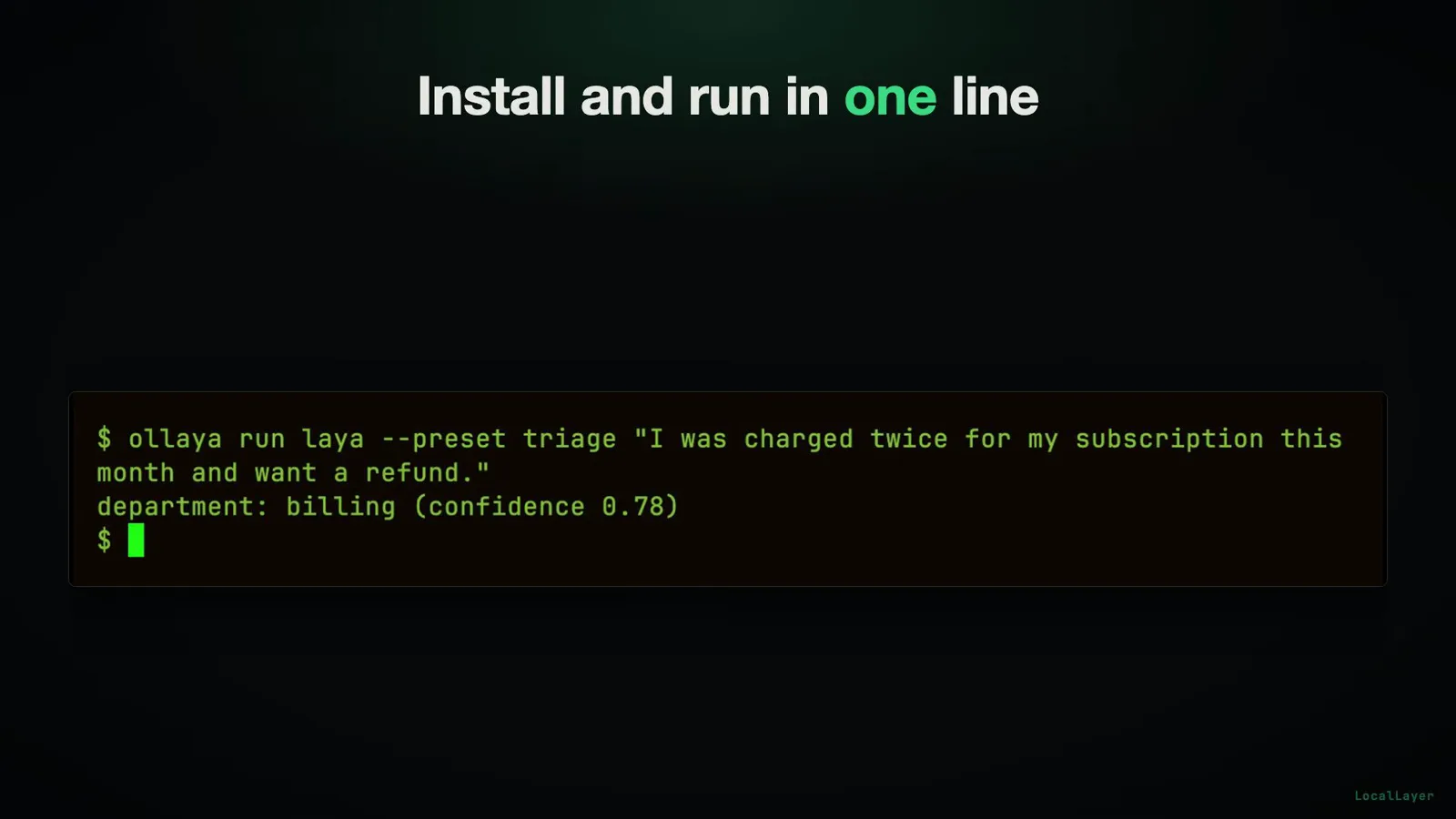
One install script, one command, one typed answer with its confidence attached.Watch at 8:46 - 4
Repoint existing hosted-API clients at the local daemon
The migration story is the quiet superpower here. Existing client code written for the TypeSafe hosted Jev API can be pointed at the local Ollaya daemon because the streaming format matches exactly — the video's phrase is that there is no need to change anything in an existing integration. The endpoint card spells out the contract: the native endpoint is /v1/systemone; /v1/decisions is documented as an exact alias, so either path hits the same handler; and the auth header is Bearer local, a placeholder token that says "the network hop is now a loopback." (This page quotes the card deliberately: the auto-transcript garbles the paths into v1/chat/completions — another reason to trust the frames over the captions.) Practically: change the base URL, keep the payload, keep the response parser. That is the entire migration, and it is why "TypeSafe-compatible API" appears in the repo's own description.
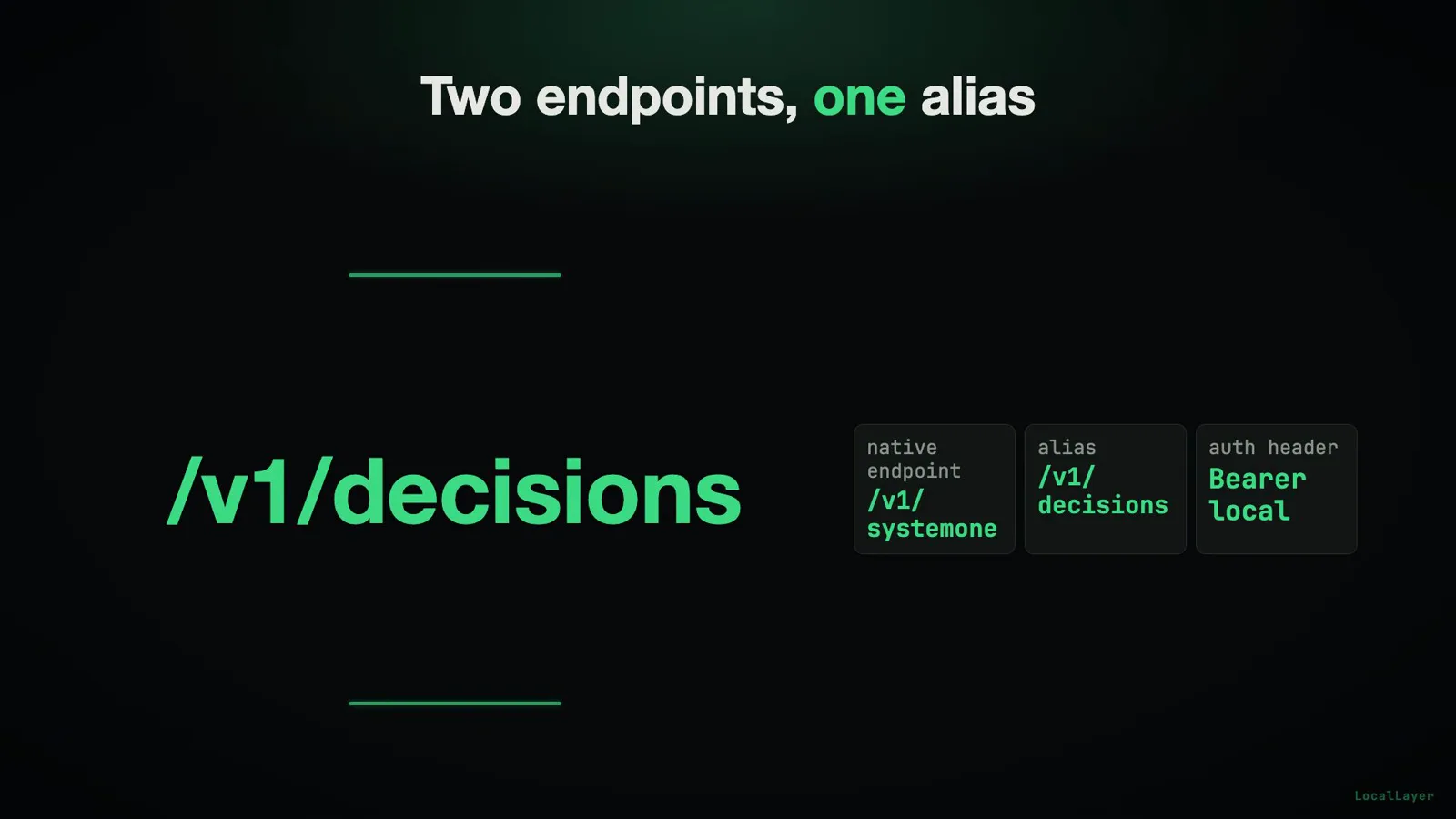
Native path plus an exact alias — hosted clients repoint without code changes.Watch at 2:40 - 5
Ollaya vs Ollama 0.35: the runner and the runtime
Since October 1, 2026, this comparison has a second contestant: Ollama 0.35 announced native support for Jev-like decision models and serves tev1 and Nimble through its own /v1/systemone — so "can Ollama serve decisions at all?" is no longer the question, and honesty requires this section. What remains distinct about Ollaya is its shape, not its wire format. It is decision-first: the entire surface — CLI presets, daemon, model menu — exists for decisions, whereas Ollama is a general LLM runtime that grew a decisions endpoint. Its menu is decision-native end to end: Laya, decider, NLI and GliClass per the repo description, with the license table below as the shipping manifest. It exposes device switching (OLLAYA_DEVICE=cpu, which becomes the star of the final step) and speaks MCP so agents can call decisions as tools. Ollama 0.35, by contrast, brings the weight of a mature runtime ecosystem and its own model roster. The licenses here: Ollaya runtime Apache-2.0 (CLI + daemon); some models MIT (llama.cpp, NLI); most models Apache-2.0 (Laya, Decider, Kev) — ship-friendly on both sides. Which to pick? If you are still deciding whether to go local at all, read our Jev vs Ollama comparison first — the should-I question — then come back here for the how-to; for the Ollama-native axis, our Ollama 0.35 decision-models test is the companion piece.
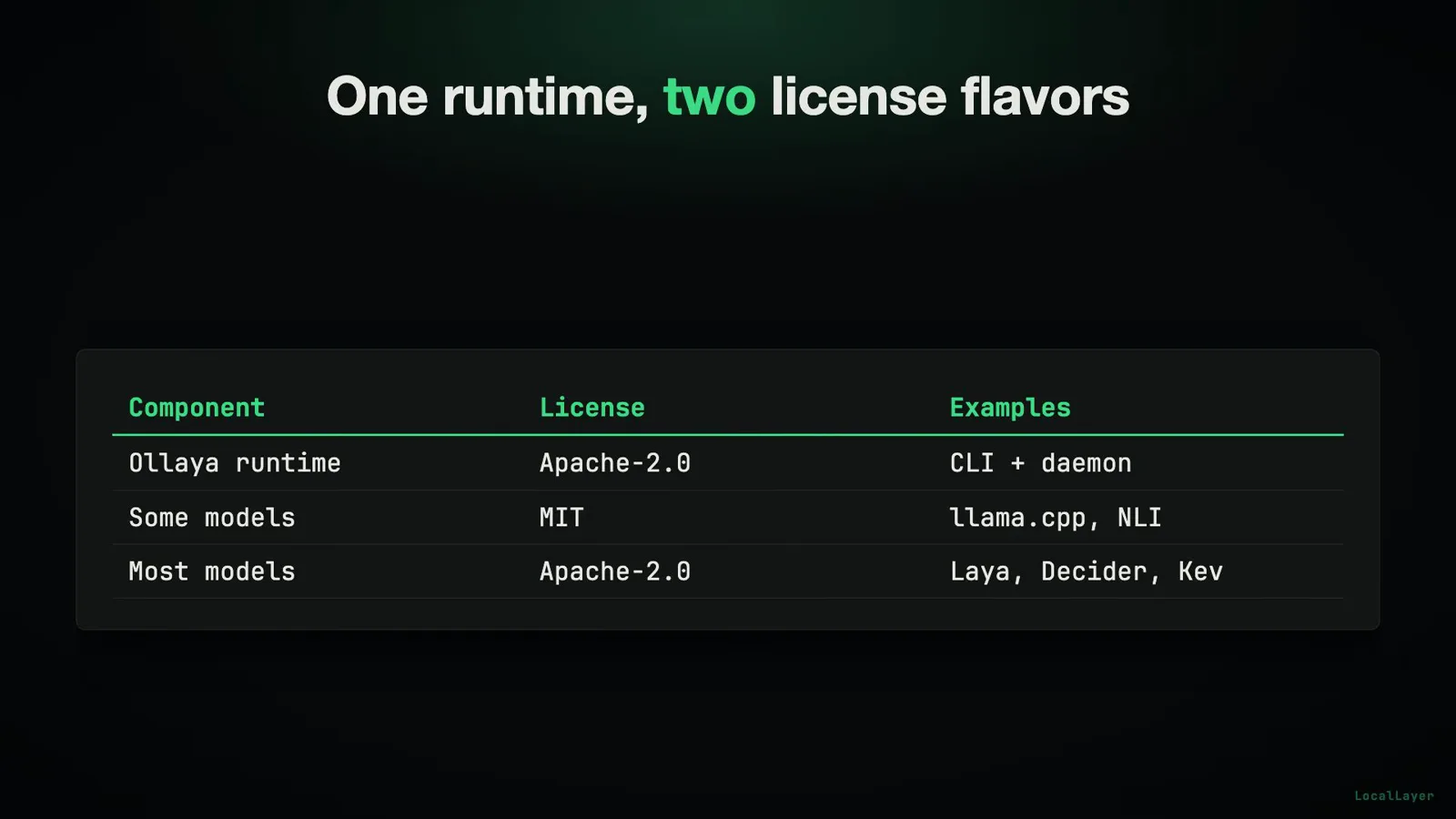
Apache-2.0 runtime, split model licenses — the table the video uses to answer "can I ship this?"Watch at 1:55 - 6
The Hacker News signal: one thread, two snapshots
Traction gets the same honesty treatment as latency. The card shows the thread live: "Ollaya – Ollama for open-source, Jev-style decision models," submitted by Ardakilic, item 49848269 — the URL is legible in the browser bar. At the recording's live snapshot it stood at 586 points with 139 comments; an earlier capture, 18 hours in, read 489 points and 122 comments. Same thread, two time points — not two sources to average, one fast-moving discussion caught twice, and the on-screen counter in this frame (580) is visibly still climbing. The video also volunteers the negative space: a second post that same week, a third-party web interface for Ollaya, stalled at 5 points and never took off. So the honest read is exactly one breakout thread, growing in real time, for the runner itself — no homepage pile-on, no second appearance anywhere on the site. Signal, not saturation.
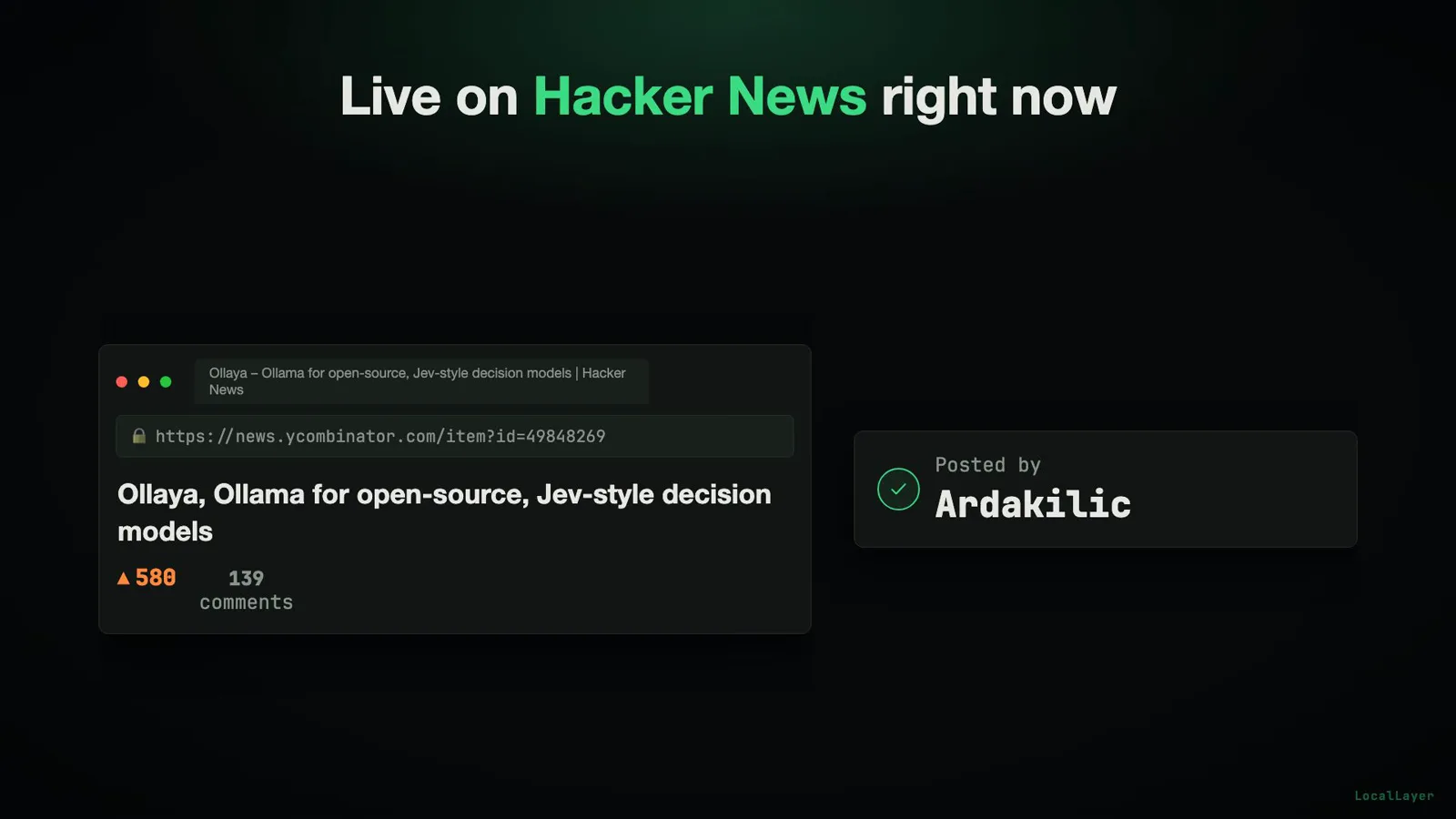
The live counter was still climbing when the video captured it — 580 in this frame, 586 at the report's snapshot.Watch at 2:50 - 7
The skeptics' section: "decision model = classifier"
Not everyone in the thread bought the framing, and the video does something rare: it puts the loudest objection on screen and keeps it there. HN user hbrn: "Decision model" is just marketing jargon. Decision model = classifier. Another reply called the marketing language misleading — the system only throws probabilities at a fixed set of options, not open generation — and a third reduced the published example to a plain text-classification task. The video's answer is not a rebuttal but a reframe, and it is the right one: some of these models are classifiers, plain and simple, and the next step opens the box to show exactly which. What is actually new is not a model family but the contract on top of them — a written question plus input state in, a calibrated probability map out, one forward pass — and whether that contract earns its keep against a hand-rolled classifier is a question about your workload, not about the vocabulary. If everything you need is a score over a fixed option set, the skeptics are mostly right and you will be well served anyway; if you need generated text, no amount of branding makes this the right tool.
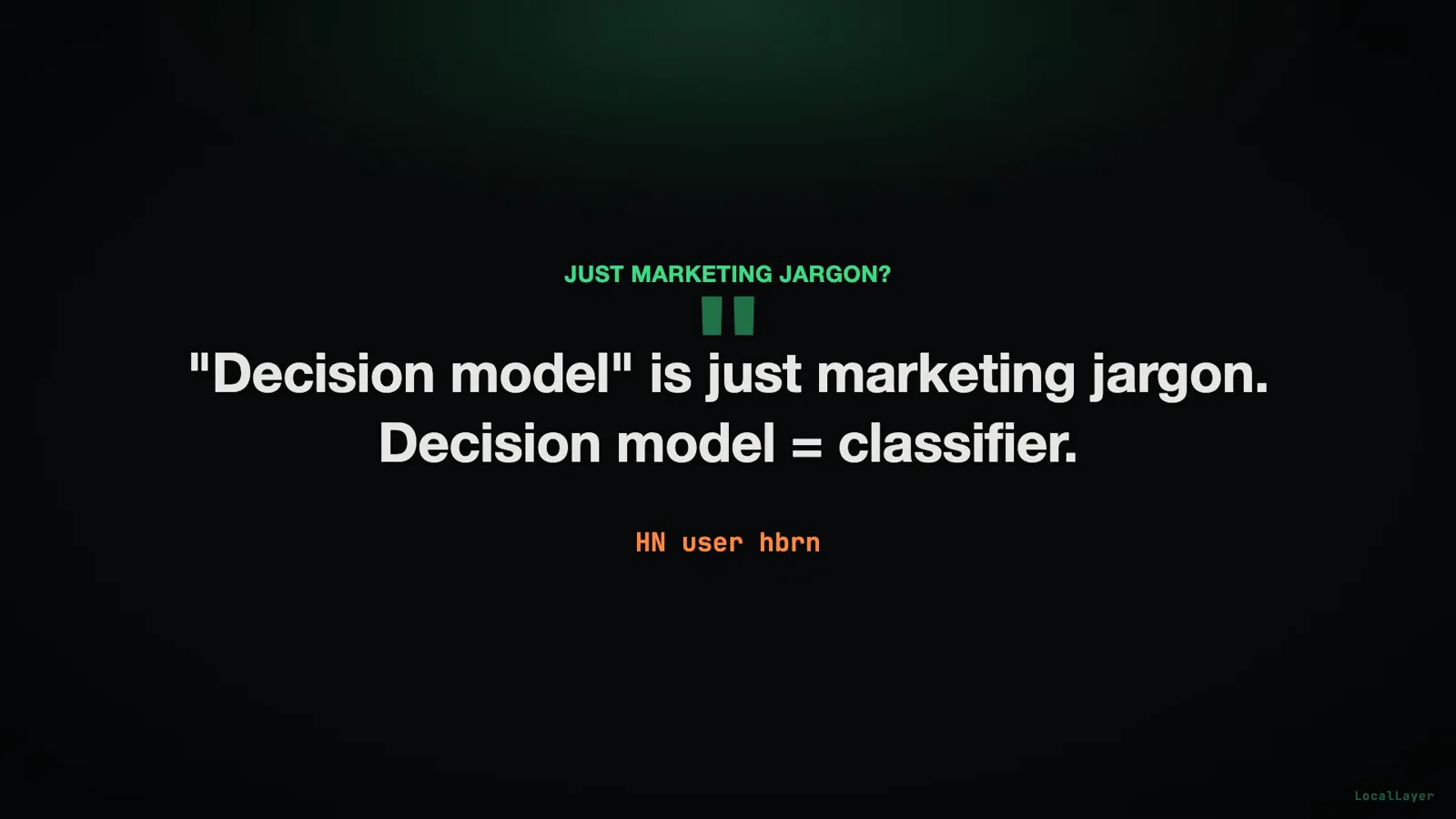
The video keeps its loudest critic on screen — and spends the next section answering him.Watch at 3:50 - 8
Under the hood: two model families, one contract
Here is the menu, from the card: nli at 435M and qwen3guard at 600M — the classifier family, NLI-style models that score options without any generation; kev at 9000M (9B) and winnow at 12000M (12B) — full decoders repurposed to score choices instead of writing sentences. Different bodies, same contract underneath: a written question plus the input state goes in, a single forward pass runs, and a calibrated probability map comes out — the decoding loop is skipped entirely. The video's illustrative map reads billing 0.85, technical 0.06, account 0.09, plus one confidence score over the whole response. Routing between languages is handled by the laya router, which picks laya:en or laya:multilingual per request; the documentation states it adds no measurable latency because it never interacts with the model itself. This is the entire answer to "how is 8 ms possible": nothing is generated token by token, so there is no decode loop to pay for — the state is read once and every option is scored in the same pass.
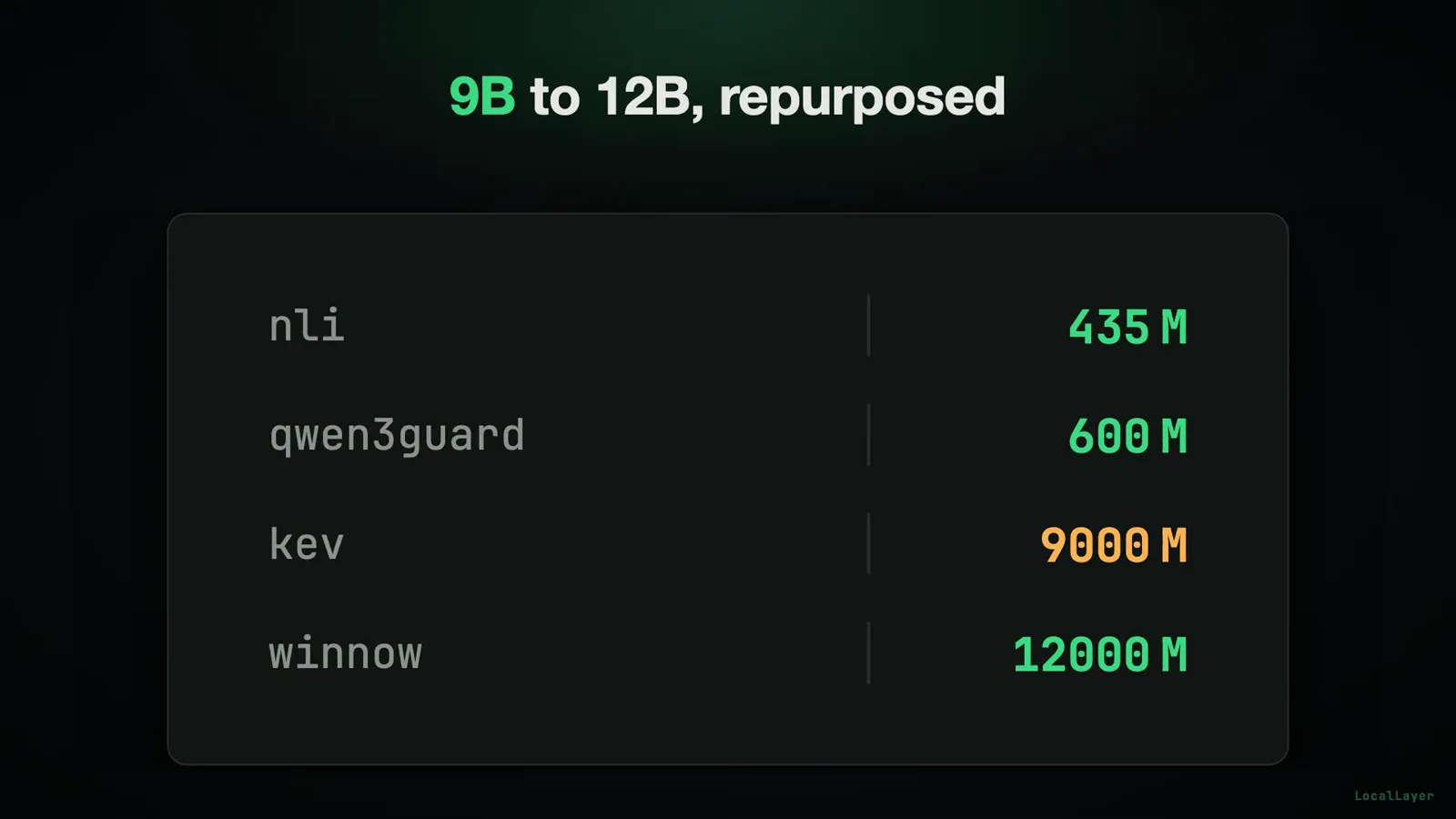
Two classifier-sized families on top, two repurposed decoders below — one contract over all four.Watch at 4:30 - 9
benchmarkheaven: a live, unaudited leaderboard — read it that way
An HN commenter linked the Jev live leaderboard at benchmarkheaven.com, and the video quotes it with the caveat repeated until it sticks: third-party, unaudited, scores change over time — a live snapshot, not a certified benchmark. The numbers as captured: Jev 1.13.0 leads the capability metric at 64.7 (capability averages intelligence and calibration) and holds second on composite at 63.3. Laya — the model Ollaya distributes — ranks #41 on both lists: capability 49.9, composite 30.3. The leaderboard card credits Laya to Convai Innovations, built on a ModernBERT-Large backbone with 421M parameters; Ollaya packages and runs the model but did not train it, and the table itself labels it a reconstruction of Jev. Pricing entry: about $0.0029 per 1,000 decisions, among the cheapest listed — the trade-off stated explicitly is much lower capability in exchange for near-zero cost and single-digit latency. One consistency check the video runs for you: the HN thread cited 63.29 and 30.25; a later live recheck read 63.3 and 30.3 — within rounding, so nobody cherry-picked. Treat the table as weather, not climate.
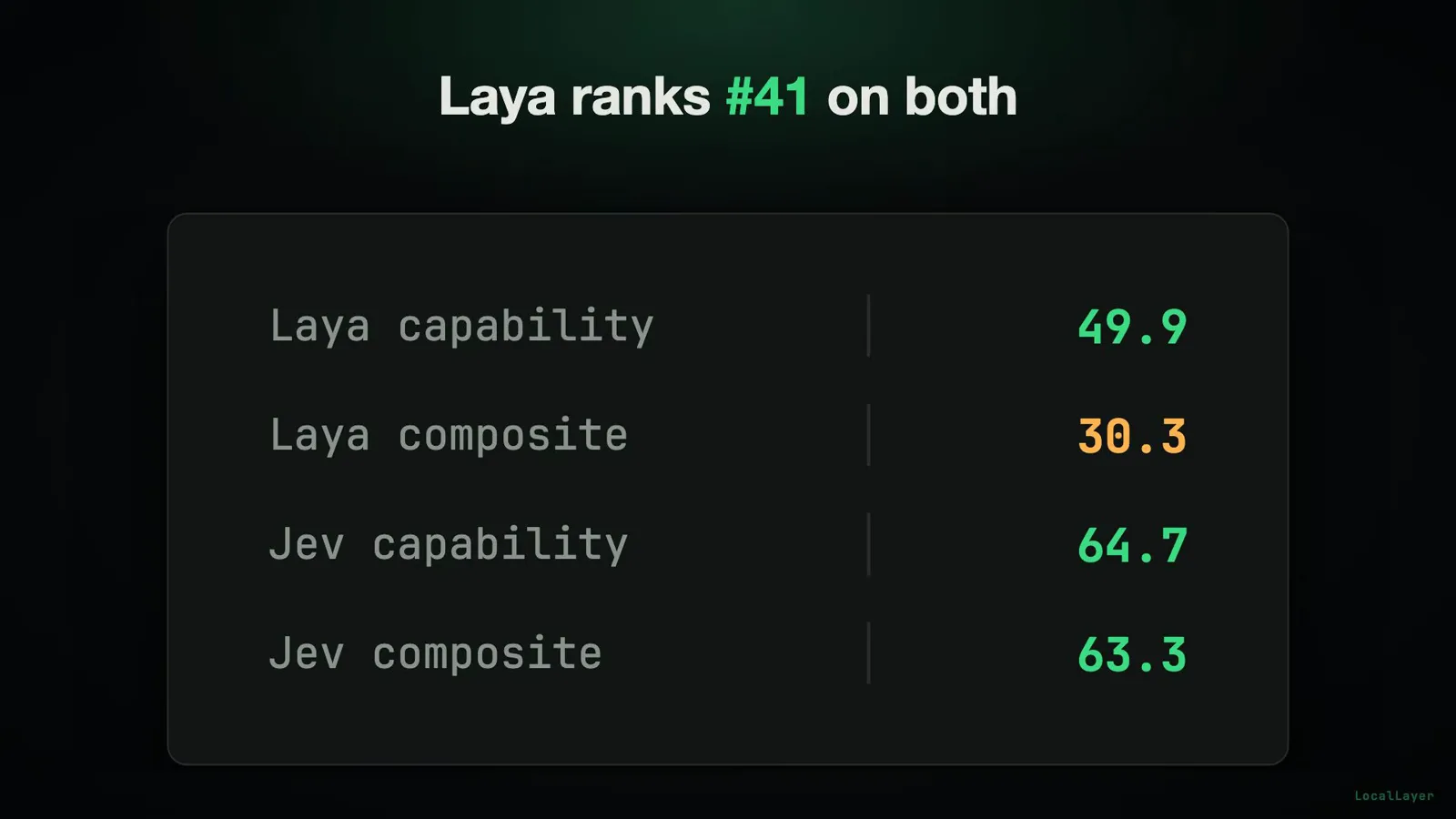
The trade-off in four numbers: capability 64.7 vs 49.9, composite 63.3 vs 30.3.Watch at 6:35 - 10
Three jobs, one daemon — and MCP for agents
The use-case card reads like a product tour of the same daemon: ticket triage takes ticket text and returns department, urgency and refund; command filtering takes a shell command and returns an allow/block label; agent tool call takes a routing question and returns a typed choice. The middle one comes with a real-world endorsement from an HN commenter: they filter live shell and command history with it because the set of tags changes too often to justify fine-tuning a dedicated classifier — exactly the failure mode where options-in-the-request beats a frozen label head. Then the integration that makes it an agent primitive: Ollaya speaks MCP, the Model Context Protocol. The diagram runs Claude Code → tool call → MCP → typed question → decision model: an agent framework can call a decision model as a tool instead of spending a full LLM call on a routing decision mid-task. One MCP call replaces a full call, and the return value is a typed option rather than a paragraph to parse — which is precisely what you want when the next step of your agent loop is code, not prose.
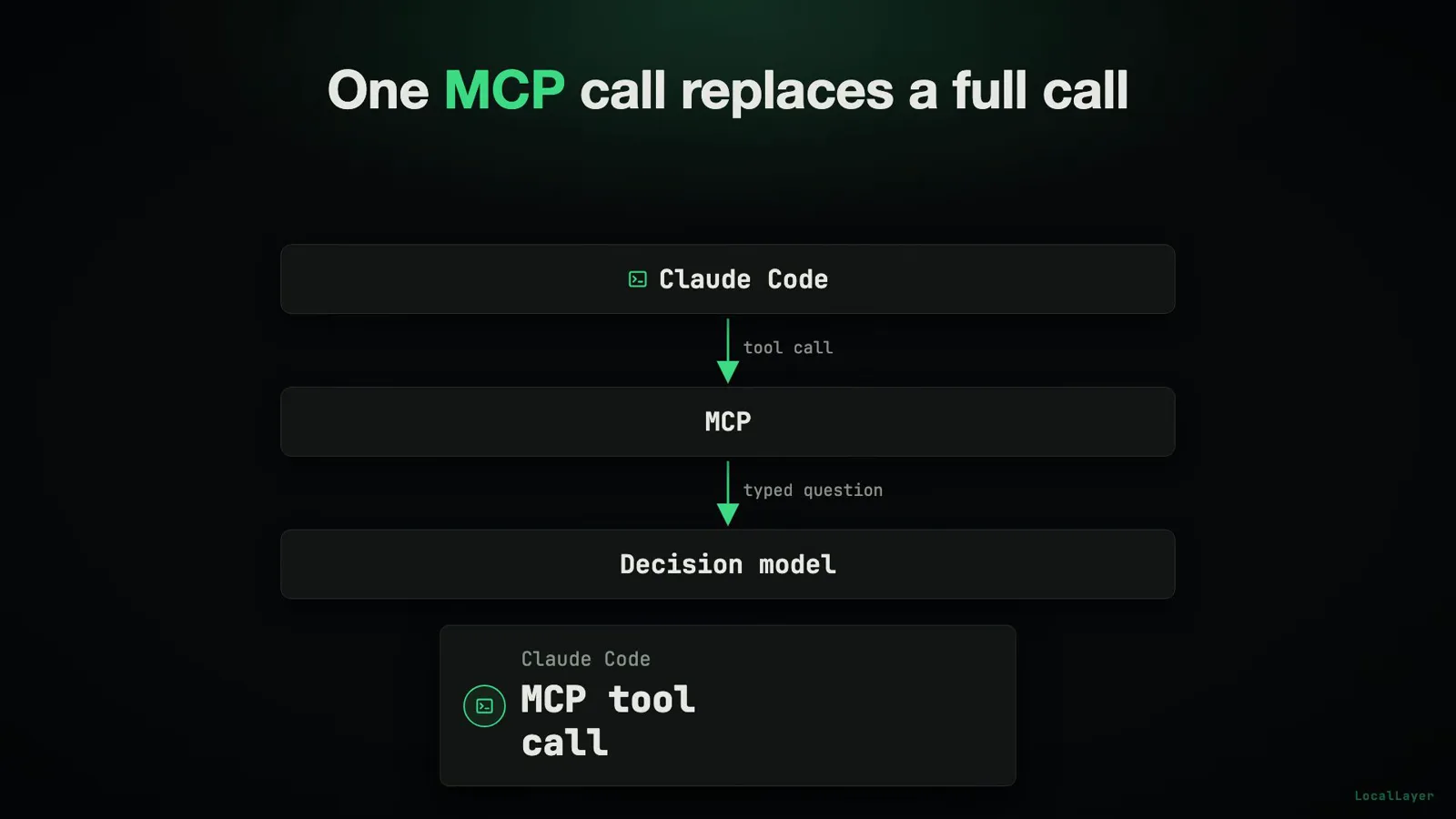
The agent path: one MCP tool call where a full chat completion used to be.Watch at 8:00 - 11
End-to-end: one ticket, three answers, a receipt in nanoseconds
The demo closes the loop with the same duplicate-charge ticket from the install step, now over the local HTTP API in one request: the response returns the department — billing, at confidence 0.78 — along with urgency and refund fields in the same JSON. No second call, no chaining; the "three answers" are one response because the questions ride on one shared state through one forward pass. The card titled "The receipt is in eval_duration" shows the response.json shape: department: {"choice": "billing", "confidence": 0.78}, followed by eval_duration, load_duration and total_duration — timing fields reported in nanoseconds. That receipt is more than bookkeeping: eval_duration is the per-call, self-reported measurement that makes every number in this guide checkable on your own hardware, which is exactly the property the final step exploits. When a model ships its own stopwatch, you do not have to trust anyone's benchmark — including the vendor's.
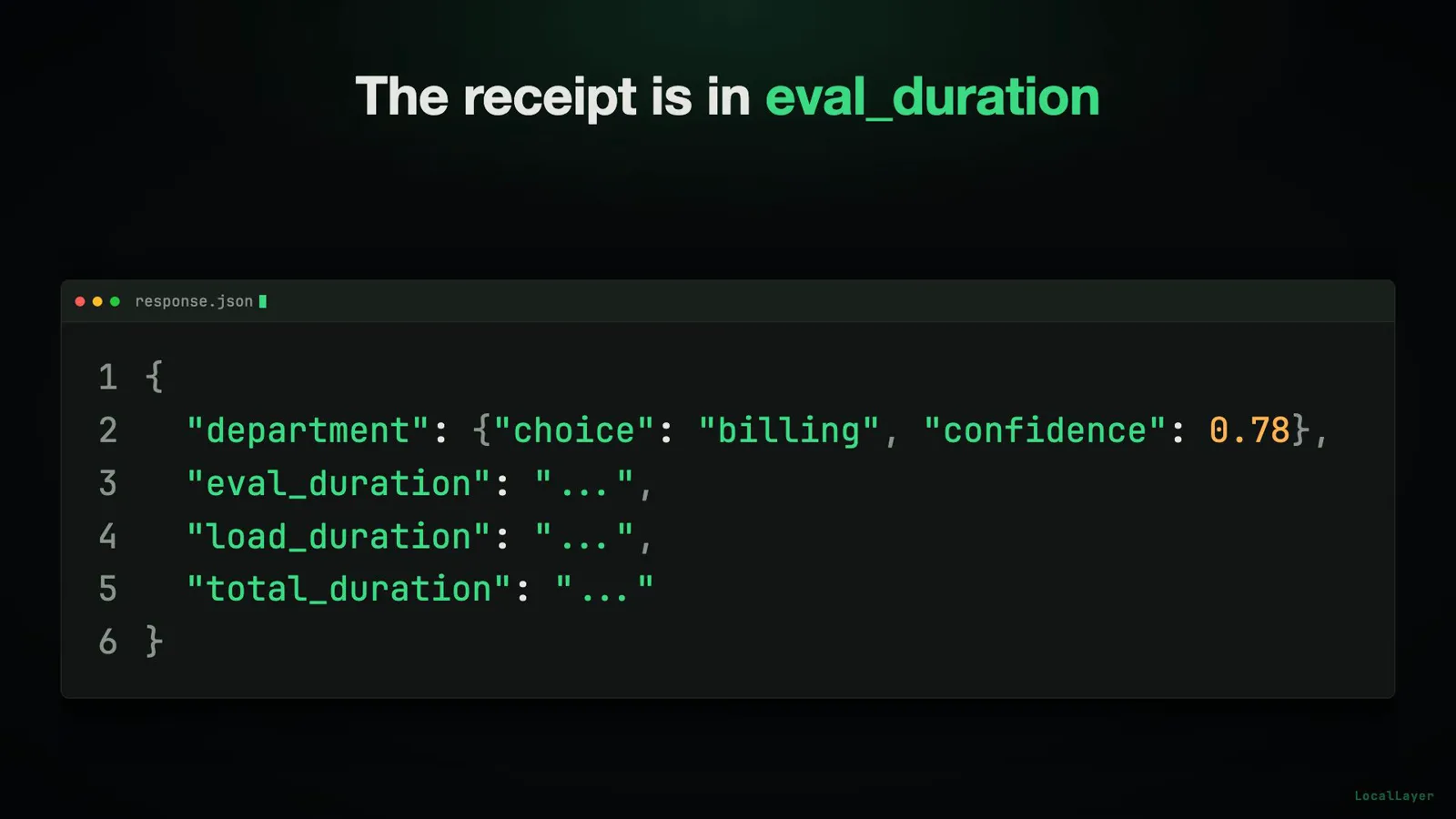
billing at 0.78 with the timing receipt — eval_duration is the field the whole video turns on.Watch at 9:05 - 12
The CPU test the video refuses to answer — run it
Every latency figure so far has a GPU behind it, and no vendor publishes CPU-only numbers for these models — a gap the video turns into its ending. The method is two lines: run the identical query once with OLLAYA_DEVICE=cpu and once on the default GPU path — OLLAYA_DEVICE=cpu ollaya run laya:en "I was charged twice for my subscription this month and want a refund." — then put the two eval_duration fields side by side and read the difference straight off the receipt from the previous step. What the video deliberately does not do is tell you the CPU result. The closing card reads: "Run the CPU test. What's your eval_duration?" — the number is left for the audience to measure, and this page keeps that discipline: no CPU figure appears here either, because printing one would just be another unverified number on the pile. The exchange rate to remember: marginal cost near zero either way, latency from single-digit milliseconds to hundreds depending on model size and device. So run the two commands, read your two eval_duration values, and you will hold the one number in this story no vendor has published. If your hardware is CPU-only anyway, our Julia-1 tutorial covers the CPU-first route as a complement.
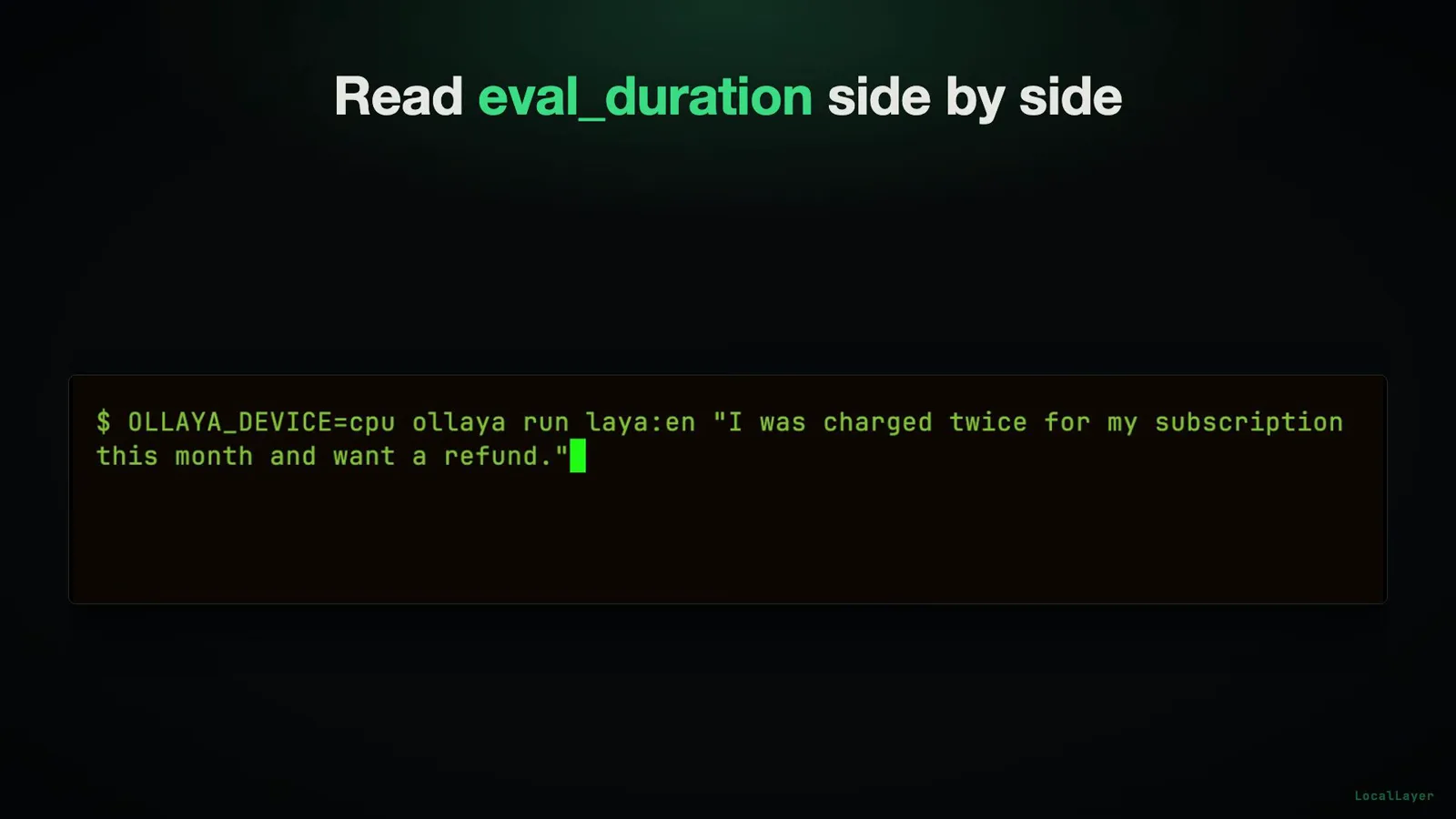
The command is shown, the number is withheld — the video's closing challenge, kept intact here.Watch at 9:12
Frequently asked questions
What is Ollaya?
Ollaya is a local runner for open decision models — self-described as "Ollama for decision models." It is a Rust CLI plus a resident background daemon that exposes a local HTTP API (native endpoint /v1/systemone, with /v1/decisions as an exact alias and a Bearer local auth header). You send a written question plus input state; it returns calibrated probabilities over your options in a single forward pass — no text generation. The runtime is Apache-2.0, the project lives at github.com/ollaya-dev/ollaya (site: ollaya.dev), and the vendor-reported latency for laya:en on an RTX 4090 is 8-10 ms including the HTTP round trip.
Is Ollaya the same as Ollama — and did Ollama 0.35 make it redundant?
Different tools with confusingly similar names (auto-transcripts routinely render Ollaya as "Ollama" or even "Ought to lie"). Ollama is the general LLM runtime; Ollaya is a decision-first runner. Since 2026-10-01, Ollama 0.35 has offered native Jev-like decision support, serving tev1 and Nimble through its own /v1/systemone — so the endpoints now converge, and Ollaya is not the only local option. What still differentiates Ollaya: a curated decision-model menu (Laya, decider, NLI, GliClass, plus kev and winnow), a decision-only CLI and daemon, OLLAYA_DEVICE device switching, and MCP tool-call support. Choose by model menu and runner ergonomics; if you are still deciding whether to go local at all, start with our Jev vs Ollama comparison, and see our Ollama 0.35 decision-models guide for the native axis.
How real is the 8 ms number?
It is vendor-reported, and both the video and this page keep that label on it: Ollaya's site reports 8-10 ms for laya:en on an RTX 4090, and the figure includes the full HTTP round trip, not just on-card compute. The first, un-warmed query measured 8.1 ms. Two honest footnotes: decider 2B averages ~190 ms in the same configuration — the single-digit figure belongs to the small models, not the whole menu — and the comparison target, TypeSafe's hosted Jev API, quotes 236-276 ms per call. None of these are independent measurements; the video says so on screen ("Every number here is vendor-reported"), which is precisely why the response ships an eval_duration field you can read yourself.
Which models ship with Ollaya?
The video's menu card lists nli (435M) and qwen3guard (600M) — pure classifier models — plus kev (9B) and winnow (12B), decoder models repurposed to score choices instead of writing sentences. The repo description adds the served set: "pull and serve Laya, decider, NLI and GliClass behind a TypeSafe-compatible API." laya:en is a ModernBERT-Large model with 421M parameters, credited on the leaderboard card to Convai Innovations — Ollaya packages and runs it but did not train it. Licenses: the Ollaya runtime (CLI + daemon) is Apache-2.0; some models are MIT (llama.cpp, NLI); most models, including Laya, Decider and Kev, are Apache-2.0.
Can Ollaya replace a classifier — or an LLM?
Both, in specific ways. HN skeptics call decision models "just classifiers" with marketing jargon, and they are partly right: part of the menu literally is NLI classifiers. What the contract adds is that options live in the request — a written question plus input state returns a calibrated probability map in one forward pass — so you get classifier-shaped answers without training or fine-tuning a dedicated model each time your label set changes. That is why a real HN commenter uses it to filter shell commands: the tags mutate too fast to justify a frozen classifier. It cannot replace an LLM for generation: nothing open-ended comes out, only probabilities and typed choices. If your task is scoring a fixed option set — triage, routing, moderation, allow/block — it is a strong fit; if you need prose, keep the LLM and put Ollaya in front of it via MCP.
How fast is Ollaya on CPU?
Honestly: unanswered, on purpose. The video points out that no vendor publishes CPU-only numbers for these models, demonstrates the method on camera — run the identical query twice, once with OLLAYA_DEVICE=cpu and once on the default GPU path, then compare the two eval_duration fields from the JSON receipt — and still refuses to read the CPU result aloud, ending on "Run the CPU test. What's your eval_duration?" This page keeps that discipline and will not invent a number. Run OLLAYA_DEVICE=cpu ollaya run laya:en "I was charged twice for my subscription this month and want a refund." on your machine, read your eval_duration (reported in nanoseconds), and you will have the one figure in this story no vendor has published — then comment it with your hardware.
Related guides
Jev vs Ollama Guide
The should-I-localize question this install guide assumes answered — read it first, then come back for the how-to.
ReadOllama Decision Models Guide
The Ollama-native axis: 0.35 serving tev1 and Nimble through /v1/systemone, tested hands-on.
ReadLaya Tutorial Guide
The model behind laya:en, without the runner — pip install, question schemes and laya-serve.
ReadRun Jev Locally Guide
The first-party route for local decisions — the benchmark this community runner ecosystem imitates.
ReadJulia-1 Tutorial Guide
The CPU-first small-model route — the natural complement to a GPU-numbered runner with an open CPU question.
ReadOpen Jev Models Guide
The panorama of open decision models, Laya included — where this runner's menu sits in the field.
ReadSupport-Ticket Routing Recipe
Build the exact triage shape from the demo — department, urgency and refund from one ticket body.
ReadMore video walkthroughs
- Jev Classification Quickstart: OpenRouter API, Primitives & Real Probabilities
- Jev Architecture Explained: Why 70ms Decision Models Beat LLMs for Workflow Automation
- Ultra-Fast Browser Agents with Jev: 178ms DOM Loops & Dual Model Orchestration
- Open Jev Models Are Here: Semif, Nimble, Decider, DiffusionGemma & Laya Hands-On
- Jev vs LLM: Will Jev Replace LLMs? Krish Naik's Whiteboard Explainer
- Jev Trader Tutorial: Build a Subsecond AI Trading Bot on Monad
- Jev Model Router: Build a Privacy-Gated LLM Router with Jev & OpenJev
- Jev Tutorial for Beginners: State, Questions & the TypeScript SDK
- Run Jev Locally: Kev, SemIf & Von on Your Own GPU (OpenJev Guide)
- Jev RAG Reranker: Policy-Steered Reranking for Retrieval-Augmented Generation
- When to Use Jev: An Engineer's Audit of Claims, Gates, and Failure Modes
- LangChain + Jev Integration Tutorial: Routing, Guardrails & Evals
- Jev MCP Server: Connect Jev Decisions to Claude Code & Cursor
- Jev vs Luna: Independent Benchmarks Put "Better, Faster, Cheaper" to the Test
- Jev Agent Harness: Where the Decision Gate Sits in Your LLM Loop
- Jev Playground Walkthrough: The Hotdog Lesson, Criteria, and a Four-Console Token Test
- Jev Text Classification API: Zero-Shot CLI & REST with classifier.dev
- Jev API Examples: First Request, curl & All Three Question Types
- Jev Log Triage with Expanso Edge
- Jev Lead Enrichment with Treg: ICP and Signup Scoring
- Use Jev Decision Nodes in Heym for Model Routing
- Laya Tutorial: Open-Source AI Routing With Calibrated Probabilities (Laya vs Jev Setup)
- Train Your Own Jev: Fine-Tune a Jev-Style Decision Model for $5–$17 (What You Can and Cannot Train)
- Jev Tips: 8 Best Practices for Better Decisions (State, Questions, Criteria & Thresholds)
- Jev Context Compaction: Prune AI Agent Memory Without Generative Summaries
- Jev as an LLM Judge: Confidence-Gated Cascades at 0.36% of the Cost
- TypeSafe Computer Use: Local Desktop Automation with Jev, Step by Step
- Jev Resume Screening: Build an AI Resume Evaluator with the Jev JavaScript SDK
- Jev + Claude Code Guide: Voice-Controlled Browser Automation with Typed Decisions
- Jev + Codex: Install the TypeSafe Skill and Triage a Real Gmail Inbox
- Jev vs Ollama: Can Local AI Replace Hosted Jev Without Sending Your Data Away?
- Build Your Own Jev: Train a Free Open-Source Zero-Shot Classifier (That Plays Doom)
- CUA-S1-Forms: a 706K-Parameter Jev-Like Model That Fills GUI Forms on Your CPU
- NOC/SOC Alert Triage with Jev: Rules First, One Typed Question, a Policy Gate
- Ollama Decision Models: Run tev1 and Nimble Locally (Tested on an 8 GB Card)
- Jev Guardrails in Production: A Five-Step Playbook for Decision Automation
- A Session Drift Guard for Pi Agent: Let the Jev Model Propose, Let Code Decide
- 50 Tev1 Use Cases: What a Local Decision Model Can Actually Do (Tested on an 8 GB Laptop)
- Jev, Hands-On: Where the Official Claims Meet Independent Remeasurement
- Jev Ticket Classification in a Real App: the After-Insert Hook and the Calculated Field
- OpenJev RLCD: Run the Open-Source Calibrated Decision Model Locally (Full Guide)
- Clef-Flash vs Jev: I Tested Cloudflare's Decision Model Locally in Ollama (Q4_K_M)
- Clef-Flash Tutorial: Install and Run Cloudflare's 9B Multimodal Decision Model Locally on Ubuntu
- CLM-8B: the Contrastive Decision Model That Scores 1,024 Options in 44 ms (13x Faster Than Jev)
- Nox 4B Tutorial: Run the Decision 2.0 Model Locally and Put It Through Four Real Decisions (One Ends in a Fail)
- Julia-1 Tutorial: Install the Open-Source Jev Replacement in Pure Python (and Watch It Beat If-Statements 9 to 2)
- OpenJev 0.8B on CPU: I Built a Ticket-Routing Inbox and Calibrated the Thresholds
- Jev n8n Integration: the JevGate Community Node, Step by Step (Plus a Plain-HTTP Fallback)
- NanoJev Tutorial: Install the 0.6B Open-Source Jev Replica and Watch It Route Decisions at 47 ms
- PPLX Decider Tutorial: Perplexity's Open 27B Decision Model, Its Decisions API, and a 12-Ticket Triage Run
- AutoTrust JEV-27B Tested Locally: Four Arms, 72 Cases, and One 0.969 Score That Was Wrong
- Clef 27B Locally: Watch Cloudflare’s Multimodal Decision Model Read an Image, a Video and an Uzbek Newspaper in One Pass
- Strands Decider 2B Tutorial: Install the AWS Strands Decision Model on an 8GB Laptop — and Keep Its Failures In