
Guides / illustrated walkthrough
Jev Lead Enrichment with Treg: ICP and Signup Scoring
Follow a Treg workflow that uses Jev to classify LinkedIn engagement and website signups, then review the creator’s small Treg-versus-Clay cost comparison with its limits.
Quick takeaway
The creator demonstrates two workflows: classifying LinkedIn posts and comments for an ideal-customer-profile signal, then segmenting website signups into categories such as enterprise, SMB, influencer, and fraud. Jev returns classifications rather than generated sales copy; Treg supplies enrichment and workflow actions. The video labels the signup run a synthetic sample and shows creator-reported cost comparisons, so treat them as demonstrations, not an independent accuracy or pricing benchmark.
Video source
AI Deals Agency
Step-by-step walkthrough
- 1
Use Jev for a bounded classification, not sales copy
The opening comparison contrasts a chat model that generates text with Jev returning a typed decision and probability distribution. For lead enrichment, frame a narrow question such as whether a comment matches your ICP rubric; use a separate writing model if the next step needs personalized prose. The creator also warns that classification is not the same as open-ended browsing or computer use.
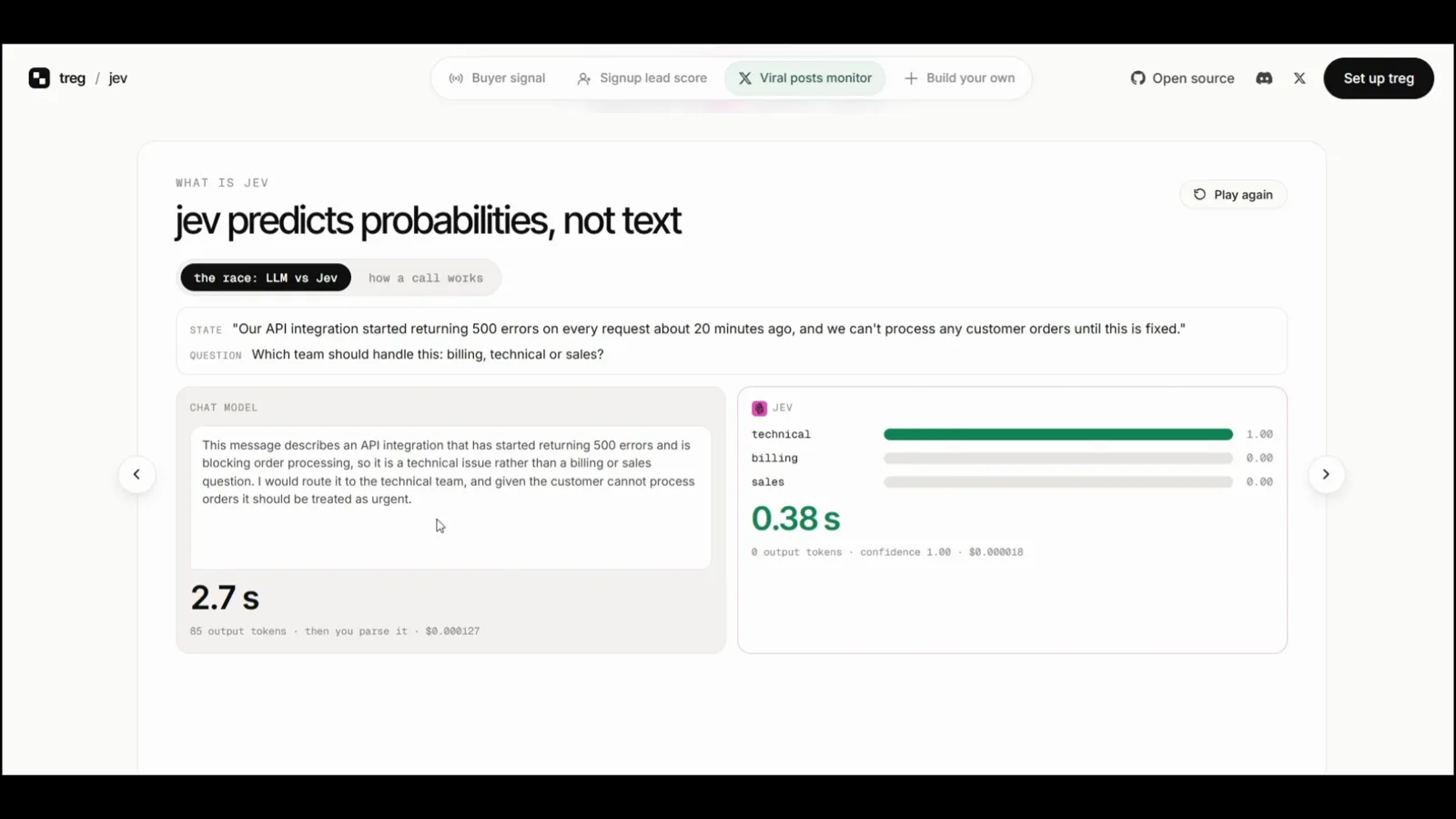
Separate classification from the generative work of writing outreach.Watch at 0:31 - 2
Compare enrichment costs only within the shown sample
A Treg-versus-Clay comparison table shows found and exact-match counts, precision, latency, and a cost row for the creator’s run. In the same video, the creator reports a separate $0.00273 Jev-assisted analysis of 20 posts and 368 comments. These are two distinct demo figures with specific inputs and configurations; neither establishes a universal price or quality result. Re-run the same records, field definitions, and provider settings before comparing your own stack.
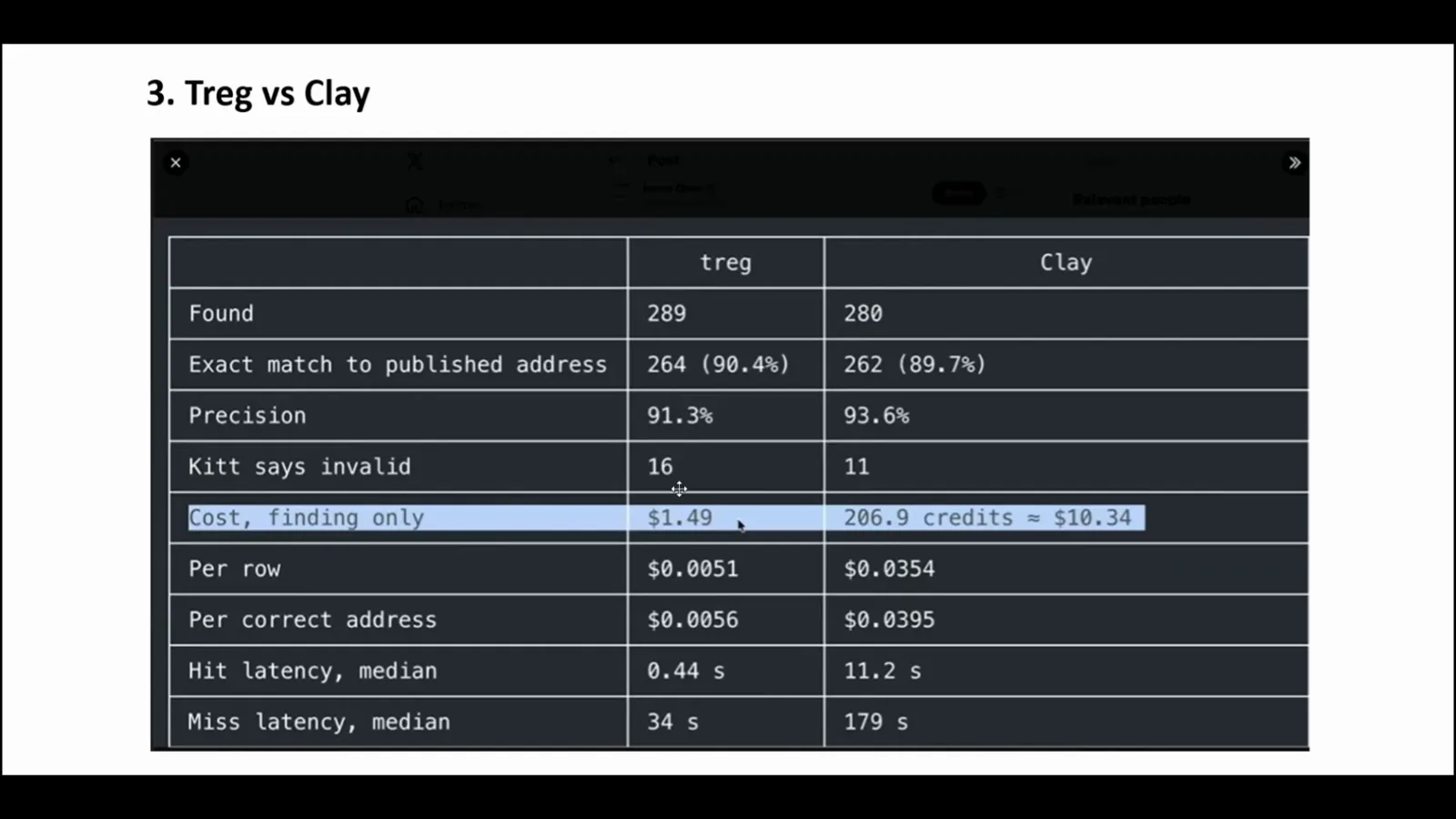
Creator-reported comparison for one sample run, not a general benchmark.Watch at 3:05 - 3
Qualify relevant LinkedIn posts and comments against your ICP
The Treg view shows analyzed LinkedIn posts and comments alongside a Jev qualification result. Start with an explicit rubric for what makes a person or company relevant, then use a Choice decision to classify candidates or a Noul gate for a yes/no qualification question. Keep the original source URL and evidence with every result so a reviewer can check why a lead was surfaced.

Attach a concrete ICP rubric to every classification decision.Watch at 3:35 - 4
Segment signups, then keep risky categories reviewable
The signup workflow groups records into enterprise, SMB, influencer, fraud, and other categories. The interface explicitly marks this run as a synthetic sample, so its counts are not real customer outcomes. Use these categories as a starting taxonomy, validate them on labeled historical records, and require human review before taking high-impact actions such as blocking an account.
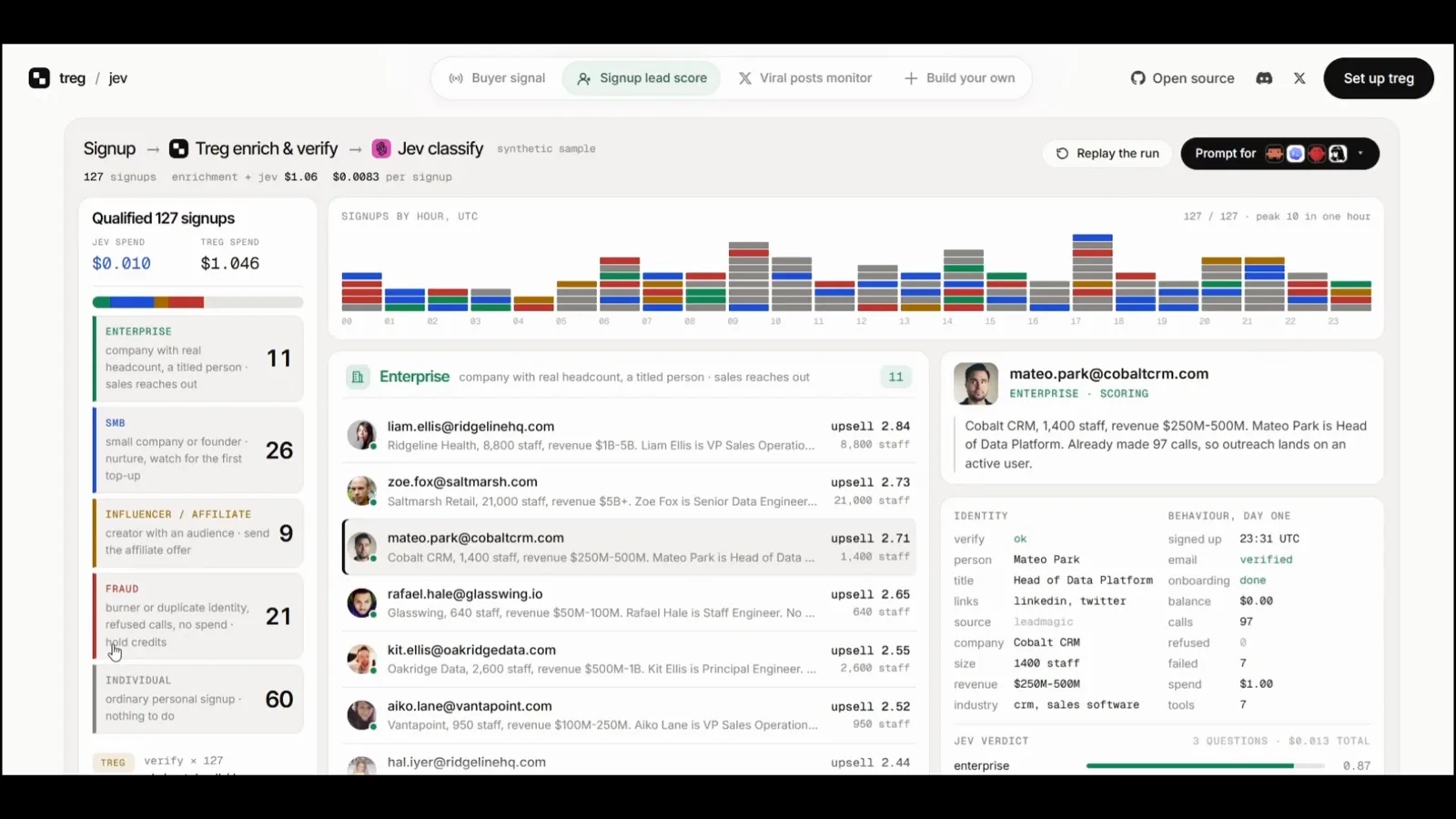
The displayed signup data is synthetic; validate category rules on labeled records.Watch at 4:08 - 5
Inspect the workflow recipe before connecting live records
The final screen points to a workflow repository and notes other signals that can be used for enrichment, including company and job data. Treat the repository as an implementation starting point: inspect data permissions, provider costs, failure handling, and the exact fields sent to Jev before connecting a live CRM or outreach sequence.

Review the recipe, data sources, and permissions before using production records.Watch at 4:38
Frequently asked questions
Can Jev write personalized sales outreach?
No. Jev returns typed decisions such as a category, score, or yes/no probability. Use a generative model for prose, and pass only the information needed for that task.
Are the signup categories in the video real customer results?
The dashboard labels the displayed run a synthetic sample. The category counts should not be read as production conversion, fraud, or accuracy results.
Does the video prove Treg is always cheaper or more accurate than Clay?
No. It presents creator-reported comparisons for particular sample runs. Inputs, enrichment fields, provider settings, and pricing can change the result; reproduce the same task on your own data before making a vendor decision.
How should a team use a Jev lead score safely?
Define the rubric and labels, validate against reviewed records, monitor false positives and missed leads, and route uncertain or high-impact decisions to a person. Do not block accounts solely from an unvalidated model result.
Related guides
AI Lead Scoring with Jev
Build an explicit lead-score, hot-lead gate, and segment schema.
ReadJev Model: Choice, Score, and Noul
Map an ICP category, ordered fit score, or binary qualification to the right output.
ReadJev API Examples: curl, Python, and JavaScript
See the request and response shape before wiring a workflow into your CRM.
ReadJev Log Triage with Expanso Edge
Compare another Jev workflow that classifies only selected operational events.
ReadUse Jev Decision Nodes in Heym
See Jev language checks and task-based model routing in a Heym workflow.
ReadMore video walkthroughs
- Jev Classification Quickstart: OpenRouter API, Primitives & Real Probabilities
- Jev Architecture Explained: Why 70ms Decision Models Beat LLMs for Workflow Automation
- Ultra-Fast Browser Agents with Jev: 178ms DOM Loops & Dual Model Orchestration
- Open Jev Models Are Here: Semif, Nimble, Decider, DiffusionGemma & Laya Hands-On
- Jev vs LLM: Will Jev Replace LLMs? Krish Naik's Whiteboard Explainer
- Jev Trader Tutorial: Build a Subsecond AI Trading Bot on Monad
- Jev Model Router: Build a Privacy-Gated LLM Router with Jev & OpenJev
- Jev Tutorial for Beginners: State, Questions & the TypeScript SDK
- Run Jev Locally: Kev, SemIf & Von on Your Own GPU (OpenJev Guide)
- Jev RAG Reranker: Policy-Steered Reranking for Retrieval-Augmented Generation
- When to Use Jev: An Engineer's Audit of Claims, Gates, and Failure Modes
- LangChain + Jev Integration Tutorial: Routing, Guardrails & Evals
- Jev MCP Server: Connect Jev Decisions to Claude Code & Cursor
- Jev vs Luna: Independent Benchmarks Put "Better, Faster, Cheaper" to the Test
- Jev Agent Harness: Where the Decision Gate Sits in Your LLM Loop
- Jev Playground Walkthrough: The Hotdog Lesson, Criteria, and a Four-Console Token Test
- Jev Text Classification API: Zero-Shot CLI & REST with classifier.dev
- Jev API Examples: First Request, curl & All Three Question Types
- Jev Log Triage with Expanso Edge
- Use Jev Decision Nodes in Heym for Model Routing