
Guides / illustrated walkthrough
Jev Text Classification API: Zero-Shot CLI & REST with classifier.dev
classifier.dev wraps the Jev decision engine in a zero-shot text classification CLI and REST API. This illustrated guide installs the tool, pipes a bulk feedback file through comma-separated labels, gates on --review 0.7, and dissects the input + labels POST contract and its typed JSON response.
Quick takeaway
classifier.dev is a stateless zero-shot text classification proxy over the Jev decision engine — no API key, account, or auth, because the state you send is judged and immediately discarded. One npm command (npm i -g classifier.dev) gives you a classify command that takes comma-separated taxonomy tags plus a stdin-redirected text file and returns every line with its assigned category. Add --review 0.7 (any float strictly between 0 and 1) to route low-confidence rows to human review while high-confidence rows continue to the automated pipeline. The same engine is a REST API: POST { input, labels } to the classifier.dev endpoint — cap the taxonomy at 100 discrete categories per request — and read back { label, confidence, scores, model, ms }; the video’s demo response returns label "bug" with confidence 1 from model jev-1.13.0 in 260 ms. Because no tokens are generated, hallucinated categories and multi-second LLM delays never enter the pipeline, and agents can attach the same capability via MCP.
Video source
Alex Hitt
Step-by-step walkthrough
- 1
Why text classification needs a decision engine, not an LLM
The video opens on the bottleneck: autoregressive LLMs generate one token at a time, so categorizing thousands of support tickets means paying latency and compute on every token — and risking hallucinated or malformed results. classifier.dev takes the other route: a specialized System One decision engine, powered by Jev, that evaluates the unstructured input and your predefined categories in a single parallel pass and returns a typed decision — no generated text anywhere in the loop. By the end of the 4:35 walkthrough you have both shapes of the same engine: a local CLI pipeline that parses bulk files, and a programmatic REST call for backends.
A decision engine judges; it never writes tokens.Watch at 0:20 - 2
Install the CLI globally — no key, no account, no auth
Requirements are minimal: an active terminal, Node.js on your machine, and a basic text file. Provision the tool with npm i -g classifier.dev, then type classify to activate the help menu and confirm the binary is available system-wide — the install log checks off each package, prints Setup complete, and ends with Config verified. There is no API key provisioning, account creation, or authentication step at all: classifier.dev operates strictly as a stateless proxy, sending your data to the model and immediately discarding it.
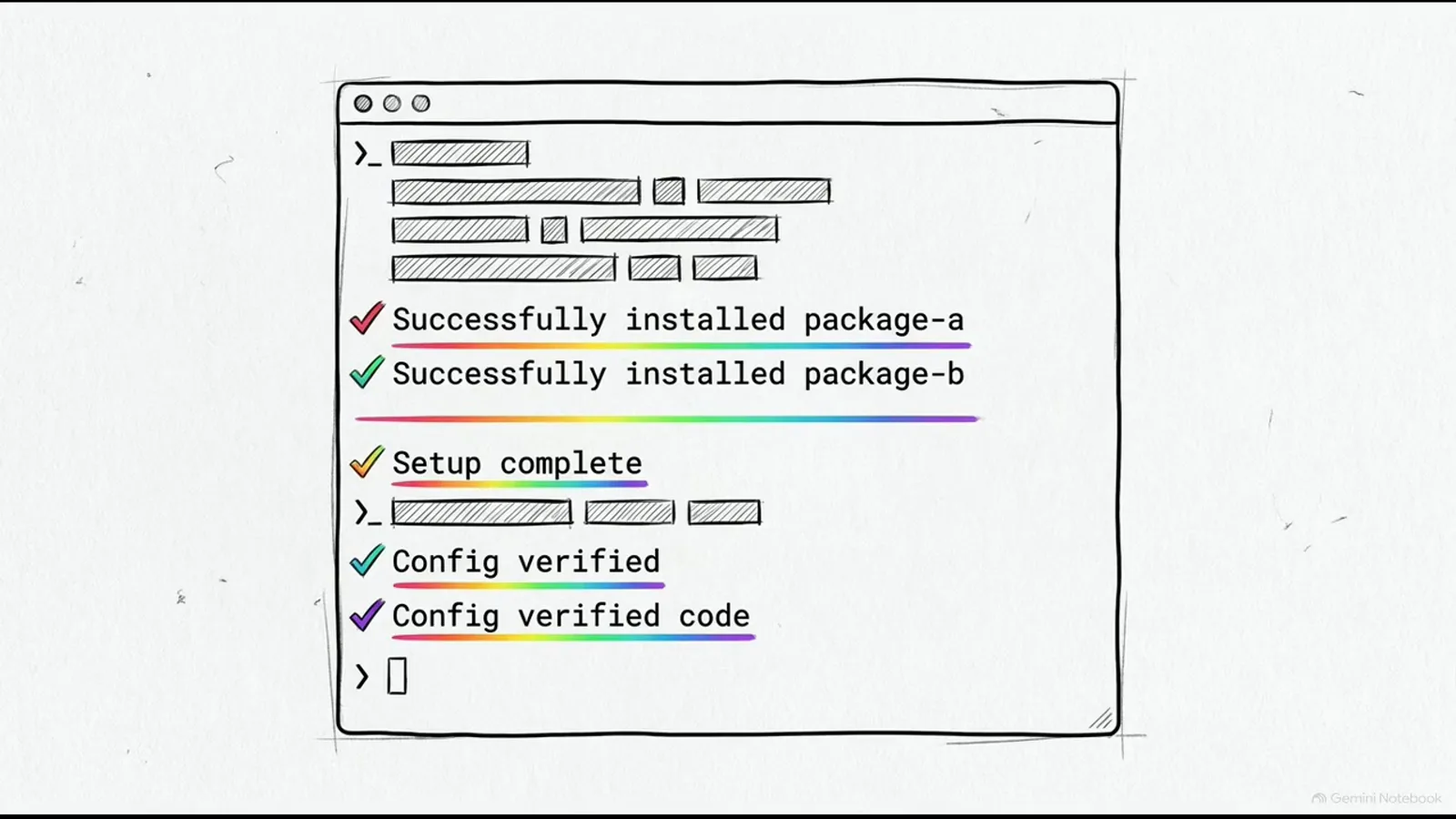
One npm command; the help menu confirms the binary.Watch at 1:08 - 3
Write the input file: one record per line
Zero-shot means you never train anything or upload examples — the labels themselves carry the semantics. Create a plain local text file filled with a few distinct lines of unstructured user comments. The video’s feedback.txt mixes three intentions: a bug report ("System is responsive but needs more features"), a feature request ("Color scheme is vibrant and clear" — a change request in context), and a compliment ("Integration with external tools is seamless"). One line equals one classification, and mixing intentions in one file is what makes the batch worth automating.
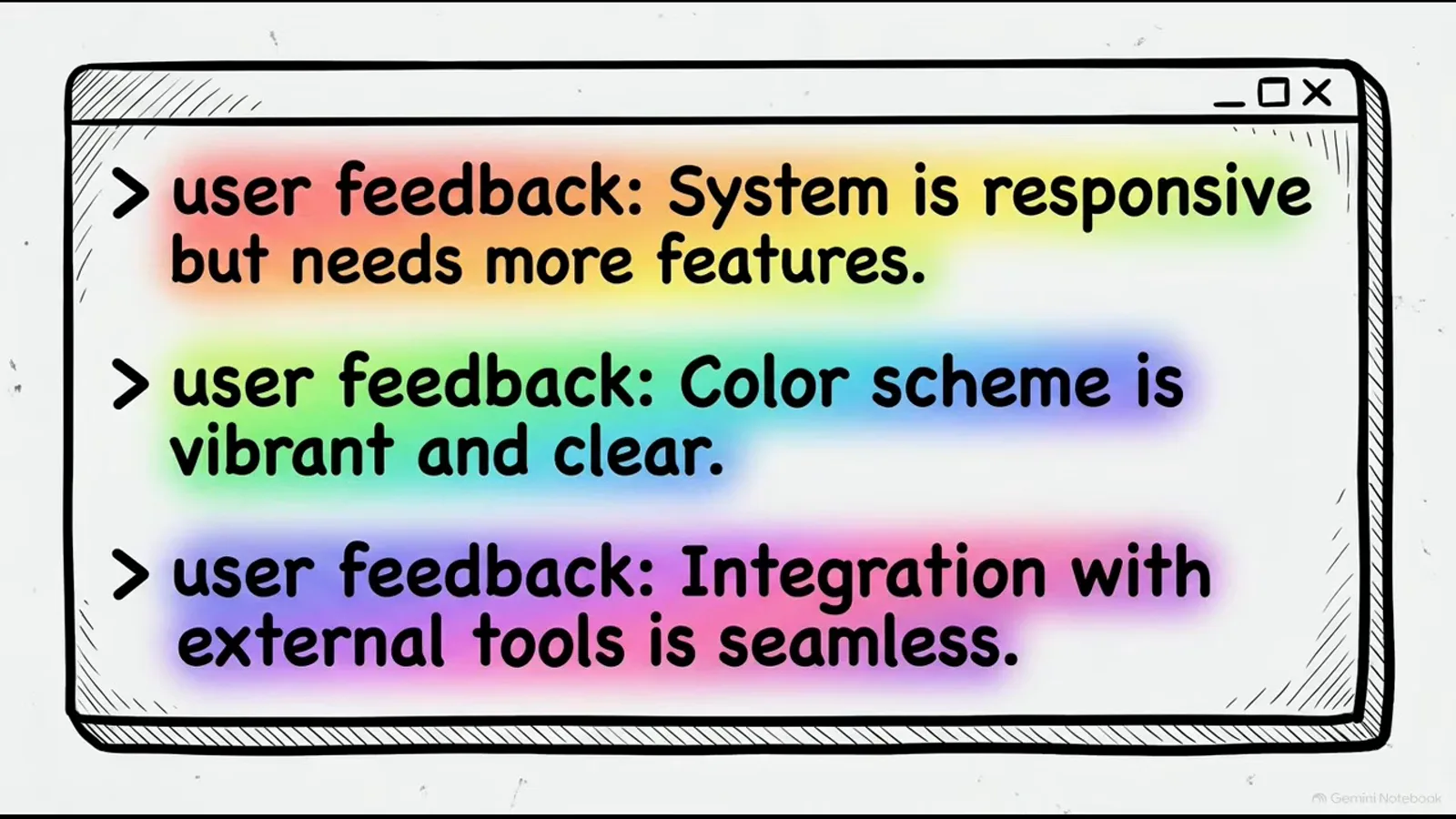
One line, one decision — mix intentions on purpose.Watch at 1:32 - 4
Run classify: comma-separated tags + stdin redirection
The call shape is: the classify command, followed by your taxonomy tags as comma-separated arguments — error, function, praise in the video — then Unix standard input redirection to send the text file directly into the command stream: classify error,function,praise < feedback.txt. The terminal instantly echoes your original text with each line’s assigned category appended. Combining Unix data pipelines with zero-shot classification is how you structure massive logs on the fly, reaching the semantic understanding of an AI model without writing custom API wrapper code.
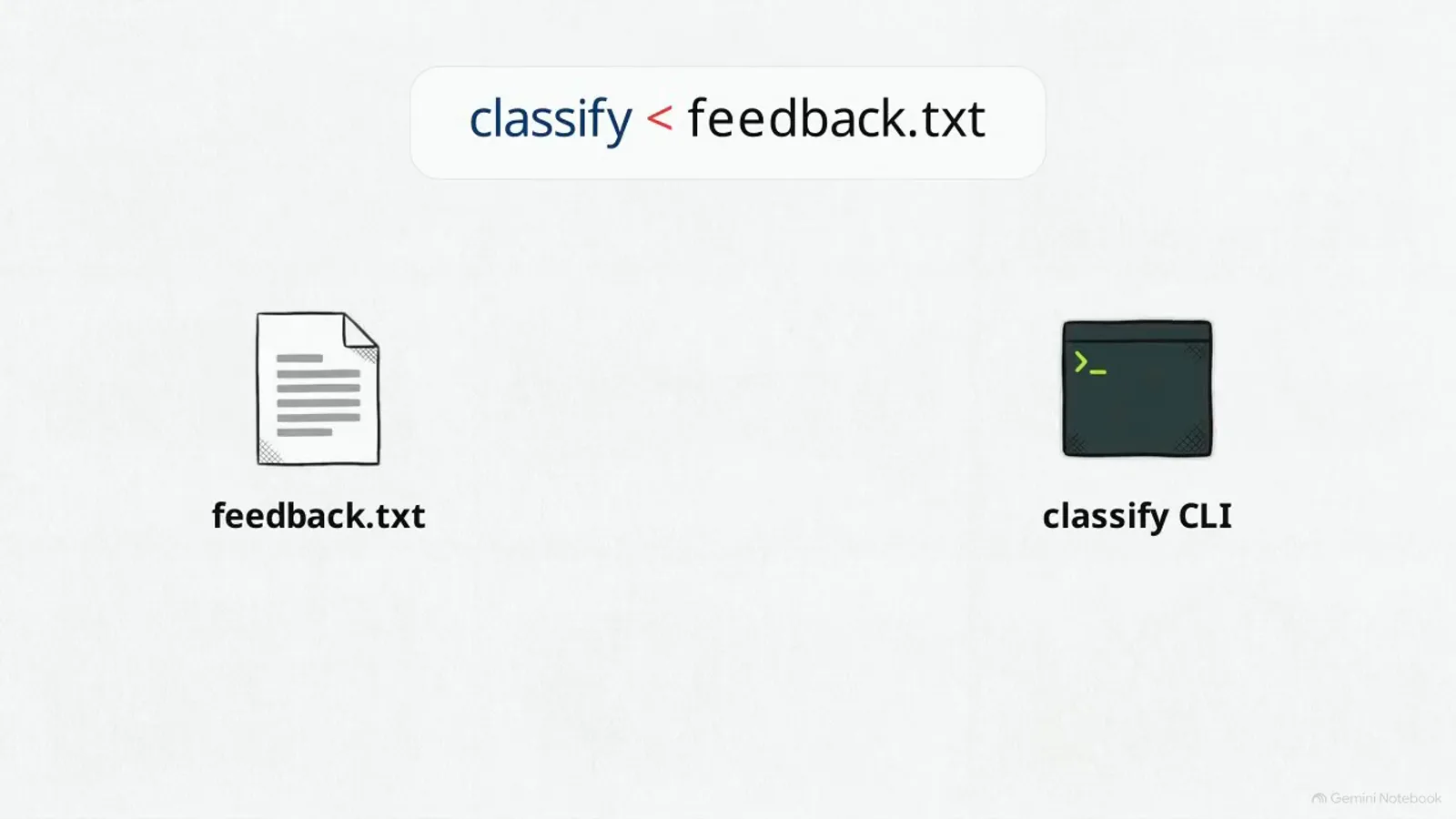
Tags as arguments, the file as stdin.Watch at 1:44 - 5
Read the tagged output and trust the calibration
Every raw line comes back with its mathematically assigned category neatly added: the system error is tagged [bug], the two algorithm requests are tagged [feature], and the positive note is tagged [praise]. Underneath, the Jev model produces calibrated probabilities — the video contrasts this with standard language models, which frequently assign high certainty to incorrect statements. With calibration, higher confidence scores are strictly correlated with greater statistical accuracy, and that property is exactly what makes threshold-based automation safe in the next step.
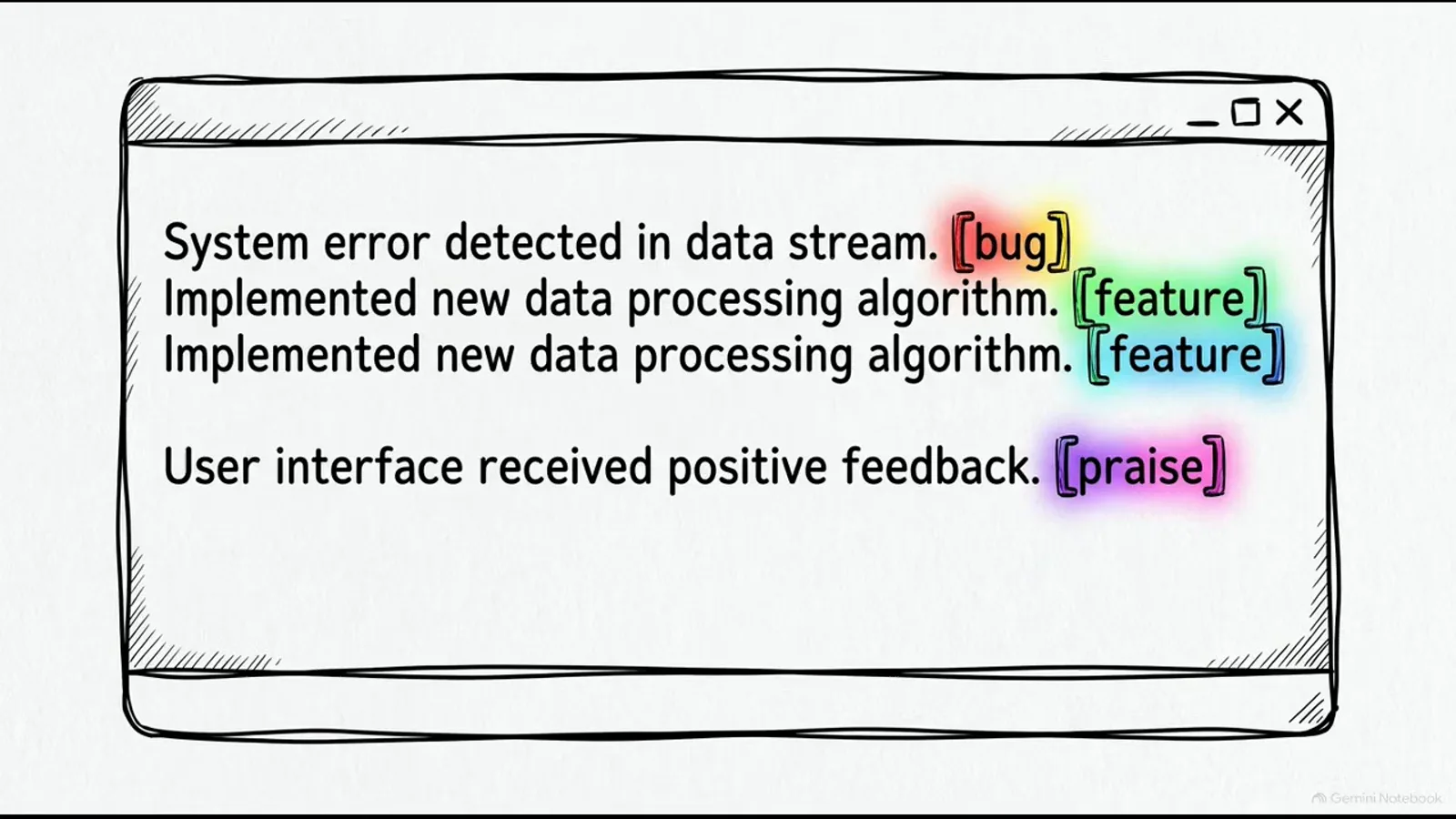
Same lines in, every line labeled on the way out.Watch at 1:52 - 6
Gate on confidence with --review 0.7
Run the CLI command again and add the flag --review 0.7. The value passed to review must be a float strictly between 0 and 1. That single flag establishes deterministic routing: ambiguous data points below the threshold are isolated for human review, while high-confidence results keep flowing to automated execution. The video’s calibration chart draws the split — statistical accuracy plotted against model confidence, the ideal-calibration diagonal rising through the 0.7 decision boundary, with the automated pipeline on one side and manual review on the other.
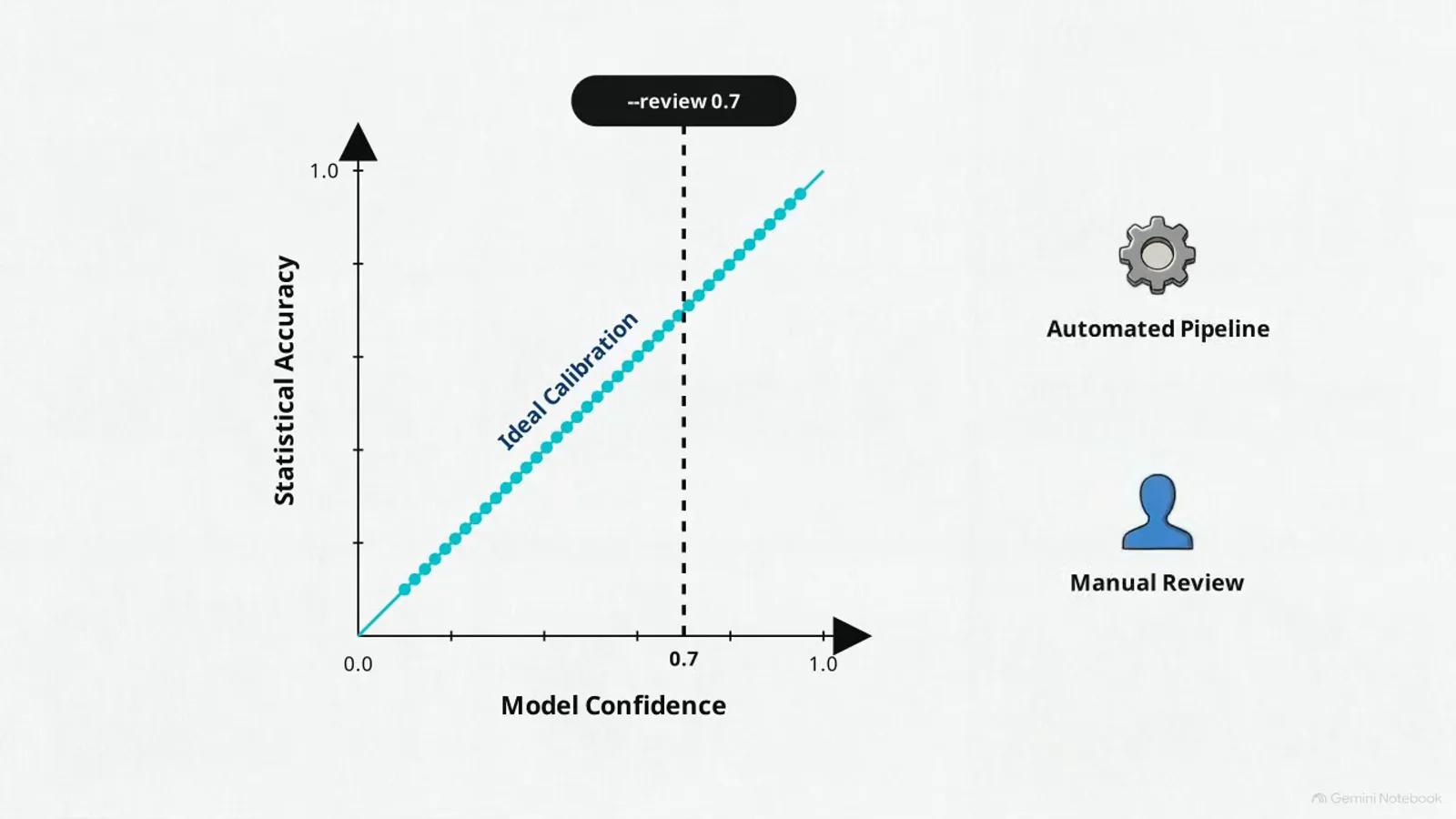
Below the line: a human. Above it: the pipeline.Watch at 2:28 - 7
Go programmatic: POST { input, labels } from your backend
For web applications and microservices you move from the shell to programmatic REST calls: send a standard JSON POST request to the classifier.dev endpoint using curl in your backend script. The payload requires exactly two keys — an input string with your text and a labels array that defines your categories; the video’s request body pairs input "the checkout button does nothing" with the labels bug, feature, and praise. To maintain optimal processing speed in a single pass, limit the taxonomy space to a maximum of 100 discrete categories per request.
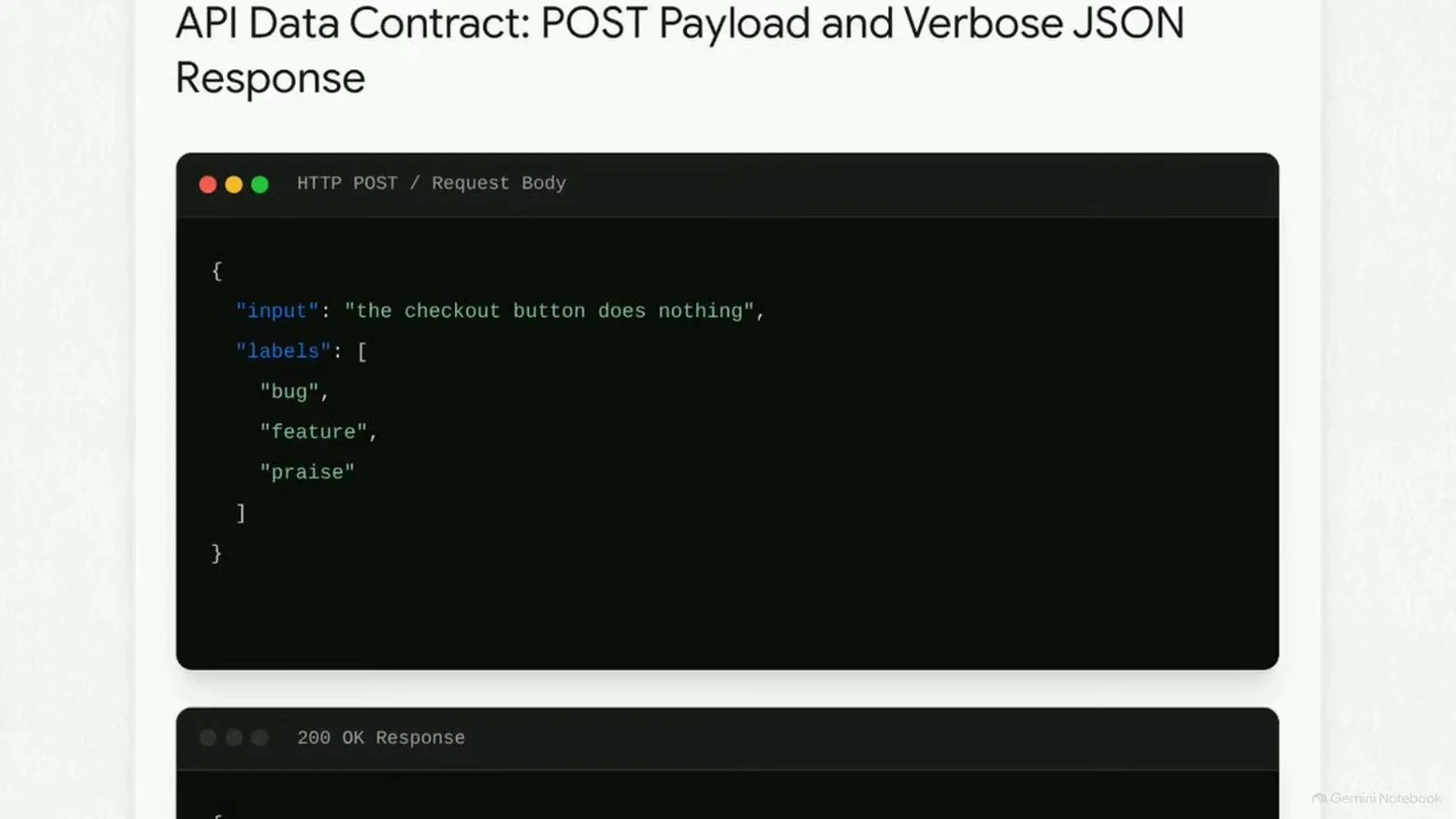
Two keys in: input + labels, capped at 100.Watch at 3:12 - 8
Consume the typed response: label, confidence, scores, ms
The video’s 200 OK response shows the whole contract: the selected dominant string label ("bug") with its primary confidence score (1), a nested scores object breaking out independent probabilities for each requested label (bug 1, feature 0, praise 0), the model string (jev-1.13.0), and an ms key tracking server-side processing latency — 260 milliseconds. Enforcing the delimited JSON data contract means a non-existent category cannot be generated, which eliminates the prompt engineering and JSON-parsing defenses traditional LLM integrations need. Autonomous agents can add the same capability to their skill set via MCP, running AI triage with the speed and reliability of standard software infrastructure.
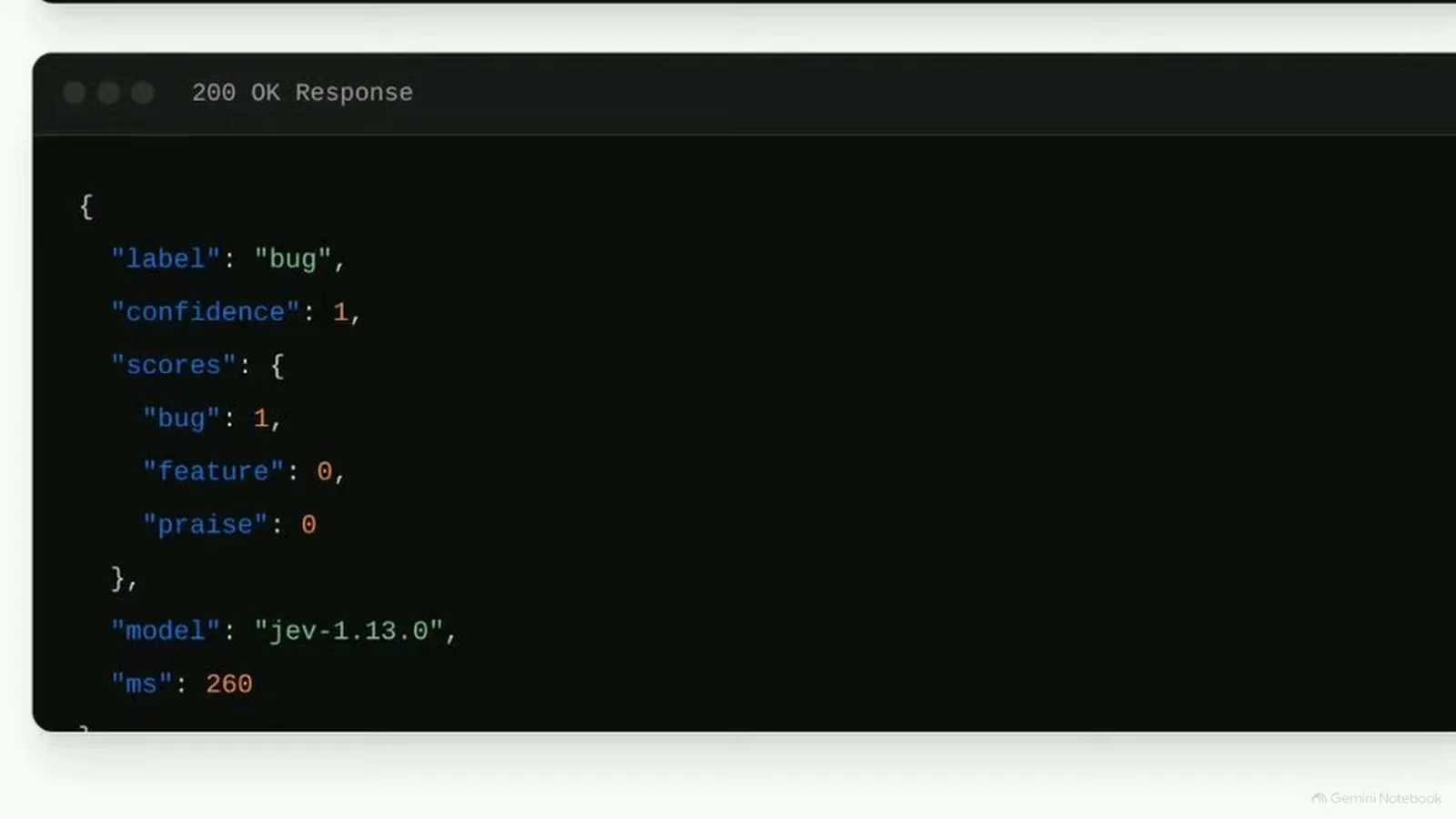
Typed answer, per-label scores, 260 ms on the clock.Watch at 3:28
Frequently asked questions
Does the Jev text classification API need an API key?
No. classifier.dev operates strictly as a stateless proxy: it sends your text to the Jev model and immediately discards it, so there is no API key provisioning, no account creation, and no authentication step. You install the CLI with one npm command and start classifying, and the same holds for the REST endpoint you call from a backend.
How do I do sentiment analysis with the Jev API?
Sentiment is just another taxonomy. Pass your own labels — for example positive, negative, neutral — as comma-separated CLI tags or as the labels array in the JSON POST, and the engine returns the dominant label with a primary confidence plus per-label probabilities in the scores object. Because classification is zero-shot you can rename or rescope the label set any time without retraining; just keep it to at most 100 discrete categories per request.
How many categories can one Jev classification request handle?
The video advises limiting your taxonomy space to a maximum of 100 discrete categories per request to maintain optimal processing speed in a single pass. Tighter label sets also read better: every label you define becomes one branch of the parallel evaluation, and the response’s scores object hands you an independent probability for each requested label.
What fields come back in the classification response?
Five things, straight from the video’s 200 OK example: the selected dominant string label ("bug"), a primary confidence score (1), a nested scores object with independent probabilities per requested label (bug 1, feature 0, praise 0), the model identifier (jev-1.13.0), and an ms key with server-side processing latency (260 ms). The delimited JSON contract prevents labels outside your taxonomy from ever appearing.
Why not just prompt an LLM to classify text as JSON?
An LLM generates tokens one at a time and can hallucinate categories or emit malformed JSON, so production integrations grow prompt engineering plus defensive parsing. The Jev-backed endpoint returns a bounded JSON contract instead: the selected label comes from your taxonomy, confidence is calibrated so higher scores correlate with statistical accuracy, and the demo call finished in 260 ms. Routing deterministically on that confidence — review anything below your threshold — is what turns classification into infrastructure.
Related guides
Jev API Reference
The evaluate endpoint and typed payload behind classification calls like these.
ReadJev Classification Quickstart
Sam Witteveen’s OpenRouter walkthrough of the Choice, Score, and Noul primitives.
ReadSupport Ticket Routing Recipe
Route tickets on typed labels and thresholds — the production pattern this pipeline feeds.
ReadWhen to Use Jev
Where a classification decision beats text generation — and where it does not.
ReadJev API Errors & Rate Limits
Keep batch classification loops running through 429s and timeouts without losing batches.
ReadMore video walkthroughs
- Jev Classification Quickstart: OpenRouter API, Primitives & Real Probabilities
- Jev Architecture Explained: Why 70ms Decision Models Beat LLMs for Workflow Automation
- Ultra-Fast Browser Agents with Jev: 178ms DOM Loops & Dual Model Orchestration
- Open Jev Models Are Here: Semif, Nimble, Decider, DiffusionGemma & Laya Hands-On
- Jev vs LLM: Will Jev Replace LLMs? Krish Naik's Whiteboard Explainer
- Jev Trader Tutorial: Build a Subsecond AI Trading Bot on Monad
- Jev Model Router: Build a Privacy-Gated LLM Router with Jev & OpenJev
- Jev Tutorial for Beginners: State, Questions & the TypeScript SDK
- Run Jev Locally: Kev, SemIf & Von on Your Own GPU (OpenJev Guide)
- Jev RAG Reranker: Policy-Steered Reranking for Retrieval-Augmented Generation
- When to Use Jev: An Engineer's Audit of Claims, Gates, and Failure Modes
- LangChain + Jev Integration Tutorial: Routing, Guardrails & Evals
- Jev MCP Server: Connect Jev Decisions to Claude Code & Cursor
- Jev vs Luna: Independent Benchmarks Put "Better, Faster, Cheaper" to the Test
- Jev Agent Harness: Where the Decision Gate Sits in Your LLM Loop
- Jev Playground Walkthrough: The Hotdog Lesson, Criteria, and a Four-Console Token Test
- Jev API Examples: First Request, curl & All Three Question Types