
Guides / illustrated walkthrough
Jev n8n Integration: the JevGate Community Node, Step by Step (Plus a Plain-HTTP Fallback)
A 2:39 walkthrough of JevGate, the MIT n8n community node that turns Jev's per-option probabilities into branch decisions — plus the no-community-node HTTP route through OpenRouter and Telegram review, every step illustrated.
Quick takeaway
JevGate is an MIT-licensed n8n community node, published as n8n-nodes-jev-gate and built by Perseo, that turns Jev — TypeSafe's decision model — into three n8n operations: Decide, Route, and Calibrate. Jev never writes text; you hand it a field to read and a question whose options you accept, and it returns a probability for every option. The node's job is turning that probability into workflow: above your threshold an item goes straight through, below it — or when the answer is none of your options — the item goes to review with the reason attached. The video's demo runs six support messages through one gate: four leave confident, two land in review (a banana bread recipe and a plain “hi”, both caught by the automatic “none of these” option). Calibrate sweeps labeled examples across thresholds 0.5–0.99 and recommends 0.7 (at 0.5 one wrong answer slipped through; at 0.7 none did). This page also documents a second, independent route for teams that cannot install community nodes: flownix's build uses n8n's stock HTTP Request node POSTing to openrouter.ai/api/alpha/decisions, an IF gate on the score, and a Telegram message node as the human review queue. Honest scope: a 2:39 video with one small demo (6 messages, 12 labeled examples) — these numbers calibrate that workflow, not the category.
Video source
Perseo n8n Automations
Step-by-step walkthrough
- 1
Meet JevGate: an n8n node that turns a probability into a decision
The opening card states the whole product: Jev Gate is an n8n community node for Jev, TypeSafe's decision model. On the left, two probabilities; on the right, what happens to each. p = 0.98 crosses the line and routes to “act automatically”; p = 0.49 falls short and routes to “send to a human”. That is the entire mental model — everything else in this page is configuration detail. The node exists because a probability sitting in a JSON field does nothing; someone has to decide what to do with it, and doing that in the workflow canvas keeps the decision visible next to the branches it feeds.
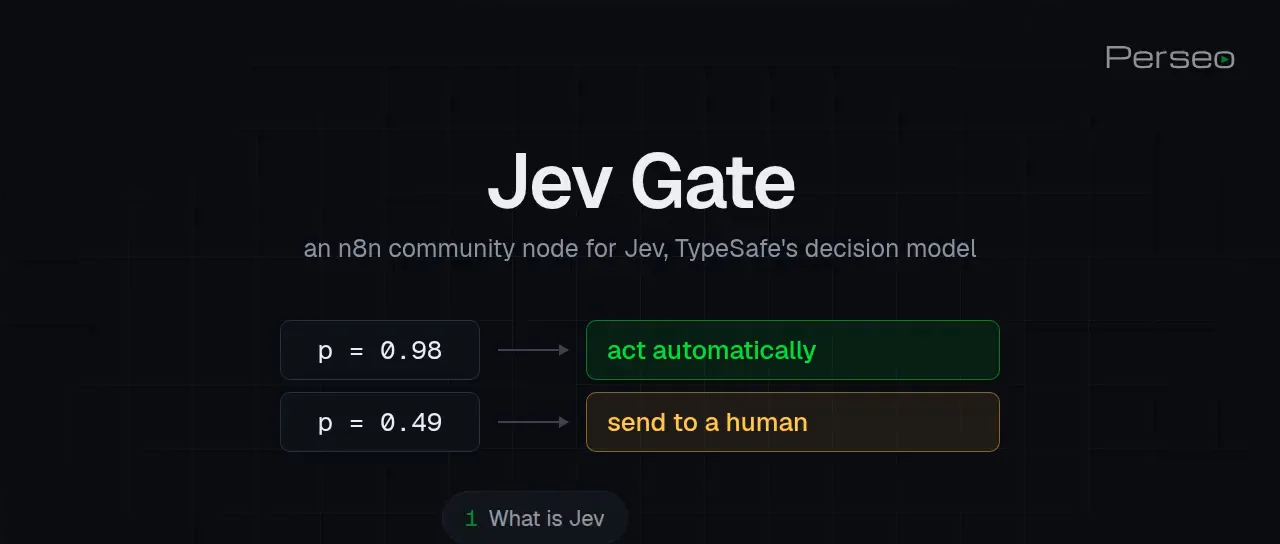
The pitch in one frame: p above your threshold acts, p below it goes to a person.Watch at 0:06 - 2
What Jev answers — and where it belongs in a workflow
Before the demo, the video sets two boundaries. First, what Jev is: a decision model that does not write text. You give it the text to read and a question with the options you accept; it answers with a probability for every option. An LLM drafts the reply; Jev answers “which of these, how sure”. Second, where that fits: the deterministic end of the work — routing a ticket, tagging a lead, checking an extraction, filtering a feed — explicitly not writing the reply. In n8n terms, Jev is the node between “something arrived” and “something happens”: it reads a field, and its output decides which branch fires. The rest of the video builds exactly that segment.
- 3
The three question kinds: Choice, Score, Yes/No
Jev accepts three kinds of typed questions, and the demo card shows all three with real answers from the demo workflow. Choice picks one option from your list: “Which team should handle this message?” returns billing 1.00, technical 0.00, sales 0.00. Score places the item on a scale you define: “How frustrated is the writer?” reads Calm 0.78, Annoyed 0.22, Angry 0.00, and the chosen score of 0.22 maps to Calm. Yes/No returns the probability that a statement is true: “Is this urgent?” comes back 0.08 — no, with 0.92 confidence. Same input field, three different output shapes; every answer travels with its own confidence, which is what the gate later consumes.
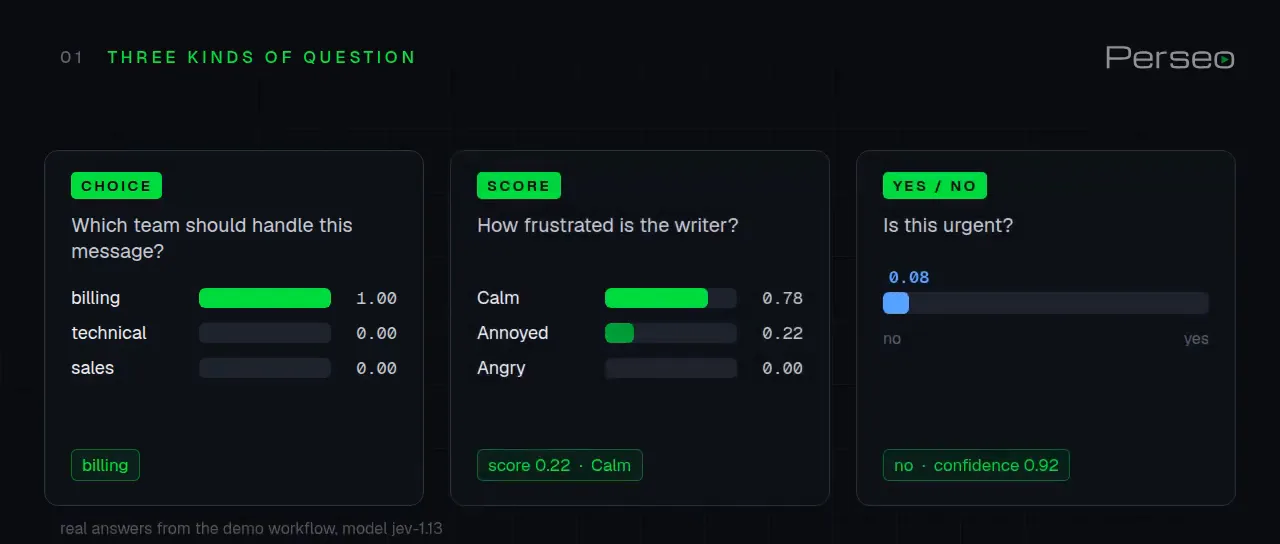
Choice picks, Score rates, Yes/No gates — each answer arrives with its own confidence.Watch at 0:31 - 4
The two constraints: a 64k window and a sub-cent price tag
Two practical limits frame every integration. The context window is 64,000 tokens in total — the card draws “your state plus the longest question” against that 64k budget — so you send the field that matters, not the whole record. Then the price tag, per the card: input costs $0.042 per 1M tokens and output tokens are free, with the measured line underneath: 12 messages classified in one request for $0.000085 — under a hundredth of a cent, matching the narration’s “under 1/100 of a cent”. The economics are what make per-item gating economical: you can afford to ask a question on every message and let the threshold, not a batch job, decide what deserves attention.
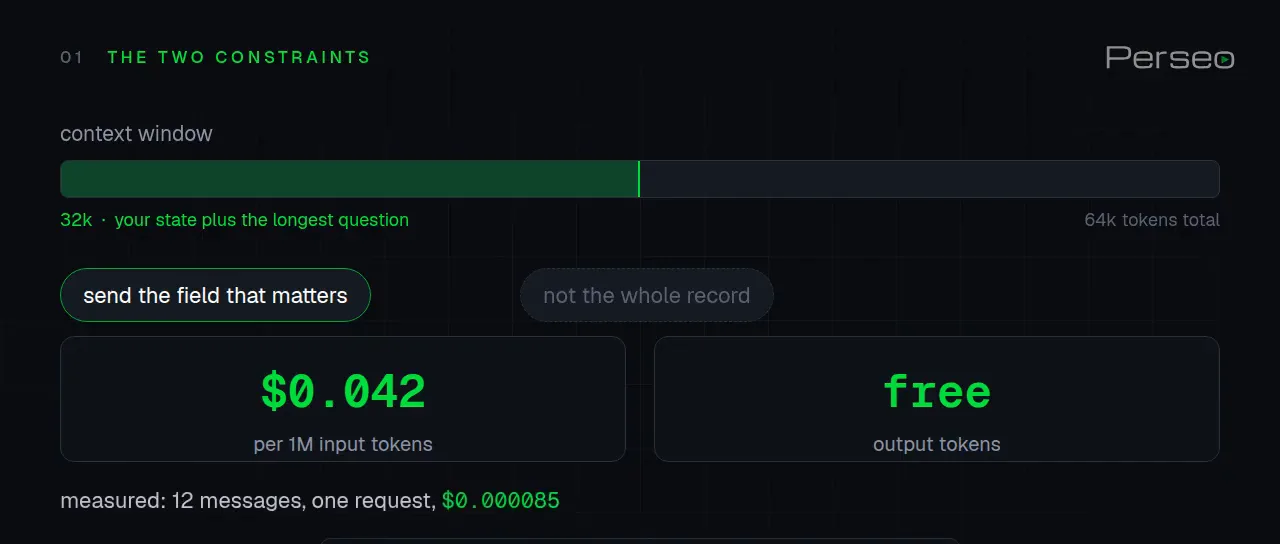
Send the field, not the record: 64k tokens, $0.042 per million in, output free.Watch at 0:55 - 5
Configure the node once: the field to read, the question to ask
Here is the node inside n8n. The Jev Gate Triage node uses a “Jev Gate account” credential, Operation set to Decide, Data Source set to Selected Fields, and one field selected: message. Define Questions is set to Using Fields; the question itself has Answer Key “team”, Answer Type “Choices”, and the ask text “Which team should handle the support message in the field message?”. That is the whole setup the narration summarizes: you pick the fields the model reads, write the questions, and set one threshold. No prompt engineering surface, no temperature, no system message — the question schema is the configuration.
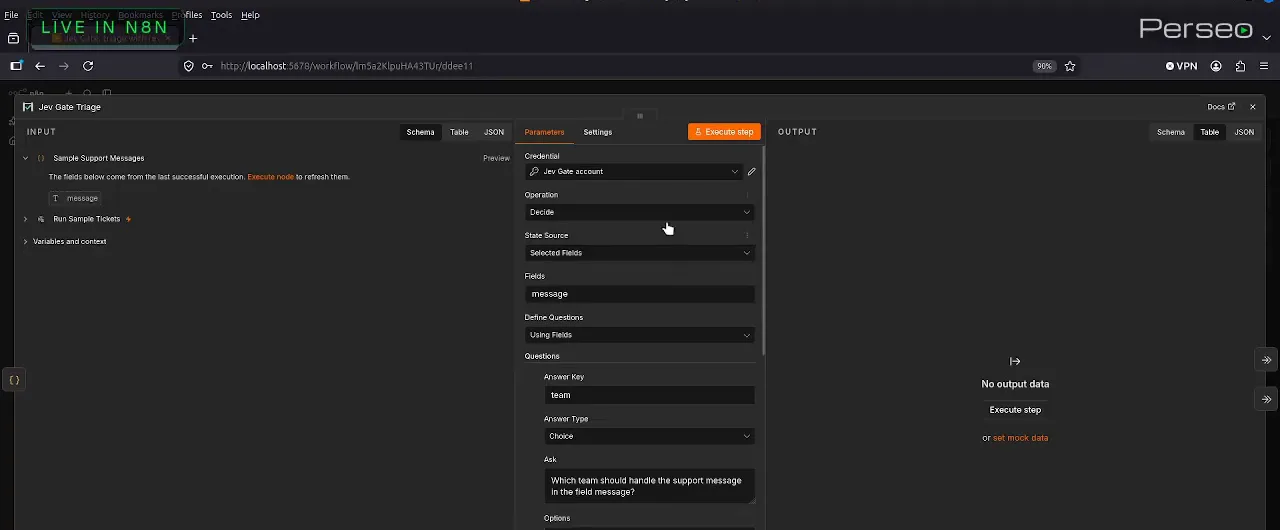
One Decide operation: the field to read, the question to ask, the options you accept.Watch at 1:26 - 6
The demo run: six tickets in, four confident, two review
The executed workflow tells the story in its branch counts: Run Sample Tickets (1 item) feeds Sample Support Messages (6 items) into Jev Gate Triage, and the node’s two outputs split the load — Confident carries 4 items into Act Automatically while Review carries 2 items into Human Review. Every item that passes through carries the chosen option, the probability of each option, the confidence, and the cost of the call; every review item also says why it is there. The two held back in this run were a banana bread recipe and a plain “hi” — the node adds a “none of these” option to every question automatically, so off-topic text is never forced into your categories. That is the failure mode most prompt-based routers hide.
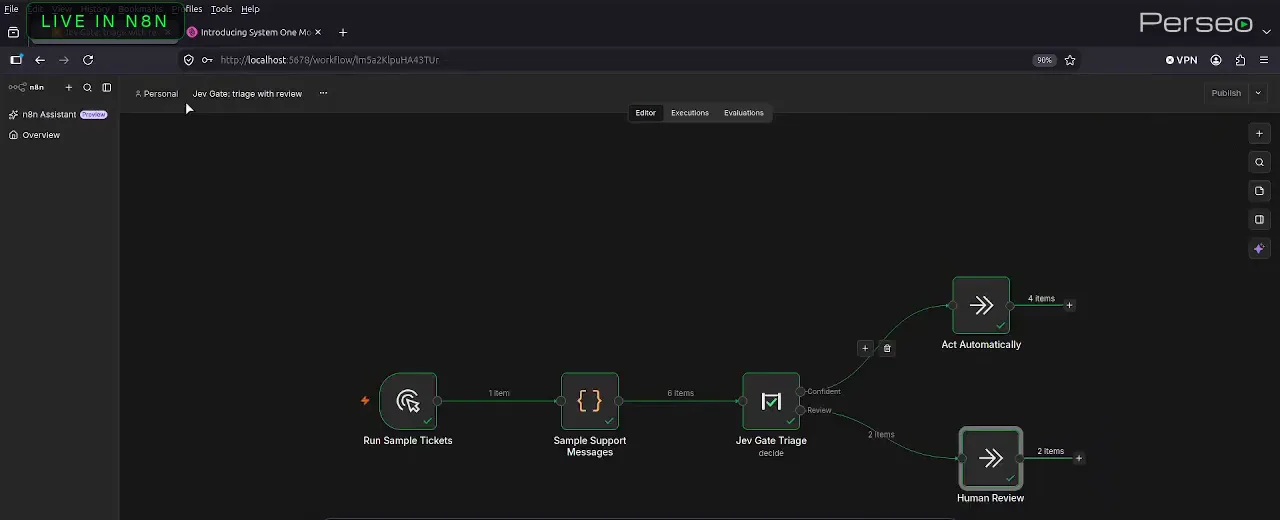
Six tickets in: four straight through, two held for a person.Watch at 1:59 - 7
Calibrate: let labeled examples pick the threshold
The threshold is not a vibe, and the video proves it with the Calibrate operation. The Jev Gate Calibrate node takes labeled messages — 12 here, each with a label field — and returns accuracy and coverage for every threshold you list (0.5, 0.7, 0.8, 0.9, 0.95, 0.99 in the Thresholds field). The output table starts from the honest baseline: accuracyWithoutGate 0.9166, meaning 11 of 12 the model got right with no gate at all. On this run, a 0.5 threshold let one wrong answer slip through, while 0.7 kept every confident answer correct — so the node prints recommendedThreshold: 0.7. Sweep your own labeled set before you hard-code a number; the “right” threshold is a property of your categories and traffic, not of the model.
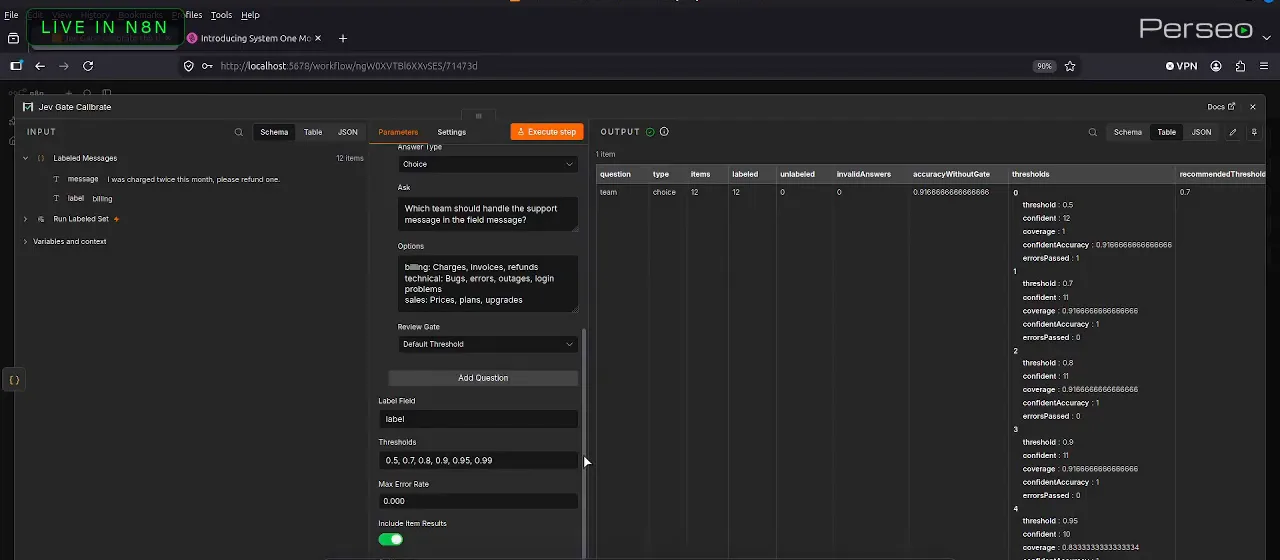
The node swept the thresholds for you and printed its recommendation: 0.7.Watch at 2:03 - 8
Route: every option becomes its own output, review goes last
Decide gives you two doors; Route gives every option its own. The Route operation in the video names each option and describes it in plain English — billing: “Charges, invoices, refunds”; technical: “Bugs, errors, outages, login problems”; sales: “Pricing, plans, upgrades” — with a confidence threshold of 0.65 and, always, review as the last output. So the uncertain items always have somewhere to go. The narration draws the operational payoff precisely: the confident part runs without a person, and a person only sees what was actually uncertain. In a busy workspace that is the difference between a triage queue nobody reads and a review queue that only contains genuinemaybes.
- 9
What you are installing: n8n-nodes-jev-gate, MIT, 23 unit tests
The closing card names the package: n8n-nodes-jev-gate — Decide, Route, Calibrate — MIT licensed, built by Perseo. The engineering card alongside it lists the verification the author ran: 23 unit tests, a live run against the API, and execution inside n8n. Worth naming the scope honestly: this is a 2:39 video with one small demo — six messages through the gate, twelve labeled examples through Calibrate. Those numbers calibrate that demo workflow; they are not a benchmark of Jev or of the node. What the video does establish is the shape of the integration, and that shape is exactly what you would rebuild for your own categories.
n8n-nodes-jev-gate: Decide, Route, Calibrate — MIT, by Perseo.Watch at 2:38 - 10
No community nodes? The stock HTTP Request node does the same job
The frames from here on come from a different, independent video — flownix’s n8n + Jev build, linked at each timestamp — which reaches the same goal without installing anything. The n8n HTTP Request node is configured with Method POST and the URL https://openrouter.ai/api/alpha/decisions, and the Authentication dropdown (None / Predefined Credential Type / Generic Credential Type) is where the OpenRouter key gets attached as header auth. Downstream, a plain IF node compares the returned score against a number (“is greater than”) — your hand-built version of the threshold. The trade-offs are the flip side of the node’s conveniences: no automatic “none of these” option, no Calibrate sweep, no per-option Route outputs. You get full control and zero installs; you also own every piece of the gate.
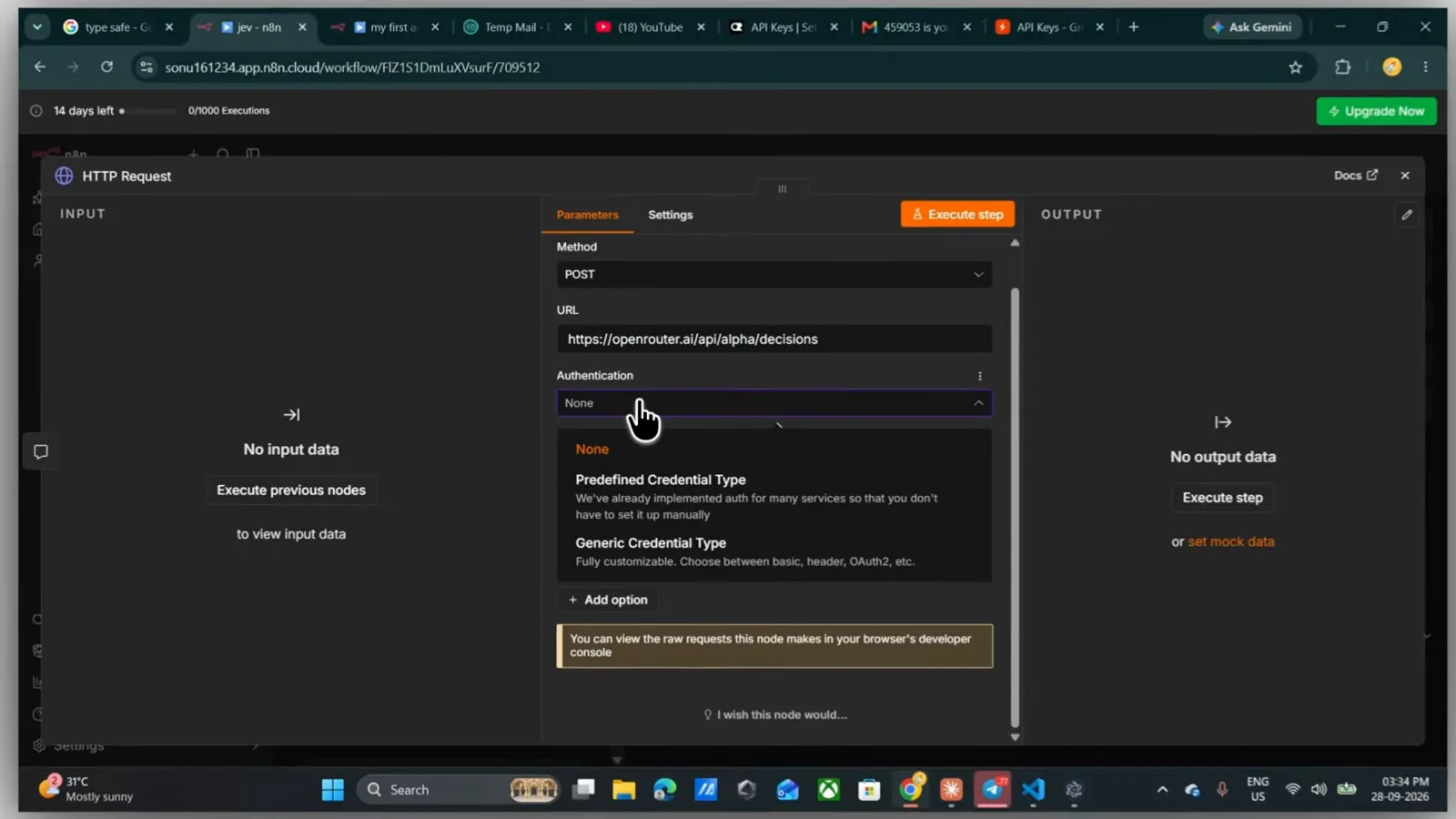
Frame from flownix’s separate build (a different video; the timestamp links there): the same job with n8n’s stock HTTP Request node.Watch at 1:40 - 11
Hand the uncertain ones to a human: Telegram as the review queue
Same source video, next piece of plumbing: the Telegram “Send a text message” node. The configuration shows a connected “Telegram account” credential (from your bot token), Resource Message, Operation Send Message, the Chat ID of the reviewer, and a Text field mapped from the chat input — with Reply Markup set to None. In this build the IF gate routes low-confidence messages here, so the reviewer’s Telegram becomes the review queue; everything else flows to an AI agent (prompt defined below, response mode “Using Response Nodes”) so normal messages still get an answer while the uncertain ones page a person. The narration’s Hindi is machine-translated in the subtitles, so treat the frames — not the caption text — as the source of these details.
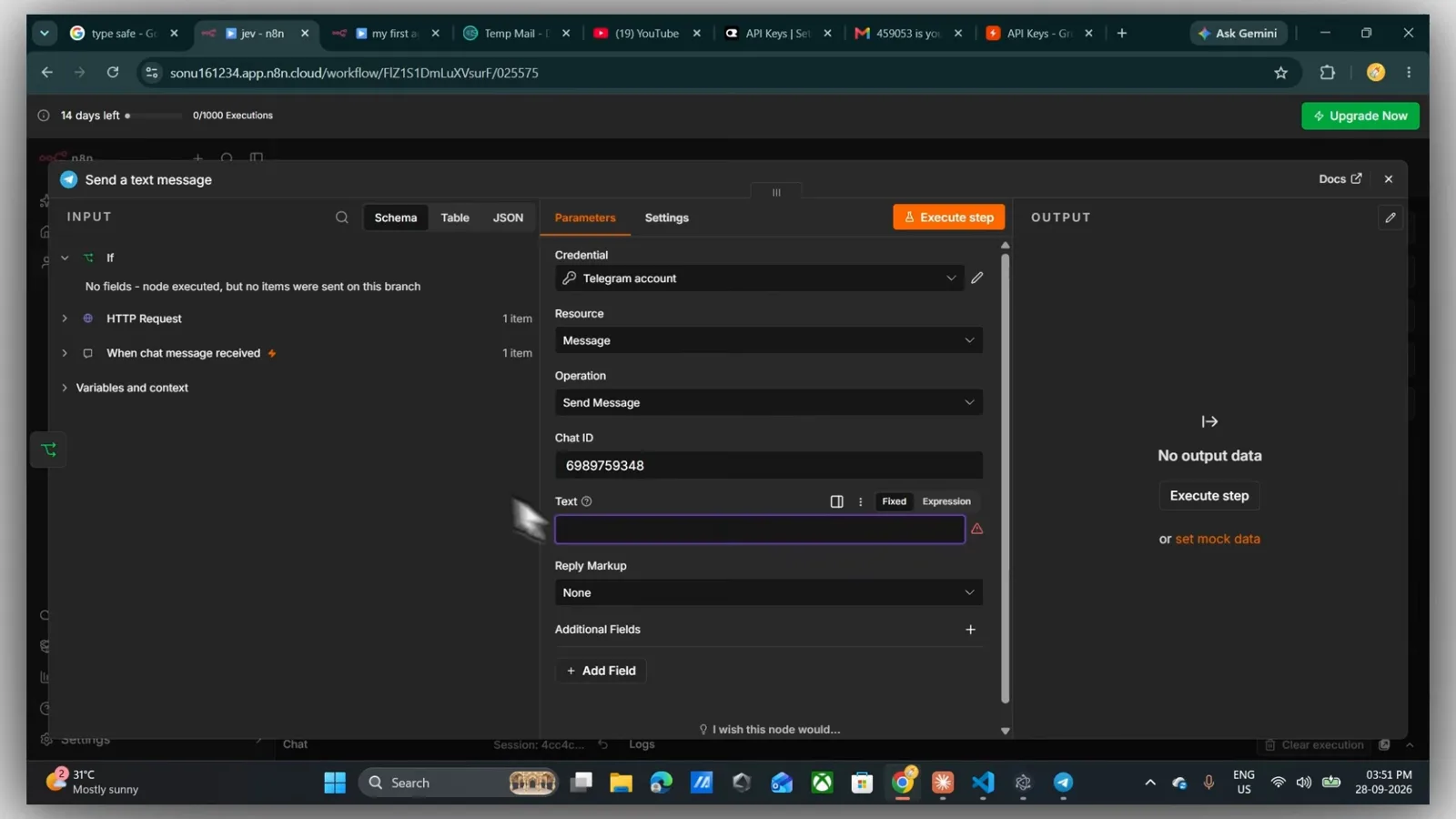
Same flownix video, same idea: the reviewer’s Telegram chat becomes the review queue.Watch at 5:00 - 12
End to end: the uncertain ticket reaches a person
The proof run. A chat message arrives — “Help! My payments have been failing for 3 days and nobody answers support.” — and the execution log shows the path: When chat message received, HTTP Request, Send a text message all succeeded, with a “Workflow executed successfully” badge over the canvas. The agent replies to the user in chat while the review message lands on the reviewer’s Telegram. Two implementations, one shape: something reads the message, a scored decision is made, and confidence — not luck — decides whether software or a human handles it. That shape is portable: the JevGate node packages it; the HTTP route assembles it; both end at the same place an honest automation should, which is a person, but only when it matters.
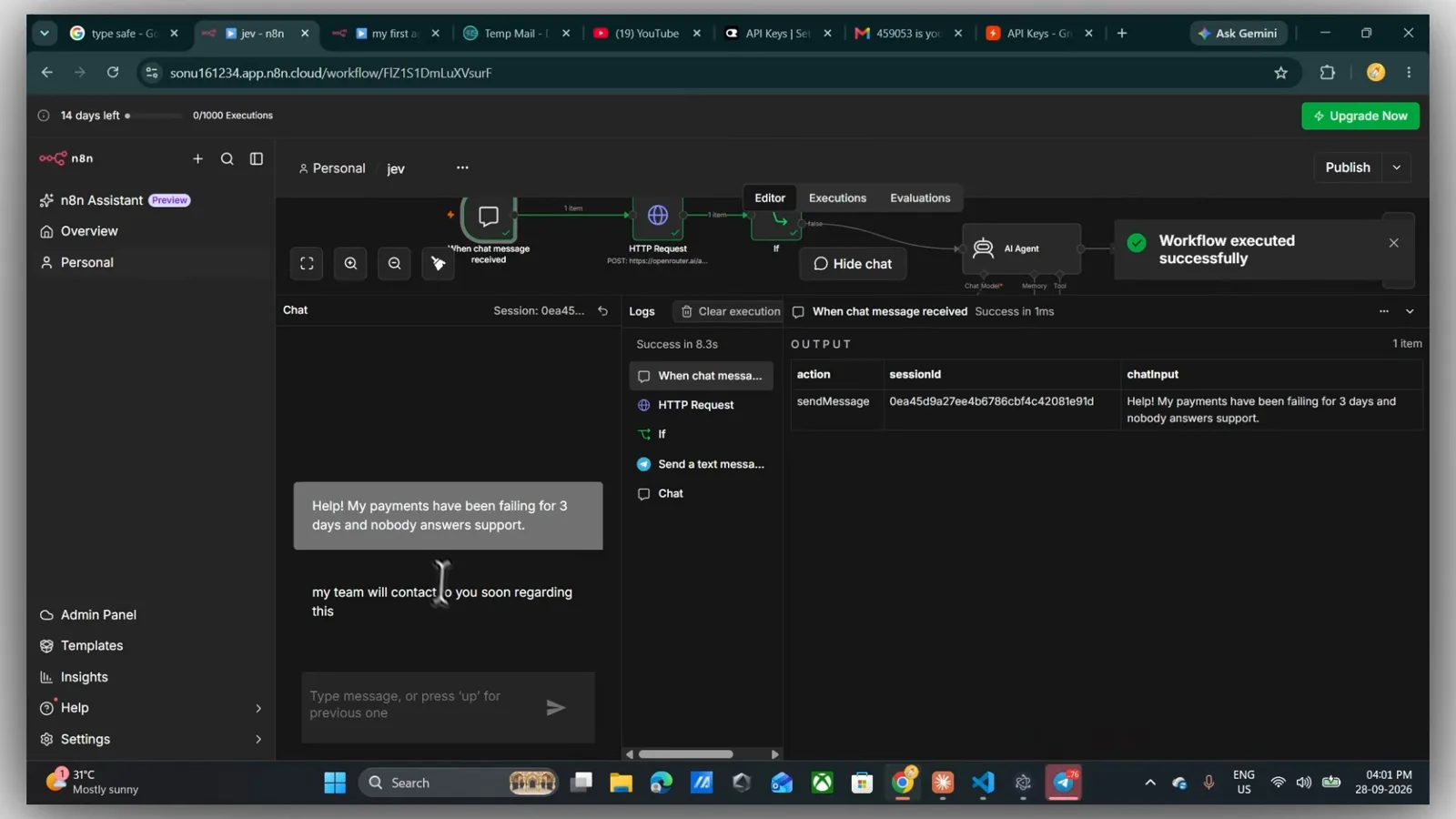
End to end in the flownix video: decision made, agent replies, the uncertain one pages a human.Watch at 8:14
Frequently asked questions
What is JevGate, and how do I add it to n8n?
JevGate is an MIT-licensed n8n community node built by Perseo that wraps TypeSafe's Jev decision model. The closing card publishes the package name n8n-nodes-jev-gate; community nodes install from n8n's Settings → Community Nodes using that name. It adds three operations — Decide (gate each item on a confidence threshold), Route (one output per option, review last), and Calibrate (sweep thresholds over labeled examples) — plus a “Jev Gate account” credential. The video itself starts after installation and shows the configuration: pick the fields the model reads, write the question with its accepted options, set one threshold.
Why are Jev's output tokens free?
Because Jev does not generate text. Reading your field and scoring the accepted options happens in one forward pass, so there are no generated output tokens to bill — output is free on the video's pricing card, with input at $0.042 per 1M tokens. The card's measured line makes it concrete: 12 messages classified in a single request cost $0.000085, under a hundredth of a cent. Treat the pricing card (and TypeSafe's official pricing) as the authority — the narration rounds the input price to “four cents”.
How do I pick the confidence threshold?
Calibrate it instead of guessing. The Calibrate operation takes labeled examples — 12 in the demo — and returns accuracy and coverage at every threshold you list (0.5 through 0.99). On that run the ungated baseline was 0.9166 (11 of 12 correct), a 0.5 threshold let one wrong answer slip through, and 0.7 kept every confident answer correct, so the node recommended 0.7. The honest caveat: those twelve messages calibrate that demo workflow, not your category set — run your own labeled traffic through Calibrate before committing a number, and re-run it when the categories change.
How does the review branch work inside n8n?
Items below the threshold — or whose answer is not one of your options — exit through the review output with the reason attached: low_confidence, none_of_these for off-topic input, or no_answer for an invalid answer. In the demo, six support messages split four confident and two review, and the two held back were a banana bread recipe and a plain “hi”. Because the node adds a “none of these” option to every question, off-topic text is never forced into your categories. Route completes the picture: each option gets its own output and review is always the last one, so an uncertain item always has somewhere to go — pair it with a Telegram node or a ticket assignment and a person only ever sees genuine maybes.
Can I use Jev in n8n without installing community nodes?
Yes — that is the second route on this page, taken from flownix's independent build. A stock HTTP Request node POSTs to openrouter.ai/api/alpha/decisions with header authentication carrying your OpenRouter key; an IF node compares the returned score against a number; items below it go to a Telegram “Send a text message” node while an AI agent answers the rest. You get zero installs and full control, and you also rebuild by hand what JevGate ships: no automatic “none of these” option, no Calibrate sweep, no per-option Route outputs. Note the source video's narration is Hindi with machine-translated subtitles — the frames, not the captions, are what these details come from.
When should a workflow use Jev — and when should it not?
Use it at the deterministic ends of a workflow: routing a ticket, tagging a lead, checking an extraction, filtering a feed — anywhere a probability should become an if/else with an escape hatch. Do not use it to write the reply (Jev does not generate text), for open-ended generation, or in flows where a low-confidence item has nowhere to go — a gate without a review path just silently drops uncertain cases. Both routes on this page end the same way on purpose: the confident part runs without a person, and a person only sees what was actually uncertain.
Related guides
LangChain + Jev Integration Tutorial
The code-first sibling: langchain-typesafe, ModelRouter and guardrails in TypeScript. This page drags nodes on a canvas; that one ships the same decisions as code.
ReadJev in Heym: Decision Nodes & Model Routing
The same decision-node idea inside the Heym platform. Three surfaces, one model: Heym’s built-ins, LangChain code, and n8n’s no-code workflows on this page.
ReadJev Ticket Classification: Hook + Calculated Field
Ticket routing without a workflow canvas at all — hooks and calculated fields inside a helpdesk product. Compare its category design with the Route descriptions here.
ReadJev API Examples
The raw requests underneath both routes on this page: what the JevGate node wraps and what the HTTP Request node actually posts.
ReadSupport Ticket Routing Recipe
The triage pipeline as a step-by-step recipe: Choice, Score, and Noul questions over a real ticket stream — the logic JevGate packs into one node.
ReadMore video walkthroughs
- Jev Classification Quickstart: OpenRouter API, Primitives & Real Probabilities
- Jev Architecture Explained: Why 70ms Decision Models Beat LLMs for Workflow Automation
- Ultra-Fast Browser Agents with Jev: 178ms DOM Loops & Dual Model Orchestration
- Open Jev Models Are Here: Semif, Nimble, Decider, DiffusionGemma & Laya Hands-On
- Jev vs LLM: Will Jev Replace LLMs? Krish Naik's Whiteboard Explainer
- Jev Trader Tutorial: Build a Subsecond AI Trading Bot on Monad
- Jev Model Router: Build a Privacy-Gated LLM Router with Jev & OpenJev
- Jev Tutorial for Beginners: State, Questions & the TypeScript SDK
- Run Jev Locally: Kev, SemIf & Von on Your Own GPU (OpenJev Guide)
- Jev RAG Reranker: Policy-Steered Reranking for Retrieval-Augmented Generation
- When to Use Jev: An Engineer's Audit of Claims, Gates, and Failure Modes
- LangChain + Jev Integration Tutorial: Routing, Guardrails & Evals
- Jev MCP Server: Connect Jev Decisions to Claude Code & Cursor
- Jev vs Luna: Independent Benchmarks Put "Better, Faster, Cheaper" to the Test
- Jev Agent Harness: Where the Decision Gate Sits in Your LLM Loop
- Jev Playground Walkthrough: The Hotdog Lesson, Criteria, and a Four-Console Token Test
- Jev Text Classification API: Zero-Shot CLI & REST with classifier.dev
- Jev API Examples: First Request, curl & All Three Question Types
- Jev Log Triage with Expanso Edge
- Jev Lead Enrichment with Treg: ICP and Signup Scoring
- Use Jev Decision Nodes in Heym for Model Routing
- Laya Tutorial: Open-Source AI Routing With Calibrated Probabilities (Laya vs Jev Setup)
- Train Your Own Jev: Fine-Tune a Jev-Style Decision Model for $5–$17 (What You Can and Cannot Train)
- Jev Tips: 8 Best Practices for Better Decisions (State, Questions, Criteria & Thresholds)
- Jev Context Compaction: Prune AI Agent Memory Without Generative Summaries
- Jev as an LLM Judge: Confidence-Gated Cascades at 0.36% of the Cost
- TypeSafe Computer Use: Local Desktop Automation with Jev, Step by Step
- Jev Resume Screening: Build an AI Resume Evaluator with the Jev JavaScript SDK
- Jev + Claude Code Guide: Voice-Controlled Browser Automation with Typed Decisions
- Jev + Codex: Install the TypeSafe Skill and Triage a Real Gmail Inbox
- Jev vs Ollama: Can Local AI Replace Hosted Jev Without Sending Your Data Away?
- Build Your Own Jev: Train a Free Open-Source Zero-Shot Classifier (That Plays Doom)
- CUA-S1-Forms: a 706K-Parameter Jev-Like Model That Fills GUI Forms on Your CPU
- NOC/SOC Alert Triage with Jev: Rules First, One Typed Question, a Policy Gate
- Ollama Decision Models: Run tev1 and Nimble Locally (Tested on an 8 GB Card)
- Jev Guardrails in Production: A Five-Step Playbook for Decision Automation
- A Session Drift Guard for Pi Agent: Let the Jev Model Propose, Let Code Decide
- 50 Tev1 Use Cases: What a Local Decision Model Can Actually Do (Tested on an 8 GB Laptop)
- Jev, Hands-On: Where the Official Claims Meet Independent Remeasurement
- Jev Ticket Classification in a Real App: the After-Insert Hook and the Calculated Field
- OpenJev RLCD: Run the Open-Source Calibrated Decision Model Locally (Full Guide)
- Clef-Flash vs Jev: I Tested Cloudflare's Decision Model Locally in Ollama (Q4_K_M)
- Julia-1 Tutorial: Install the Open-Source Jev Replacement in Pure Python (and Watch It Beat If-Statements 9 to 2)
- OpenJev 0.8B on CPU: I Built a Ticket-Routing Inbox and Calibrated the Thresholds