
Guides / illustrated walkthrough
Ollama Decision Models: Run tev1 and Nimble Locally (Tested on an 8 GB Card)
A hands-on test of Ollama 0.35’s new /v1/systemone endpoint: pull tev1 (4B/0.8B, Together AI) and Nimble (9B, Bespoke Labs), route tickets and moderate messages in a few hundred milliseconds, then compare them against a JSON-schema-forced chat model on the same 30 tickets.
Quick takeaway
Ollama 0.35 (released alongside the 2026-09-29 announcement) added a /v1/systemone endpoint — not a chat endpoint — that runs Jev-style decision models locally. Two families are live: tev1 from Together AI (4B and 0.8B, further-trained Qwen 3.5) and Nimble 9B from Bespoke Labs (Apache 2.0). The video walks the whole path on an 8 GB laptop: pulling the models, learning the finicky request shape through three validation errors, and running a four-tab Decision Lab (triage, moderation, router, grader). On the creator’s own 30-ticket test — a good start, not a benchmark — tev1 4B scored 100% on team routing at 470 ms using 4.7 GB, Nimble hit 96.7% at 1.5 s but spills onto the CPU, and the 0.8B runs in under a gigabyte. The most instructive part: a plain Qwen 3.5 chat model forced into a JSON schema matched the accuracy and beat the speed (268 ms) — what it cannot give you is calibrated confidence (every decision-model error sat below 0.9) or consistency (the same ticket came back “billing” 7 times out of 8). That is the whole local-decision-model pitch in one experiment.
Video source
Prompt Engineer 48
Step-by-step walkthrough
- 1
Start from the announcement: Ollama now speaks System One
The video opens on Ollama’s blog post dated September 29, 2026: “Ollama now supports Jev-style decision models.” Decision models based on TypeSafe’s Jev API now run through a new endpoint on your own machine — the post calls out no additional costs, lower latency than a hosted call, and three new decision models available the same day. The fine print that matters later: the new API requires Ollama 0.35 or later, so check ollama --version before anything else. The creator had exactly 0.35.0 — the minimum.
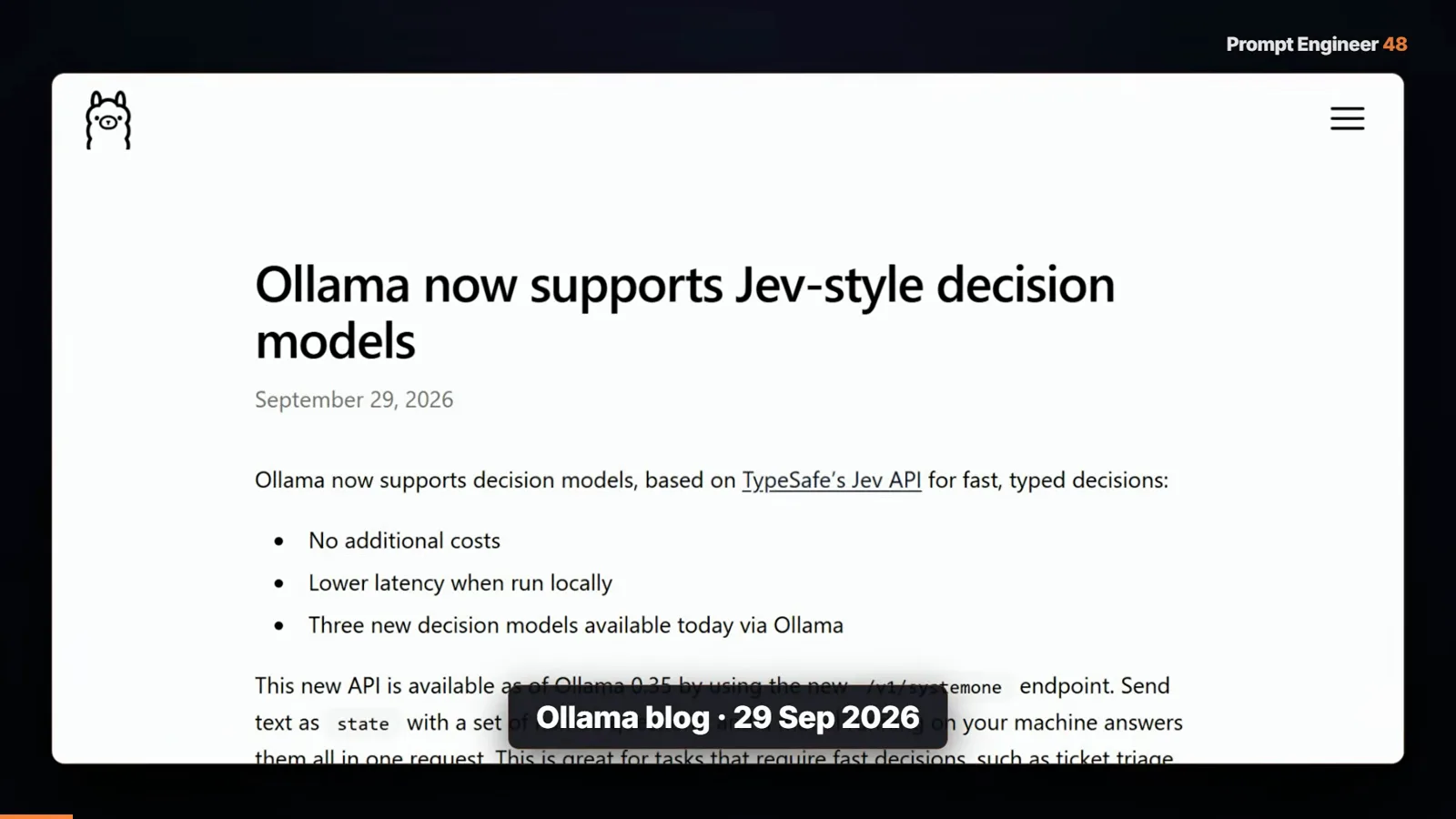
The 2026-09-29 announcement: Jev-style decisions, local, no extra cost.Watch at 0:25 - 2
Meet the cast: tev1 in two sizes and Nimble 9B
Three models land in ollama list. tev1 comes from Together AI in a 4B (“a 4B decision model from Together AI for fast classification,” a 4.5 GB download) and an 0.8B (811 MB) — both further-trained on Qwen 3.5. Nimble is a 9B from Bespoke Labs under Apache 2.0 (a 7.5 GB file). TypeSafe publishes benchmarks of 73.3% for tev1 4B and 75.7% for Nimble — the video is careful to flag these as the vendors’ numbers, not his, and then runs its own test. Both model cards are one ollama run away.
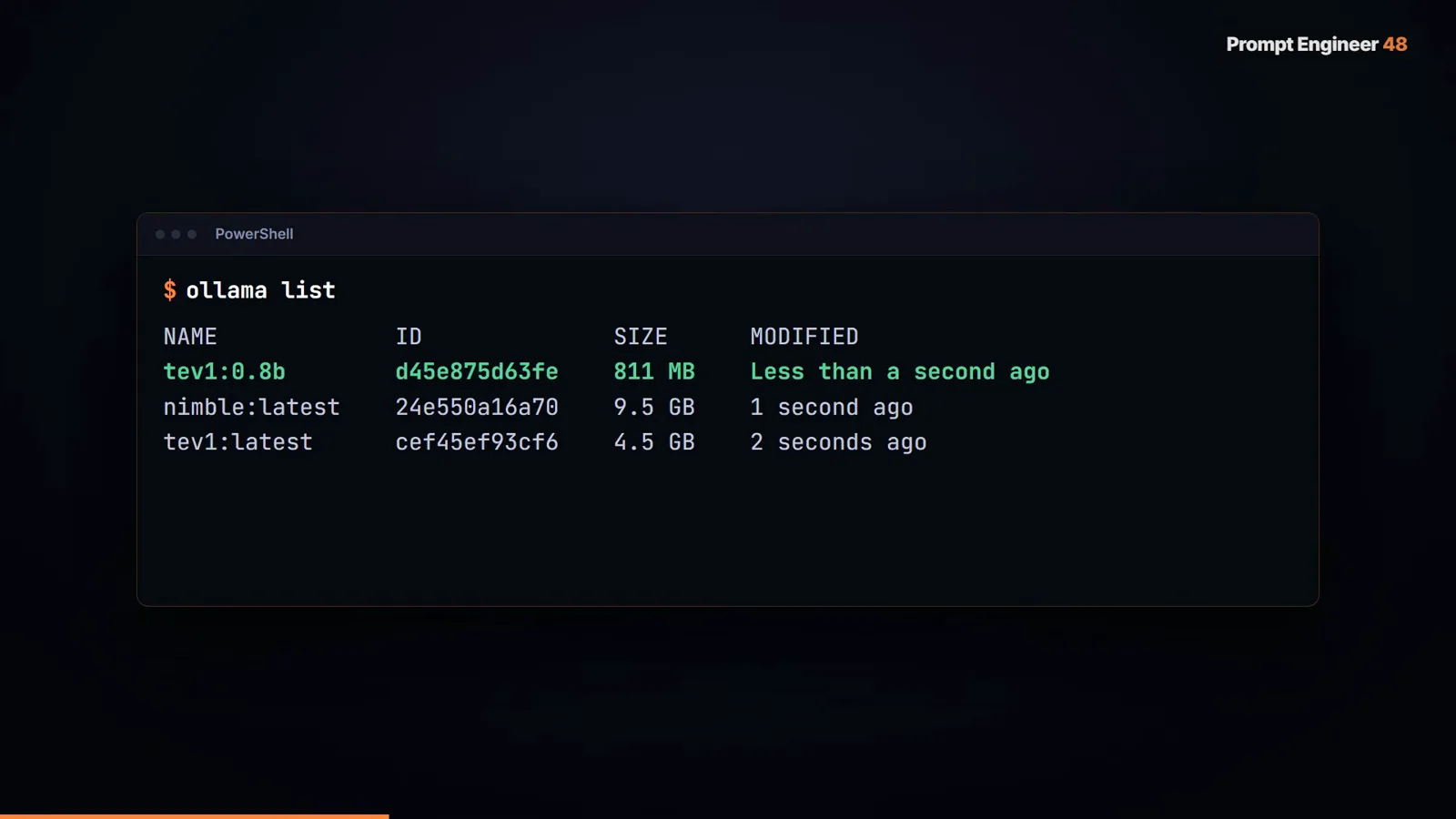
811 MB, 4.5 GB, 7.5 GB — the whole decision-model menu fits a laptop.Watch at 2:13 - 3
Learn the request shape through three validation errors
This is not a chat endpoint — it is /v1/systemone on port 11434, and the request takes a model, a state, and named questions. The video’s first curl fails: “question team: instructions must be a nonempty string, object, or array.” The second try fails nicer: choice criteria must associate option keys with descriptions (a map like billing → payments and returns). The third error teaches that a score question’s criteria is an array of descriptions, not a map. Every message tells you exactly what is missing — but the lesson stands: rigid schemas, strict validation. Copy the shape before you freestyle.
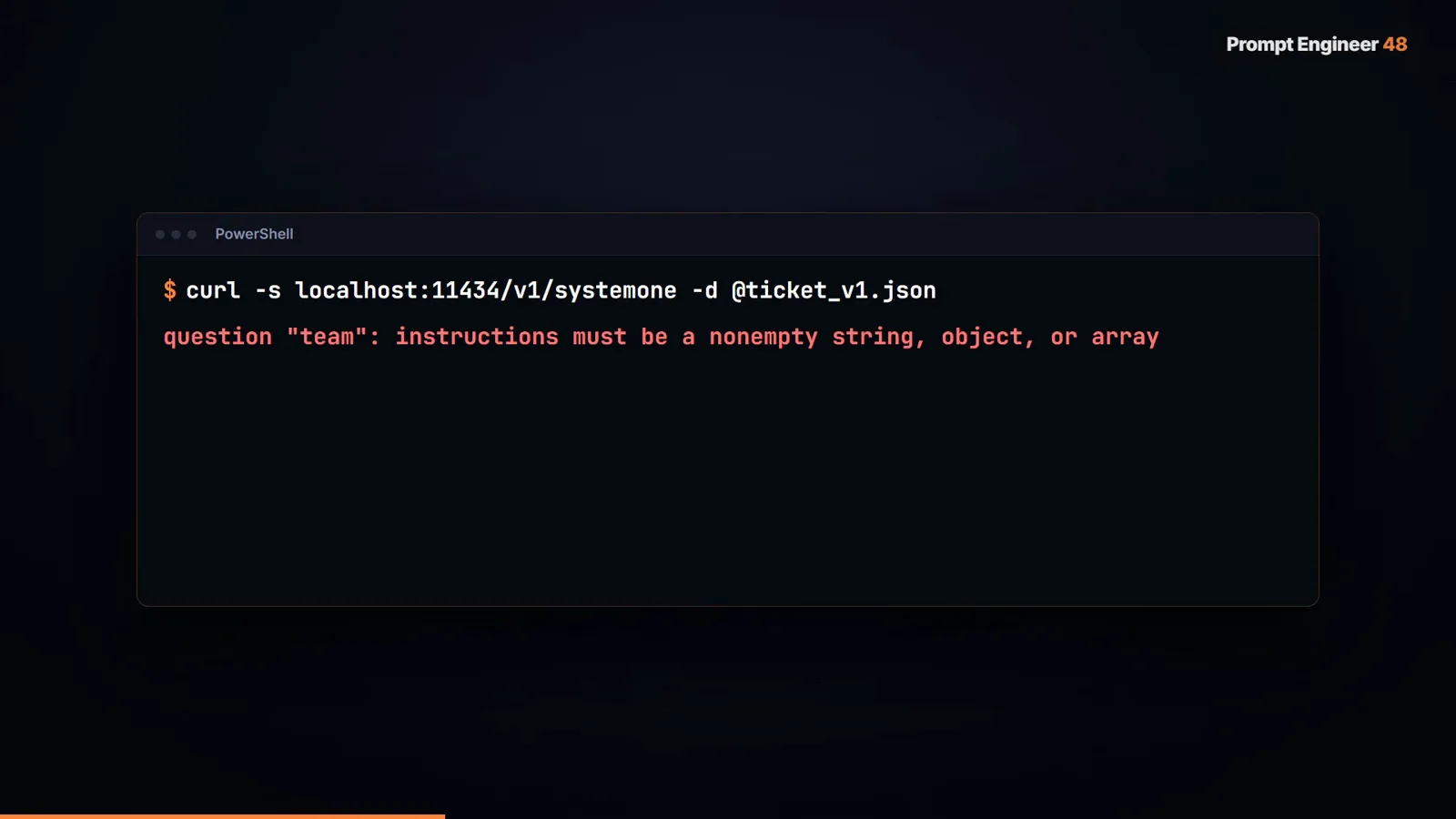
Error one of three: every question needs an instructions string.Watch at 2:32 - 4
One call, three typed questions, four output tokens
Once the shape is right, a single request asks three questions about the same ticket and gets everything back at once: billing at 0.9975 (choice), customer-anger at 0.87 (noul), urgency at 0.65 (score). The counter that explains the speed: 4 output tokens. Nothing is generated — the answers and probabilities arrive in one forward pass, which is why a decision endpoint can sit on the hot path of every message. Up to 64 questions can ride in one call.
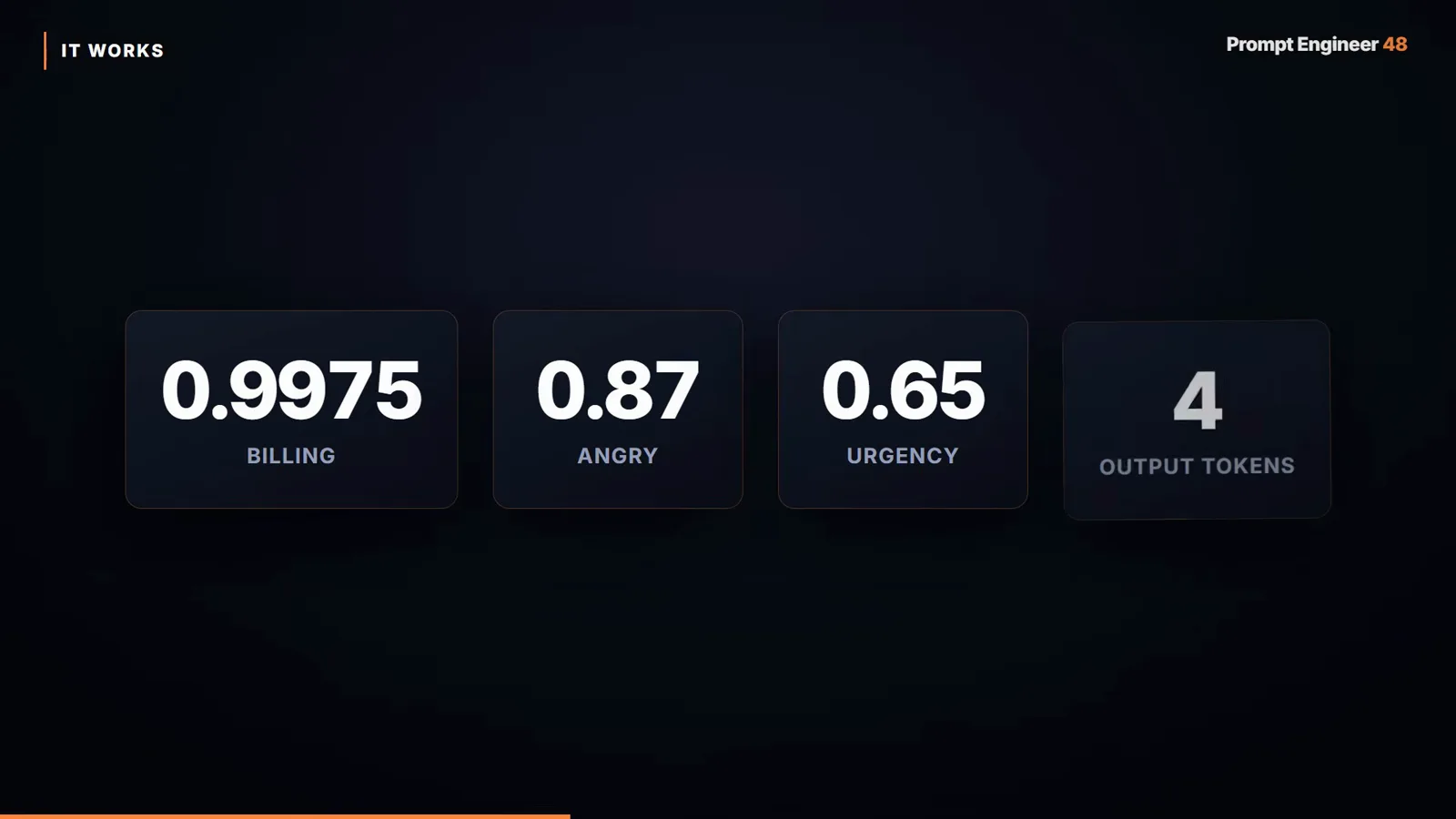
0.9975 billing + 0.87 angry + 0.65 urgency — and only 4 tokens out.Watch at 3:15 - 5
Watch it route: the four-tab Decision Lab app
The creator wraps the endpoint in a small Gradio app. On the triage tab, “My card was charged twice and I want a refund now!!” routes to billing at 0.99 confidence in 733 ms (794 tokens in, 4 out). An “API returns 500, production is down” message goes to tech at 0.94. The persuasive one: “Do you have a discount for non-profits?” lands on sales — no billing keyword anywhere. The model reads intent, not vocabulary, and every answer carries a number you can gate on.
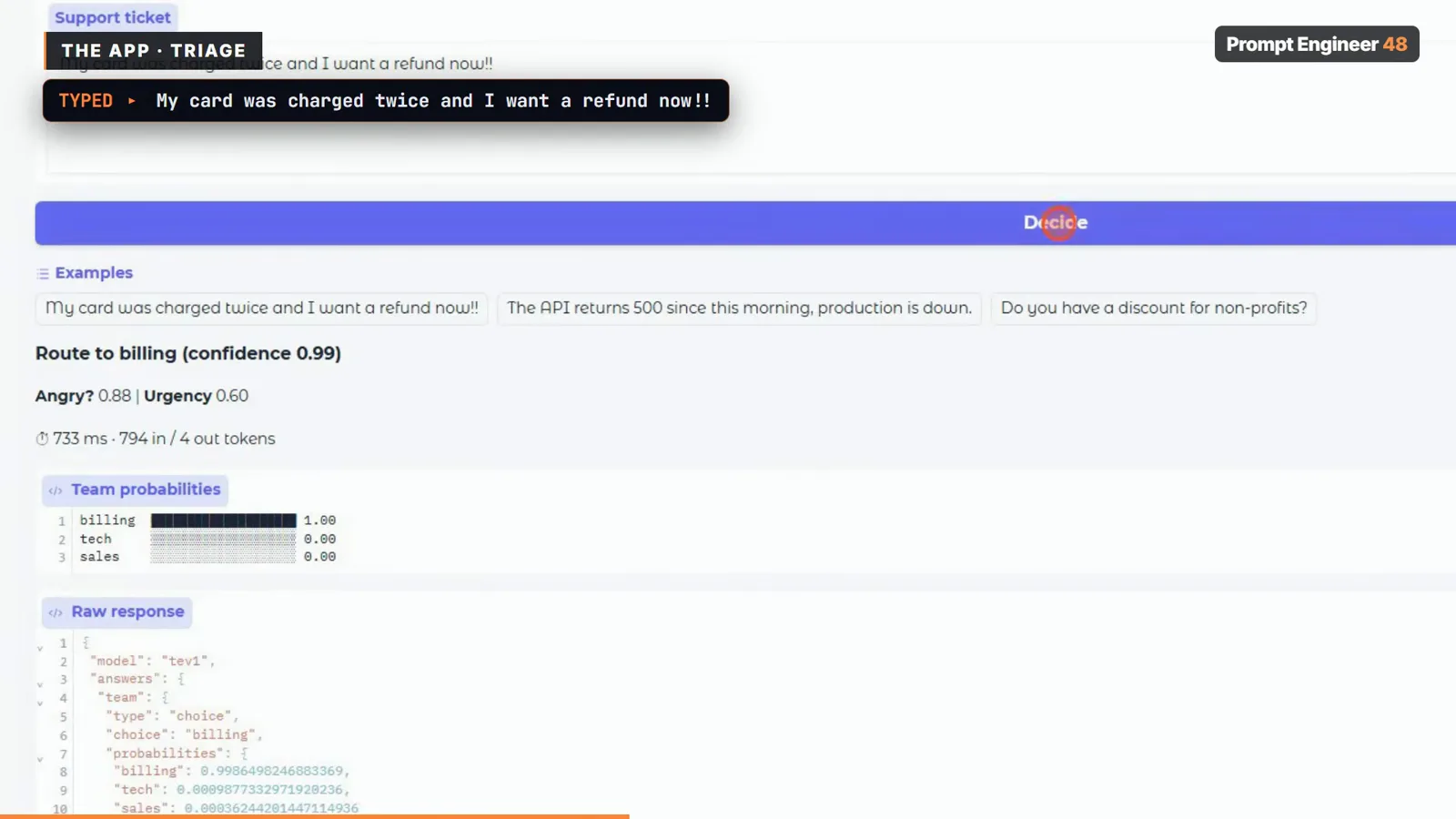
Refund ticket → billing 0.99 in 733 ms; intent, not keywords.Watch at 3:35 - 6
Moderation is three yes/no gates in one pass
The moderation tab fires three noul questions per message — spam, personal data, toxicity. A fraud message (“Congrats!! You won 1000 USD. Click http://free-cash.xyz and send your card number”) comes back spam 0.97 BLOCK, pii 0.95 BLOCK, toxic 0.09 pass. The app’s rule is simple: block anything over 0.75. Each gate exposes its own probability, so your policy can treat a card-number leak differently from a scam link without a second model call.
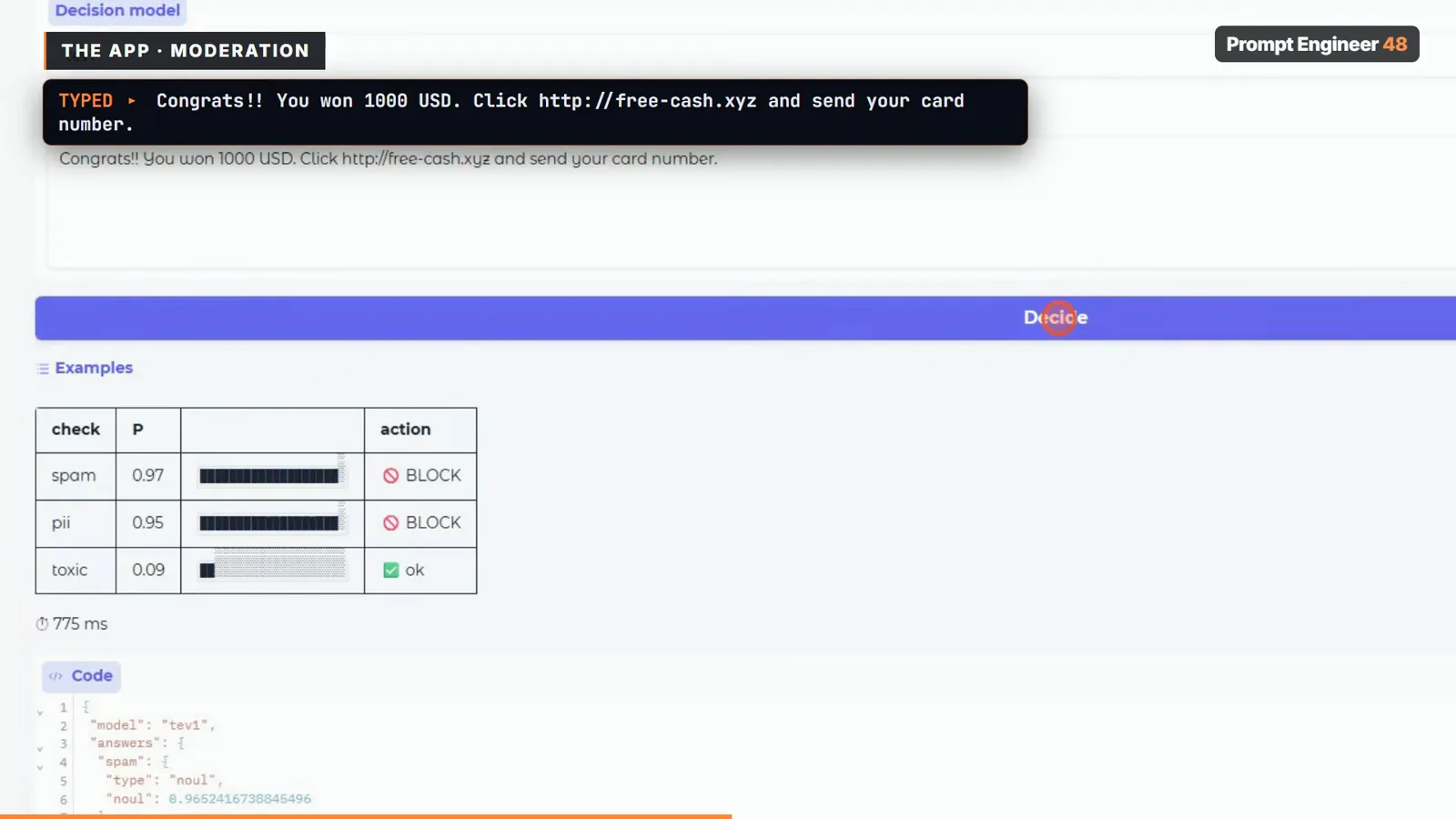
Spam 0.97, pii 0.95, toxic 0.09 — three gates, one forward pass.Watch at 4:10 - 7
The honest moment: a friendly message scores spam 0.66
“Hi, I am John, call me on +1 415 555 0134” — personal data fires correctly at 0.98, but tev1 rates spam at 0.66 and Nimble at 0.49. A phone-number intro is unusual, not fraudulent, and the models wobble. That wobble is why the creator sets the block threshold at 0.8 instead of the default-ish 0.5: thresholds are a policy decision you make after watching real false positives, not a number you copy. This one minute is the most transferable lesson in the video.
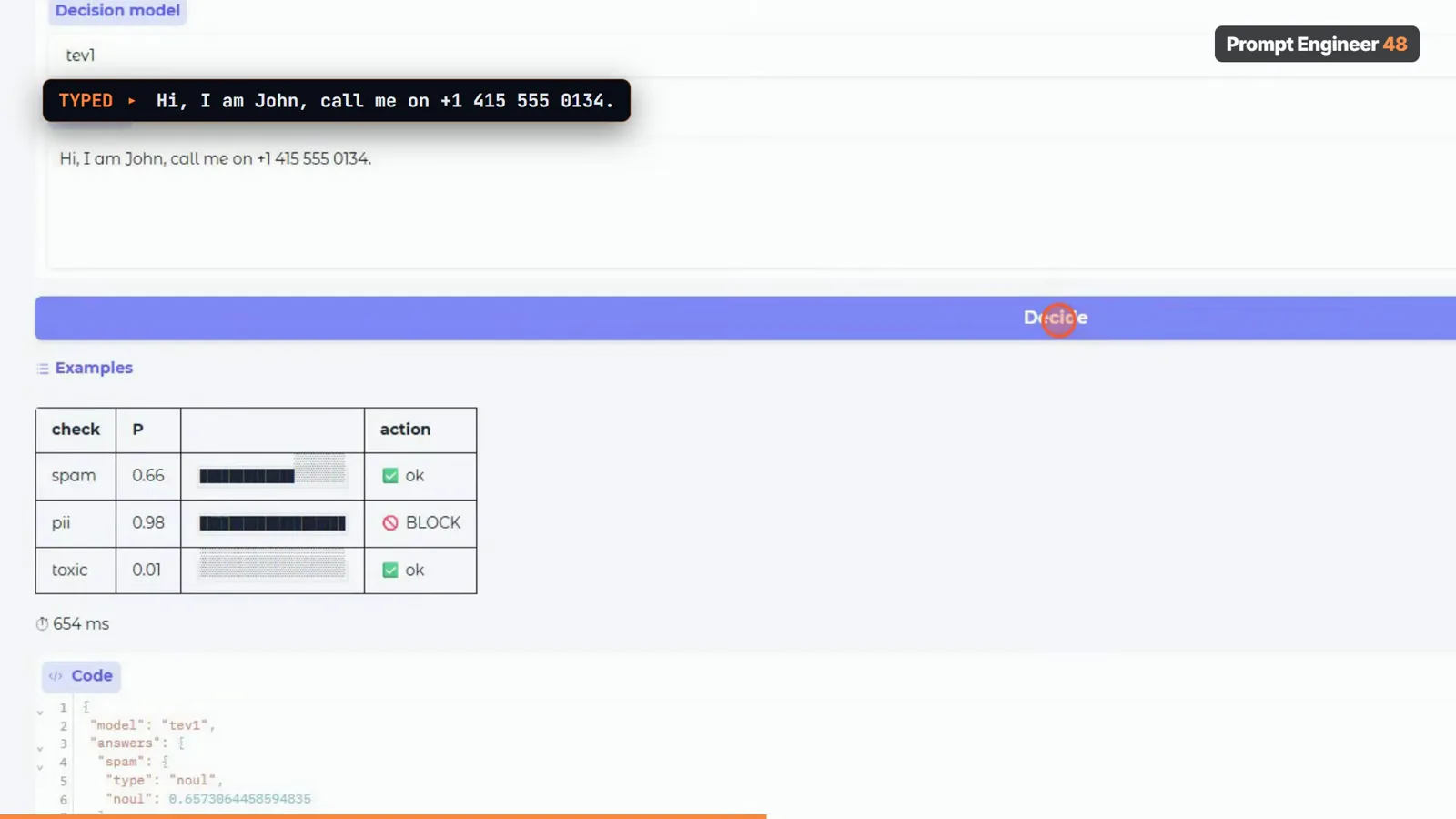
A polite message at spam 0.66 — why his block line sits at 0.8.Watch at 4:22 - 8
The 30-ticket self-test: tev1 4B never misses a route
He writes 30 support tickets himself, each labeled with the correct team and anger level — explicitly a personal test, not a public benchmark. Results: tev1 0.8B gets 86.7% on team and 76.7% on anger at 235 ms in 0.9 GB; tev1 4B gets a perfect 100% on team and 83.3% on anger at 470 ms in 4.7 GB fully on the GPU; Nimble 9B leads anger detection at 96.7% and matches 96.7% on team — but takes 1.5 s a call. His verdict for an 8 GB laptop: tev1 4B is the one to run; Nimble needs 12 GB or more to shine; the 0.8B is the when-memory-is-tight fallback.
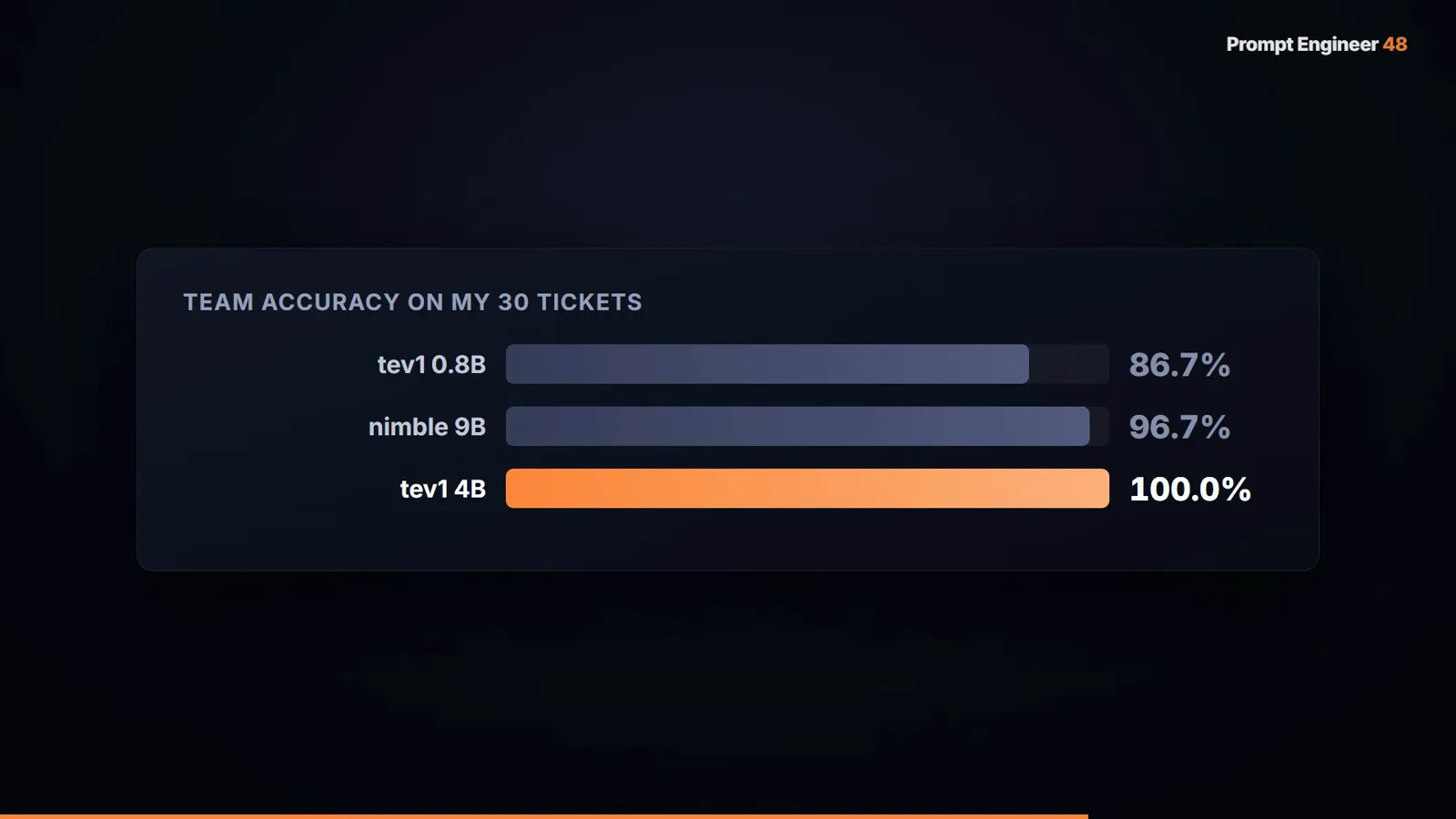
His 30 tickets: 0.8B 86.7%, Nimble 96.7%, tev1 4B a clean 100%.Watch at 6:12 - 9
Why Nimble lags: 10 GB does not fit an 8 GB card
ollama ps explains Nimble’s 1.5 s: the loaded model wants about 10 GB against an 8 GB card, so roughly 40% of the work runs on the CPU. There is also a concurrency trap — calling Nimble while tev1 was still loaded returned a host-side 500 (CUDA host-buffer allocation failed) until he ran ollama stop tev1. On small cards, one decision model at a time is the operating rule; plan your unloads like you plan your deployments.
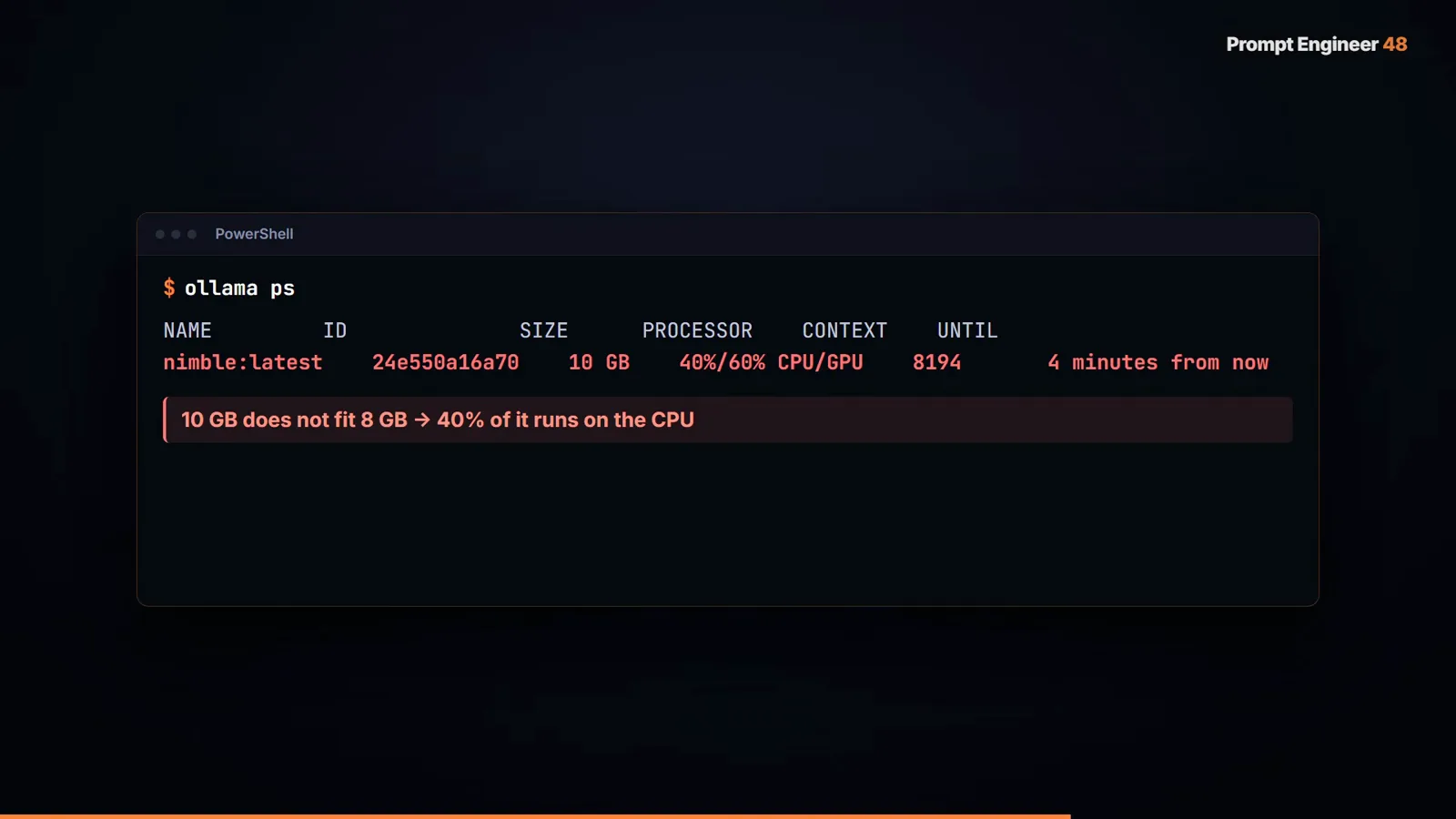
Nimble at 10 GB: 40% CPU spillover is the price of the accuracy lead.Watch at 6:06 - 10
The control experiment: force a chat model into JSON
“Why not just ask a regular model to output JSON?” He pulls Qwen 3.5 4B, forces a JSON schema, and runs the same 30 tickets: 96.7% on team, 96.7% on anger, at 268 ms — accuracy tied with Nimble and speed ahead of everything. So what does the decision model buy you? Two things the chat path cannot ship. First, calibrated probability: tev1 4B made zero routing errors, the 0.8B’s four errors all sat below 0.77, and Nimble’s only error scored 0.83 — “below 0.9, send it to a person” is a rule you can actually run. Second, consistency: the chat model answered the same ticket “billing” seven times out of eight and “tech support” once, and reports nothing about its own confidence.
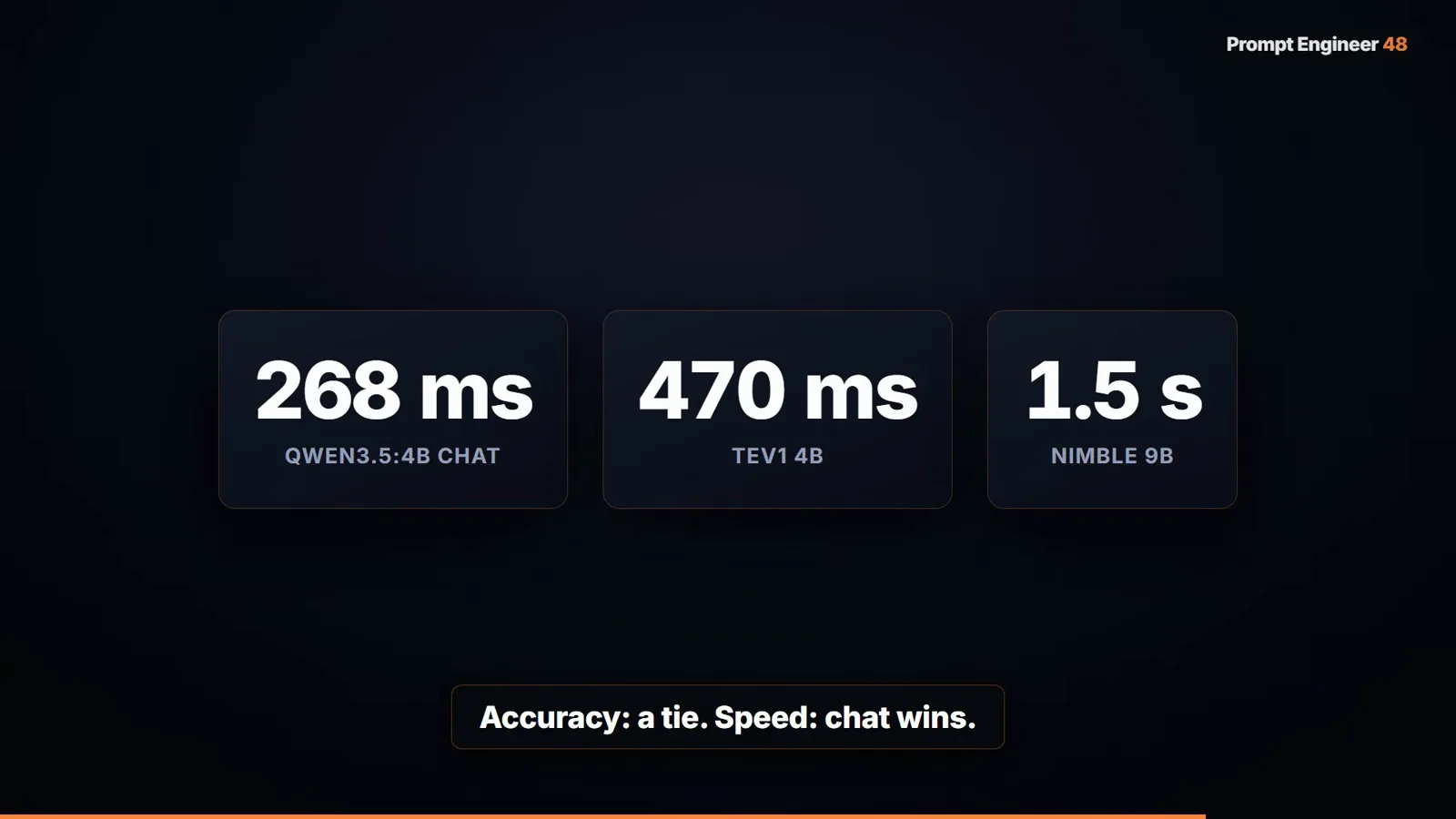
Accuracy: a tie. Speed: chat wins. Confidence and consistency: Jev-style wins.Watch at 6:52 - 11
Confidence against ground truth: the gate becomes real
The closing chart plots every answer from the 30-ticket run as confidence versus right-or-wrong. The pattern that makes automation safe: tev1 4B’s wrong answers simply do not exist, Nimble’s single miss sits at 0.83, and the 0.8B’s mistakes cluster under 0.77. With errors living below the line, a threshold like 0.9 routes the doubtful cases to a human and almost never gives up a correct answer — the same confidence-gated pattern the hosted Jev API sells, now running next to your app.
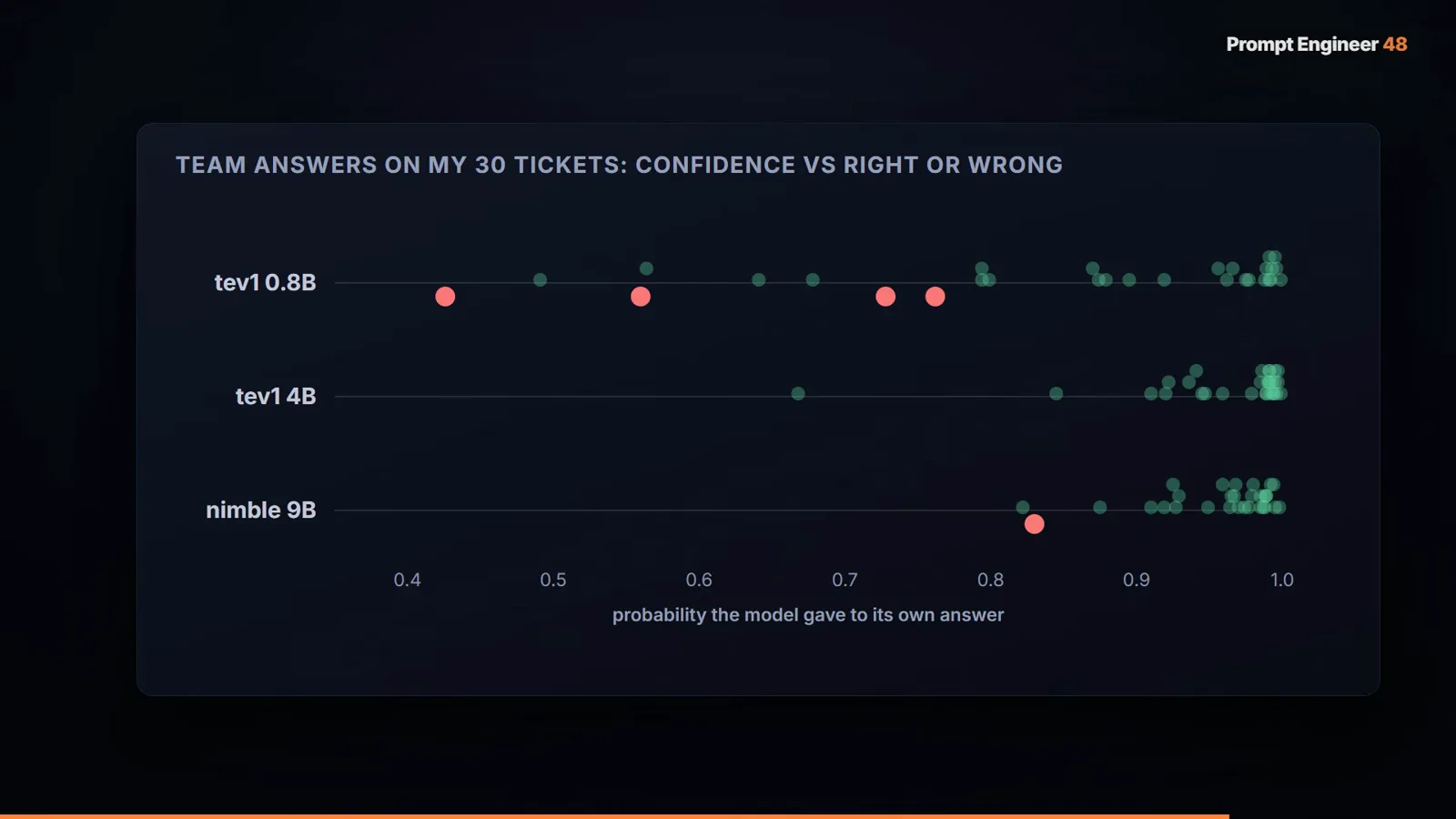
Wrong answers live below 0.9 — that is what makes the threshold honest.Watch at 7:00 - 12
The catch list: experimental labels and a 30-ticket horizon
The verdict slide splits cleanly. The good: local, free, no API key, answers in hundreds of milliseconds, probabilities you can act on, 64 questions per call. The catch: the request shape is picky, Nimble will not fit an 8 GB card, and the tev1 models are marked experimental — the official page says they can be wrong. His own sign-off is the right model for yours: 30 tickets is a good start, not a proof. Validate on your own labeled data before any auto-action, and keep a human review path under the threshold.

A good start, not a proof — the experimental label is doing real work.Watch at 7:38
Frequently asked questions
What are the Ollama decision models tev1 and Nimble?
Two Jev-style decision-model families available through Ollama 0.35’s /v1/systemone endpoint. tev1 comes from Together AI in 4B (4.5 GB) and 0.8B (811 MB) sizes, both further-trained on Qwen 3.5; Nimble is a 9B from Bespoke Labs under Apache 2.0 (7.5 GB download, about 10 GB loaded). TypeSafe publishes 73.3% (tev1 4B) and 75.7% (Nimble) on their public benchmark; the video’s own 30-ticket test put tev1 4B at 100% team-routing accuracy and Nimble at 96.7%.
How do I call the Ollama System One endpoint correctly?
POST to http://localhost:11434/v1/systemone with a JSON body containing model, state (your text), and questions. Three validation rules the video learned the hard way: every question needs a nonempty instructions string; a choice question’s criteria is a map of option keys to descriptions; a score question’s criteria is an array of descriptions. Up to 64 questions can share one request, and answers come back with per-option probabilities in a single pass.
Which model should I run on an 8 GB GPU?
tev1 4B. It went 100% on the video’s 30-ticket routing test at 470 ms while fitting entirely in 4.7 GB of VRAM. Nimble 9B is more accurate on anger detection (96.7%) but loads about 10 GB, spilling ~40% of compute onto the CPU at 1.5 s per call — give it 12 GB or more. The 0.8B (811 MB, 235 ms) is the fallback for tight-memory machines, at a real accuracy cost (86.7%). Also: unloading one big model before loading another avoids host-side CUDA 500s.
A JSON-forced chat model matched the accuracy — why bother with a decision model?
Because accuracy is not the whole contract. In the video, Qwen 3.5 4B with a forced JSON schema scored the same 96.7/96.7 at a faster 268 ms. What it could not provide: calibrated confidence (every decision-model error sat below 0.9, so a threshold can catch it — the chat model offers nothing similar) and consistency (it answered the same ticket “billing” 7 of 8 times and “tech support” once). If you only need an answer and can tolerate silent flips, schema-forced generation is fine; if you need to automate on a number, you need calibrated probabilities. The trade-off is compared in detail in our Jev vs JSON mode recipe.
Are these models production-ready?
Treat them as experimental. The official tev1 page states the models can be wrong, and the video closes with “my test was 30 tickets — a good start, not a proof.” The honest pattern from the video: set thresholds from your own false positives (the friendly message that scored spam 0.66 is the canonical example), route anything under ~0.9 to a human, and validate on labeled data from your own workload before any auto-action.
How is this different from the hosted Jev API?
Same interaction shape — state plus typed questions in, answers plus probabilities out — but the compute is yours: no API key, no per-token bill, no data leaving the machine, at hundreds-of-milliseconds latency on consumer hardware. The hosted Jev API remains the zero-ops option with the calibrated RLCD probabilities and higher accuracy ceiling; the local route trades some accuracy for cost, privacy, and latency control. The cloud-versus-local decision is covered in our Jev vs Ollama guide.
Related guides
Jev vs Ollama: Local vs Cloud Typed Decisions
The decision framework this video puts numbers on — when the local route beats the hosted API and when it does not.
ReadJev vs JSON Mode: Zero-Retry Typed Decisions
The full contract comparison behind step 10 — retry taxes, output billing, and calibration vs schema-forced generation.
ReadRun Jev-Style Models Locally
Serving Kev, SemIf, or Von on your own hardware — the manual-install alternative to the Ollama route.
ReadTrain Your Own Jev: the Fine-Tuning Route
tev1 is itself a further-trained Qwen 3.5 — the label-to-threshold pipeline if you want to roll your own.
ReadMore video walkthroughs
- Jev Classification Quickstart: OpenRouter API, Primitives & Real Probabilities
- Jev Architecture Explained: Why 70ms Decision Models Beat LLMs for Workflow Automation
- Ultra-Fast Browser Agents with Jev: 178ms DOM Loops & Dual Model Orchestration
- Open Jev Models Are Here: Semif, Nimble, Decider, DiffusionGemma & Laya Hands-On
- Jev vs LLM: Will Jev Replace LLMs? Krish Naik's Whiteboard Explainer
- Jev Trader Tutorial: Build a Subsecond AI Trading Bot on Monad
- Jev Model Router: Build a Privacy-Gated LLM Router with Jev & OpenJev
- Jev Tutorial for Beginners: State, Questions & the TypeScript SDK
- Run Jev Locally: Kev, SemIf & Von on Your Own GPU (OpenJev Guide)
- Jev RAG Reranker: Policy-Steered Reranking for Retrieval-Augmented Generation
- When to Use Jev: An Engineer's Audit of Claims, Gates, and Failure Modes
- LangChain + Jev Integration Tutorial: Routing, Guardrails & Evals
- Jev MCP Server: Connect Jev Decisions to Claude Code & Cursor
- Jev vs Luna: Independent Benchmarks Put "Better, Faster, Cheaper" to the Test
- Jev Agent Harness: Where the Decision Gate Sits in Your LLM Loop
- Jev Playground Walkthrough: The Hotdog Lesson, Criteria, and a Four-Console Token Test
- Jev Text Classification API: Zero-Shot CLI & REST with classifier.dev
- Jev API Examples: First Request, curl & All Three Question Types
- Jev Log Triage with Expanso Edge
- Jev Lead Enrichment with Treg: ICP and Signup Scoring
- Use Jev Decision Nodes in Heym for Model Routing
- Laya Tutorial: Open-Source AI Routing With Calibrated Probabilities (Laya vs Jev Setup)
- Train Your Own Jev: Fine-Tune a Jev-Style Decision Model for $5–$17 (What You Can and Cannot Train)
- Jev Tips: 8 Best Practices for Better Decisions (State, Questions, Criteria & Thresholds)
- Jev Context Compaction: Prune AI Agent Memory Without Generative Summaries
- Jev as an LLM Judge: Confidence-Gated Cascades at 0.36% of the Cost
- TypeSafe Computer Use: Local Desktop Automation with Jev, Step by Step
- Jev Resume Screening: Build an AI Resume Evaluator with the Jev JavaScript SDK
- Jev + Claude Code Guide: Voice-Controlled Browser Automation with Typed Decisions
- Jev vs Ollama: Can Local AI Replace Hosted Jev Without Sending Your Data Away?
- Build Your Own Jev: Train a Free Open-Source Zero-Shot Classifier (That Plays Doom)
- CUA-S1-Forms: a 706K-Parameter Jev-Like Model That Fills GUI Forms on Your CPU
- NOC/SOC Alert Triage with Jev: Rules First, One Typed Question, a Policy Gate
- Jev Guardrails in Production: A Five-Step Playbook for Decision Automation
- A Session Drift Guard for Pi Agent: Let the Jev Model Propose, Let Code Decide