
Guides / illustrated walkthrough
OpenJev RLCD: Run the Open-Source Calibrated Decision Model Locally (Full Guide)
The OpenJev console now speaks to decider models — the open-source RLCD (reinforcement-learning calibrated decisions) family from the Mspika/decoder repo. This walkthrough covers the Kaggle free-GPU route with a cloudflared tunnel, the local llama.cpp GGUF route, and an honest latency face-off against a parallel LLM on Groq.
Quick takeaway
This is the sequel to the channel's build-OpenJev tutorial, covering what changed: the console gained a decider mode for RLCD models — "reinforcement learning for calibrated decisions" — served from the Mspika/decoder repo, a Qwen3.5-fine-tuned System One-style family under Apache 2.0 that speaks a POST /v1/systemone wire format very close to the TypeSafe Jev API. Two deployment routes are shown: a free Kaggle notebook (clone, pip install -e .[server], expose with a cloudflared quick tunnel) and a local llama.cpp route (decoder-2b GGUF, cmake build, uvicorn wrapper). The same double-billing complaint runs through both backends: the decider returns urgency 1.83 High with a 70% anger probability, while a Qwen3 model on Groq in parallel mode returns urgency 2.38 at 95% anger — the answers disagree, which is exactly why calibrated confidence matters. The video's honest verdict: the decider took ~3 seconds per call on Kaggle's older GPU while nine parallel Groq calls finished in under one — the model is fine, the hardware is the bottleneck, and the README's own notes show proper hardware serving cached requests in ~0.3 s.
Video source
DevsKingdom
Step-by-step walkthrough
- 1
What changed: OpenJev now speaks to decider models
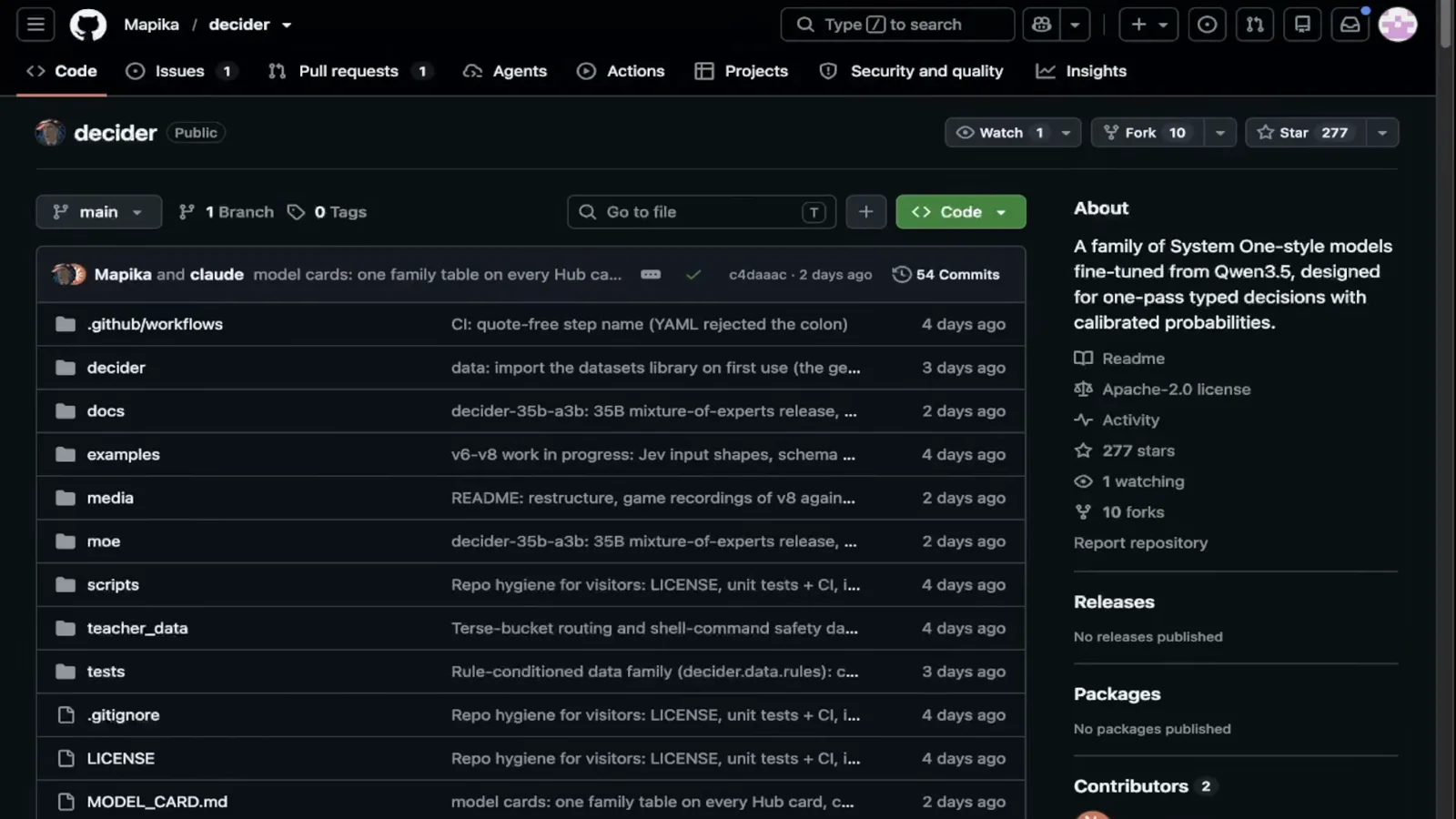
The channel's previous tutorial built and used OpenJev, the open-source version of Jev AI — but that version had no support for RLCD models ("reinforcement learning for calibrated decisions"). The project has since been updated: the OpenJev console now ships a decider mode, and the decider itself lives in the Mspika/decoder repository — a family of System One-style models fine-tuned from Qwen3.5, "designed for one-pass typed decisions with calibrated probabilities", licensed Apache 2.0 with the README noting that decoder-2b v2 adds calibration-aware RL and "speaks TypeSafe's wire format: POST /v1/systemone". If you followed the earlier video, this is the drop-in upgrade; if you didn't, the README alone documents everything shown here.
The Mspika/decoder repo: Qwen3.5-fine-tuned System One models, Apache 2.0, TypeSafe-compatible wire format.Watch at 1:20 - 2
The console: decider mode pointed at a tunnel URL
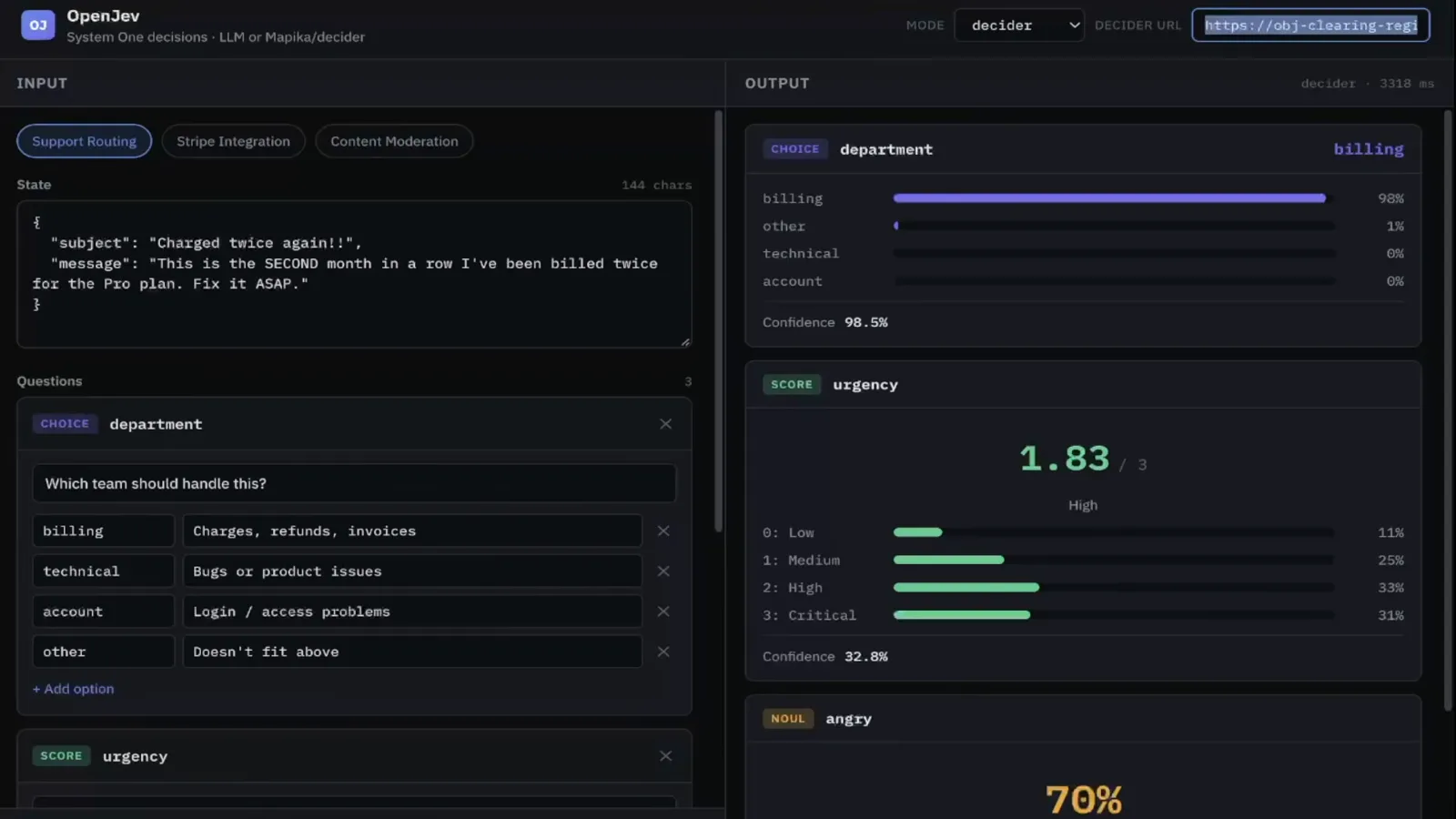
The OpenJev console looks like the one from the previous video, with one new piece: a mode selector set to decider and a decoder URL field — here pointed at a trycloudflare.com address, because this decider instance runs on a Kaggle notebook rather than a rented GPU box. The test payload is the same double-billing complaint as last time ("This is the SECOND month in a row I've been billed twice for the Pro plan. Fix it ASAP.") with three typed questions: department as a choice between billing, technical, account, and other; urgency as a 0–3 score; and angry as a noul gate. Running it returns department billing at 98% with an urgency of 1.83 — High.
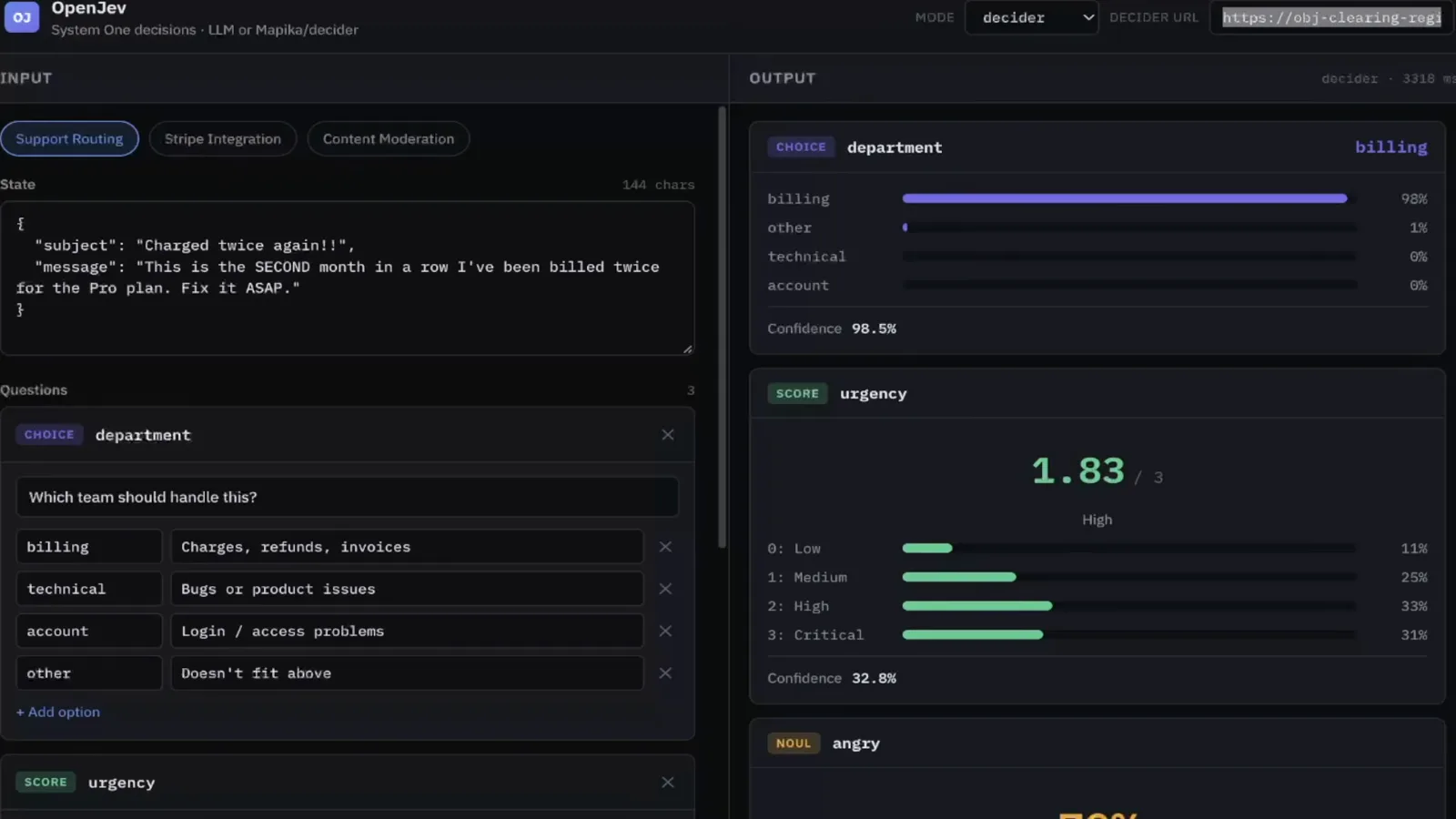
Same console, new mode: decider, pointed at a tunnel URL instead of a rented GPU.Watch at 0:25 - 3
The free-GPU trick: Kaggle notebook plus a quick tunnel
The decider does not need your hardware. The video stands it up on a Kaggle notebook — no GPU instance to buy — and the notebook cells do the work: git clone the Mspika/decoder repo, pip install with the server extras, then expose the locally-served model with cloudflared: cloudflared tunnel --url http://localhost:8000 prints a fresh quick-tunnel URL (the frame catches "Your quick Tunnel has been created! Visit it at https://…trycloudflare.com"). That URL is what goes into the console's decoder field. It is the cheapest possible way to test an RLCD model end to end — with the caveat the video is honest about: Kaggle's GPUs are old, and latency shows it.
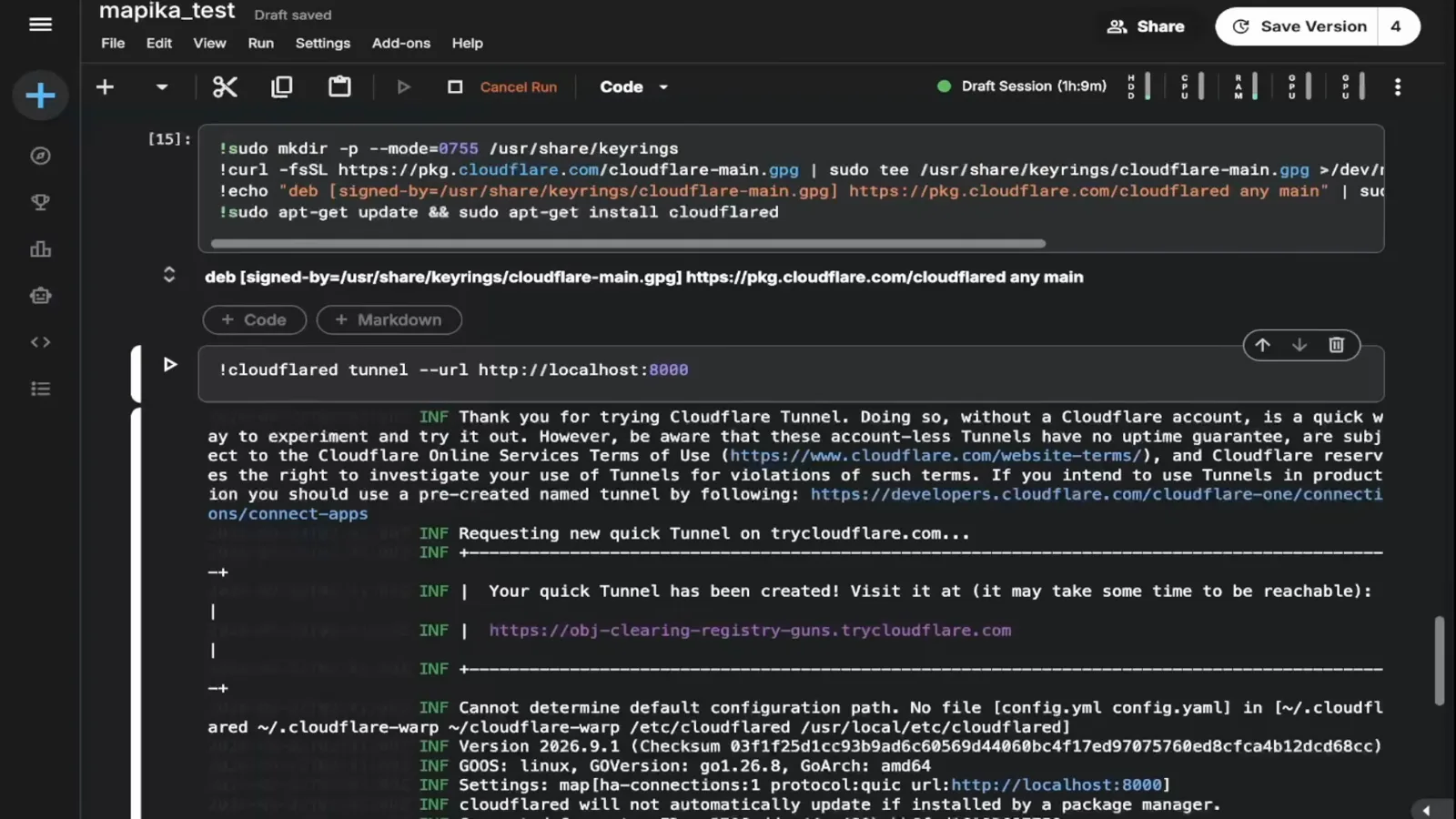
Kaggle notebook in, public tunnel URL out — zero GPU rental for a first RLCD test drive.Watch at 1:42 - 4
The decider's verdict: urgency 1.83 High, angry 70%
The full decider response on the billing complaint: urgency lands at 1.83 out of 3 — High, with the probability spread across Medium and High rather than pinned — and angry comes back true at 70% probability. Both numbers are calibrated guesses, not certainties, and that is the point of the RLCD family: the model is trained so the confidence it reports means something. Note also what the run cost: exactly one call. Keep that number in mind for the comparison two steps ahead.
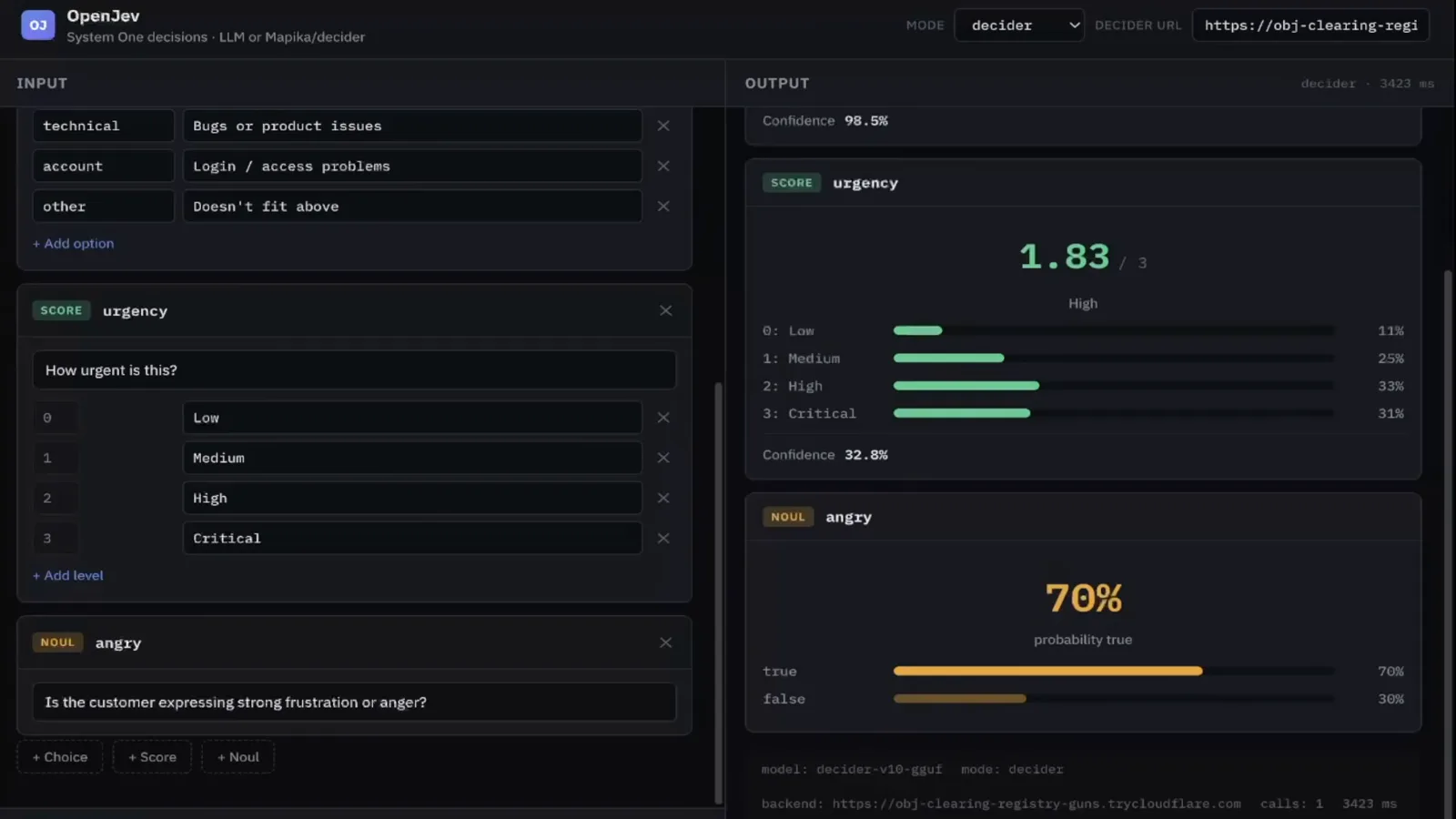
Decider: urgency 1.83 High, anger 70% — one call, calibrated probabilities attached.Watch at 3:05 - 5
The control run: nine parallel LLM calls on Groq
Now the same complaint, different machinery: the console's parallel mode dispatches the questions to a Qwen3 chat model served on api.groq.com. Where the decider used one call, this path fires nine parallel LLM calls — and the answers come back different: urgency 2.38, a full rating higher than the decider's 1.83, with anger at 95%. Neither model is "wrong" — urgency lives on a scale and two reasoners can land a notch apart — but only the decider's training optimizes for the number meaning what it says. That gap between 1.83 and 2.38 is the video's quiet argument for calibrated decision models.
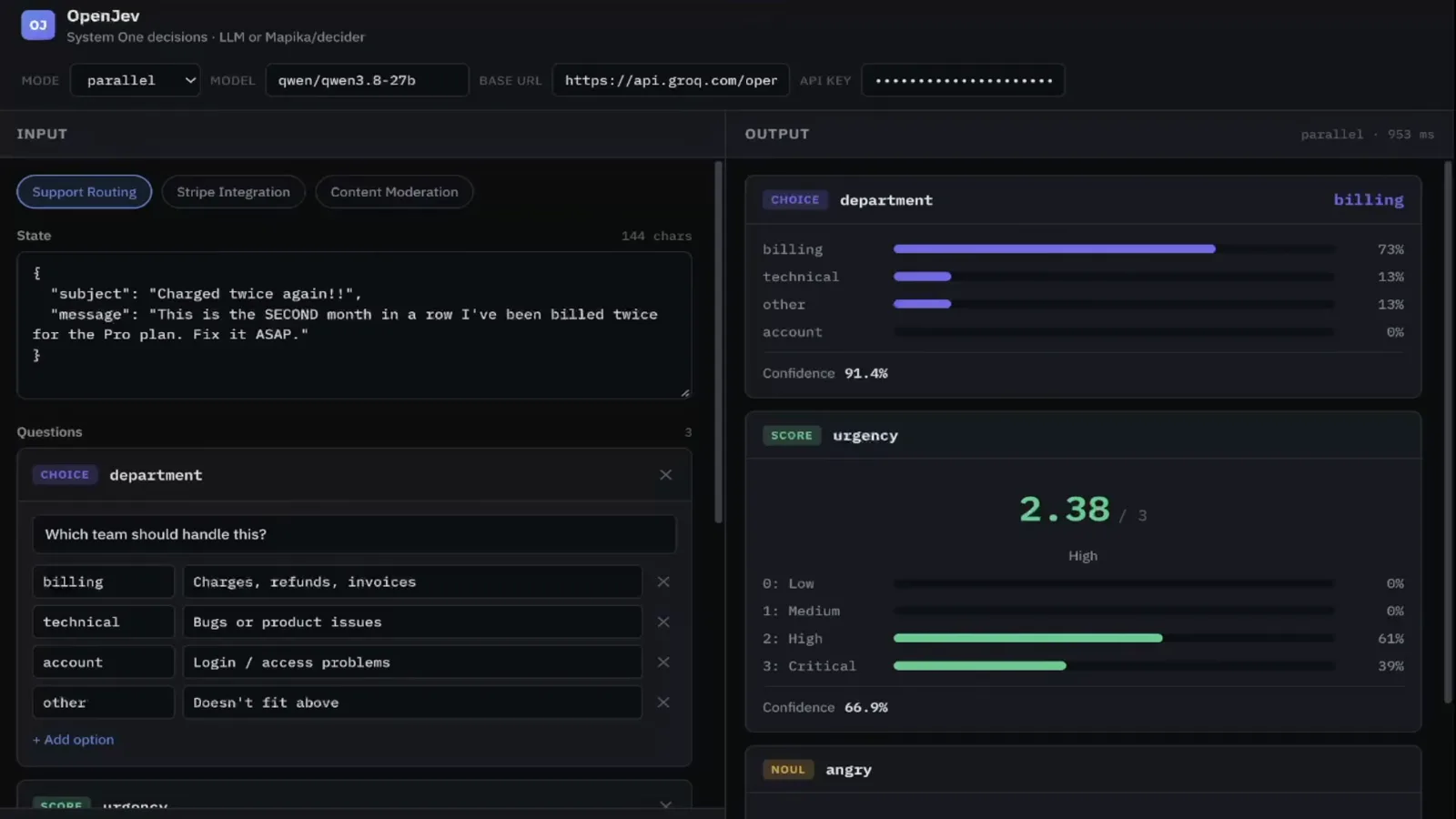
Parallel mode on Groq: nine LLM calls, urgency 2.38, anger 95% — a full notch hotter than the decider.Watch at 2:35 - 6
The honest latency verdict: hardware, not the model
The video does not hide the inconvenient numbers. The decider on Kaggle's older GPU took roughly three seconds per call, while the nine parallel Groq calls finished in under one second — about 180 ms on a single measurement. "On simple tasks, the LLM running in parallel is actually faster," the narrator concedes, and the model itself is not the problem — the Kaggle GPU is. The decoder README's own v6 performance notes back that up: on a 4-thread Ampere VM the expensive part is a one-time prompt build (~79 s per question set), after which prefix-cached requests return in around 0.3 s with about 1.2 GB resident memory. Serve it on real hardware and the calculus flips back.
The README's own numbers: ~79 s one-time prompt build, ~0.3 s cached, 1.2 GB resident — Kaggle's GPU, not RLCD, is the slow part.Watch at 3:40 - 7
Serving it yourself: the README quick start
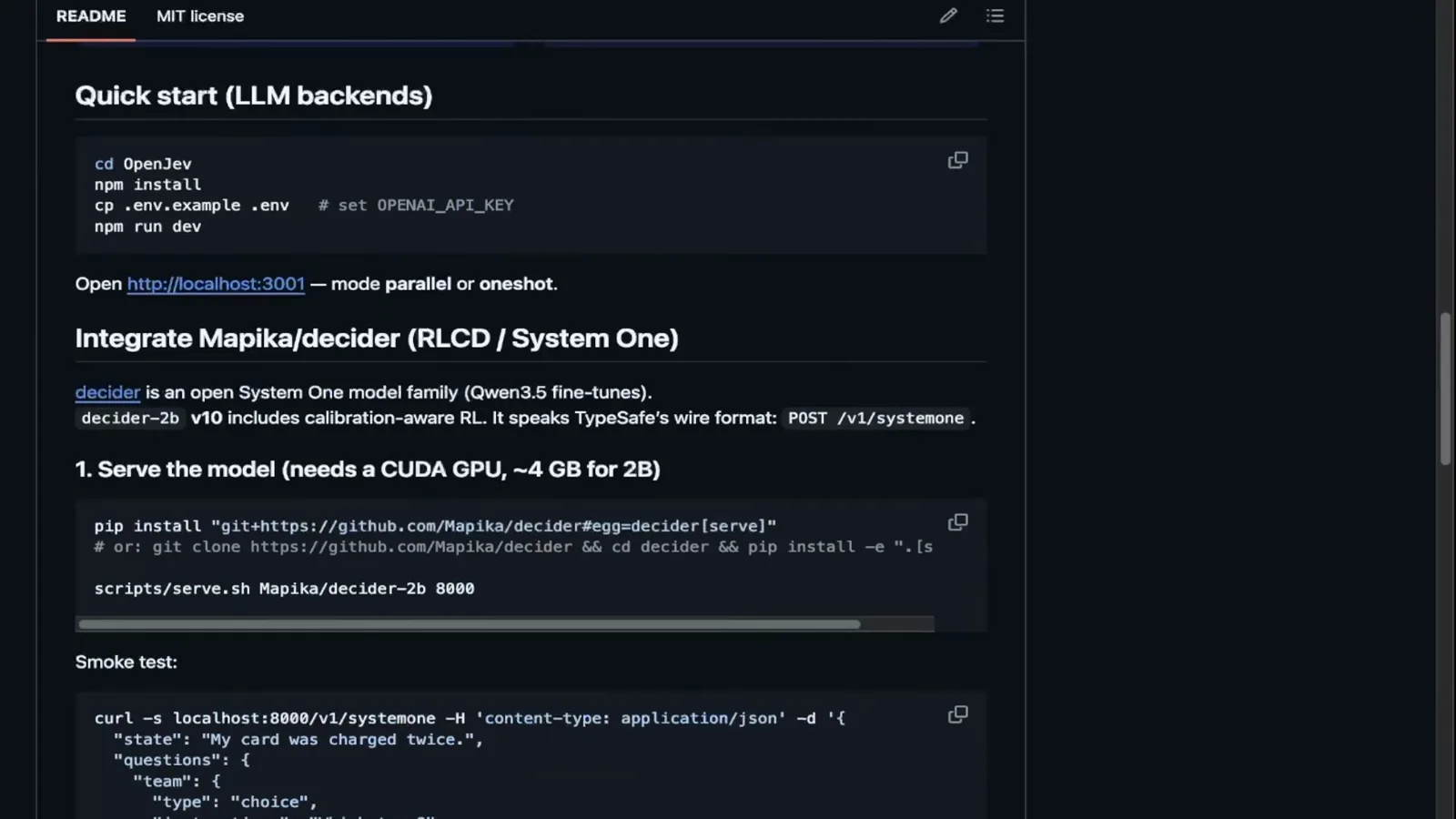
For the self-hosted route the decoder README is unusually complete — the narrator's point is you can follow it top to bottom. The integrate section in the frame: pip install from the repo with the serve extra (or git clone plus pip install -e ".[serve]"), then scripts/serve.sh starts the model — about 4 GB of GPU memory for the 2B model — and a smoke test curl to localhost:8000/v1/systemone with a tiny state and a typed team question returns the first calibrated answer. The wire format is the same shape the console and the TypeSafe Jev API use, which is why OpenJev can talk to it natively.
The whole self-host path in one README section: install, serve, smoke-test /v1/systemone.Watch at 4:00 - 8
Point OpenJev at it — or skip the console entirely
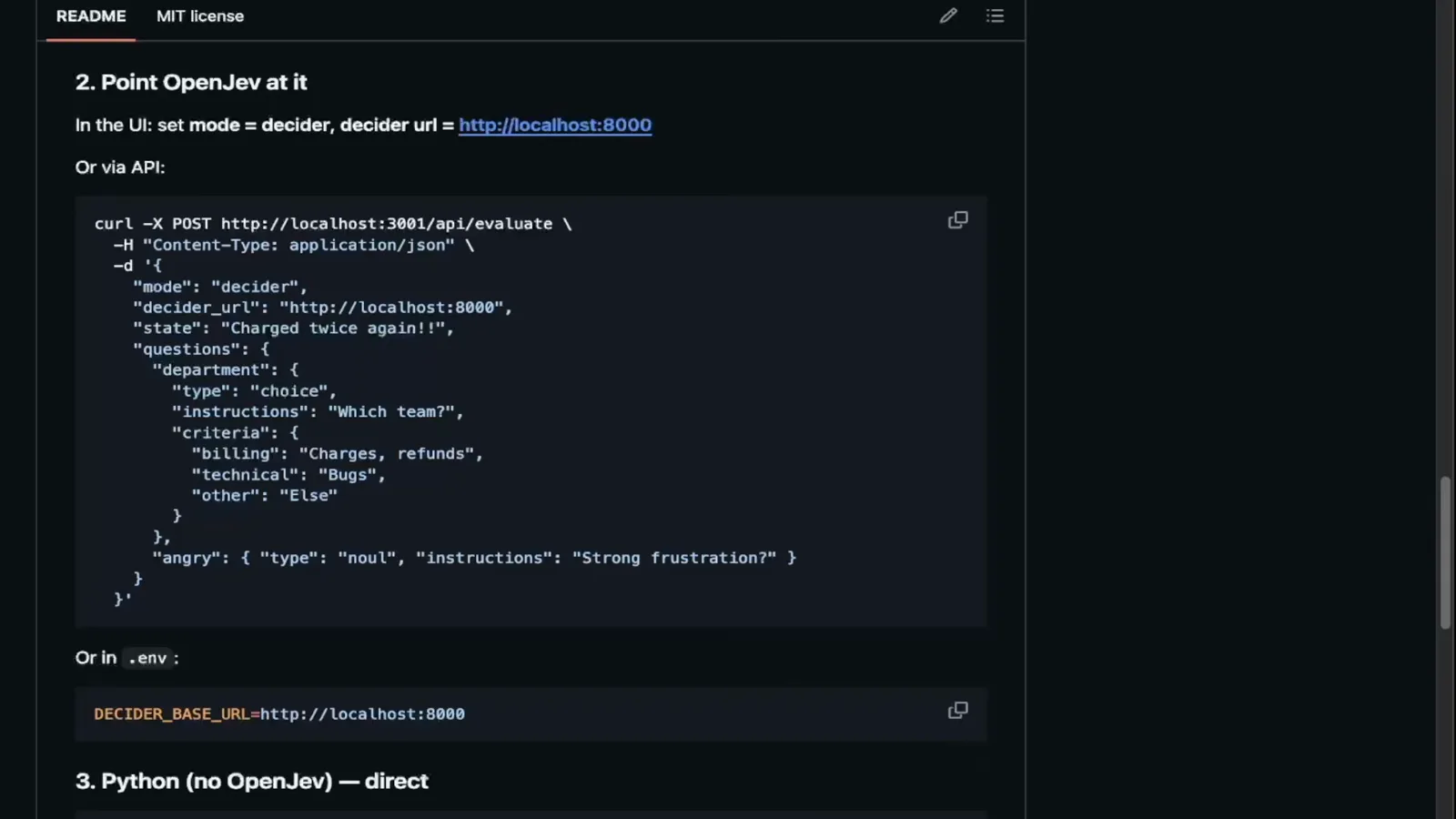
Wiring the decoder into OpenJev is one field: set the decoder URL in the UI, or set DECODER_BASE_URL=http://localhost:8000 in the environment. The README then shows the direct route for code that never touches the console: a curl POST to /v1/evaluate carrying the decoder URL, the complaint state, and the questions object — department as a choice with five named options, urgency as a noul "strong frustration?" gate — with a Python-first variant documented alongside. The payload shape mirrors the TypeSafe Jev evaluate contract closely enough that porting an existing integration is mostly a URL change.
One env var to wire the console, one curl to skip it — the payload mirrors the TypeSafe evaluate contract.Watch at 4:40 - 9
The local route: llama.cpp plus a decoder-2b GGUF
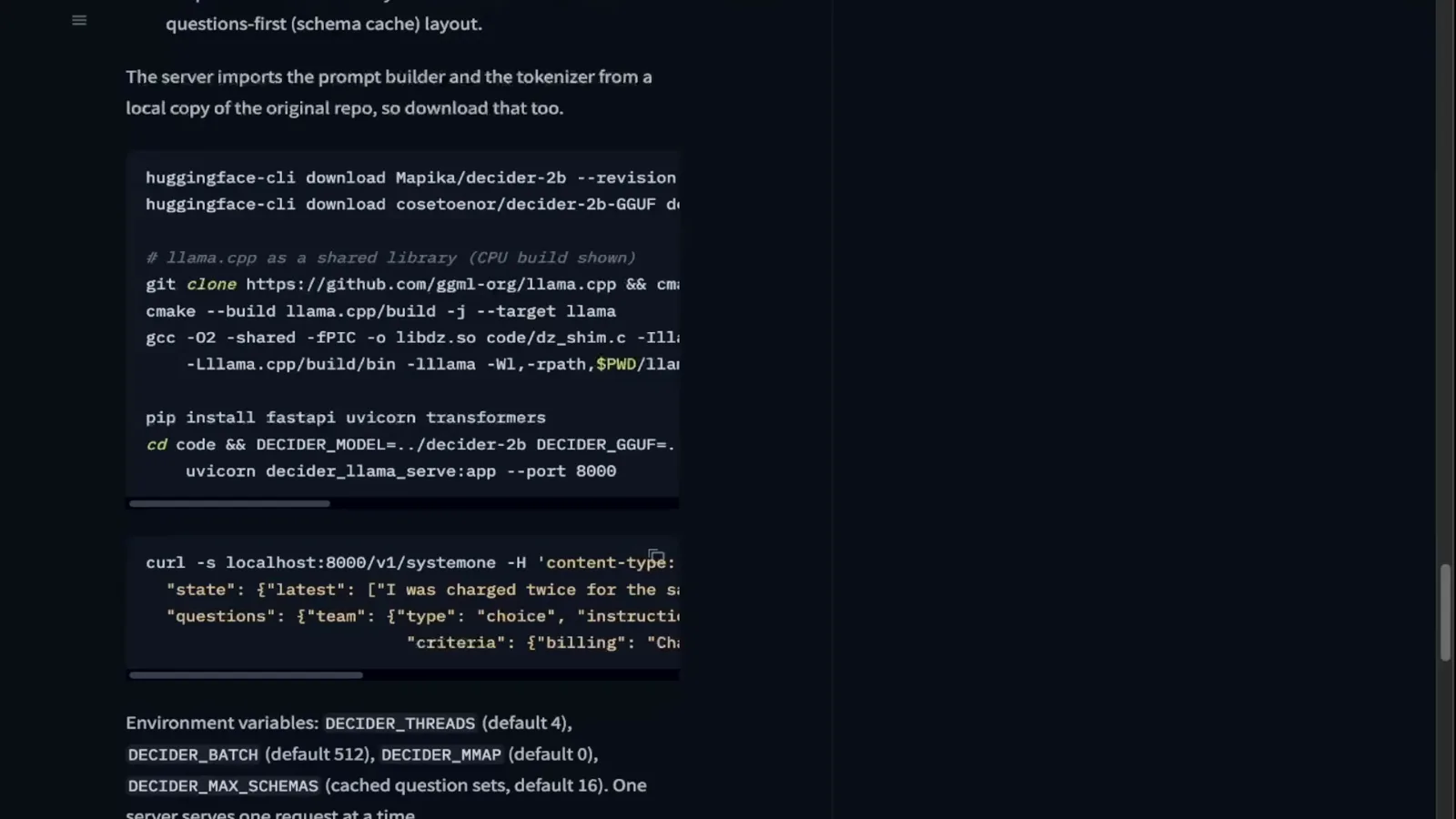
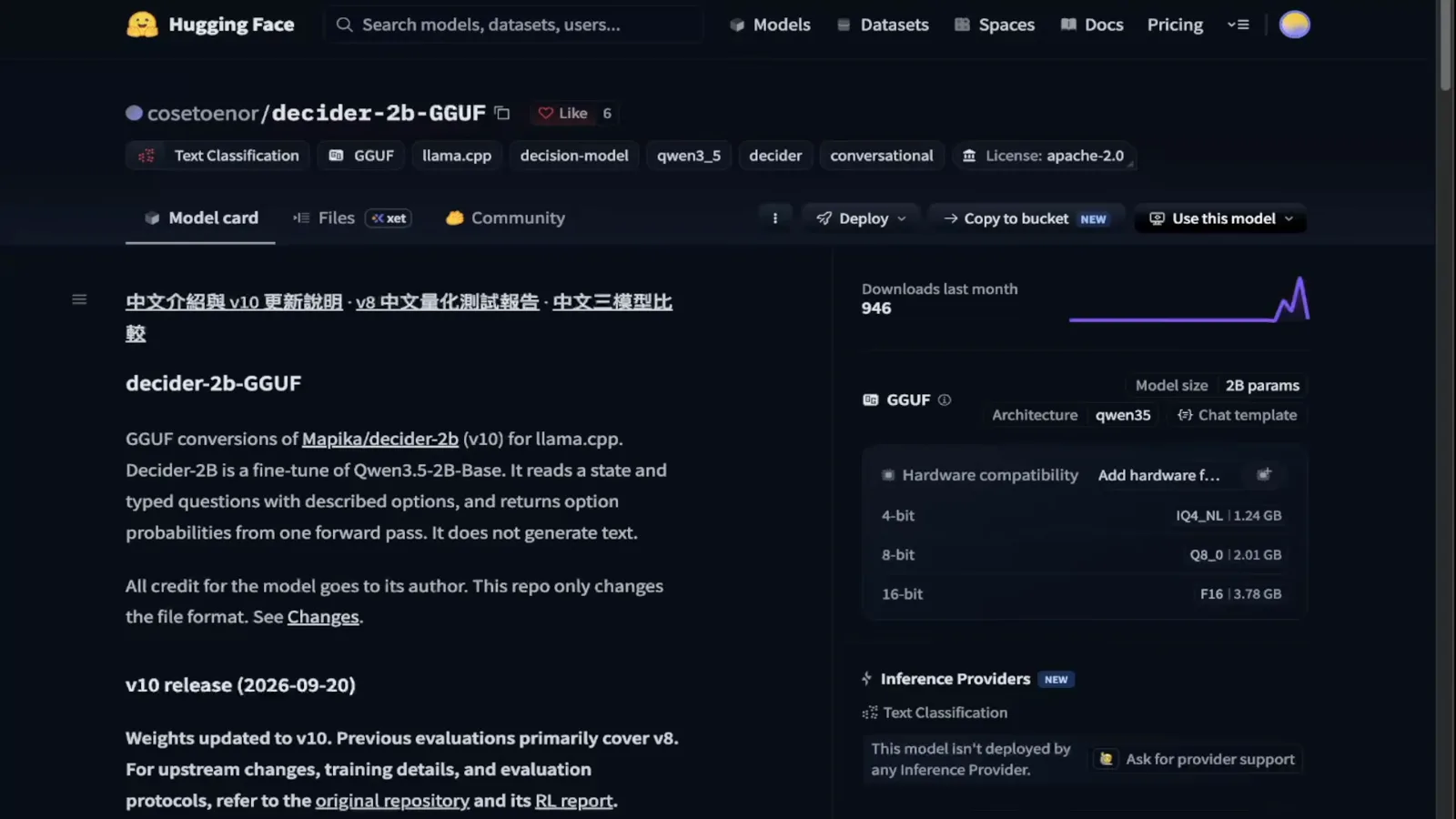
No GPU rental at all is also on the menu. The README's local section clones llama.cpp, configures a cmake build, pulls a decoder-2b GGUF quantization, and wraps it with the repo's uvicorn server (pip install "fastapi[standard]" transformers, then uvicorn decoder.llama_serve:app --port 8000). Environment variables tune the runtime: DECODER_THREADS, DECODER_BATCH, DECODER_MODEL, DECODER_PATH. This is the route for a home lab or an always-on box — the same calibrated wire format, served from a quantized file you own.
The no-rental route: llama.cpp from source, a decoder-2b GGUF, and a uvicorn wrapper on port 8000.Watch at 5:00 - 10
A real test suite: typed questions in files
The last section is the one that makes this repeatable: the project's test cases live as small files — the frame shows one with a "charged twice for the same order" subject and a department choice whose criteria spell out what each option means ("Charges and invoices", "Shipment / delivery status", other). Questions-first, state-second, the same contract the console uses — checked into version control so regressions in routing behavior are catchable before your users catch them. Our regression-testing guide builds an entire practice on this exact habit.
Test cases as files: typed questions and criteria under version control, not ad-hoc curl history.Watch at 5:20 - 11
Reading the verdicts: label, confidence, voters
Run the suite and the terminal fills with verdict JSON — a label, a confidence number, and per-option probabilities for each question, with the decoder's voters visible underneath the winning label. This is what "calibrated" looks like in practice: not a chat model's confident prose, but a distribution you can threshold, log, and alert on. Start from the README, serve the model on the best hardware you can reach — Kaggle to learn, llama.cpp to own — and let the confidence numbers, not the latency, tell you when to trust it.
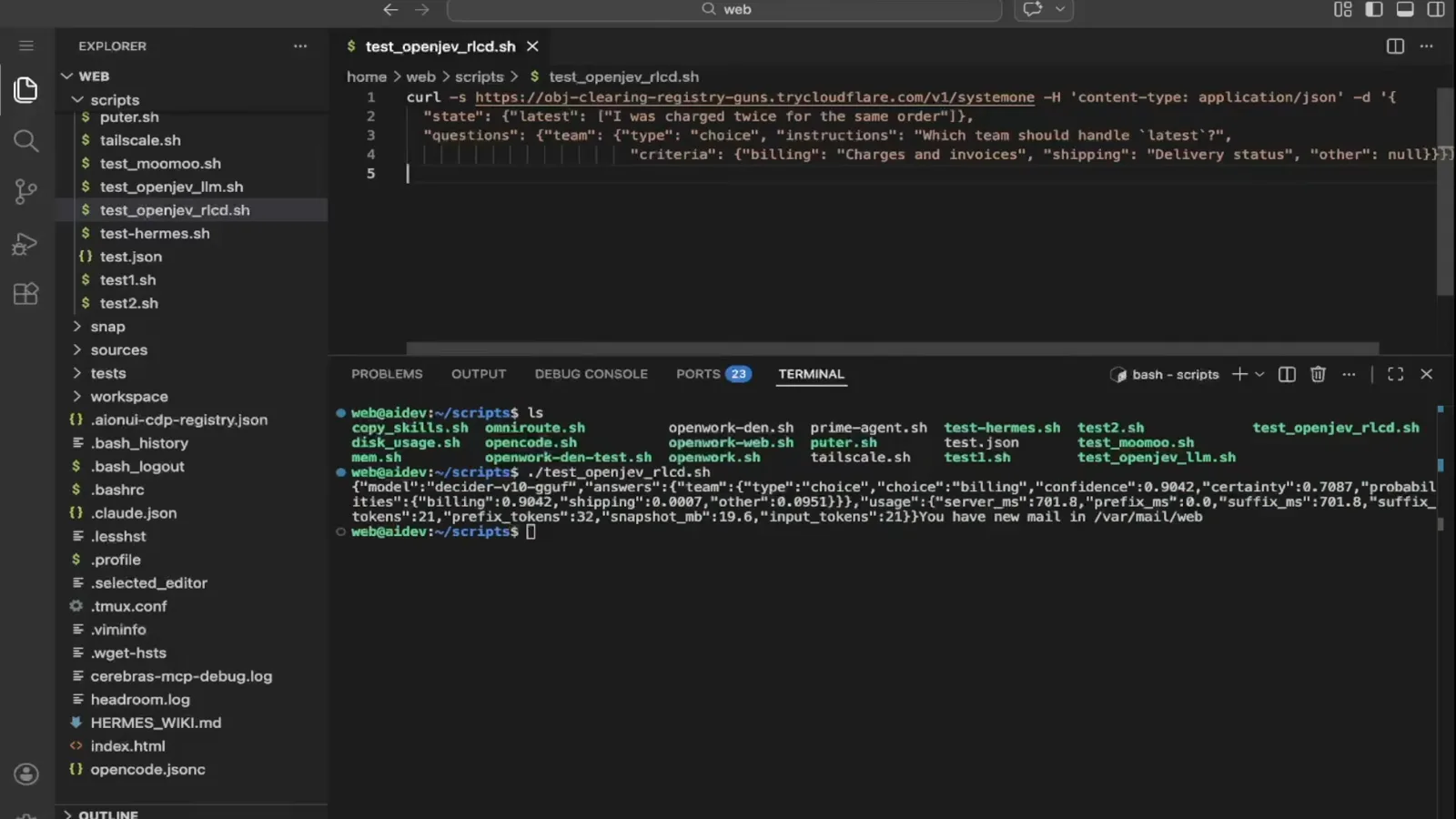
The payoff format: label + confidence + voter distribution — numbers you can threshold and log.Watch at 5:55
Frequently asked questions
What is RLCD in OpenJev?
RLCD stands for reinforcement learning for calibrated decisions — a training approach for decision models where the model learns not just to answer typed questions, but to report confidences that mean something. OpenJev's previous version had no support for these models; the updated console adds a decider mode that speaks to them, and the decider family itself (fine-tuned from Qwen3.5) is trained with calibration-aware RL and serves a TypeSafe-compatible POST /v1/systemone wire format.
What is the OpenJev decider model?
It is the open-source decision model served by the Mspika/decoder repository — a family of System One-style models fine-tuned from Qwen3.5 for one-pass typed decisions with calibrated probabilities, under Apache 2.0. The decoder-2b v2 variant adds the calibration-aware RL training and speaks TypeSafe's wire format. You hand it a state plus typed questions (choice, score, noul) and it returns answers with confidence numbers in a single pass — no text generation.
Do I need a GPU to try the decider model?
Not for a first test: the video stands the decoder up on a free Kaggle notebook and exposes it with a cloudflared quick tunnel, so the only thing your machine does is point the OpenJev console at the tunnel URL. For self-hosting, the 2B model needs roughly 4 GB of GPU memory via the serve script, or you can run a decoder-2b GGUF quantization through llama.cpp on modest hardware. Expect older free-tier GPUs to be slow — the video measured ~3 s per call on Kaggle.
Why was the decider slower than a Groq LLM in the video?
Hardware, not the model. The decider ran on Kaggle's older GPU at roughly 3 seconds per call, while the parallel mode fired nine LLM calls at Groq that all finished in under a second (~180 ms for a single measurement) — so for this simple complaint, parallel LLMs were genuinely faster. The decoder README's own notes show the picture changes on proper hardware: after a one-time ~79 s prompt build, prefix-cached requests answer in about 0.3 s with ~1.2 GB resident memory.
How do I connect the decider to the OpenJev console?
One field or one env var: paste the decoder's URL into the console's decoder URL box (a cloudflared quick tunnel works if the model runs on Kaggle), or set DECODER_BASE_URL=http://localhost:8000 in the environment. The console then routes typed questions to your model exactly as it would to any decider backend.
Is the decider API compatible with TypeSafe Jev?
Very close but verify before you port: the README states decoder-2b v2 "speaks TypeSafe's wire format: POST /v1/systemone", and the video notes the interface — the POST payload, questions structure, and response shape — is very similar to the official Jev API. Treat it as a drop-in for new integrations and a near drop-in for existing ones, but run your regression suite against the real endpoint before switching traffic.
Related guides
Open Jev Models: the Panorama Guide
The survey this video zooms into: the open Jev-style model landscape, JevBench standings, and where the decider family fits.
ReadRun Jev Locally: Kev, SemIf and Von Setup
Local routes for the official-ecosystem models, complementing this page's open-source decider deployment.
ReadBuild Your Own Jev for Free
The DIY end of the same spectrum: training your own decision model from scratch, with calibration as the hard part.
ReadWhen to Use Jev: a Decision Framework
The evaluation logic behind choosing typed decisions — including the calibration-curve checks this page's confidence numbers beg for.
ReadMore video walkthroughs
- Jev Classification Quickstart: OpenRouter API, Primitives & Real Probabilities
- Jev Architecture Explained: Why 70ms Decision Models Beat LLMs for Workflow Automation
- Ultra-Fast Browser Agents with Jev: 178ms DOM Loops & Dual Model Orchestration
- Open Jev Models Are Here: Semif, Nimble, Decider, DiffusionGemma & Laya Hands-On
- Jev vs LLM: Will Jev Replace LLMs? Krish Naik's Whiteboard Explainer
- Jev Trader Tutorial: Build a Subsecond AI Trading Bot on Monad
- Jev Model Router: Build a Privacy-Gated LLM Router with Jev & OpenJev
- Jev Tutorial for Beginners: State, Questions & the TypeScript SDK
- Run Jev Locally: Kev, SemIf & Von on Your Own GPU (OpenJev Guide)
- Jev RAG Reranker: Policy-Steered Reranking for Retrieval-Augmented Generation
- When to Use Jev: An Engineer's Audit of Claims, Gates, and Failure Modes
- LangChain + Jev Integration Tutorial: Routing, Guardrails & Evals
- Jev MCP Server: Connect Jev Decisions to Claude Code & Cursor
- Jev vs Luna: Independent Benchmarks Put "Better, Faster, Cheaper" to the Test
- Jev Agent Harness: Where the Decision Gate Sits in Your LLM Loop
- Jev Playground Walkthrough: The Hotdog Lesson, Criteria, and a Four-Console Token Test
- Jev Text Classification API: Zero-Shot CLI & REST with classifier.dev
- Jev API Examples: First Request, curl & All Three Question Types
- Jev Log Triage with Expanso Edge
- Jev Lead Enrichment with Treg: ICP and Signup Scoring
- Use Jev Decision Nodes in Heym for Model Routing
- Laya Tutorial: Open-Source AI Routing With Calibrated Probabilities (Laya vs Jev Setup)
- Train Your Own Jev: Fine-Tune a Jev-Style Decision Model for $5–$17 (What You Can and Cannot Train)
- Jev Tips: 8 Best Practices for Better Decisions (State, Questions, Criteria & Thresholds)
- Jev Context Compaction: Prune AI Agent Memory Without Generative Summaries
- Jev as an LLM Judge: Confidence-Gated Cascades at 0.36% of the Cost
- TypeSafe Computer Use: Local Desktop Automation with Jev, Step by Step
- Jev Resume Screening: Build an AI Resume Evaluator with the Jev JavaScript SDK
- Jev + Claude Code Guide: Voice-Controlled Browser Automation with Typed Decisions
- Jev + Codex: Install the TypeSafe Skill and Triage a Real Gmail Inbox
- Jev vs Ollama: Can Local AI Replace Hosted Jev Without Sending Your Data Away?
- Build Your Own Jev: Train a Free Open-Source Zero-Shot Classifier (That Plays Doom)
- CUA-S1-Forms: a 706K-Parameter Jev-Like Model That Fills GUI Forms on Your CPU
- NOC/SOC Alert Triage with Jev: Rules First, One Typed Question, a Policy Gate
- Ollama Decision Models: Run tev1 and Nimble Locally (Tested on an 8 GB Card)
- Jev Guardrails in Production: A Five-Step Playbook for Decision Automation
- A Session Drift Guard for Pi Agent: Let the Jev Model Propose, Let Code Decide
- 50 Tev1 Use Cases: What a Local Decision Model Can Actually Do (Tested on an 8 GB Laptop)
- Jev, Hands-On: Where the Official Claims Meet Independent Remeasurement
- Jev Ticket Classification in a Real App: the After-Insert Hook and the Calculated Field
- Clef-Flash vs Jev: I Tested Cloudflare's Decision Model Locally in Ollama (Q4_K_M)